How to Choose Between AI Assist, Recommend, and Act
Choose between AI assist, recommend and act with a practical diagnostic frame for AI product adoption, trust, control and retention.

Your AI feature may not be failing because the model is weak. It may be failing because the product picked the wrong level of control.
You built something that can help users. Maybe it drafts copy, summarizes research, scores leads, rewrites support replies or fills in a workflow. People try it once. They nod. Then they go back to doing the work manually.
That usually means the product has not answered one basic question: should the AI assist, recommend or act?
This choice shapes trust, adoption, retention and liability. Get it wrong and users either feel abandoned, interrupted or quietly afraid of what the system might do.
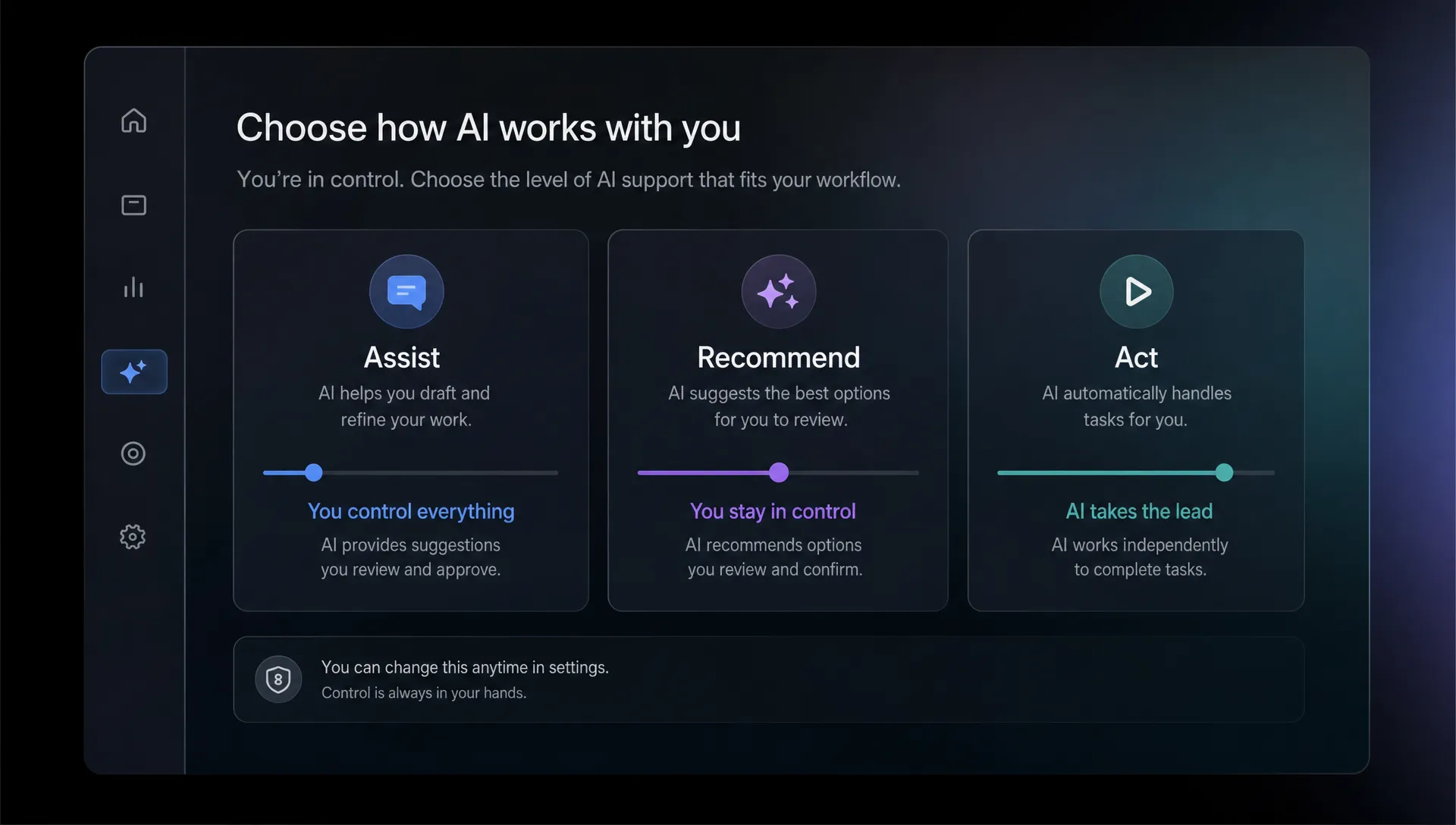
The three modes are different promises
Most AI product teams blur these modes together. They ship a chat box, add a few buttons and call it flexible. Users experience that as ambiguity.
A useful distinction:
| Mode | What the AI does | What the user owns | Best fit |
|---|---|---|---|
| Assist | Helps the user produce or understand something | Direction, judgment and final action | Open-ended work with high context |
| Recommend | Suggests a specific next step or choice | Approval and prioritization | Repeatable decisions with inspectable evidence |
| Act | Executes a task on the user's behalf | Constraints, monitoring and exception handling | Low-risk or well-bounded workflows |
None of these is more advanced than the others. “Act” is not automatically better than “assist.” In many products, forcing automation too early reduces adoption because users do not yet trust the system enough to delegate.
The question is not “how autonomous can we make it?” The question is “how much control does the user need to feel safe, effective and willing to come back?”
Choose assist when the user still needs to shape the work
AI assist is the right mode when the task depends on taste, strategy, context or personal judgment. The AI should reduce effort without pretending it can own the outcome.
This is why Grammarly works well as an assistive layer. It does not usually take over the writing job. It flags, rewrites, explains and lets the writer decide. GitHub Copilot also often behaves like assist. It proposes code, but the developer still owns the intent, integration and review.
Assist is a good fit when:
- The user can describe success better than the product can
- The output needs editing before it is useful
- The cost of a wrong answer is visible but not catastrophic
- The user wants speed without giving up control
- The product has incomplete context about the final use case
The adoption failure pattern for assist is different from the failure pattern for recommendation or action. Users do not usually complain that the AI is “not autonomous enough.” They complain that it takes too much effort to start, too much effort to correct or too much effort to move the result into the real workflow.
If your assist feature starts with a blank prompt box, you may be forcing users to do product design work before they get value. This is where task starters, object-aware defaults and constrained editing flows matter. If that symptom sounds familiar, the piece on using task starters instead of blank boxes goes deeper on that specific break.
Assist is not “just chat.” Good assistive AI has a clear job boundary. It says, in product form, “I can help you get from rough intent to usable output, but you remain in charge.”
Choose recommend when the user needs a better decision, not more content
Recommendation is the right mode when the product can identify a small set of plausible options and the user needs help choosing among them.
This is common in B2B software. Which support ticket should be escalated? Which customer account looks at risk? Which clause in this contract needs review? Which campaign variant should the marketer try next?
In these cases, the AI should not generate a large block of text and make the user interpret it. It should narrow the decision surface.
A recommendation mode needs three things:
- A specific recommendation, not a vague observation
- Evidence the user can inspect quickly
- A clear approval, dismissal or feedback action
Perplexity is useful as a reference point here. Its answer is not only the generated summary. The citations are part of the product contract. They help the user decide whether to trust the recommendation. The same principle applies inside SaaS workflows. A risk score without evidence is decoration. A suggested action with source signals is a decision aid.
Recommendation is often the right middle step when teams are tempted to jump straight from assist to automation. If users are not ready to let the product act, ask whether they would accept a stronger recommendation with a fast approval path.
Choose act when the product can carry the consequence
AI act is the highest-control mode. The product does something in the user’s environment: sends a reply, updates a CRM field, files a ticket, changes a setting, schedules a workflow or triggers an external system.
This is where many AI adoption problems get expensive. The feature looks impressive in a demo, then stalls in production because users do not want to be surprised by an automated action.
Act is appropriate when:
- The task is bounded and repeatable
- The user can set clear constraints before execution
- The action can be undone or corrected
- The product can explain what happened after the fact
- The cost of a bad action is acceptable or contained
The difference between recommend and act is not just a button. It is accountability. If the AI recommends a reply and the user sends it, the user feels responsible. If the AI sends the reply automatically, the product has assumed part of that responsibility.
That can be valuable. It can also break trust fast.
Approval design matters here. Some actions should be one-click approved. Some should require review. Some should never be automated until the system has enough observed user behavior to constrain the action safely. For a deeper treatment, see when AI suggestions need an approval step.
The common mistake: choosing the mode from the model's capability
Teams often ask, “Can the model do this?” That is the wrong starting point.
A model may be able to draft, rank, classify, summarize and execute. That does not tell you which mode the product should expose.
Choose the mode from the user’s relationship to the work:
| Diagnostic question | If the answer is yes | Likely mode |
|---|---|---|
| Does the user need to shape the output heavily? | The work depends on taste, voice, strategy or hidden context | Assist |
| Does the user need to choose between known options? | The work is a decision with evidence and tradeoffs | Recommend |
| Does the user mainly need the task completed reliably? | The work is bounded, low-risk and repeatable | Act |
| Would a wrong output be easy to spot before use? | The user can inspect quickly | Assist or recommend |
| Would a wrong action create cleanup work or reputational risk? | The cost appears after execution | Recommend before act |
This is why matching the feature to the actual job matters. A product that treats “write me something” as the job may ship assist. But if the real job is “decide which customer segment gets this message,” recommendation may be the better mode. The article on matching product to the actual AI job to be done covers that mismatch in more detail.
Symptom map: what the wrong mode looks like
When adoption is weak, look for the behavioral symptom before changing the UX.
| Symptom | Likely mismatch | What to change |
|---|---|---|
| Users generate outputs but rarely use them | Assist is too far from the final workflow | Add editing controls, insertion points or task-specific starters |
| Users ask for “more control” after trying automation | Act was introduced before trust | Move to recommend with approval and evidence |
| Users ignore AI suggestions | Recommendation lacks relevance or proof | Show why the suggestion was made and what action it supports |
| Users keep editing the same kind of output | Assist is under-constrained | Add defaults, examples or field-level controls |
| Users accept once but do not return | The mode solved a task, not a recurring job | Tie the AI to a repeated trigger, metric or workflow moment |
| Users fear hidden changes | Act lacks observability | Add logs, undo, previews and constraint settings |
This table is often enough to stop a bad roadmap argument. If users are abandoning generated drafts, giving the AI more autonomy will not fix the problem. If users already trust the recommendation but hate approving the same safe step every day, automation may be overdue.
A practical decision frame for product teams
When choosing between assist, recommend and act, run the feature through five checks.
First, define the user’s next action after the AI responds. If the next action is “figure out what this means,” the product is not done. AI output should collapse effort, not move ambiguity downstream.
Second, identify the cost of being wrong. Cost is not only money or security. It can be embarrassment, rework, lost customer trust or a manager asking why something changed.
Third, decide what evidence the user needs. Assist may need editable source context. Recommendation may need rationale and citations. Act may need a log, constraints and undo.
Fourth, test whether the user wants control because the AI is weak or because the task is theirs. Those are different problems. Better output quality can solve the first. Better product boundaries solve the second.
Fifth, instrument the handoff. Track not only generation or click rate, but whether users edited, accepted, dismissed, reversed, copied, exported or repeated the behavior later. AI product adoption depends on what happens after the model responds.
Frequently Asked Questions
Is “act” always the goal for AI products? No. Act is only the goal when the task is bounded enough for delegation and the product can handle the consequence. Many durable AI features stay in assist or recommend mode because users need judgment, context or accountability.
When should an AI assistant become a recommendation system? Move from assist to recommend when users are repeatedly asking the AI to help them make the same decision. If the product can detect the options, show evidence and support a fast approval, recommendation will usually beat open-ended generation.
How do we know if users do not trust the AI or just do not need it? Look at behavior after first use. If users inspect, edit or ask for proof, you likely have a trust and control problem. If they do not return at all, the feature may not map to a recurring job.
Can one product use all three modes? Yes, but not in the same moment without clear boundaries. A writing product might assist during drafting, recommend improvements before publishing and act only when applying safe formatting changes.
The next decision
Do not start by debating autonomy. Start by naming the user’s risk, control need and next action.
If the user needs to shape the work, design assist. If the user needs to choose, design recommend. If the user needs the product to complete a bounded task safely, design act.
If you want a more structured way to diagnose which mode is breaking adoption, the AI Product Adoption Deck includes diagnostics, action cards and workshops for turning these symptoms into product decisions, experiments and specs. The point is not to make the AI feel more powerful. The point is to make the product easier to trust, use and return to.