Matching Product to the Actual AI Job to Be Done
Matching product to the actual AI job to be done means diagnosing where users stall, what they trust, and what work the output must finish.

Users try your AI feature once, say it is useful, then go back to the old workflow.
That is the symptom. Not failed onboarding. Not necessarily a weak model. Often, the break is more basic: you matched the product to the model task, not to the user's actual job to be done.
The model task might be “summarize this meeting.” The user's job might be “walk into the account review knowing which deal is at risk.”
The model task might be “draft this email.” The user's job might be “send something accurate, on-brand, and safe enough that I do not have to rewrite it from scratch.”
Matching product to the actual AI job to be done means designing around the situation where the user needs help, not around the capability you can demo.
The AI job is not the prompt
A prompt is just the visible request. The job is the pressure behind it.
Users do not hire AI because they want generated text, summaries, answers, or classifications. They hire it to move work forward. Sometimes that means speed. Sometimes it means confidence. Sometimes it means reducing the cost of a decision they were avoiding.
This is why broad AI features stall. “Ask AI anything” looks powerful, but it leaves the user to define the job, supply the context, judge the output, and figure out where it goes next. That is too much product work pushed onto the user.
A better question is not “What can the AI do?” It is “What repeatable moment in the workflow is painful enough that the user will come back to this help again?”
The common mismatch patterns
When an AI feature is matched to the wrong job, the usage data usually shows it. The feature may get trials, compliments, and demos, but not durable adoption.
| Symptom | Likely job mismatch | Product response |
|---|---|---|
| High first-use, low repeat | The feature solves a novelty task, not a recurring job | Anchor it to a trigger that happens weekly or daily |
| Users generate output but do not save, send, or apply it | The output is not shaped for the downstream artifact | Design the output around the next action, not the generation |
| Users ask vague prompts and get vague results | The job requires context the product does not collect | Provide structured inputs, defaults, or carried context |
| Users read the answer but still do the work manually | The trust burden is too high | Add evidence, source links, diffs, constraints, or review paths |
| Only power users retain | The job is real, but the product assumes too much skill | Make the path more opinionated and less prompt-dependent |
| Users copy output into another tool | The job ends somewhere else | Integrate with the place where the work is finished |
The table is blunt on purpose. Most stalled AI features are not mysterious. They are useful in isolation, but detached from the job the user is actually trying to finish.
The four-part fit test
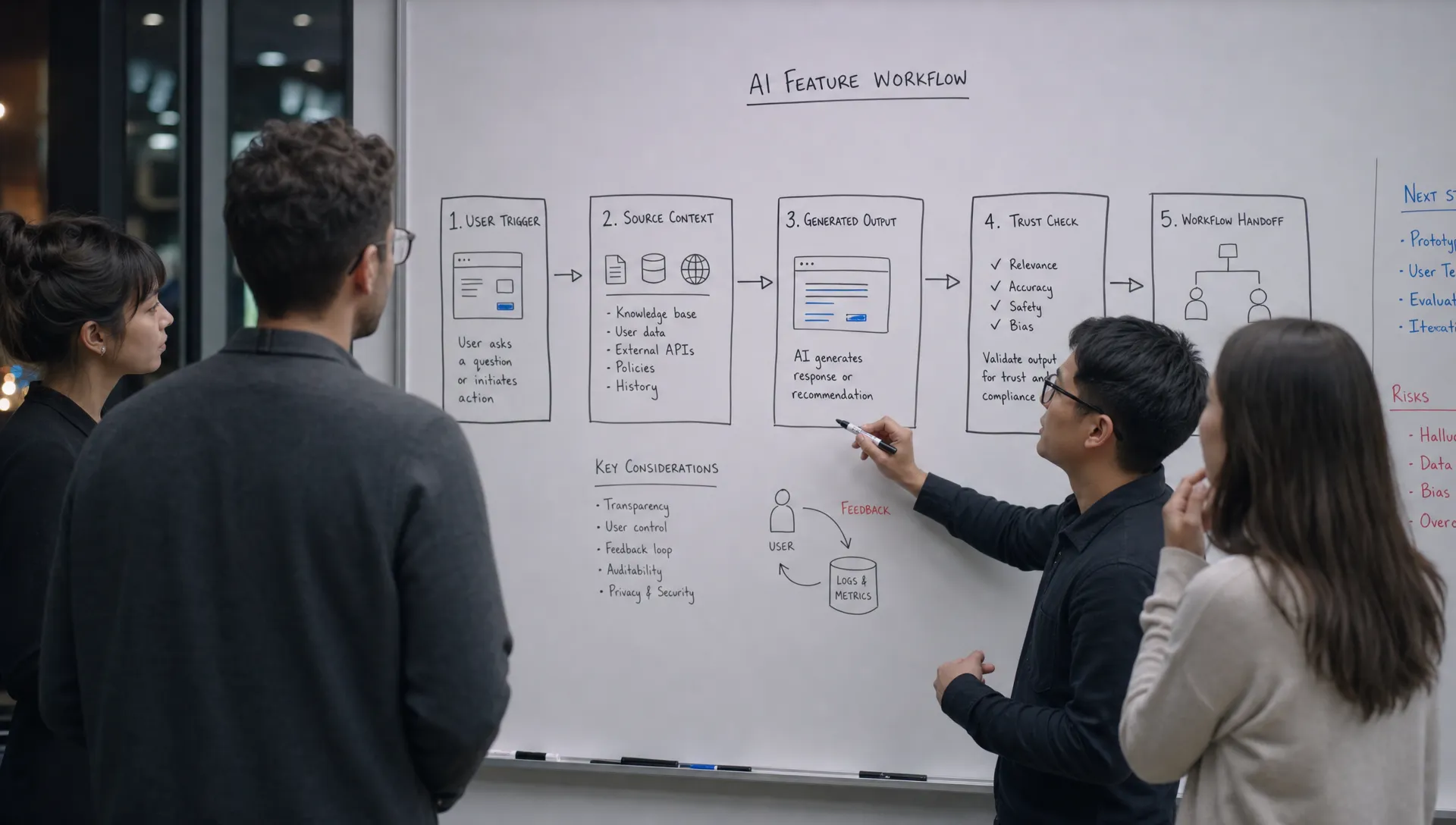
To diagnose job fit, look at four parts of the user situation.
First, identify the trigger. What happens right before the user needs help? A blank page is not a strong trigger. A customer call ended, a pull request is open, a contract needs review, or a campaign needs approval are stronger triggers because the need is attached to real work.
Second, define the desired progress. What is the user trying to decide, send, change, approve, or understand? If you cannot name the next action, you probably have an output feature, not a product feature.
Third, map the trust burden. What would make the user comfortable relying on the output? Grammarly works because the user can inspect changes inline. GitHub Copilot works better when the suggestion appears inside the code context and can be accepted, edited, or ignored fast. Perplexity is useful because the answer is tied to sources the user can inspect. The product reduces doubt at the moment it appears.
Fourth, locate the handoff. Where does the output need to go next? A summary that lives in a side panel may be less valuable than a summary that updates the CRM, fills the brief, creates the ticket, or prepares the customer email.
High-trust workflows make this easy to see. A mortgage product is not hired to “calculate numbers.” It is hired to help someone move through a financing decision with clarity, documents, guidance, and confidence. That is why a mortgage process that combines smart tools with human guidance maps more closely to the real job than a standalone calculator. AI product teams should read that as a product lesson: the job includes confidence, not just computation.
Where teams pick the wrong job
Teams usually pick the wrong job because they start from the demo.
The demo says: “The AI can summarize calls.”
The real product question is: “Which role needs which part of the call summarized, at what moment, in what format, with what level of confidence, and for what next decision?”
Those are different products.
A sales manager may need risk signals across accounts. A rep may need follow-up bullets. A customer success manager may need renewal objections. A founder may need investor update material. Same transcript. Different jobs. Different interface. Different adoption pattern.
This is also why adding more model power often does not fix adoption. If the feature is matched to the wrong job, better output only makes the wrong thing better. For a deeper version of this diagnosis, it helps to separate model performance from the surrounding product system. The break is often in how the work is framed, verified, and handed off, not in the raw AI capability.
Five questions to test the match
Before redesigning the feature, answer these questions in plain language:
- What exact situation should make the user reach for this AI feature?
- What work product, decision, or workflow step should be better after using it?
- What source material does the user already have at that moment?
- What would the user need to verify before trusting the output?
- Where should the accepted output go next?
If the answers are vague, your product is probably asking users to assemble the job themselves. That creates prompt paralysis, shallow trials, and weak retention.
If the answers are specific, you can redesign the feature around a narrow adoption path. That usually beats adding another generic AI entry point.
Design for acceptance, not generation
A common mistake is treating generation as the success event. It is not.
The important moment is acceptance. Did the user use the output? Did they edit it lightly instead of rewriting it? Did it change the decision? Did it move into the system of record? Did the user come back the next time the same trigger appeared?
This changes the product decisions.
For a writing assistant, the product should care less about how many drafts were generated and more about whether a user sent, published, or reused the final version. For a code assistant, the key event is not suggestion volume. It is accepted code that survives review and helps the developer stay in flow. For an analytics assistant, the win is not “answer generated.” It is “decision made with enough confidence to act.”
This is where measurement has to change too. If your dashboard only counts prompts, generations, and clicks, you are measuring AI activity, not product adoption. You need to measure real adoption rather than AI activity by tracking the path from eligible use to accepted output to repeat behavior.
The practical fix: narrow the promise
The fix is rarely “make it more flexible.” Flexibility often increases the user's workload.
The better move is to narrow the promise around a real job. Instead of “AI assistant for customer calls,” try “turn renewal calls into account risk updates.” Instead of “AI writing helper,” try “rewrite this support reply so it is accurate, calm, and ready to send.” Instead of “AI research assistant,” try “compare these three vendors against our buying criteria.”
A narrower promise gives the product more leverage. You can prefill context. You can constrain the output. You can add the right verification cues. You can place the result where the user already works.
That is the point of job fit. Not less ambition. Less ambiguity.
Frequently Asked Questions
How do I know if my AI feature is matched to the wrong job? Look for a gap between generation and application. If users create outputs but do not save, share, approve, send, or reuse them, the feature is likely matched to a task rather than a real workflow job.
Is jobs-to-be-done different for AI products? The core idea is the same, but AI adds a trust layer. You need to understand not only what progress the user wants, but also what proof, control, and review path they need before relying on the output.
Should we make the AI feature broader or more specific? If retention is weak, start more specific. Broad AI tools can work for expert users, but most product adoption improves when the feature is tied to a clear trigger, clear context, and clear handoff.
What metric best shows whether the AI job is working? Track accepted output tied to a downstream action, then measure repeat use when the same trigger comes back. Generation volume alone is usually a vanity metric.
Next step: diagnose the job before redesigning the feature
If you are not sure whether your adoption problem is job fit, trust, input friction, or workflow handoff, run the symptom through the free AI product triage tool.
If you want to go deeper, the AI Product Adoption Deck turns this kind of diagnosis into a structured workflow with diagnostics, action cards, and workshops for product teams trying to make shipped AI features stick.