When AI Suggestions Need an Approval Step
AI product adoption: learn when AI suggestions need approval, how to spot risk and design review steps that do not slow users down.

A familiar adoption pattern shows up after launch: users generate AI suggestions, inspect them, maybe even say they are useful, then stop before applying them. The feature looks activated in the dashboard but does not change the workflow. This is one of the cleaner AI product adoption signals that your product has a trust boundary problem, not a generation problem.
The mistake is to treat approval as friction by default. Sometimes it is. Sometimes it is the missing bridge between “interesting output” and “safe enough to use.”
Approval is not only a legal or enterprise control. In AI product management, approval is a product promise. It tells the user who is responsible, what is about to happen, what can be undone and what evidence supports the suggestion.
When AI suggestions need an approval step
AI suggestions need an approval step when accepting the suggestion changes something the user cannot cheaply inspect, undo or explain later.
That definition is more useful than “high risk” because teams overuse that phrase. A sales email sent to one prospect is lower risk than a bulk campaign sent to 4,000 accounts. A code suggestion inside a local file is different from a merged production change. A support reply saved as a draft is different from a reply sent to an angry customer.
The question is not “does the AI make mistakes?” It does. The question is whether the product gives the user a responsible place to catch those mistakes before the cost lands somewhere else.
You usually need approval when the AI suggestion has one or more of these traits:
- It acts outside the product, such as sending, publishing, committing or notifying.
- It changes shared records, customer data, permissions, pricing or account state.
- It represents the user or company in public.
- It is hard to verify quickly from the current screen.
- It compounds across many items, customers or files.
- It creates work for someone else if wrong.
If none of those are true, an approval step may just slow the user down.
The symptom: users accept drafts but avoid commitment
Many AI adoption problems hide in the gap between generation and application. Users click “generate.” They skim. They may copy part of the output manually. But they do not use the product’s intended apply, send or commit path.
That behavior is a signal. It usually means the user wants the AI close enough to help but not close enough to act.
Look for these patterns in your product data and interviews:
| Symptom | Likely cause | Product response |
|---|---|---|
| High generation, low apply rate | Users cannot tell what will change | Add preview, diff or affected-item summary |
| Users copy text manually instead of clicking apply | Native action feels too risky | Add draft states and reversible approval |
| Users edit heavily before approval | Output format misses the real workflow | Improve constraints, templates and field-level editing |
| Users ask for “confidence scores” | They lack evidence, not just certainty | Show sources, inputs and validation checks |
| Managers require side-channel review | Accountability is unclear | Add assigned approvers, comments and audit trail |
This is why approval design is tied to AI user retention. If the approval moment feels vague or expensive, users learn to route around the feature. They may still use the AI occasionally but it never becomes part of the operating rhythm.
Approval is needed when responsibility changes hands
A suggestion can live in a low-stakes state for a long time. The handoff happens when the output becomes accountable work.
GitHub Copilot is a useful example. The suggestion appears inside the developer’s context. The developer accepts, edits or ignores it. Then the normal engineering system still applies: tests, code review, CI and deployment controls. The AI does not remove approval from the workflow. It inserts a suggestion into an existing chain of responsibility.
Grammarly works similarly for writing. A suggestion is not automatically the final document. The user sees the change in place and accepts or rejects it. The approval step is small because the consequence is local and visible.
Cursor often uses a stronger approval pattern for code changes: the AI proposes edits and the user reviews a diff before applying. That is the right shape for multi-file changes because the user cannot inspect every token as it is generated.
These products do not all use the same review mechanism. They match the approval step to the consequence of the action.
If your AI feature moves from suggestion to action without making that boundary visible, users will create their own boundary. Usually it is slower, messier and outside your product.
For related handoff design, the article on what users need before letting AI take action goes deeper on scope, evidence, control, reversibility and responsibility.
When approval hurts adoption
Approval is not a cure-all. A lazy approval step can make AI product adoption worse because it transfers all ambiguity to the user.
The worst version is the modal that says “Approve changes?” without showing the changes. That is not approval. That is liability theater.
Approval also fails when every tiny AI suggestion gets the same weight. If a user must approve harmless formatting, low-impact copy tweaks and risky customer-facing actions through the same flow, they stop reading. Your approval step becomes a reflex click.
Bad approval design has a few common smells:
- It asks for approval before the user sees enough evidence.
- It interrupts the workflow instead of sitting at the natural decision point.
- It uses the same review pattern for low-risk and high-risk actions.
- It hides the difference between draft, proposed, approved and applied.
- It captures approval but gives no way to undo, comment or learn from rejection.
A good approval step lowers perceived risk. A bad one adds review burden without improving trust. If your team is seeing that tradeoff, use the lens in how to work with AI without raising review burden before adding more checkpoints.
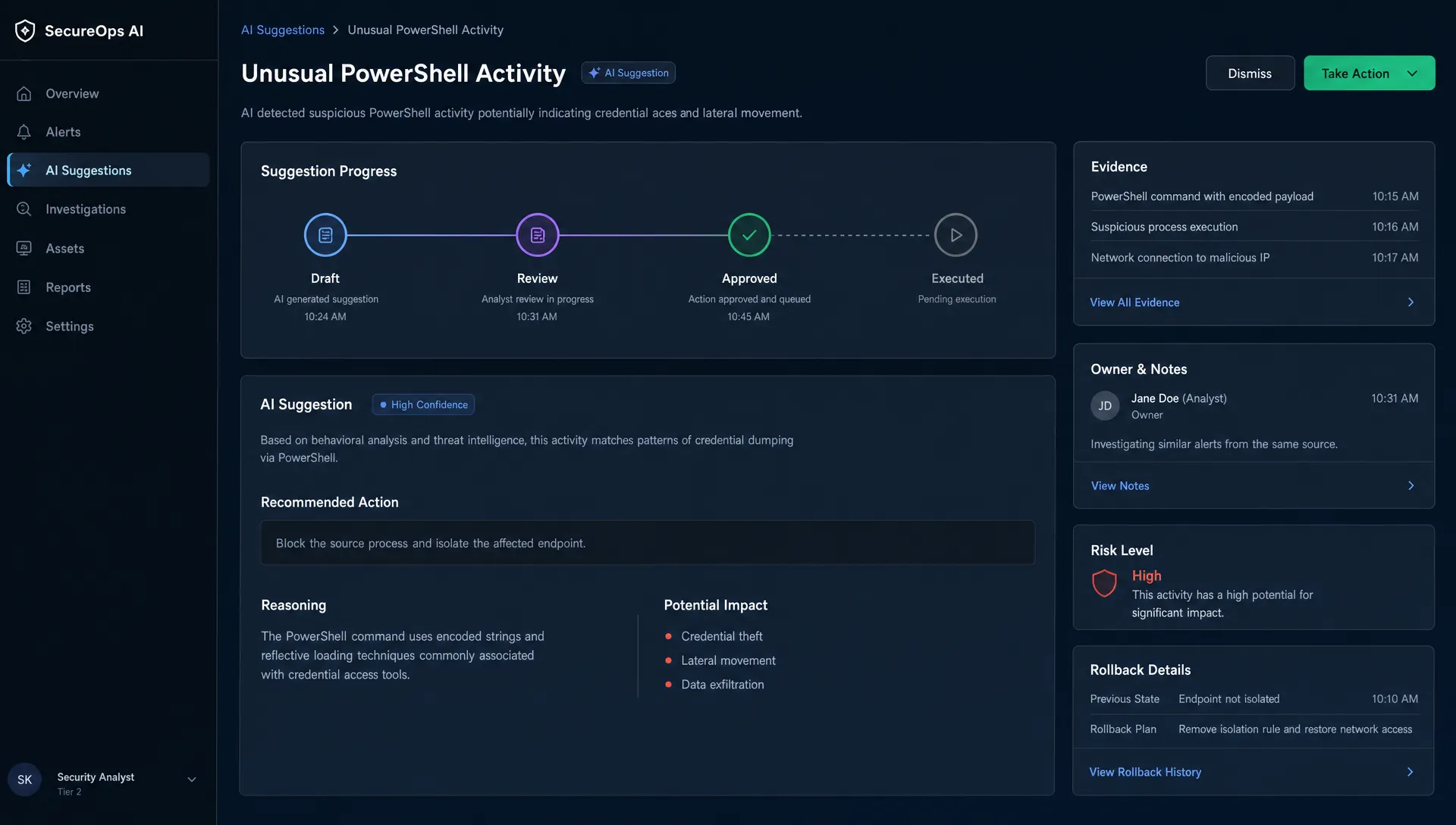
Design the approval step around the decision
Approval should answer the questions users already have at that moment. Not all of them. The ones that block commitment.
For most AI suggestions, that means the approval UI needs four parts.
First, show what will change. Use a diff, preview or itemized change list. Do not make the user compare the output against memory.
Second, show why the AI made the suggestion. This can be source text, selected inputs, policy references, customer history or constraints the system used. Avoid fake precision. Evidence beats decorative confidence labels.
Third, give scoped control. Let users approve one field, one paragraph, one file or one account segment instead of forcing an all-or-nothing decision.
Fourth, make rollback obvious. If the action can be undone, say so at the point of approval. If it cannot, the approval needs to be stricter.
This is where AI onboarding strategies often miss. Teams teach users how to prompt but not how to approve. For a shipped feature, onboarding should teach the operating contract: what the AI can suggest, what the user must verify and what happens after approval.
A simple decision frame helps:
| Action type | Approval pattern | Example |
|---|---|---|
| Private draft | Inline accept or edit | Rewrite notes, summarize research |
| Visible but reversible | Preview plus one-click apply | Update a page, apply formatting |
| External communication | Draft, review and send | Customer email, support response |
| Shared system change | Diff plus scoped approval | CRM update, project plan change |
| Hard to undo or high impact | Multi-step approval or second reviewer | Pricing change, bulk permission update |
This frame keeps approval proportional. It also prevents a common product mistake: copying enterprise review patterns into lightweight personal workflows.
Measure approval quality, not just approval rate
Approval rate alone is a weak AI adoption metric. A high approval rate could mean users trust the system. It could also mean they stopped reading.
Track approval as a behavior chain:
- Suggestion viewed to approval started.
- Approval started to approval completed.
- Approval completed to downstream use.
- Approved output edited after application.
- Approved output reverted, corrected or escalated.
- Rejection reasons by task type.
The most useful metric is often time to confident approval. If users can verify and approve faster without more downstream corrections, the product is doing real work. If approval time drops but corrections rise, you trained users to rubber-stamp.
Add qualitative review too. Watch five users approve an AI suggestion. Do they understand what changed? Do they know what will happen next? Do they look outside the product to verify? Do they ask who is accountable if it goes wrong?
Those moments tell you which AI product tactics to use next: better previews, stronger defaults, source display, scoped permissions, workflow-specific templates or a second reviewer.
The practical rule for PMs
Add approval when the user needs a commitment boundary. Remove or soften it when the user only needs lightweight editing.
That sounds simple but it forces a real product decision. You have to define the state of the AI output. Is it a draft, a recommendation, a proposed change or an action ready to execute? If the interface does not say, the user has to guess.
For teams diagnosing a shipped AI feature, this is the next step: map the point where users hesitate. Do not start with model quality. Start with the moment of commitment.
Ask:
- What exactly changes after the user approves?
- Can the user inspect that change from the same screen?
- Is approval scoped to the smallest safe unit?
- Is rollback clear before commitment?
- Does the approval event create useful learning for the product team?
If you want a structured way to sort this symptom against other adoption breaks, the free AI Product Adoption Deck triage tool can help identify whether the issue is approval, verification, onboarding, trust or retention. The full AI Product Adoption Deck goes deeper with diagnostics, AI action cards and workshop templates for turning the diagnosis into product decisions.
Frequently Asked Questions
Should every AI suggestion require approval? No. Approval should be proportional to consequence. Low-risk private drafts can often use inline accept, edit or ignore patterns. Approval becomes necessary when the suggestion changes shared state, reaches other people or is hard to undo.
What is the difference between verification and approval? Verification is how the user checks whether the suggestion is good enough. Approval is the commitment step that applies, sends, saves or executes it. Good AI UX usually lets users verify before they approve.
Can approval steps reduce AI user retention? Yes, if they add work without adding confidence. Users retain AI features when review feels faster than doing the work manually. If approval feels like a second job, they will avoid the feature or use it only for drafts.
What should an AI approval screen show? It should show what will change, the evidence behind the suggestion, the scope of the action, the owner of the decision and whether the action can be undone. The exact UI depends on the task and risk level.
How do we know if our approval step is working? Look beyond approval rate. Track time to confident approval, edit rate after approval, downstream corrections, reverts and rejection reasons. Then pair the data with user sessions to see where hesitation actually happens.