Where AI Product Teams Misread Activation Data
AI product adoption often looks healthy at activation. Learn where teams misread activation data and how to diagnose weak retention sooner.

Your dashboard says activation is fine.
Users find the AI feature. They click the shiny entry point. They generate an output. Maybe they even come back once or twice in the first week.
Then the curve flattens.
The team looks at the funnel and argues about the wrong thing. Design wants to improve onboarding. Growth wants more surface area. Engineering says the model needs work. Leadership asks why the feature has strong activation but weak adoption.
The uncomfortable answer is usually simpler: you did not measure activation. You measured first contact.
For AI products, that mistake is common. A generated response looks like value delivery in your analytics. But to the user, it may only be a trial balloon. They may be testing the feature, checking if it is safe, or trying to understand what the product can do. None of that means the AI has entered their workflow.
Activation data is useful only if it tells you that a user crossed a real adoption threshold. With AI, that threshold sits later than most teams think.
The false positive: generation is not activation
Most SaaS activation events are built around setup or first use. Create a project. Invite a teammate. Connect an integration. Publish a page.
AI breaks that pattern because first use is cheap. A user can ask for something vague, skim the answer, dislike it, and still trigger your activation event. They can generate five outputs and leave with less trust than they had before.
A user clicking Generate tells you they were curious. It does not tell you they got value.
A better activation definition asks: did the user use the AI output to make progress on a real task?
That requires more than one event. You need to know whether the output was inspected, edited, accepted, copied, inserted, shared, applied, saved, or used as input to the next step. You also need to know whether the user returned when the same job appeared again.
This is where many AI adoption metrics get noisy. They count the easy event because it is visible. The valuable behavior happens afterward, often outside the AI surface.
Where teams misread the funnel
Here are the most common activation reads that produce bad product decisions.
| What the data says | What the team often assumes | What it may actually mean | What to check next |
|---|---|---|---|
| High Generate clicks | Users understand the feature | Users are exploring the boundary | Look at apply, save, insert, or export rate |
| High output views | The output is useful | The output needs inspection | Track verification steps and time to decision |
| High regeneration | Users are engaged | Users cannot steer the output | Review correction controls and prompt burden |
| High copy rate | Users got value | Users moved the work elsewhere to fix it | Compare copy rate with return rate and downstream edits |
| Strong week-one usage | Onboarding worked | Novelty or launch attention drove trials | Segment first-week exploration from week-two repeat use |
| Long prompts | Users are invested | Users are compensating for missing context | Check abandonment before submission and prompt rewrites |
The main problem is not that these events are useless. It is that they are ambiguous.
A copied answer can mean the AI helped. It can also mean the user had to leave your product to clean it up. A long session can mean deep work. It can also mean the user got stuck in a correction loop. A second visit can mean habit formation. It can also mean one more test before churn.
If you are seeing strong first-week usage and then a fast drop, this is probably not an onboarding story. It is often the pattern described in why AI adoption slows after a strong first week: week one measures exploration, while week two reveals whether the feature has earned a repeat job.
The AI-specific activation traps
Trap 1: treating curiosity as intent
AI features invite play. Users ask edge-case questions. They test tone. They try joke prompts. They compare the answer to what they expected.
That behavior is not bad. It can help users learn the system. But it should not be counted the same way as a real workflow attempt.
Separate sandbox usage from task usage. If the prompt came from an empty state, a launch banner, or a sample card, tag it differently from usage triggered inside an active workflow.
Trap 2: counting completion before confidence
Your system may complete the task. The user may not believe it.
This shows up when users view outputs but do not apply them. It also shows up when they repeatedly regenerate instead of editing, or when they verify everything manually outside the product.
For AI, activation depends on confidence. The user needs enough evidence to proceed. If your UX does not make the output checkable, activation will look healthier than it is.
For a deeper breakdown of that pattern, see how to tell if your AI UX has a trust problem.
Trap 3: ignoring the correction path
Many teams instrument the first output and the final apply event. They skip the middle.
That middle is where adoption often breaks.
If users can correct the output in small, legible steps, they may build trust. If the only option is regenerate, rewrite the prompt, or start over, the feature starts to feel random. The user stops teaching the system and starts abandoning it.
Activation should include whether users can recover from a bad first answer.
Trap 4: aggregating unlike jobs
One AI surface may support several jobs. Summarize. Draft. Classify. Search. Recommend. Transform. Explain.
If you roll all of those into one activation rate, you hide the real break.
Summarization may activate well because users can verify it quickly. Drafting may lag because tone is subjective. Recommendations may get views but low acceptance because the decision risk is higher.
Activation should be measured by job, not by feature.
Trap 5: missing the human handoff
AI products often produce something that a human still has to use. A brief. A reply. A code suggestion. A workout plan. A sales note. A support answer.
That same distinction shows up outside AI. In a coaching product, activation is not opening the app or receiving a plan. A service like personal training and nutrition coaching has to care whether guidance turns into action. AI products have the same trap: the valuable event is not the generated plan, it is the user acting on the output with enough confidence to come back.
If the handoff is fuzzy, your analytics will overstate activation. The AI did something. The user did not finish the job.
What activation should mean instead
For AI products, define activation as a first successful assisted outcome.
That usually includes five parts:
- The user starts from a real task context, not only a sample prompt.
- The AI produces an output connected to that context.
- The user can judge whether the output is usable.
- The user applies, edits, inserts, accepts, or saves the output.
- The user returns when a similar task appears again.
The exact event depends on the product. A writing assistant should not use the same activation event as a coding assistant. A research assistant should not use the same activation event as a support copilot.
| AI product pattern | Weak activation event | Better activation event |
|---|---|---|
| Writing assistant | Draft generated | Draft inserted, edited, and not immediately deleted |
| Coding assistant | Suggestion shown | Suggestion accepted and retained after subsequent edits or tests |
| Research assistant | Answer viewed | Source opened, claim checked, and result saved or reused |
| Sales brief generator | Brief created | Brief viewed before a customer action and updated with rep feedback |
| Support copilot | Reply suggested | Agent uses, edits, or rejects with a clear reason |
This is not about making your metrics harder for the sake of purity. It is about making them decision-useful.
If activation is just Generate clicked, you cannot tell whether to fix onboarding, context collection, output quality, trust signals, editing controls, or workflow placement.
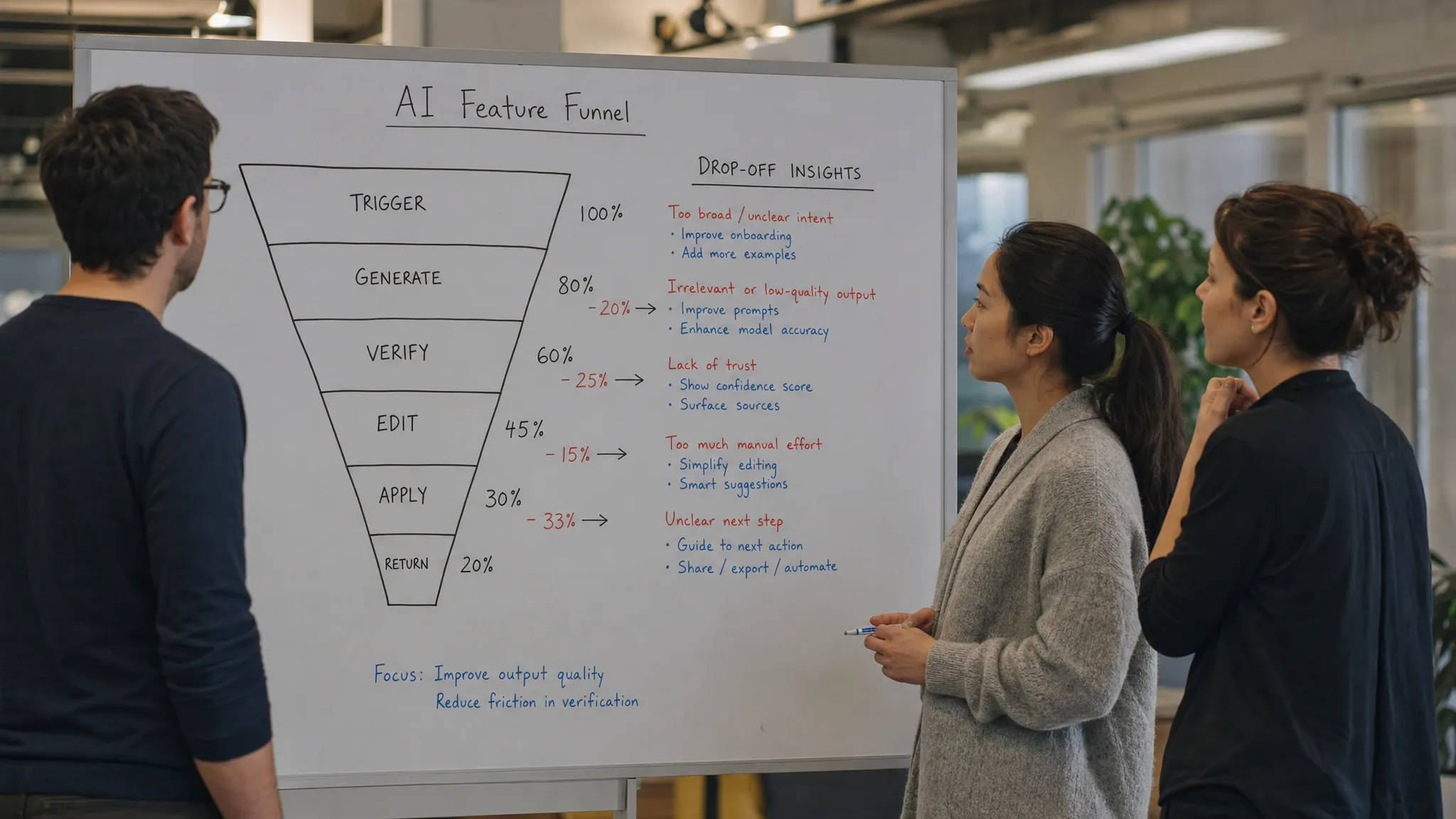
If activation is broken into trigger, output, verification, correction, application, and return, the next product decision becomes much clearer.
A cleaner diagnostic sequence
Start by splitting your activation funnel into stages.
| Stage | Diagnostic question | Common product response |
|---|---|---|
| Trigger | Did the user start from a real workflow moment? | Move the entry point closer to the job |
| Context | Did the system have enough task-specific input? | Pre-fill context instead of asking for prompts |
| Output | Did the user receive something plausible? | Improve task framing before blaming the model |
| Verification | Could the user check the answer quickly? | Add sources, previews, diffs, assumptions, or confidence cues |
| Correction | Could the user steer the output without starting over? | Add scoped edits, controls, or structured feedback |
| Application | Did the output enter the workflow? | Tighten insert, accept, save, share, or handoff paths |
| Return | Did the user come back for the same job? | Build recurring triggers and reminders around the job |
This sequence prevents the most common team argument: everyone picks their favorite fix because the metric is too broad.
Low generation may be an entry-point problem. High generation with low application may be a trust or fit problem. High application with low return may mean the job is occasional, the trigger is missing, or the first output took too much work to clean up.
If your retention is already weak, avoid jumping straight to lifecycle emails. First identify the exact point where repeat behavior breaks. The framework in diagnosing AI retention without guessing is useful here because it separates first success from habit formation.
The decision frame for your next metrics review
In your next activation review, do not ask whether activation is high or low. Ask which version of activation you are measuring.
Use this frame:
- If users generate but do not inspect, the promise or entry point is wrong.
- If users inspect but do not apply, the output is not trusted or not usable.
- If users regenerate repeatedly, the correction loop is weak.
- If users copy but do not return, the product may be leaking value into another workflow.
- If users apply once but do not repeat, the feature helped once but did not become a habit.
That last distinction matters. AI adoption is not proven by a successful demo moment. It is proven when the user knows when to reach for the AI again.
If you want to go deeper, the AI Product Adoption Deck is built around this kind of diagnosis: 12 diagnostics, 80 action cards, and 12 workshops for turning adoption symptoms into product decisions. For a quick read on the specific break in your funnel, the free AI adoption triage tool can help you sort symptoms before you prescribe fixes.
Frequently Asked Questions
What is a good activation metric for an AI feature? A good activation metric shows that the user used AI output to make progress on a real task. For many products, that means tracking application, editing, saving, accepting, or downstream workflow use, not just generation.
Should AI teams stop tracking Generate clicks? No. Generate clicks are still useful as an early funnel signal. They should not be treated as proof of adoption. Use them to measure interest, then pair them with verification, correction, application, and return behavior.
Why can activation look strong while retention is weak? Because first-use activity often reflects curiosity, novelty, or launch attention. Retention depends on whether the user found a repeatable job where the AI reliably helps with less effort than the old workflow.
How do you separate AI onboarding problems from trust problems? Look at where users drop. If they never start, onboarding or entry-point placement may be the issue. If they generate and inspect outputs but do not apply them, trust, verification, or output fit is more likely the break.
Activation data should make the next product decision easier. If it only creates debates, the event is probably too early, too broad, or too detached from the user’s actual workflow.
Fix the measurement first. Then fix the product.