How to Tell if Your AI UX Has a Trust Problem
Learn how to spot an AI UX trust problem using product signals, adoption metrics, and practical fixes before users quietly abandon output.

You can have healthy usage and still have a trust problem.
The giveaway is not that users refuse to click your AI button. It is that they click it, inspect the answer, then quietly avoid using it. They regenerate three times. They rewrite everything. They copy the output into another tool to check it. They ask a teammate, “Does this look right?” Then they stop coming back.
That is an AI UX trust problem. The model may be good enough. The feature may be useful. But the product has not helped the user decide when the output is safe to act on.
What a trust problem actually means
Trust is not a feeling you add with friendly copy or a confidence badge.
In AI products, trust is a working condition. The user needs enough context, control, and recovery to move from “this looks plausible” to “I can use this in my work.”
A trust problem appears when users see potential value but cannot confidently convert output into action. That distinction matters. If nobody understands the use case, you may have a positioning problem. If users never reach the output, you may have an onboarding problem. If they reach the output and hesitate, you are probably looking at trust.
The blunt test is this: are users using the AI result in the workflow that matters, or are they only sampling it?
Signal 1: generation is high, acceptance is low
Many teams overread generation metrics. “Users generated 10,000 outputs this week” sounds good until you check what happened next.
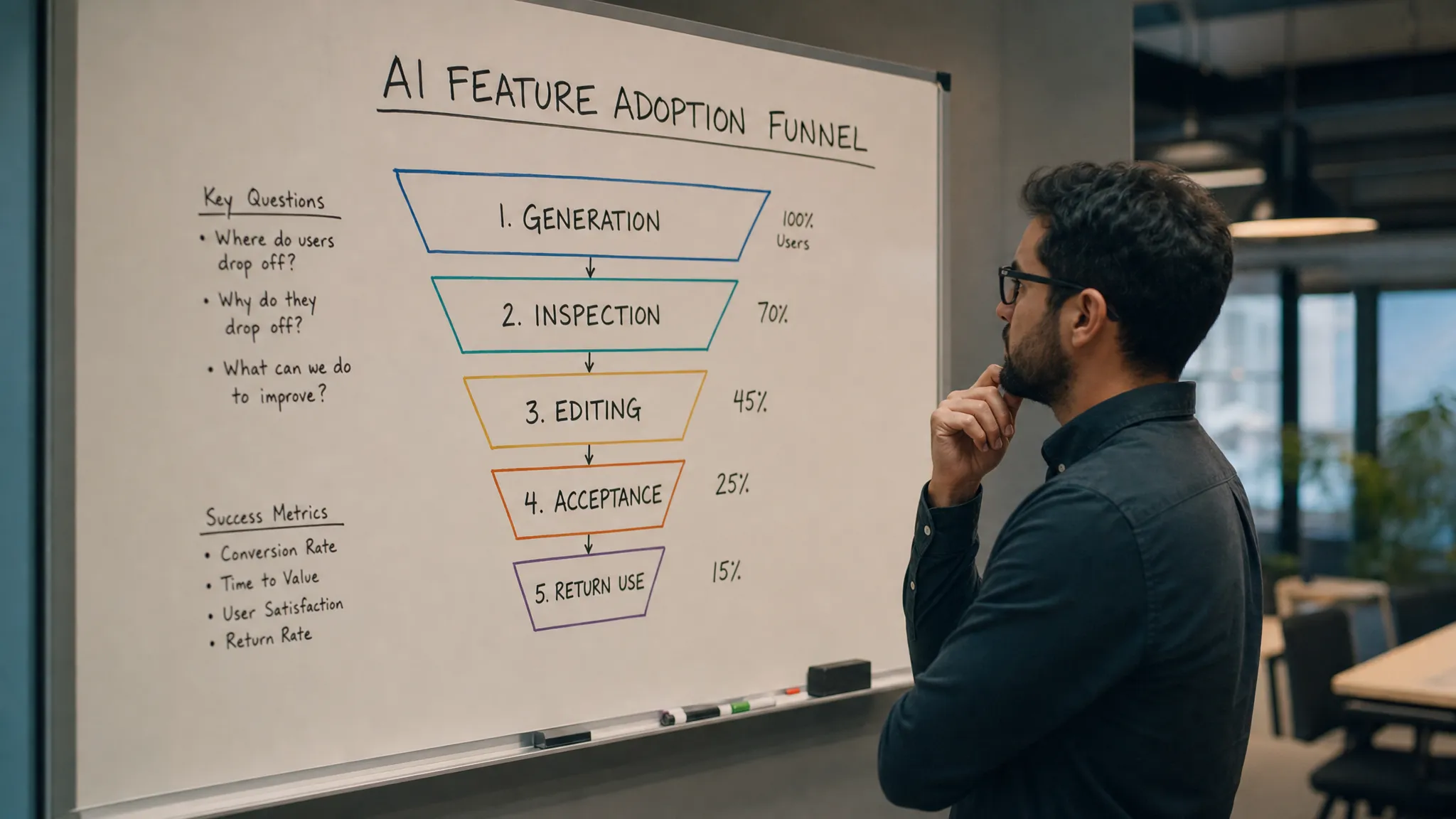
For AI UX, generation is only the start of the adoption path. The more useful metrics sit downstream:
- Output accepted, inserted, applied, exported, published, merged, or sent
- Output edited before use
- Output discarded after viewing
- Output regenerated without being used
- User returned to the same task later
If people generate often but rarely apply the result, they may not trust it enough to risk using it. This is common in writing assistants, analytics summaries, code tools, sales email generators, and internal knowledge assistants.
The problem is not always accuracy. Sometimes the answer is accurate but hard to verify. Sometimes it is mostly right but too risky to use as-is. Sometimes it is useful, but the user cannot see what assumptions shaped it.
If verification is the bottleneck, this deeper breakdown of why AI trust drops when users cannot check the output is a useful next read.
Signal 2: users regenerate instead of refine
Regeneration is often misread as engagement. Sometimes it is. But repeated regeneration without a change in user intent is usually a trust smell.
A user who clicks “try again” five times is not always exploring. They may be looking for an answer that feels safer. They may not know how to steer the system. They may be comparing outputs because none comes with enough evidence to choose.
Look at the pattern:
| User behavior | Likely trust break | What to inspect | Better product response |
|---|---|---|---|
| Repeated regenerate clicks | User cannot judge which output is best | Output differences, missing rationale, weak comparison cues | Show what changed and why one version fits the task |
| Heavy rewriting after generation | Output is not safe to use directly | Edit distance, deleted sections, recurring corrections | Add constraints before generation and editable sections after |
| Copying output elsewhere | Verification is happening outside the product | Copy events, tab switching, support quotes | Bring sources, assumptions, or checks into the workflow |
| Asking teammates to review | Risk is higher than the user’s confidence | Approval paths, shared comments, escalation points | Add review states, comments, and handoff language |
| Drop-off after one bad answer | Recovery path is weak | Undo, correction, retry, return rate after failure | Let users correct the system without starting over |
Signal 3: users leave your product to verify the answer
This is one of the clearest signs of a trust problem.
The user gets an answer, then checks it somewhere else. They search the web. They open the source document. They paste into Slack. They ask a senior teammate. They run the code locally. They compare against the CRM.
Some external checking is normal. The issue is whether your product forces it every time.
This is not unique to AI. In any high-trust service, people need proof before they act. A skincare studio such as Lumina Skin Sanctuary reduces uncertainty by showing services, products, testimonials, policies, and contact paths before someone books. The AI version is similar. If the user is about to rely on an output, they need the proof in the moment, not after they get nervous.
For AI UX, that proof might be:
- The source passages used
- The fields or records included
- The assumptions made
- The confidence boundaries, stated in plain language
- The parts of the output that are safe to use versus need review
Do not make users become detectives. If they must reconstruct how the answer was produced, trust will leak out of the workflow.
Signal 4: users trust the demo but not the daily workflow
A demo task is clean. A real task is messy.
In a demo, the user asks Notion AI to summarize a tidy page. They ask Perplexity a focused question. They use Grammarly on a short paragraph. They ask GitHub Copilot for a familiar code pattern.
In daily work, the source material is incomplete, the stakes are higher, and the user has domain-specific constraints. The AI output may still be impressive, but the UX does not help the user handle edge cases.
That is where trust breaks.
A good trust diagnostic asks: does the product help users define the task before generation and inspect the result after generation?
If not, the user has to carry too much invisible work. They have to remember constraints, spot omissions, check sources, correct tone, and decide whether the result is safe. That workload creates adoption drag.
Signal 5: users recover poorly from the first mistake
Every AI product will be wrong. The trust question is what happens next.
If the user can correct the output, understand the failure, and continue the task, trust can survive. If the user has to start over, re-prompt from scratch, or manually clean up the mess, the product teaches them that AI creates risk.
This is why confidence scores rarely fix trust by themselves. A score does not help much after a bad answer. Recovery does.
Strong recovery patterns include correction memory, inline edits, source replacement, undo, version history, partial accept, and clear handoff states. If this is the failure mode you see, the article on why trust in AI comes from recovery, not confidence scores covers that pattern in more detail.
How to confirm the diagnosis in one week
Do not start with a redesign. Start with a small audit.
Pick one high-intent AI workflow. Review 20 to 30 recent sessions where the user reached an output. You are not looking for whether the model was “good.” You are looking for the moment trust broke.
For each session, answer five questions:
- Did the user apply the output in the intended workflow?
- Did they edit, regenerate, or abandon it?
- Did they leave the product to verify it?
- Did they correct the system or work around it manually?
- Did they return to the same AI workflow within the next few days?
Then tag each failure. Use plain labels: unclear source, missing constraint, too generic, unsafe to publish, hard to edit, no recovery, wrong handoff, user unsure what to ask.
After 20 sessions, the pattern is usually obvious. You will see whether trust is breaking before generation, during inspection, during editing, or at handoff.
What to fix first
Fix the earliest trust break in the workflow.
If users do not know what to ask, improve task framing. Give examples, templates, defaults, and constraint prompts. Do not make the blank prompt box do all the work.
If users cannot judge the output, improve inspection. Show sources, inputs, assumptions, missing data, and scope. Make the answer checkable.
If users rewrite everything, improve control. Break output into sections. Let users accept, reject, or edit parts. Give them levers that match the task.
If users abandon after mistakes, improve recovery. Let them correct the system and continue. Preserve context. Make failure cheap.
If users hesitate at the final step, improve handoff. Make the next action explicit: insert into doc, create ticket, send draft, save summary, request review, apply change.
A trust problem is rarely solved by one UI element. It is usually solved by reducing the user’s uncertainty at the exact point where they must act.
Frequently Asked Questions
How do I know if poor AI adoption is a trust problem or a value problem? If users reach the output, show interest, but do not apply it, trust is likely involved. If users never start the workflow or do not understand why they would use it, the issue is more likely value, positioning, or onboarding.
Are confidence scores useful for AI UX trust? Sometimes, but only when users understand what the score means and what to do with it. In most product workflows, sources, assumptions, edit controls, and recovery paths build more usable trust than a generic score.
What is the most important AI adoption metric for trust? Track the gap between generation and applied use. The exact event depends on your product, such as accepted suggestion, inserted text, merged code, sent message, saved summary, or completed workflow.
Next action
If this sounds like your product, do not debate trust in the abstract. Pick one workflow and diagnose the break.
You can run the symptom through the free AI adoption triage tool to narrow the likely failure mode. If you want a fuller operating system for this kind of work, the AI Product Adoption Deck maps adoption symptoms to diagnostics, action cards, and workshop templates for product teams shipping AI features users need to trust enough to reuse.