A Better Way to Diagnose AI Retention Without Guessing
Diagnose AI retention without guessing. Map user behavior to trust, workflow, correction, and habit breaks before choosing the fix.

Your AI feature has users. They tried it. Some even said the output was useful. Then Week 2 flattens.
Activation looked fine. Demo reactions were good. The launch post got clicks. But the feature never became part of the way people work.
That is the moment when teams start guessing. Maybe the model is not good enough. Maybe users need more onboarding. Maybe the prompt box is too empty. Maybe pricing is wrong.
Maybe. But AI retention usually breaks for a more specific reason. You need to find the failed return moment before you pick a fix.
Retention is not one problem
A weak retention curve tells you users did not come back. It does not tell you why.
For a normal SaaS feature, retention often comes down to recurring need, workflow fit, or team adoption. Those still matter. But AI adds extra failure points between first use and repeat use.
The user has to know what to ask. They have to judge whether the answer is safe enough. They have to edit or accept the output. They have to move it into the real workflow. Then they have to remember to come back when the next similar task appears.
Each step can fail while your top-level retention chart looks the same.
This is why “our D7 retention is low” is not a diagnosis. It is a symptom.
If you want a broader map of the possible breaks, this companion piece on AI diagnostics for finding the real adoption break lays out the main failure zones: input, trust, control, application, and habit.
Start with the failed return moment
Do not start by asking, “Why did users churn?” That question is too broad.
Start with a smaller question: “What was the next moment where this user should have used the AI again, but did not?”
That question forces you to define the expected return loop. For example:
- A sales rep should use the AI again before the next outbound sequence.
- A support lead should use it again when triaging the next batch of tickets.
- A designer should use it again before preparing the next usability summary.
- A developer should use it again when touching similar code.
If you cannot name that moment, you do not have an AI retention problem yet. You have a product fit problem. The feature may be interesting, but it is not attached to a recurring job.
If you can name the moment, then your job is to find what blocked the return.
Separate AI retention from “used AI”
Many teams instrument AI features too loosely. They track “AI button clicked” or “generation completed” and call it usage.
That is not enough.
A user can generate output and still get no value. They may read it, distrust it, copy one sentence, rewrite everything, and never return. Your analytics may still count that as usage.
For AI product adoption, the more useful question is not whether output was generated. It is whether the output moved the user forward.
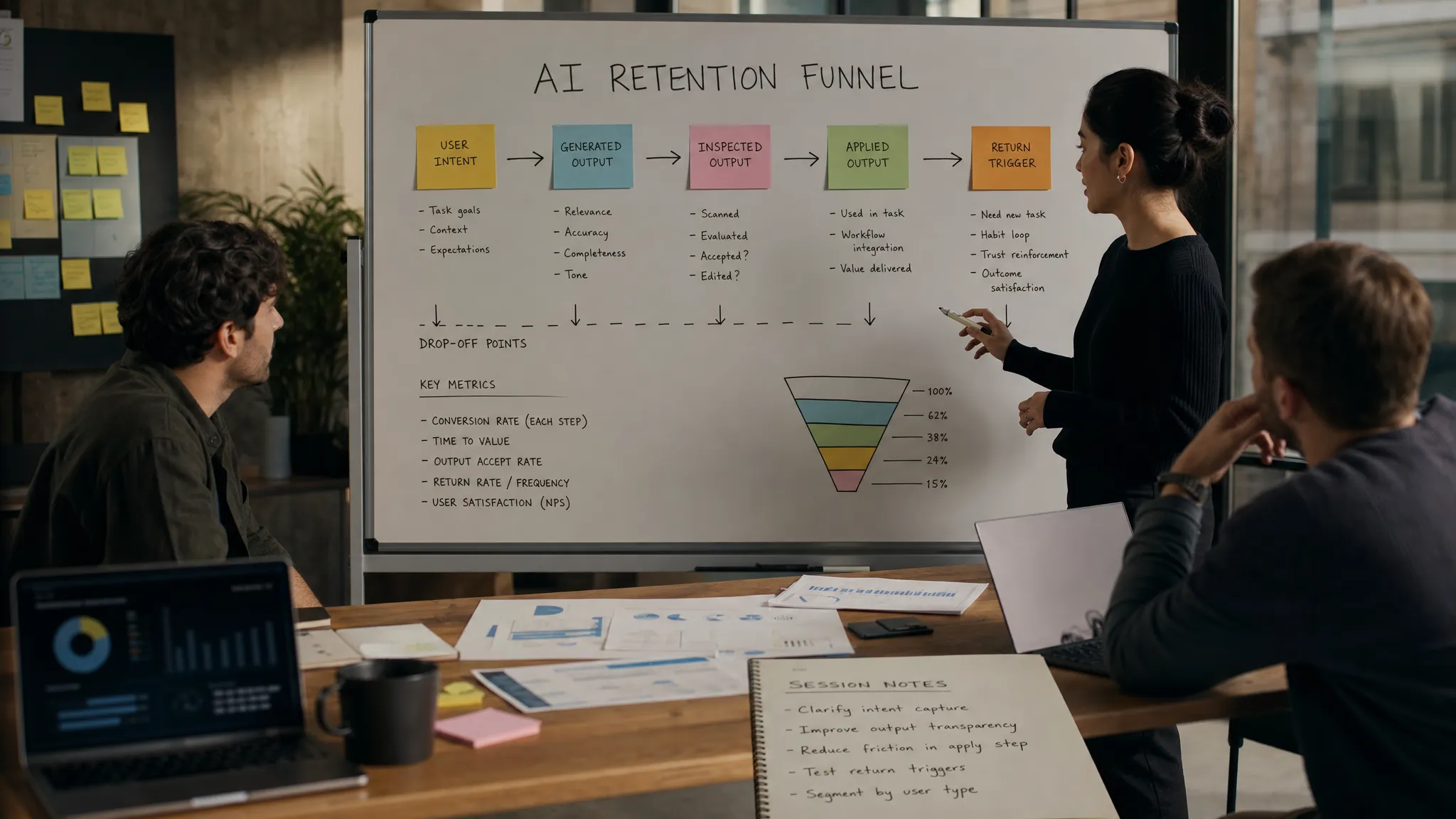
Track the chain:
- Intent expressed: The user started a task the AI is meant to help with.
- Output generated: The system returned something relevant to that task.
- Output inspected: The user reviewed, expanded, verified, or compared it.
- Output applied: The user accepted, inserted, sent, saved, exported, merged, or otherwise used it.
- Return triggered: The user came back when a similar job appeared again.
The drop-off between these events tells you more than a generic retention chart.
If users generate but do not inspect, the output may not look worth reviewing. If they inspect but do not apply, trust or fit is probably broken. If they apply once but do not return, the feature may solve a one-off task rather than a recurring one.
A symptom map for AI retention
Use behavior before opinion. Users are often bad at explaining why they did not return, especially when the answer is “I forgot,” “I did not trust it enough,” or “it was easier to do it myself.”
| Symptom | Likely break | What to inspect | First product response |
|---|---|---|---|
| Strong first-use, weak Week 2 return | Curiosity without habit | Whether the feature maps to a recurring job | Tie the AI entry point to the next natural workflow moment |
| High generation, low application | Output does not reach the work surface | Copy, export, insert, save, or accept events | Improve handoff into the user’s real tool or object |
| Many regenerations, few accepts | Trust or specificity gap | Prompt quality, output variance, confidence signals | Add constraints, examples, citations, previews, or verification paths |
| Heavy editing before use | Correction loop is too expensive | Edit distance, time to usable output, repeated manual fixes | Make correction faster than starting over |
| Templates used once, then ignored | Onboarding teaches the demo, not the job | Which templates map to active work | Replace generic examples with job-specific starting points |
| Only expert users retain | Feature requires too much task framing | Prompt length, failed starts, help usage | Add guided inputs, defaults, and narrower modes |
The point is not to label every user perfectly. The point is to stop treating retention as one blended average.
Diagnose by cohort behavior, not averages
Averages hide the adoption break.
Segment users by the kind of task they attempted, not just by plan, role, or company size. In AI products, two users can click the same feature with very different expectations. One wants a finished draft. Another wants a rough starting point. Another wants a second opinion. If you mix them together, your retention data gets noisy fast.
Useful cohorts often look like this:
- Users who applied the first output versus users who only generated.
- Users who edited output versus users who regenerated repeatedly.
- Users who started from a template versus users who wrote from scratch.
- Users who returned through an in-workflow trigger versus users who returned through the main nav.
This also helps you separate product UX problems from operating context problems. In regulated, infrastructure-heavy, or data-sensitive environments, users may avoid repeat use because of governance concerns rather than interface friction. Organizations working with open source and data governance partners like Anwit SAS often need to distinguish trust in the AI output from trust in the surrounding data and deployment model.
That distinction matters. A tooltip will not fix a procurement, governance, or data residency blocker. And a model upgrade will not fix an unclear handoff.
Run a 30-minute retention diagnostic
You do not need a quarter-long research project to get unstuck. You need a focused pass through the right evidence.
1. Pick one return window
Choose a window tied to the job, not a generic metric. Daily retention may matter for an AI coding assistant. Monthly retention may be fine for a board memo generator. The right window depends on how often the underlying task occurs.
2. Define a successful return
Do not define success as “opened the AI feature again.” Define it as “used the AI again for the recurring job and applied the output.” If application is not measurable yet, fix instrumentation before drawing conclusions.
3. Pull the last 30 relevant sessions
Look at users who activated, got output, and then did or did not return. You want both retained and non-retained users. Compare the path, not just the profile.
4. Mark the first visible break
For each user, identify the first break in the chain: no clear intent, weak input, ignored output, verification failure, editing burden, poor handoff, or no trigger to return.
5. Choose one intervention
Pick the smallest product change that targets the dominant break. If the break is trust, do not redesign onboarding. If the break is application, do not add prompt tips. If the break is habit, do not spend the sprint tuning output tone.
This is where many teams waste time. They fix the most visible surface instead of the actual adoption break.
What not to fix first
The default fixes are often wrong.
A model upgrade may improve quality, but it will not help if users do not know when to use the feature. More prompt examples may help input, but they will not help if users cannot verify the answer. A bigger empty text box may feel flexible, but it can make prompt paralysis worse.
Generic onboarding is another common trap. Teaching users what the AI can do is not the same as helping them use it at the moment of need.
If your feature got clicks but did not earn repeat use, the issue may be novelty decay rather than onboarding. This pattern is covered in more detail in why AI features win clicks but lose repeat use.
Turn the diagnosis into a product decision
Once you know the break, the fix becomes less vague.
If users do not start, narrow the entry point around a recognizable job. If users start but give weak inputs, add structure. If users generate but do not apply, improve the output handoff. If users edit too much, make correction cheap and visible. If users apply once but do not return, connect the feature to the next recurring trigger.
A better AI retention diagnosis should end in a product decision, not a debate about whether the model is “good enough.”
Frequently Asked Questions
What is the best metric for AI retention? The best metric is repeat successful application, not repeat generation. Track whether users come back for the same recurring job and use the output in their workflow.
How do I know if low AI retention is a trust problem? Look for repeated regeneration, long review time, external checking, low accept rates, or users copying output into another tool before using it. Those behaviors usually point to uncertainty, not lack of awareness.
Should we improve onboarding before changing the AI UX? Only if the break is at the start. If users already generate output but do not apply it, onboarding is probably not the main issue. Fix inspection, correction, verification, or handoff first.
How many users do we need to diagnose the problem? You can often find the dominant break by reviewing 20 to 30 relevant sessions, especially if you compare users who applied output with users who abandoned it.
A concrete next step
Open your last 30 activated users. Split them into “applied output” and “did not apply output.” Then mark the first break in the chain for each user.
If the pattern is obvious, fix that break. If the pattern is not obvious, your instrumentation is probably too shallow.
The AI Product Adoption Deck goes deeper on this with 12 diagnostics, 80 action cards, and workshop templates for turning symptoms into product decisions. But the first move is simple: stop asking why retention is low, and start finding where the return loop broke.