When AI Defaults Beat Custom Prompts for Product Adoption
AI product adoption improves when defaults guide repeatable jobs. Learn when custom prompts add friction and how to design better starting points.

Your AI feature is getting opened, but not adopted. Users run one request, maybe two, then go back to the old workflow. Support asks for a prompt library. Sales asks for more examples. The team assumes users need better prompt education.
Often they do not. They need a better default.
Custom prompts feel powerful to the team that built the feature. They also push the hardest part of the product decision onto the user. The user has to decide what job to ask for, what context to include, what output shape to request and how to judge whether the result is good enough. That is a lot of work before value shows up.
For AI product adoption, defaults usually beat custom prompts when the product already knows the user, the object and the next likely task.
The symptom: users engage, but do not repeat
This problem does not look like total failure. It looks like weak continuation.
You may see:
- Healthy feature discovery, but low second-session usage
- Long first prompts, followed by output abandonment
- Users asking teammates for prompt examples instead of building habits
- Strong usage from power users, weak usage from the median user
- Many generations, but few accepted, inserted, shipped or saved outputs
That pattern usually means the AI can do something useful, but the product is making the user assemble the path every time. The friction is not only typing. It is deciding.
This is close to the problem covered in the hidden adoption cost of asking users to prompt from scratch, but the fix is not simply adding examples under the box. The better fix is deciding which jobs deserve defaults.
Why defaults beat prompts for repeatable jobs
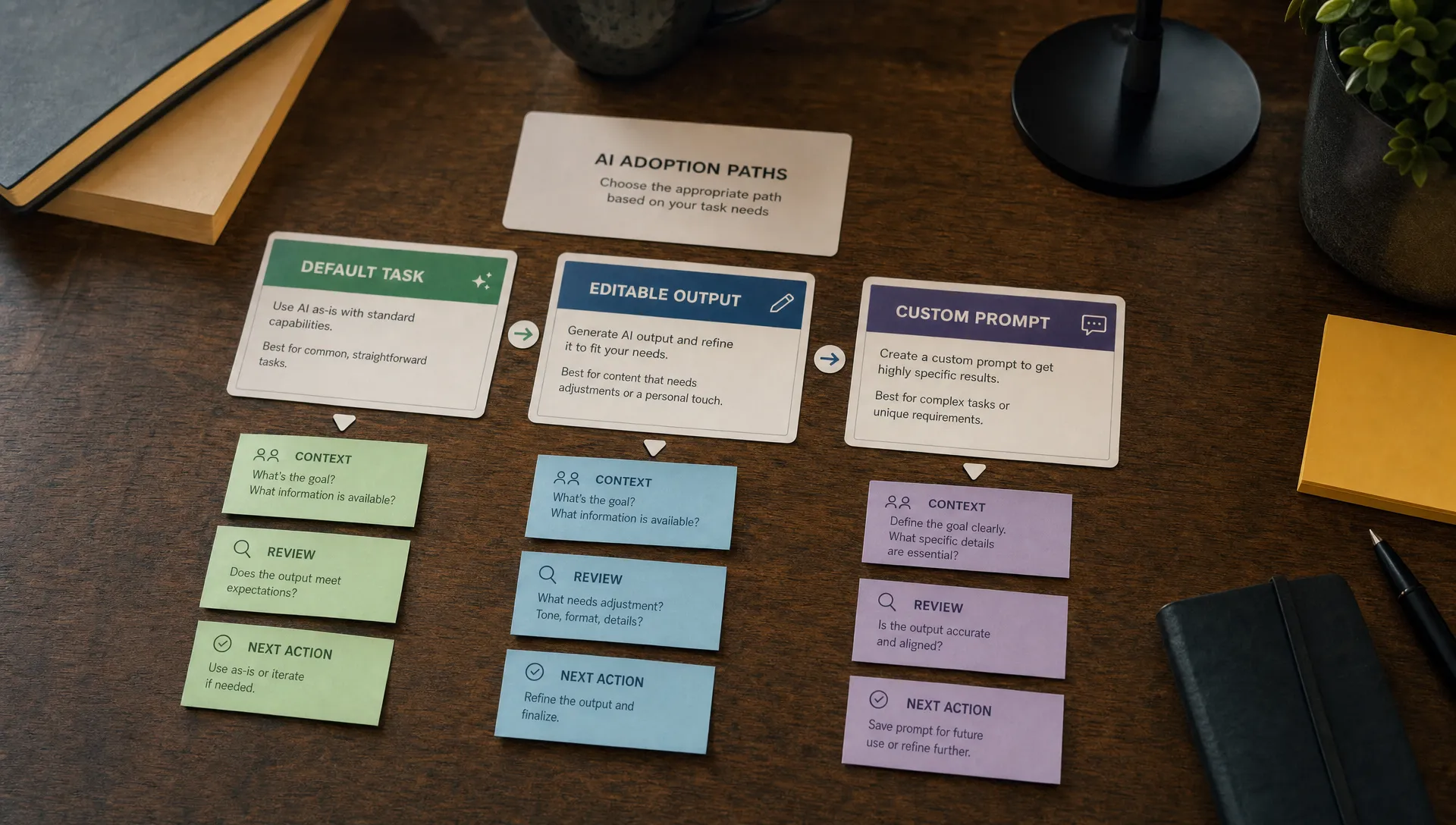
A custom prompt is good when the user needs expressive control. A default is better when the user is trying to complete a known job inside a known workflow.
Good defaults reduce four adoption costs at once. They frame the task, preload context, constrain the output and make the next action obvious. That matters because most retained product behavior is not exploratory. It is repeated.
| Product situation | Better first move | Why it helps adoption |
|---|---|---|
| User is editing an existing object | Context-aware default | Removes setup work and uses what the product already knows |
| User is new to the AI feature | Default task starter | Creates a safe first success before asking for skill |
| User repeats the same workflow weekly | Saved default | Turns AI from novelty into habit |
| User has an unusual edge case | Custom prompt | Lets the user express constraints the product cannot infer |
| Admin wants team consistency | Shared default | Makes quality less dependent on individual prompt skill |
The decision is not defaults versus prompts forever. It is defaults before prompts for the jobs that drive adoption.
Defaults are not prompt templates with nicer labels
A weak default says, Summarize this. A strong default knows what this is, why the user is likely summarizing it and what the output needs to support.
A useful AI default has a few parts:
- A trigger tied to the current workflow
- Context the user should not have to restate
- A clear operation, such as shorten, compare, classify or draft
- An output shape that matches the destination
- A next action, such as insert, approve, revise or send for review
This is why generic prompt libraries rarely fix adoption. They still ask the user to translate a product moment into a prompt. Better AI onboarding strategies start by turning the current object into a useful starting point. If you are working on that layer, task starters tied to the current object are usually stronger than a blank input with sample text underneath.
What this looks like in real products
Notion AI does not only offer a blank assistant. It surfaces actions like summarizing, improving writing and changing tone near the document where the work happens. The prompt box still exists, but the default action lowers the cost of the first useful result.
GitHub Copilot is another clear example. The core habit is not asking the model for code from scratch. It is accepting or modifying suggestions that appear inside the coding context. The default is shaped by the file, cursor position and surrounding code. The user can still steer, but the product makes the first move.
Grammarly works the same way in writing workflows. Users do not need to ask for a grammar review every time. Suggestions appear against the text. The product turns a broad AI capability into a default review loop.
Perplexity also benefits from defaults. A search starts with an answer structure, sources and follow-up paths. Users can ask anything, but the product does not make them design the format of a useful research result from scratch.
The common pattern is simple. The product does not treat prompting as the primary user job. It treats prompting as an escape hatch.
Diagnostic: do you need better prompts or better defaults?
Do not decide this in a design critique. Look at behavior.
| Symptom | Likely cause | Better response |
|---|---|---|
| Users open the AI surface, then leave | The next task is unclear | Add workflow-specific defaults |
| First prompts are long and messy | Users are doing product framing work | Preload context and constraints |
| Output gets copied elsewhere for cleanup | Default format does not match destination | Design output for insertion or handoff |
| Lots of generations, low acceptance | Users are fishing for acceptable quality | Narrow the default and expose review controls |
| Power users retain, median users churn | Skill burden is too high | Make expert prompts into shared defaults |
When custom prompts still win
Custom prompts are not bad product design. They are just bad as the only path.
They win when the task is ambiguous, the context lives outside your product or the user has domain-specific constraints the system cannot infer. Consultants, analysts, engineers and operators often need this control. Removing it would make the product feel shallow.
The adoption problem starts when every user must act like that expert on day one. A better pattern is default first, editable prompt second. Let the user see what the product thinks the job is. Then let them adjust the instruction, tone, scope or source set.
This keeps power without making prompt skill a prerequisite for value.
How to design defaults that improve AI product adoption
Start from the workflow event
Do not start with model capability. Start with the moment where the user already feels friction. A support manager triaging tickets needs different defaults than a marketer rewriting campaign copy. Same model, different adoption problem.
The best default appears where the user is already deciding what to do next. If the user has to leave the workflow to find the AI surface, the default is already late.
Make the default opinionated enough to be useful
A default that tries to serve every job becomes another blank prompt. Choose a specific input, output and success condition.
For example, Draft reply is vague. Draft a concise reply that answers the customer question, cites the help article and flags missing account details is closer to a product decision. It gives the user something to accept, edit or reject.
Design the review step, not just the generation
AI user retention often breaks after the first impressive output because the user still has to verify too much. Defaults should include the review loop. Show what context was used. Separate facts from style changes. Make edits easy. Put the accept action near the destination.
If the user cannot confidently move from output to action, the default did not finish the job.
The adoption metrics to watch
Prompt volume is a weak signal by itself. It can mean curiosity, confusion or repeated failure.
Track AI adoption metrics closer to the workflow outcome: default take rate, acceptance rate, edit depth, time to first accepted output, repeat use by workflow and conversion from default to custom prompt. If custom prompt usage rises after users accept defaults, that can be a good sign. It means users learned the job before extending it.
If custom prompt usage is high but retention is low, the product may be forcing users to work too hard.
Frequently Asked Questions
Are AI defaults just prompt templates? No. A prompt template is text the user adapts. A product default is a workflow decision. It includes timing, context, output shape and the next action.
Should every AI feature have custom prompts? Not always, but most serious AI products need an escape hatch. The key is not making custom prompting the required first step for common jobs.
How do I know which defaults to build first? Start with repeated jobs that already have clear inputs and outputs. Then check where users abandon, regenerate or copy outputs into another tool.
Can defaults hurt advanced users? They can if they hide control. Use defaults as fast paths, not cages. Let advanced users inspect, edit, save or bypass them.
Next action
Pick one high-intent workflow where AI usage is high but repeat behavior is weak. Replace the open prompt as the primary first move with one opinionated default. Measure accepted outputs, not generations.
If you are not sure which adoption break you are seeing, run the symptom through the AI Product Adoption Deck free Triage tool. It is built for teams that have already shipped AI and need to diagnose why users are not coming back.