The Hidden Cost of Asking Users to Prompt From Scratch
Asking users to prompt from scratch hurts AI product adoption. Learn the hidden costs, diagnostic signals, and better UX patterns.

Your users are not lazy. They are busy, uncertain, and trying not to look foolish in front of a machine that might confidently waste their time.
That is the hidden cost of asking users to prompt from scratch.
The blank input looks flexible. It feels powerful in a demo. It lets the team avoid choosing a narrow workflow too early. But in a shipped product, it often creates a tax on every use: the user has to decide what the AI can do, translate their goal into prompt language, guess the right level of detail, inspect the result, then remember what worked next time.
Most users will not pay that tax repeatedly.
If your AI feature gets trial clicks but weak repeat use, the problem may not be model quality. It may be that the product is making users do product design work every time they open it.
The blank prompt shifts too much work to the user
A prompt box is not just an input. It is an implied contract.
When you give users a blank field, you are asking them to answer several questions before the product helps them:
- What task should I use this for?
- What information does the AI need?
- What format should I request?
- What quality bar should I expect?
- How do I recover if the output is wrong?
That is a lot of decision load before value. It is especially expensive inside existing SaaS workflows, where users already have a job to finish. They did not come to your product to become better prompt writers. They came to close a ticket, edit a proposal, review a contract, summarize research, debug a query, or ship a campaign.
This is why prompt-from-scratch UX often produces misleading adoption signals. Users click because they are curious. They try one or two obvious prompts. Some get a useful result. Then usage drops because the feature never becomes a dependable step in the workflow.
That pattern is closely related to empty prompt paralysis, but the cost goes beyond the first blank screen. Even users who can write a prompt may still avoid the feature if each session requires too much setup and judgment.
The hidden costs show up in places your dashboard may miss
Teams usually look for adoption problems in activation, retention, and output satisfaction. Those metrics matter, but they can hide the real source of friction.
Prompting from scratch creates costs across the whole product system.
| Symptom in the product | Likely hidden cost | What it usually means |
|---|---|---|
| Users try the AI once, then disappear | High task-framing cost | The product did not make a recurring job obvious enough |
| Users paste long prompts from elsewhere | Missing input contract | They do not know what the product needs to succeed |
| Users regenerate repeatedly | Weak steering controls | They are using prompts to compensate for missing UI choices |
| Output quality varies by user | Prompt skill dependency | Value depends too much on user expertise |
| Support asks for “better prompt examples” | Training is covering for UX | The interface is not carrying enough context |
| Power users succeed, average users stall | Skill gap | Adoption is limited by prompt fluency, not need |
The last row is the one product teams often underweight.
A few advanced users can make almost any AI tool look useful. They know how to specify role, context, tone, constraints, examples, and output format. They also know when to ignore a bad answer. That does not mean the product is working for the market. It means the product is working for people who can complete the missing interface in their heads.
For broad adoption, that is fragile.
Prompting skill is useful. It should not be required for basic value
There is nothing wrong with teaching users how to work with AI. In many companies, structured learning matters. If your customers are investing in professional development through programs like live expert-led upskilling paths, that can raise the ceiling for how teams use AI.
But training should raise the ceiling, not create the floor.
If a user needs a prompt-writing course before they can get first value from your feature, the product is under-designed. The same is true if your onboarding depends on a library of clever prompt examples that users must mentally adapt to their own situation.
Good AI product design does not eliminate prompting. It reduces unnecessary prompting. It turns common user intent into product structure.
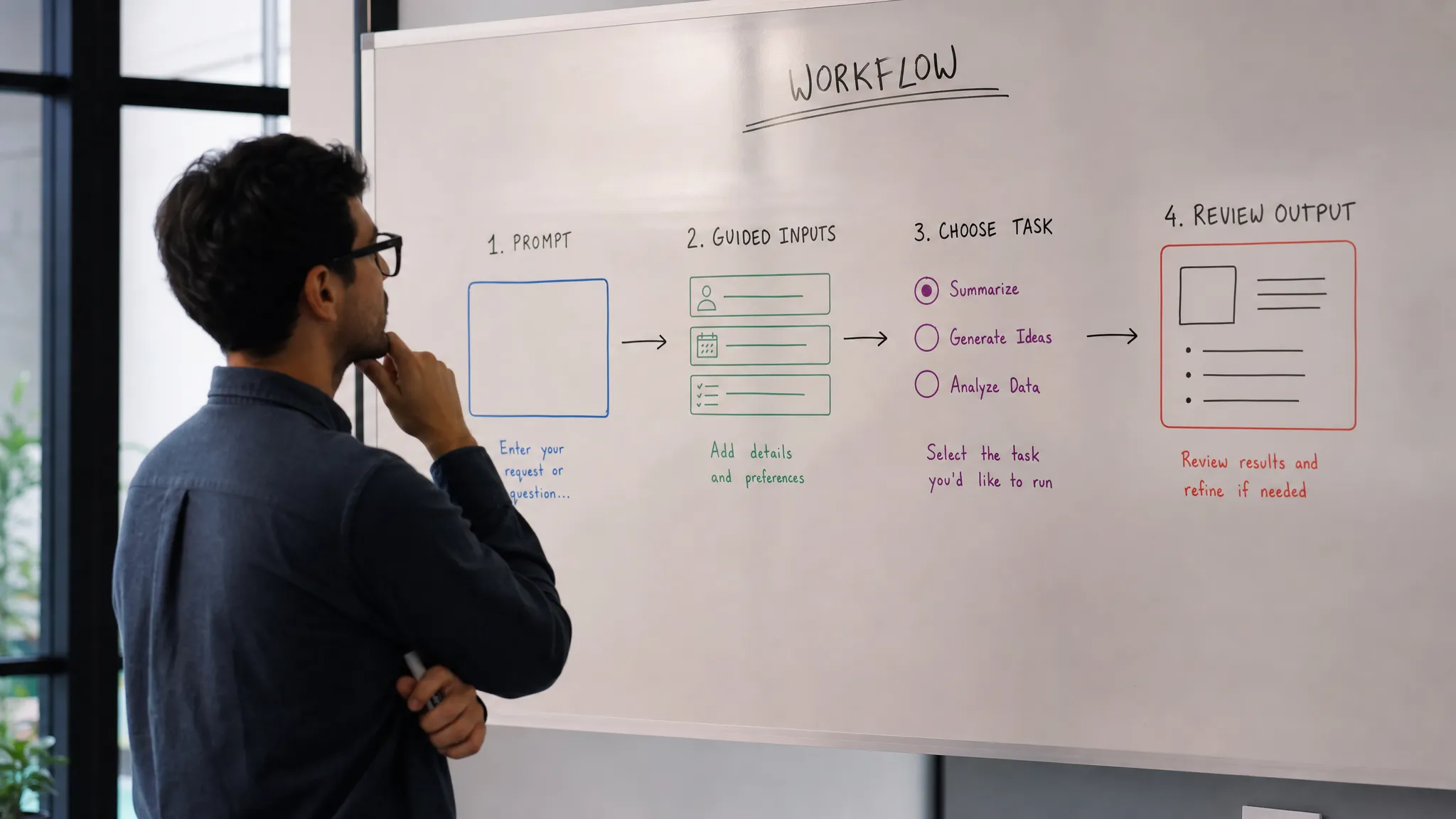
In practice, that means replacing “write anything” with sharper choices:
- A visible task frame, such as “turn these notes into a client-ready recap”
- An input contract, such as “select source material, audience, and desired output format”
- Defaults based on current context, such as the open document, selected ticket, or active project
- Editing controls for direction changes, rather than asking users to re-prompt from memory
- Examples tied to real jobs, not generic prompt inspiration
The goal is not to make the product less flexible. It is to make the first useful move obvious.
The core diagnosis: are users stuck before intent, input, or iteration?
Not every blank-prompt problem has the same root cause. Before redesigning the feature, separate the failure into three stages.
1. Intent failure
The user does not know what job the AI feature is for.
This happens when the entry point is too generic: “Ask AI,” “Generate,” “Assistant,” or “What can I help you with?” Those labels force the user to invent a use case. In a mature workflow product, that is backwards. The product should already know where the user is and what jobs are likely.
A better pattern is to anchor the AI action to the current workflow state. In a CRM, the task might be “draft follow-up from last call.” In analytics, it might be “explain this anomaly.” In design, it might be “create three headline variants for this selected section.”
The product is not removing agency. It is narrowing the first step to something worth doing.
2. Input failure
The user knows what they want, but not what the AI needs.
This is where many products fall into the “prompt better” trap. The user writes a vague instruction, gets a vague result, then assumes the feature is unreliable. In reality, the model may have lacked context, constraints, or source material.
An input contract fixes this. Instead of expecting users to write a perfect prompt, ask for the minimum fields that make success likely. That might be audience, source, tone, length, policy constraints, brand voice, or examples.
The important part is that the product owns the contract. The user should not have to guess it.
If this is your onboarding problem, the more tactical fixes in AI onboarding strategies for empty prompt paralysis are worth reviewing.
3. Iteration failure
The user gets an output, but cannot easily shape it into something usable.
This is common when the only way to improve the result is another free-text prompt. “Make it better” becomes the main control surface. Users regenerate, compare, copy fragments, and eventually leave the AI workflow to finish the job elsewhere.
That is adoption leakage.
AI products need revision paths. Let users accept part of an output, reject sections, apply constraints, switch format, preserve a good sentence, or ask for a targeted rewrite. If the product treats each generation as a full reset, users lose trust and momentum.
The prompt should not be the only steering wheel.
How to tell if scratch prompting is hurting adoption
You do not need a six-week research project to see this. Look for behavior that shows users are compensating for missing structure.
Session recordings, support tickets, and prompt logs can usually answer the question quickly. The strongest signals are not just what users type. They are what users do before and after typing.
Watch for these patterns:
- Long pauses before first prompt
- Users opening help docs or examples before trying the feature
- Prompts that include workflow context the product already has
- Repeated regeneration with small wording changes
- Copying output out of the AI surface for manual cleanup
- High satisfaction on first output but low return rate
That last one matters. A user can rate an output as useful and still not build a habit. Useful is not the same as repeatable. If the user cannot predict when to use the feature, what to provide, and how to recover, the product remains a novelty.
This is also why generic activation metrics can mislead. “Generated one output” is weak evidence. Better adoption metrics include time to first useful output, percentage of outputs edited in-product, repeat use by workflow trigger, acceptance rate by task type, and return use after a successful session.
What to build instead of a blank prompt
The better alternative is not always a rigid form. It depends on the task.
For open-ended exploration, a prompt box may still be right. For repeated work, especially inside SaaS workflows, users usually need guided starts and structured steering. The product should decide which parts of the task are stable enough to encode.
Use this decision frame:
| If the task is... | Avoid relying on... | Build toward... |
|---|---|---|
| Frequent and predictable | Free-form prompting every time | One-click task starters with sensible defaults |
| Context-heavy | User-pasted background | Automatic context capture and source selection |
| Quality-sensitive | Prompt instructions for standards | Checklists, constraints, and verification cues |
| Iterative | Regenerate-only loops | Partial accept, targeted rewrite, and editable sections |
| New to the user | Prompt libraries | Guided examples tied to their current object |
This is where AI product management gets uncomfortable. The blank prompt is often a sign that the team has not chosen the workflow sharply enough. It leaves the user to discover product fit one prompt at a time.
That may work in a playground. It rarely works in a busy workday.
The product decision to make
Do not ask, “How do we teach users to prompt better?” first.
Ask, “Which part of the prompt should the product already know?”
That question changes the roadmap. It pushes the team toward context, defaults, task-specific entry points, and revision controls. It also makes adoption easier to diagnose, because you can see where users drop: before intent, during input, or after the first output.
If you want a structured way to map the symptom to the right product move, the free AI adoption triage tool can help separate prompt paralysis from trust, verification, and retention problems. The AI Product Adoption Deck goes deeper with diagnostic cards and action cards for teams that need to turn the diagnosis into product decisions.
Frequently Asked Questions
Is a blank prompt always bad in an AI product? No. A blank prompt can work for expert users, exploratory tasks, or products where open-ended conversation is the core workflow. It becomes a problem when basic value depends on the user inventing the task, context, and output format from scratch.
What is the difference between prompt paralysis and poor model quality? Prompt paralysis happens before the model has a fair chance to help. Users do not know what to ask, what to include, or how to steer the result. Poor model quality shows up even when the task, context, and constraints are clear.
Should we add prompt examples to fix this? Examples can help, but they are usually not enough. If users must browse examples, choose one, rewrite it, and adapt it to their workflow, the product is still pushing too much work onto them. Turn the best examples into guided task starters or input contracts.
What metric best shows whether scratch prompting is hurting retention? Look at repeat use after a successful output, not just first generation. If users get useful outputs but do not return, the workflow may be too hard to repeat. Pair that with time to first useful output and regeneration behavior.
Next step
Pick one AI entry point in your product this week. Remove the blank prompt as the default. Replace it with three task-specific starts, prefilled with context the product already has, and give users one clear way to revise the result.
Then compare repeat use, not just first clicks. That is where the cost of prompting from scratch becomes visible.