What to Fix When AI Activation Does Not Turn Into Habit
AI activation can look healthy while habit never forms. Diagnose the broken trigger, trust gap, workflow handoff or correction loop.

Your AI feature gets the first run. The user opens it, tries a prompt, generates something useful and maybe even uses the output.
Then they do not come back.
The activation chart looks fine. The retention chart does not. This is the gap most AI product teams underestimate. Activation proves the user could get value once. Habit proves the user knows when to return, trusts the output enough to reuse it and can fit it into the work they already do.
If activation does not turn into habit, do not start by polishing the model demo. Start by finding the break in the loop.
First, make sure activation was real
Some teams call a user activated when they open the AI panel, send a prompt or generate an output. That is too early. For AI product adoption, activation should usually mean the user did something with the output.
They inserted it into a document. Accepted a suggestion. Copied the answer into a workflow. Used it to make a decision. Shared it with someone. Took the next step the product is supposed to enable.
If your activation event stops at “generated response,” your habit problem may actually be a measurement problem. Before fixing retention, check whether your activation metric captures real progress. This is the same mistake covered in where AI product teams misread activation data.
Once activation is real, the question changes. The user got value once. Why did that value not become repeatable?
Habit breaks after activation for a small set of reasons
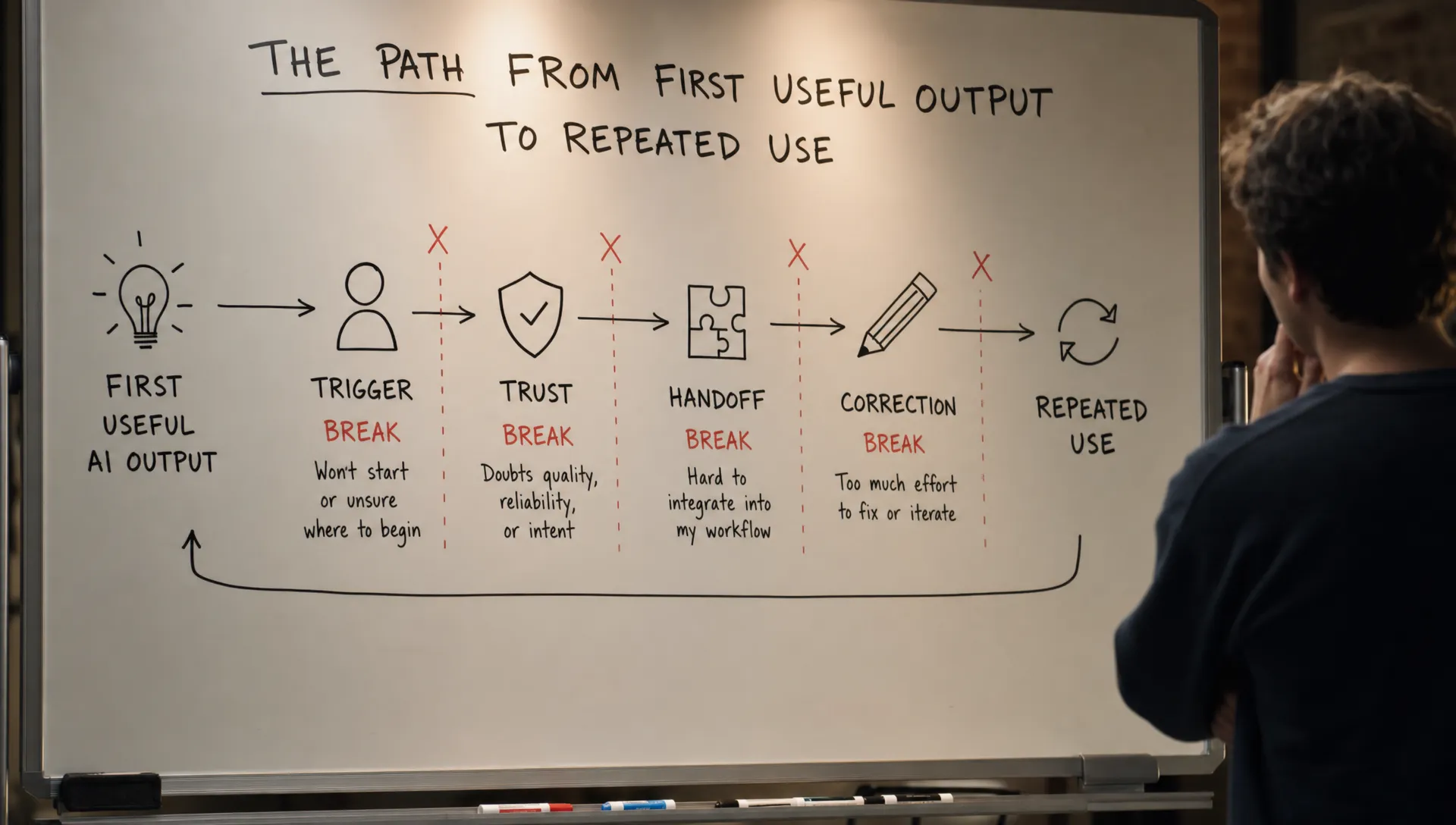
AI habits are not built by novelty. They are built when a user can connect a recurring situation to a reliable product behavior.
That means the habit loop needs five pieces:
- A clear trigger, so the user knows when to use the AI again.
- A specific job, so the feature is not just “AI somewhere in the product.”
- A trusted output, so the user is willing to rely on it.
- A low-friction handoff, so the output moves into the real workflow.
- A correction path, so imperfect output does not end the session.
When any one of those breaks, you get the same surface symptom: users activate once, then fade.
| What you see after activation | Likely break | What to inspect | Better fix |
|---|---|---|---|
| Users generate once, then never return | No return trigger | What was happening right before the first use? Does that moment repeat? | Attach the AI feature to a recurring workflow moment |
| Users return, but only for random one-off tasks | Vague job definition | Are prompts broad, exploratory or unrelated? | Narrow the use case and provide task-specific entry points |
| Users view output but do not apply it | Trust gap | Do users verify elsewhere, rewrite heavily or ask for sources? | Add evidence, constraints, preview states or safer acceptance controls |
| Users copy output manually into another tool | Broken handoff | Where does the output need to land? | Add insert, replace, export, save or create actions |
| Users try again after a bad output, then stop | Correction loop failure | Do users regenerate from scratch or abandon after edits? | Make correction smaller, visible and recoverable |
This is why “improve onboarding” is often the wrong first move. Onboarding can get a user to the first output. It cannot create a habit if the feature is disconnected from the next real work moment.
Fix the return trigger before you add more prompts
A weak trigger is the most common activation-to-habit break.
The user remembers the feature exists during onboarding because you put it in front of them. Two days later, they are back in their normal workflow. If the product does not surface the AI at the moment of need, the user has to remember it manually.
That rarely holds.
Grammarly works as a habit because suggestions appear in the writing surface. GitHub Copilot fits into the coding surface. The trigger is not “go use AI.” The trigger is “you are writing” or “you are coding.”
Most failed AI features ask the user to leave their work, open an AI area, restate context and decide what to ask. That can produce activation, but it does not produce routine use.
A better return trigger is tied to a repeated user state:
- A blank document needs a first draft.
- A support reply needs a rewrite.
- A meeting transcript needs follow-up actions.
- A dashboard change needs an explanation.
- A long thread needs a summary before response.
The trigger should be specific enough that the user can form the sentence, “When this happens, I use this.” If they cannot say that, you do not have a habit loop yet.
Fix the handoff from output to work
Many AI features stop at generation. That is usually too soon.
The user does not want an answer sitting in a side panel. They want the answer to become a draft, issue, reply, chart, task, decision or saved change. If the product leaves them to copy, paste, reformat and clean up manually, the AI may feel useful but still not become the default path.
Watch for these signals:
Users copy output but rarely click product actions. They export to another tool. They ask the AI for formatting changes that your product should handle. They generate a draft, then rebuild it somewhere else.
The fix is not always a better model. It is often a better final mile.
Add actions close to the output: “insert into doc,” “replace selected text,” “create task,” “save as template,” “send for review,” “add citations,” “apply to all rows” or “open as draft.” The right action depends on the workflow. The principle is simple: do not make users carry the AI output by hand if the product already knows where it belongs.
Fix trust at the point of reuse
A user may trust the AI enough to try it once. Habit needs a higher bar.
The second and third use require confidence that the output will not create extra risk. This matters most when the AI output is customer-facing, decision-facing or expensive to correct.
Trust does not only come from a “confidence score.” Many users do not know what to do with that. Trust usually comes from inspectability and control.
For example, Perplexity makes sources part of the answer pattern. Code assistants show changes in context before acceptance. Writing tools often let users accept small suggestions instead of replacing a whole document.
Useful trust controls include:
- Showing what context the AI used.
- Letting users compare before and after states.
- Making citations, source snippets or assumptions visible.
- Offering partial acceptance instead of all-or-nothing replacement.
- Providing undo, revert and edit paths that feel safe.
If users keep verifying output elsewhere, your product has a trust gap. If they stop verifying and blindly accept risky output, you may have an overreliance problem. Both are adoption problems. They just sit on opposite sides of the same trust design issue.
Fix the correction loop, not just the first answer
AI output will be imperfect. The product question is what happens next.
If the only correction path is “regenerate,” users learn that fixing output is a gamble. They may get a better version. They may lose the part they liked. After a few cycles, they stop editing and start abandoning.
A strong correction loop lets the user steer without starting over. It captures what is wrong, preserves what is right and makes the next change smaller.
Instead of only offering a blank follow-up prompt, give users structured correction moves: shorter, more formal, keep the examples, change the tone, use this source, apply this format, remove this section. For complex workflows, corrections should attach to specific parts of the output, not the whole response.
If you see heavy regeneration, long clarification prompts or abandoned outputs after edits, read the pattern as a product design issue. The deeper breakdown is covered in these signs of a correction loop problem.
Fix the second session
Teams over-design the first session and under-design the second.
The second session is where habit either starts or dies. The user has already seen what the feature can do. Now they want less setup, better context and a faster path to the same kind of outcome.
If every session starts from zero, the user has to rebuild the relationship each time. They restate their role, audience, format, preferences and constraints. That makes the AI feel like a demo, not a teammate in the workflow.
You do not need magical memory. You need practical continuity.
Remember the last useful template. Keep the user’s preferred output format. Preserve project context where appropriate. Let users save a prompt pattern as a reusable action. Show recent AI outputs next to the objects they affected.
The second session should answer one question: “Can I get back to the useful part faster than last time?”
Measure the path to habit, not just repeat usage
Weekly active use is too blunt for diagnosing AI user retention. A user can return weekly for unrelated novelty tasks and still not have a habit. Another user may use the feature twice a month in a high-value recurring workflow and be deeply retained.
Measure habit around repeated useful outcomes.
| Stage | What it means | Example metric |
|---|---|---|
| First contact | User opens or sees the AI feature | AI panel opened |
| First output | User generates a response | Output generated |
| First applied value | User uses the output in the workflow | Output inserted, accepted, shared or saved |
| Second applied value | User repeats the same kind of useful action | Same job completed again by same user |
| Habit signal | User returns from a recurring trigger without heavy prompting | Repeat applied value within the expected workflow cycle |
The “expected workflow cycle” matters. A daily writing assistant and a monthly board-report assistant should not share the same retention window. Match the metric to the job.
If you are not sure where users fall out of this ladder, start with behavior, not opinions. Session recordings, event paths, saved outputs, edit history and follow-up actions will tell you more than a generic survey.
Frequently Asked Questions
Why do users activate an AI feature once, then stop using it? Usually because the first value is not connected to a repeatable workflow trigger. Other common causes are low trust, a poor output handoff, weak second-session continuity or a broken correction loop.
Is this an onboarding problem or a retention problem? If users never reach a useful output, it is an onboarding or activation problem. If they reach useful output once but do not return, it is a habit problem. Treat those separately.
What is the best metric for AI habit formation? Track repeated applied value by the same user in the same workflow. Do not rely only on prompt counts, generations or weekly active usage.
Should we improve model quality first? Only if users are abandoning because the output is wrong for the job. Many activation-to-habit failures come from product issues around timing, trust, handoff and correction, even when the model is good enough.
Use a diagnostic before you rebuild the feature
When AI activation does not turn into habit, resist the broad redesign. Find the break first.
If the user does not know when to return, fix the trigger. If they do not trust the output, fix inspectability and control. If they like the answer but do not use it, fix the handoff. If they try to improve it and give up, fix the correction loop.
If you want to triage the symptom before choosing a fix, the free AI adoption triage tool can help you sort the likely break. For a deeper working system, the AI Product Adoption Deck maps these patterns into diagnostics, action cards and workshop templates your team can use during planning.