7 Signs Your AI Feature Has a Correction Loop Problem
Spot 7 correction loop problems in AI product adoption, from regen spam to copy out, and learn what to fix before blaming the model.

Your AI feature gets the first click. Users try it, see something that is almost useful, then the session gets weird.
They regenerate three times. They paste the output into another tool. They rewrite half of it by hand. They ask for a tiny change and get a completely different answer. Then they stop using the feature.
That is not always a model quality problem. Often, it is a correction loop problem.
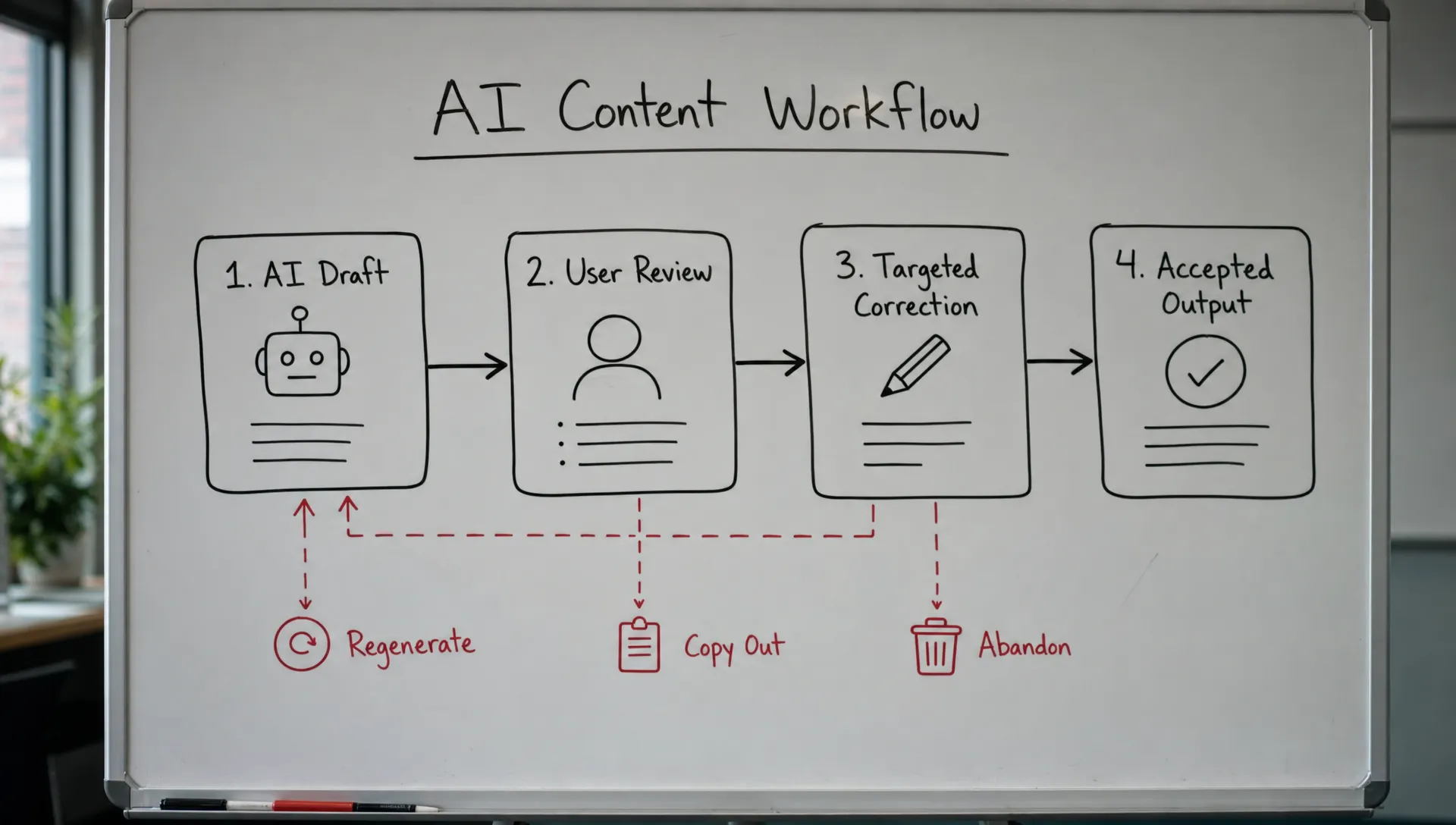
A correction loop is the path between a first AI output and a usable result. In real work, the first answer is rarely the final answer. The user has to inspect it, correct it, preserve the good parts, remove the bad parts, and move it into the workflow.
If that loop is weak, adoption breaks after the demo moment. The feature can look impressive in a launch video and still fail in daily use.
What a healthy correction loop looks like
A working correction loop lets users do four things without starting over: understand what the AI produced, identify what needs to change, make a targeted correction, and trust that the next output will respect the correction.
That is why Grammarly works better when it points to a specific sentence, not just when it says, "Improve this." It is why GitHub Copilot is useful when a developer can accept, reject, or edit a suggestion in context. It is why Perplexity reduces anxiety by making source-checking part of the experience instead of forcing the user to verify everything elsewhere.
The product decision is simple, but hard to execute: do not make users restart the whole task every time the AI misses.
Here are seven signs your AI feature has a correction loop problem.
1. Users regenerate more than they edit
High regeneration is not automatically bad. Some exploration is normal, especially in creative tasks.
The warning sign is high regeneration with low acceptance. Users keep asking for a new version, but they do not move forward. The behavior starts to look like a slot machine: maybe the next output will be better, maybe it will not.
This usually means users can tell the output is wrong, but the product has not given them a precise way to fix it. The only available control is "try again." That is too blunt.
Look at regeneration depth per session. If users generate four or five variants and still abandon, the model may not be the main issue. The loop is not helping them converge.
A better response is to add scoped correction paths. Let users change one section, preserve selected text, rewrite only the intro, adjust tone without changing facts, or apply a constraint to the next version.
2. Users copy the output somewhere else before finishing
Copy-out behavior is easy to misread. A PM may see clipboard events and think, "Great, they used the output."
Maybe. Or maybe they left because your product is not where correction happens.
If users copy an AI draft into Google Docs, Notion, Slack, Linear, or their IDE before the work is complete, ask what they can do there that they cannot do in your product. Usually, the answer is one of these: edit freely, comment, compare versions, involve someone else, or place the output near the real task.
This is a correction loop smell. Your AI produced material, but the user needed another surface to make it usable.
The fix is not always to build a full editor. Sometimes it is a better handoff. Sometimes it is inline editing. Sometimes it is a structured review step before export. The key is to know whether copy-out means completion or escape.
3. Users correct the same issue repeatedly
Watch for repeated instructions like:
"Make it shorter."
"No, shorter."
"Keep the examples but make it shorter."
"Why did you remove the examples?"
This is where users start to feel the AI is not listening. The feature may be technically responsive, but behaviorally forgetful.
Repeated correction usually points to a context persistence problem. The AI is not carrying forward the user's prior correction, or the interface does not show which constraints are currently active.
Users should not have to restate the same preference every turn. If they do, they learn that correction is temporary. That kills confidence.
Make constraints visible. Show what the AI is preserving. If the user says "keep the structure," the next output should make it obvious that the structure was kept. When the system cannot preserve something, say so before generating a surprise.
4. Users ask for full rewrites to make small changes
A user wants the second paragraph tightened. They type, "Rewrite this."
A user wants one bullet made more specific. They regenerate the whole answer.
A user wants the tone changed in one section. They rerun the entire prompt.
That is not user laziness. It means the product has collapsed all correction into one big input box.
Good correction loops support small moves. They let users operate at the level of the actual problem: word, sentence, section, field, citation, code block, recommendation, or next step.
If every correction produces a new full output, users lose the parts they liked. That makes each change risky. Once correction feels risky, users either over-edit manually or abandon the feature.
5. Users verify every output outside the product
Some verification is healthy. Users should check important AI output.
The problem starts when verification becomes the main workflow. If users constantly open search, docs, source systems, or another AI tool to validate your output, your product is forcing them to do unpaid QA.
This often looks like a trust problem, but it is also a correction loop problem. If users cannot inspect why the AI said something, they cannot correct it cleanly.
They do not know whether to fix the prompt, the data, the assumptions, or the final wording. So they verify from scratch.
For factual, analytical, or operational workflows, add inspectability. Show sources, inputs used, assumptions, diffs, confidence caveats, or missing context. Do not invent fake certainty. Give users a way to check the output fast enough that correction stays inside the workflow.
If this pattern is familiar, it is worth comparing it against a broader AI UX trust problem, because trust and correction usually break together.
6. Power users can fix outputs, but normal users cannot
Your internal champion loves the feature. A few expert customers get good results. Everyone else stalls.
That gap often gets explained as "users need better prompts." Sometimes true. But it is also a product failure if the correction loop only works for people who already know how to steer AI.
Power users know how to say:
"Keep the structure, but make the claims more specific."
"Use the same examples, but remove unsupported assumptions."
"Rewrite only the final recommendation for a CFO audience."
Most users do not think in those terms. They think, "This is close, but not right."
A strong product turns that vague dissatisfaction into usable controls. It offers correction options, examples, presets, and contextual prompts based on the output. The user should not need to become a prompt engineer to recover from a mediocre answer.
This is also where AI onboarding strategies matter. Do not onboard users only into the first prompt. Onboard them into how to repair the result.
7. Retention drops after the first useful output
This is the most frustrating version.
Users get value once. They may even say the output was useful. But they do not come back.
That usually means the feature passed the novelty test but failed the habit test. For repeated use, the user is asking a harsher question: "Is this easier than the way I already work?"
If each session requires prompting, reviewing, correcting, verifying, and reformatting, the answer is often no.
AI user retention depends on correction cost. A feature that saves ten minutes on generation but adds twelve minutes of cleanup will not become a habit. It will become something users remember only for edge cases.
To diagnose this, separate first-output satisfaction from completed-workflow satisfaction. A user can like the draft and still hate the process required to make it usable. For a deeper diagnostic frame, look at where users stop in the adoption path rather than treating retention as one number. This is the same principle behind diagnosing AI retention without guessing.
Quick diagnostic table
Use this table to avoid jumping straight to model tuning.
| Signal you see | Likely correction loop break | Better product response |
|---|---|---|
| Many regenerations, few accepts | Users cannot make targeted fixes | Add scoped edits and preserve-good-part controls |
| Copy-out before completion | Real correction happens elsewhere | Improve editing surface or handoff path |
| Same instruction repeated | Corrections are not remembered | Make active constraints visible and persistent |
| Full rewrites for small changes | Controls are too blunt | Support section-level or field-level correction |
| Heavy outside verification | Output is not inspectable | Add sources, assumptions, diffs, or input traceability |
| Only experts succeed | Correction requires prompt skill | Add repair prompts, presets, and guided options |
| One-time value, weak return | Cleanup cost kills habit | Measure completed workflow value, not just generation |
What to measure before you redesign
Do not start by asking whether the output is "good." That question is too broad.
Pull 20 to 30 sessions where a user generated an output but did not complete the target action. Tag the first point where forward motion stopped. Did they regenerate? Copy out? Edit heavily? Verify elsewhere? Delete the output? Leave after viewing?
Then compare those events to acceptance and return behavior. The correction loop is probably the issue if users engage with the output but fail to converge.
That distinction matters. Low first-click usage points to positioning or trigger problems. Low generation quality may point to task framing or context. But high interaction followed by abandonment usually means users are trying to correct the output and failing.
If you want a fast starting point, run the symptom through the free AI product triage tool. It is built for this exact kind of question: which adoption break are we actually looking at?
Frequently Asked Questions
What is a correction loop in an AI product? A correction loop is the process users go through after the first AI output: reviewing it, identifying what is wrong, making changes, and getting to a usable final result.
Is a correction loop problem the same as a model quality problem? Not always. The model may be good enough for the task, but the product may not help users steer, inspect, or repair the output. Fix the experience before assuming the model is the only issue.
Which metric best reveals a correction loop problem? Look for high generation or regeneration paired with low acceptance, low completion, or copy-out before completion. The pattern matters more than any single metric.
How do you fix a broken correction loop? Start by identifying where users lose control. Then add more precise correction paths, such as partial rewrites, visible constraints, inline editing, source inspection, or structured review before export.
The next product decision
A correction loop problem is not solved by telling users to write better prompts. It is solved by deciding where the product should help them recover.
Pick one high-intent workflow. Find the moment after the first output where users stop making progress. Then make one correction action easier, safer, and more visible.
If you want to go deeper, the AI Product Adoption Deck includes diagnostics, action cards, and workshop templates for problems like high regeneration, output abandonment, weak trust, and poor retention. Use it when you need a shared way for product, design, and growth to decide what to fix next.