How to Diagnose the Real AI Problem in Your Product
Diagnose the real AI problem in your product by mapping symptoms to adoption breaks, trust gaps, prompt friction, and workflow fit.

You shipped the AI feature. People tried it. The launch graph looked fine for a week.
Then usage flattened.
Now the team is arguing about the wrong thing. One person says the model needs to be better. Another says users need more education. Someone wants better prompts. Someone else wants to move the AI button into the main nav.
All of those might be true. None of them is a diagnosis.
The real AI problem is rarely visible in a top-level adoption chart. You find it by locating the exact moment where the user stops trusting, stops editing, stops applying, or stops coming back.
If you skip that step, you will optimize the loudest symptom. Not the break.
Start by separating model quality from product adoption
When an AI feature underperforms, teams often collapse every issue into “the model is not good enough.” Sometimes that is correct. If the output is factually wrong, unsafe, off-brand, or unusable for the target task, you have a model or system quality problem.
But many AI adoption failures happen even when the output is decent.
Users generate something, glance at it, then leave. They ask three versions of the same prompt, then copy nothing. They like the demo, but never add the feature to their weekly workflow. They use the output as inspiration, then rebuild it manually somewhere else.
That is not just a model problem. It is a product problem around the model.
A useful first split:
| What you see | Likely category | Core question |
|---|---|---|
| Output is consistently wrong or unusable | Model/system quality | Can the system reliably perform the job? |
| Output is plausible but not used | Trust or verification | Can the user judge whether it is safe to use? |
| Users do not know what to ask | Input framing | Does the product make the right request obvious? |
| Users generate once but do not return | Workflow or habit | Does the output land inside a repeated job? |
| Users copy output into another tool, then rewrite it | Application gap | Is the AI result easy to turn into finished work? |
| Users over-edit every result | Control or fit | Does the product preserve user standards and context? |
This distinction matters because the fixes are different. A better model will not fix a vague entry point. More onboarding will not fix output that cannot be verified. A bigger button will not create habit if the AI sits outside the user’s real workflow.
For a deeper version of this argument, the related piece on why your product is the problem, not AI breaks down common misdiagnoses teams make after launch.
Trace the adoption path, not the feature funnel
Most SaaS funnels are too blunt for AI features.
“Clicked AI button” is not adoption. “Generated output” is not success. Even “gave thumbs up” can be misleading if the user still does not apply the result.
AI products need a behavioral trace. You want to see the user move through the full sequence:
- Notices the AI option at the right moment
- Understands what job it can help with
- Provides enough input without getting stuck
- Waits with the right expectation
- Inspects the output
- Verifies or edits it
- Applies it to real work
- Returns when the same job appears again
The real AI problem is usually hiding between two of those steps.
If users never start, you may have a relevance or timing problem. If they start but abandon the prompt, you may have an input-cost problem. If they generate but do not apply, you may have a trust or workflow problem. If they apply once but never return, you may have a habit problem.
Do not diagnose from averages. Watch sessions. Read prompts. Compare accepted outputs with abandoned ones. Look at what users do immediately after generation. The action after the output is often more revealing than the output itself.
Use symptoms as your diagnostic unit
A symptom is observable user behavior. It is not a team opinion.
“Users do not trust it” is not specific enough. “Users regenerate three times, then paste the output into Google Docs and rewrite it from scratch” is useful. It points to inspection, confidence, and editing friction.
Here is a practical map you can use in a product review:
| Symptom | Likely break | What to inspect | Better response |
|---|---|---|---|
| Low AI entry-point clicks | Poor task timing | Where the AI option appears relative to the job | Move AI into the workflow moment, not just the nav |
| Prompt box opens, then closes | Prompt paralysis | Empty-state copy, examples, required context | Offer structured starts or task-specific inputs |
| Many regenerations, low acceptance | Output mismatch or low confidence | Prompt quality, result variance, user standards | Add constraints, previews, or comparison states |
| Output viewed but not copied or applied | Verification gap | Evidence, citations, source material, risk level | Make checking faster and safer |
| Heavy manual rewriting | Control gap | Editing surface, tone controls, field-level changes | Let users adjust parts, not rerun the whole output |
| Strong first use, weak repeat use | Habit gap | Recurring trigger, saved state, workflow integration | Attach AI to a repeated job and next action |
This is why a symptom-led workflow beats a generic backlog. It keeps the team from jumping from “retention is low” to “let’s add onboarding.” Maybe onboarding is the fix. Maybe the product is asking users to trust an output they cannot check.
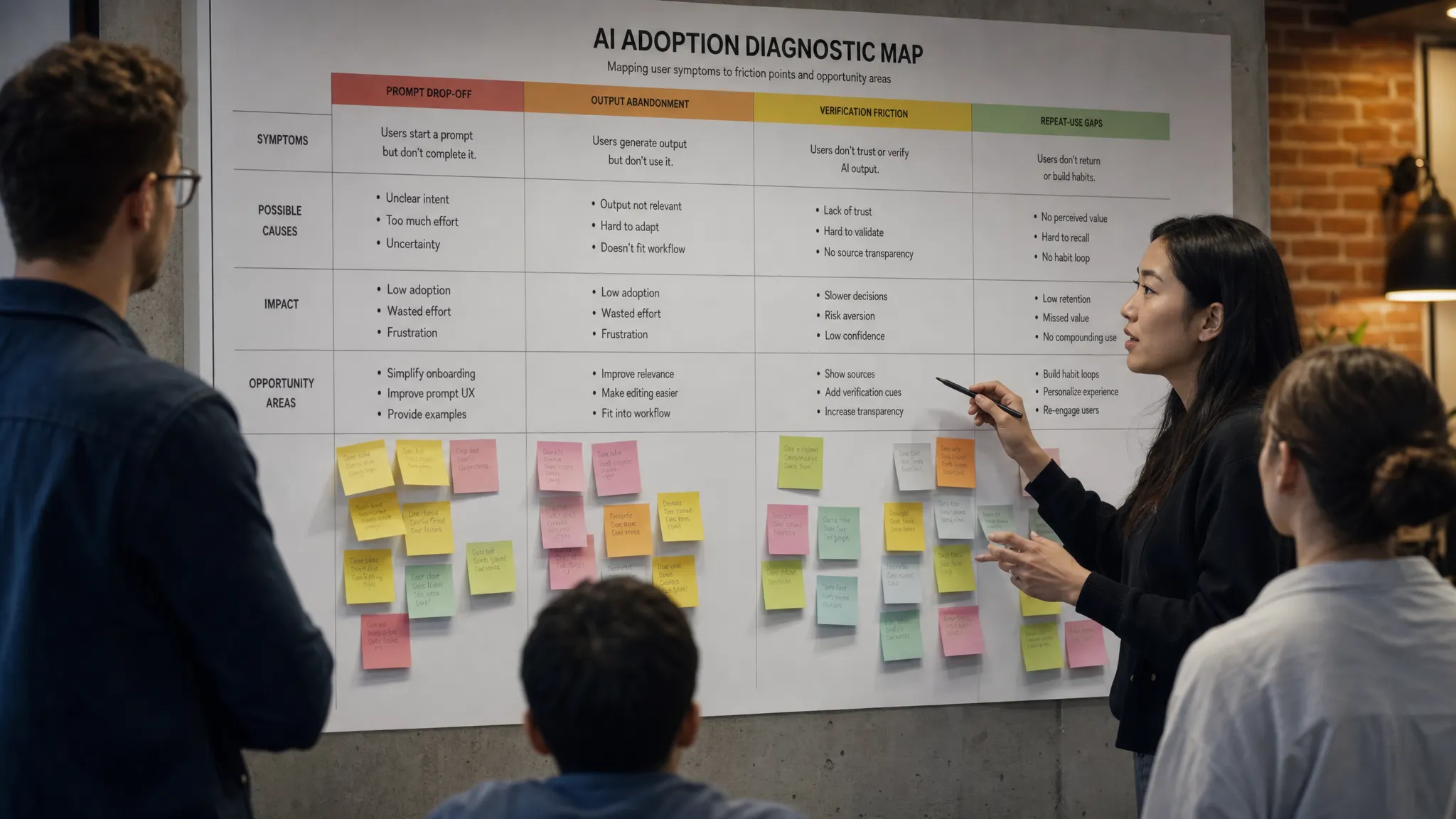
The five diagnostic questions that usually expose the break
You do not need a six-week research project to get a better diagnosis. Start with five questions. Answer them with product data and user evidence, not opinions.
1. Does the user know when to use the AI?
A generic AI button creates ambiguity. Users have to translate “AI can help” into “AI can help with this task, right now.” Many will not do that work.
Look at entry-point behavior. Are users discovering the feature from a top-level button, or from the workflow where the need appears? Are examples tied to real jobs, or are they generic prompts? Are users trying tasks the feature was never designed to handle?
If the entry point is broad, the AI problem may be task framing. The fix is not louder positioning. It is narrower, better-timed invitation.
2. Is the input cost too high?
Prompting is work. Users have to define the job, provide context, set constraints, and predict what the system needs. If they are not already skilled prompt writers, a blank box can feel like being handed an empty spec.
Check prompt abandonment, short prompts, repeated clarifications, and copied prompt templates. These signals suggest users are not avoiding the feature because they dislike AI. They are avoiding unpaid setup work.
Good AI UX reduces input cost. It can prefill context, offer structured choices, use existing product data, or turn a blank prompt into a guided task. The point is not to remove user intent. The point is to stop making users express intent in the least helpful format.
3. Can the user verify the output fast enough?
Trust is not a mood. It is a workflow calculation.
Users ask, “How much effort will it take me to know whether this is safe to use?” If the answer is “almost as much effort as doing it myself,” adoption will stall.
This is common in summarization, research, analysis, sales messaging, legal-adjacent workflows, and anything where errors have social or business cost. The output may read well. That does not mean the user can rely on it.
Look for outside verification, repeated fact-checking, low apply rates, and copy-paste into other tools. If those appear, read how to tell if your AI UX has a trust problem before assuming quality alone is the issue.
4. Can the user control the result without starting over?
Regeneration is a crude control. It asks the user to throw away the whole result because one part is wrong.
That works for low-stakes ideation. It fails when users are trying to finish real work.
If users like 70 percent of an output, they need ways to keep that 70 percent and fix the rest. Field-level edits, tone adjustments, source toggles, constraints, undo, and partial regeneration can matter more than another model upgrade.
Watch for users regenerating multiple times, then manually editing anyway. That often means the product gives them randomness when they need control.
5. Does the output land where work continues?
An AI result is not valuable until it becomes part of the user’s workflow.
If your feature produces a draft that must be copied, reformatted, checked, moved, approved, and re-entered elsewhere, the adoption problem may be downstream of generation. The AI did its part. The product failed to carry the result into the next step.
GitHub Copilot works partly because suggestions appear where code is already being written. Grammarly works partly because edits sit inside the writing surface. Perplexity reduces some research friction by pairing answers with sources users can inspect. These products are not just “AI features.” They are AI placed inside a continuation path.
Ask where your output goes next. If the answer is “the user figures that out,” you have found a likely break.
Be careful with the metrics that look decisive
AI feature metrics can lie by omission.
High generation volume can mean value, or confusion. Regeneration can mean engagement, or dissatisfaction. Time spent can mean deep work, or struggle. Thumbs up can mean “interesting,” not “used.”
Use metrics in pairs:
| Metric | Pair it with | Why |
|---|---|---|
| Feature clicks | Prompt completion | Separates curiosity from intent |
| Generations | Apply rate | Separates production from adoption |
| Regenerations | Final acceptance | Separates exploration from failure |
| Time in feature | Downstream completion | Separates engagement from friction |
| Repeat usage | Trigger frequency | Separates habit from rare need |
The key metric is often not “used AI.” It is “completed the job with AI and came back when the job returned.”
A simple decision frame for your next product review
In your next review, do not ask, “How do we improve the AI?”
Ask this instead: “Where does the user stop moving from AI output to completed work?”
Then classify the break:
| Break type | Product question | Example fix direction |
|---|---|---|
| Relevance | Does the user see the right AI option at the right moment? | Contextual entry points |
| Input | Can the user start without writing a mini-spec? | Guided inputs, prefilled context |
| Quality | Is the result good enough for the job? | Better constraints, retrieval, evaluation |
| Trust | Can the user check the result quickly? | Sources, evidence, confidence cues |
| Control | Can the user shape the output safely? | Partial edits, undo, adjustable constraints |
| Application | Can the user turn output into finished work? | Insert, export, approve, assign, send |
| Habit | Does the feature attach to a repeated trigger? | Saved workflows, reminders, recurring jobs |
Pick one break. Fix that. Then measure the next behavior in the chain.
If prompt completion improves but apply rate does not, you moved the bottleneck forward. Good. Now diagnose the next break. AI adoption usually improves as a sequence of bottleneck removals, not one grand redesign.
Frequently Asked Questions
What is the most common AI problem in shipped products? The most common problem is not always output quality. Many shipped AI features fail because users cannot tell when to use them, how to prompt them, whether to trust the output, or how to apply the result inside their workflow.
How do I know if my AI problem is really a model problem? Look for consistent output failure across well-formed inputs and clear use cases. If strong users provide good context and still get unusable results, model or system quality is likely involved. If decent outputs are still abandoned, look at trust, control, and workflow fit.
What metric best shows AI product adoption? Apply rate is often more useful than generation count. The strongest signal is whether users complete a real job with the AI output and return when that job happens again.
Should we fix onboarding first? Only if the symptom points to onboarding. If users understand the feature but abandon outputs, onboarding will not solve the core issue. Diagnose the break before choosing the intervention.
Go deeper if you need a sharper diagnosis
If your team is stuck debating the same AI problem every week, run the symptom through a structured triage instead of guessing. The free AI adoption triage tool is built for that first pass.
If you want the fuller operating system, the AI Product Adoption Deck turns these patterns into diagnostics, action cards, and workshops your team can use to decide what to fix next.