GitHub Copilot Retention Problems Start After Acceptance
GitHub Copilot retention problems often appear after acceptance. Learn how to diagnose post-acceptance trust, verification, and habit gaps.

Your Copilot-style feature can show healthy acceptance and still fail to become a habit.
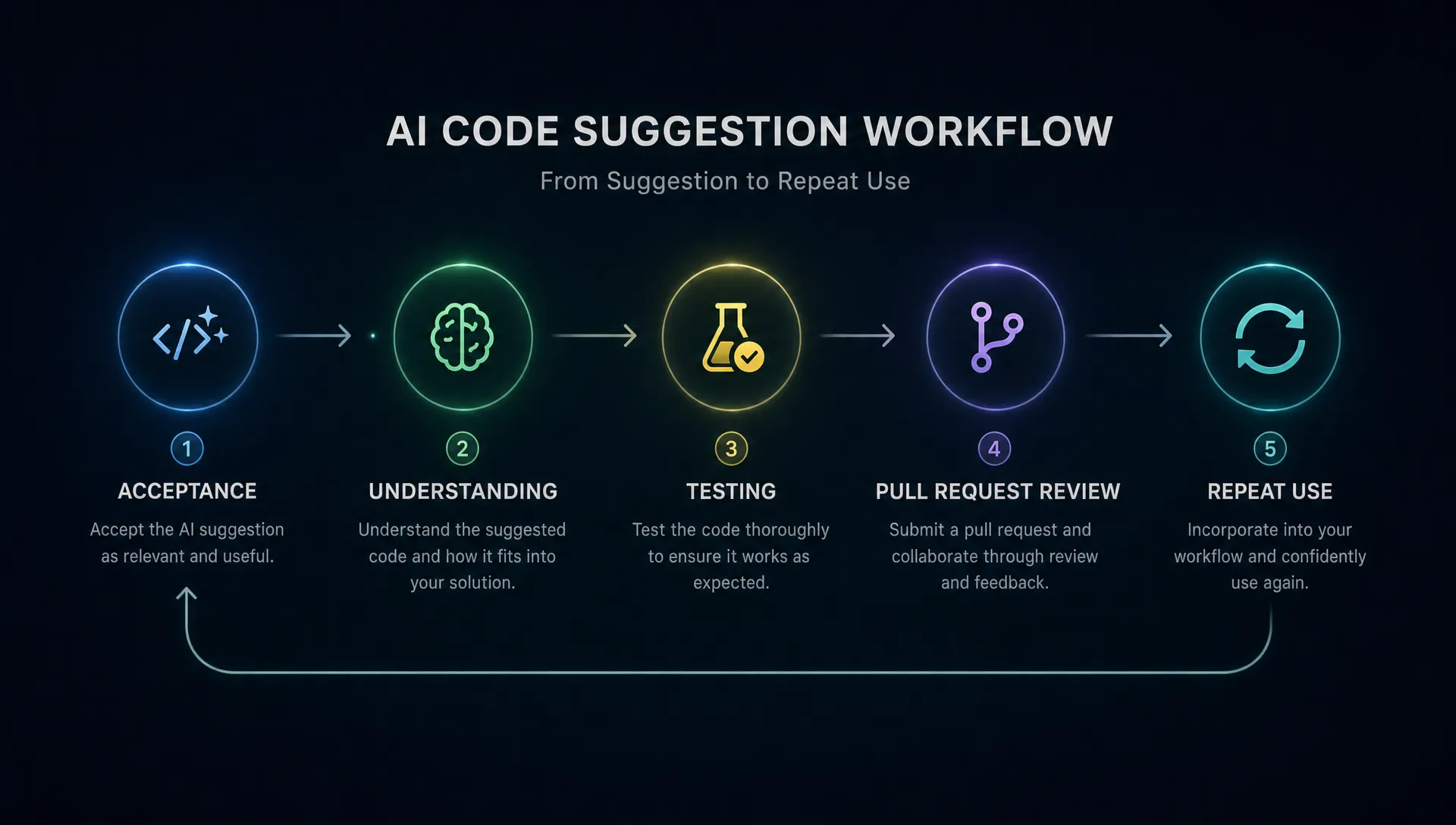
A developer accepts a suggestion. The line lands in the editor. Your dashboard records a win. But the real adoption test starts after that moment, when the developer has to read it, adapt it, test it, explain it in review, and trust it enough to ask again next time.
That is where many GitHub Copilot retention problems start. Not because the product cannot generate useful code. Because acceptance is not the end of the workflow. It is the point where ownership transfers from the model to the user.
This is not a claim about GitHub's private retention data. It is a product diagnostic using GitHub Copilot as the clearest public pattern. If you are building an AI coding assistant, support copilot, writing assistant, analytics assistant, or any AI feature where users accept output into their work, this break matters.
Acceptance is a weak signal if the user still pays the downstream cost
Acceptance feels like a strong metric because it is concrete. A suggestion appeared. The user accepted it. That is better than ignoring it.
But acceptance often measures short-term convenience, not durable trust. It can mean the suggestion was useful. It can also mean the user wanted a starting point, planned to rewrite it, or accepted it reflexively because fixing generated code was faster than typing from scratch.
For coding assistants, the accepted output still has to survive several checks:
- Does the developer understand what the code does?
- Does it fit the surrounding architecture?
- Does it pass tests?
- Will it hold up in review?
- Would the developer use the assistant again for this kind of task?
Only the last question is retention.
GitHub's own responsible use guidance for Copilot tells developers to review and test generated code, which is the right expectation. But that also exposes the product problem. If review and testing feel too expensive after every accepted suggestion, acceptance turns into labor. The user may keep using the feature for low-risk boilerplate, then avoid it for work that matters.
That is not failed activation. It is failed post-acceptance confidence.
The post-acceptance gap has four common causes
When a Copilot-like feature stalls after initial use, teams often reach for model quality. Sometimes that is right. Often it is too broad.
A better diagnosis is to ask what happens after the user accepts the output. The failure usually sits in one of four places.
1. The user accepts faster than they can understand
Code suggestions can be quick enough to outrun comprehension. The developer sees something plausible, accepts it, then later has to reconstruct the reasoning.
That creates an ownership tax. The user is now responsible for code they did not fully author. If the suggestion is simple, the tax is small. If it touches business logic, security, data access, or error handling, the tax gets large fast.
This is the same pattern seen in many AI products. The output arrives before the user has a way to judge it. If you want a deeper breakdown of that specific adoption break, the analysis of why AI copilots stall when users cannot verify fast maps closely to this moment.
2. The suggestion fits the local context but not the real workflow
A code completion can be correct in the editor and still wrong for the product. It may match the current file but miss a team convention, hidden dependency, test strategy, naming pattern, permissions model, or migration constraint.
The user does not always discover this at acceptance. They discover it later, during test failure, review comments, or integration work. That delayed mismatch is dangerous because the user remembers the assistant as unreliable, even if the initial suggestion looked good.
3. The user cannot recover cleanly from a bad suggestion
Bad AI output is not fatal if recovery is cheap. It becomes a retention problem when recovery is unclear.
In a coding flow, recovery includes undoing the suggestion, comparing alternatives, seeing what changed, asking for a narrower revision, or moving from completion to explanation. If the product makes the user clean up manually, they learn a simple habit: only use the assistant when mistakes are cheap.
That caps retention. The product becomes a nice autocomplete layer, not a trusted work partner.
4. The team environment punishes unverified AI work
Developers do not work alone. Even when AI output helps the individual, it still enters a social system: pull requests, senior review, incident history, coding standards, compliance concerns, and team norms.
If accepted suggestions create more review friction, the user will adapt. They may stop using the assistant for code that teammates will inspect closely. They may use it privately for exploration, then rewrite before committing. Your product still gets usage, but not the kind that compounds into habit.
Here is the diagnostic pattern in product terms:
| Symptom after acceptance | What it usually means | What to inspect | Product response |
|---|---|---|---|
| High acceptance, high deletion or rewrite | Suggestions are useful starts, not trusted finishes | Edit distance, deletion rate, time-to-rewrite | Add clearer intent controls and easier refinement |
| Accepted code often fails tests | Local plausibility is beating system fit | Test outcomes after accepted suggestions | Bring tests, constraints, or project rules closer to generation |
| Users accept for boilerplate only | Trust is limited to low-risk work | Task type by acceptance and repeat use | Segment use cases by risk and add verification support for higher-risk tasks |
| PR review comments increase around generated code | Team trust is breaking after individual use | Review comments, requested changes, reviewer language | Add explainability, diff clarity, and conventions surfaced before commit |
| Users do not return after a first successful session | The feature helped once but did not attach to a recurring job | Cohort return by task completed | Build triggers around repeated work, not generic availability |
The metric shift: measure survived acceptance, not raw acceptance
If acceptance is your main success metric, you are optimizing the first handoff. That is useful, but incomplete.
For AI product adoption, the better question is whether the accepted output survived the user's real workflow. This applies to GitHub Copilot-style code completion, but also to AI-generated support replies, sales emails, data summaries, designs, and product specs.
A stronger retention dashboard separates the acceptance event from downstream survival.
Look at metrics like:
- Accepted output still present after a meaningful time window
- Percentage of accepted output rewritten heavily before use
- Test pass rate or validation pass rate after acceptance
- Time from acceptance to confident completion
- User return rate for the same job type
- Manual verification steps after acceptance
- Review comments or rejections tied to accepted output
The exact metric depends on the product. The principle is stable: do not treat insertion as impact.
For code, a suggestion that is accepted, heavily rewritten, causes a test failure, and leads to reviewer pushback should not count the same as a suggestion that survives into a merged pull request. Both started with acceptance. Only one built trust.
This is where many AI adoption metrics get too shallow. They capture whether the user touched the AI, not whether the AI made the user more likely to trust it next time.
If you are not sure where your retention break sits, a behavior-based diagnosis is better than another dashboard debate. The framework in diagnosing AI retention without guessing is useful when your team is arguing from anecdotes instead of workflow evidence.
What product teams should change after this diagnosis
The fix is not simply better prompts. Better prompts may improve output quality, but they do not remove the post-acceptance burden by themselves.
You need product decisions that reduce the cost of owning AI output.
First, make intent more explicit before generation. Many bad suggestions come from under-specified intent. In coding tools, this can mean tighter controls around framework, style, error handling, test expectations, or whether the user wants a minimal patch versus a broader refactor. In non-code products, it may mean audience, tone, source constraints, approval state, or risk level.
Second, make uncertainty visible at the point of use. Users do not need fake confidence. They need to know what to check. A useful assistant can expose assumptions, edge cases, missing context, or likely validation steps. This turns verification from an open-ended burden into a focused checklist.
Third, design the recovery loop. When output is wrong, the next action should be obvious. Can the user narrow the request? Compare variants? Ask why? Revert cleanly? Apply a smaller patch? Keep the good part and reject the risky part? Recovery is part of retention because every AI product makes mistakes.
Fourth, connect the AI output to the system of record. For Copilot-style products, that may mean tests, diffs, conventions, repository context, or PR review. For other AI tools, it may mean CRM fields, help desk macros, analytics definitions, approval workflows, or brand rules. The closer the assistant is to the real workflow constraints, the less the user has to act as middleware.
Finally, measure repeat use by job type. A user returning to generate boilerplate is not the same as a user returning to solve a production issue, write a migration, or draft a customer-facing answer. Retention gets clearer when you track the recurring jobs where the assistant earns trust.
The decision frame: what happens in the 20 minutes after acceptance?
If you only review the moment of acceptance, you will overestimate adoption.
Instead, run a simple product review around the next 20 minutes of work. Pick five accepted outputs. Watch what users do with them. Do they read carefully? Rewrite immediately? Run tests? Ask a teammate? Paste into another tool? Abandon the task? Come back to the assistant for the next step?
That review will tell you more than another aggregate acceptance chart.
The blunt version: if users accept output but do not want to be accountable for it, you do not have durable adoption. You have temporary acceleration with hidden cleanup.
The product work is to close that gap.
Frequently Asked Questions
Is acceptance rate useless for AI coding assistants? No. Acceptance rate is useful as an activation and relevance signal. It becomes misleading when teams treat it as proof of retention, trust, or workflow impact.
What is a better metric than accepted suggestions? Use downstream survival metrics. For code, that can include accepted code still present after editing, test pass rate, time to merge, review friction, and repeat use for the same task type.
Does this problem only apply to GitHub Copilot? No. GitHub Copilot is a useful example because code acceptance is easy to observe. The same pattern appears whenever users accept AI output into work they later have to defend, verify, or revise.
Should product teams focus on better models or better UX? Both can matter, but do not default to model quality. If users accept output and then struggle to verify, recover, or integrate it, the adoption problem is in the product experience around the model.
How do I diagnose this in my own AI product? Start by separating pre-acceptance, acceptance, and post-acceptance behavior. If the drop happens after users take the output, inspect verification cost, rewrite behavior, workflow fit, and whether users return for the same job.
If this pattern sounds familiar, do not start by rewriting every prompt. Start by locating the break.
The free AI adoption triage tool can help you map the symptom to the likely adoption failure. If you want a deeper working system, the AI Product Adoption Deck includes diagnostics, action cards, and workshop templates for turning these post-acceptance problems into concrete product decisions.