Why AI Copilots Stall When Users Cannot Verify Fast
AI copilots stall when users cannot verify fast. Learn the adoption symptoms, root causes, and UX fixes that turn output into use.

The usage chart looks fine in week one. People click the copilot. They generate drafts. They even say the output is pretty good.
Then the curve flattens.
Not because the model is useless. Not because users hate AI. The stall happens later, after generation, when the user has to decide whether the output is safe to use.
You hear it in interviews:
“I still need to check everything.”
That sentence is the adoption problem.
AI copilots do not fail only when they produce bad output. They fail when they make verification slower than the work they were meant to save. If the user cannot check the answer fast, the copilot becomes another inbox. It creates material to review, not work to ship.
The real metric is time to verified use
Most teams measure the wrong moment. They track prompts submitted, generations completed, or thumbs-up ratings. Those are useful, but they stop before the adoption decision.
The better question is: how long does it take a user to move from AI output to confident action?
Call it time to verified use.
For a writing copilot, that might mean the time between draft generation and sending the message. For a coding copilot, it is the time between suggestion and merged code. For an analytics copilot, it is the time between answer and a decision someone is willing to defend.
AI user retention depends on that gap. If users save five minutes generating an answer but spend fifteen minutes checking it, they learn the wrong lesson. The product is not helping. It is shifting effort into review.
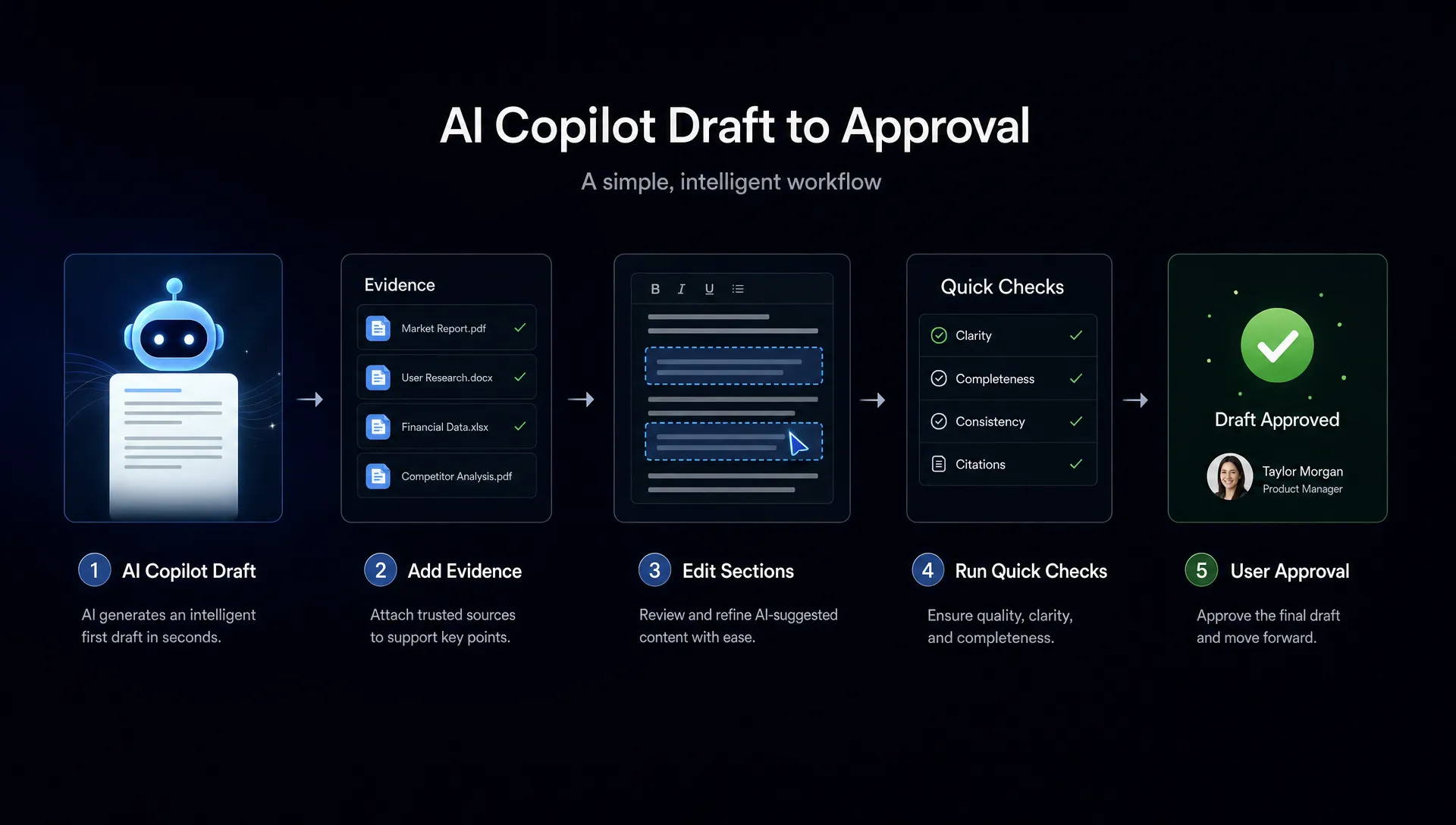
Fast verification usually has four ingredients:
- The user can see where the output came from.
- The user can inspect what changed.
- The user can test or preview the result cheaply.
- The user can recover quickly if the output is wrong.
When one of those is missing, trust becomes a tax.
What the stall looks like in product data
A verification problem often hides inside decent activation metrics. Users try the copilot. They generate outputs. They may even return a few times. But the output does not become a habit because the last mile feels unsafe.
Look for these patterns before you blame awareness, onboarding, or model quality.
| Symptom | Likely diagnosis | Product response |
|---|---|---|
| High generation, low apply or accept rate | Output is interesting but not safe enough to use | Add preview, diff, citations, or partial acceptance |
| Many regenerations with small prompt changes | User is searching for confidence, not variety | Show scope, assumptions, and uncertainty earlier |
| Users copy output into another tool before using it | Verification happens outside your product | Bring the check step into the workflow |
| Users accept only low-risk suggestions | The copilot is useful but not trusted for consequential work | Segment use cases by risk and add stronger review surfaces |
| Strong trial usage, weak week-four retention | Novelty is carrying usage, not repeat value | Measure verified outcomes, not just prompt volume |
This is why AI adoption metrics need to include post-generation behavior. A copilot can look active while still being ignored at the moment that matters.
Why copilots create unbounded review work
Traditional software usually exposes its state. A spreadsheet shows the formula. A checkout page shows the item, price, shipping, and return policy. A marketplace like Sandhai makes buying easier because the shopper can compare concrete product details before committing.
AI copilots often skip that clarity. They produce a finished-looking answer, but the user has to reverse-engineer whether it is right.
That creates unbounded review work.
The user does not know which parts are grounded, guessed, stale, incomplete, or outside policy. So they check everything. They open other tabs. They ask a colleague. They rewrite from scratch because editing the AI output feels riskier than starting over.
This is especially common in three workflows.
Code suggestions
GitHub Copilot and Cursor work well when the user can run tests, inspect diffs, and understand the surrounding code. They stall when suggestions cross boundaries the user cannot quickly validate, such as security behavior, data handling, or unfamiliar parts of the codebase.
The product issue is not just whether the code compiles. It is whether the developer can understand the blast radius fast.
Knowledge answers
Perplexity-style products are easier to trust when sources are visible and scannable. Internal knowledge copilots often fail here. They answer from a pile of docs, but do not show which doc mattered, how recent it was, or whether there were conflicting sources.
The user now has to audit the answer and the retrieval path.
Drafting and editing
Notion AI, Grammarly, and similar writing tools work best when the user can compare before and after, accept small changes, and preserve voice. They struggle when the copilot rewrites too much at once.
A full rewrite may look impressive, but it increases review cost. A smaller, inspectable change often gets adopted faster.
The fix is not “make users trust AI more”
That framing is too vague. Trust is not a feeling you add with nicer copy. It is the result of repeated, low-friction verification.
If users cannot check the output, reassurance copy will not help much. “AI can make mistakes” is honest, but it often pushes all the work back to the user. “Here is what changed, why, and how to undo it” is more useful.
The better product question is: what is the smallest review surface that lets the user move forward?
| Design choice | What it helps users verify | Example use |
|---|---|---|
| Source snippets | Whether the answer is grounded | Knowledge answers, research copilots, support replies |
| Inline diffs | What changed and what stayed intact | Writing, code, configuration changes |
| Scope labels | What the copilot did not consider | Legal, analytics, finance, compliance workflows |
| Partial accept | Whether useful parts can be kept without accepting all risk | Email drafts, generated code, data cleanup |
| Preview and rollback | Whether applying the output is reversible | Automations, CRM updates, bulk edits |
For deeper pattern work, the useful framing is to design AI products users can verify before they apply. That sequence matters. Verification after damage is support. Verification before action is product design.
Onboarding cannot compensate for slow verification
Many teams respond to stalled copilot adoption by improving AI onboarding strategies. They add prompt examples. They explain what the feature can do. They run enablement sessions.
That can help if users do not understand the job of the copilot. It will not fix a verification bottleneck.
If the first session teaches users that every answer requires a manual audit, the onboarding has taught them to avoid the feature. The product has created a memory: this thing looks helpful, then gives me more work.
Good AI onboarding should not only explain how to prompt. It should teach the verification contract:
- What the copilot is allowed to change.
- What evidence it will show.
- What the user must still decide.
- What happens if the user rejects or edits the output.
That contract reduces ambiguity. It also helps teams avoid over-promising. The goal is not to make the copilot seem capable of everything. The goal is to make the next safe action obvious.
Diagnose the stall before you redesign
Before changing the model, rewriting the prompt library, or adding more templates, isolate where verification breaks.
Start with one high-value copilot flow. Watch five users move from prompt to applied output. Do not stop the session when the output appears. That is where the real test begins.
Ask:
What does the user check first? Their first check tells you what they are most afraid of. Accuracy, tone, policy, source, formatting, side effects, or reversibility.
Where do they leave the product? If they open Google, Slack, docs, logs, or another internal system, your product is missing part of the verification path.
What do they edit manually? Repeated edits show where the copilot is violating the user’s standard. The edit history is often better feedback than a rating widget.
What would make them apply the output immediately? Do not ask whether they trust AI in general. Ask what evidence, preview, or control would let them act now.
If you are not sure whether this is a verification issue or a broader trust issue, use a trust diagnostic. The patterns in how to tell if your AI UX has a trust problem map well to this kind of stall.
The practical decision frame
When an AI copilot stalls, do not start with “How do we improve the answer?” Start with “How does the user know this answer is safe enough?”
Then choose one of three moves.
First, reduce the size of the output. Smaller outputs are easier to verify. A sentence-level rewrite may beat a full-page rewrite. A suggested code block may beat a generated pull request.
Second, expose the reasoning surface, not hidden chain-of-thought. Users do not need a model diary. They need sources, assumptions, constraints, affected fields, tests, and changes.
Third, make application reversible. Preview, undo, draft mode, and staged apply all reduce the cost of being wrong. Reversibility turns verification from a high-stakes judgment into a manageable check.
This is where AI product management differs from normal feature optimization. You are not only reducing clicks. You are reducing the cognitive cost of responsibility.
Frequently Asked Questions
Why do users abandon AI copilots even when the output is good? Good output is not enough if users cannot verify it quickly. If checking the output takes longer than doing the task manually, users will stop treating the copilot as a shortcut.
What is the best AI adoption metric for this problem? Track applied or accepted output, not just generated output. Better yet, measure the time from generation to verified use and segment it by workflow risk.
Should we add more explanations to make users trust the copilot? Add explanations only if they help the user act. Sources, diffs, previews, and rollback controls usually matter more than generic reassurance copy.
Is this a model quality problem or a UX problem? It can be both, but many stalls are UX problems. If users say the answer is decent but still check everything manually, the verification surface is probably the bottleneck.
A concrete next step
Pick the copilot flow with the biggest gap between generation and applied output. Run a short review audit. Watch where users slow down, what they verify outside the product, and what would let them apply the result with less effort.
If you want a structured way to do that, run the free AI adoption triage tool. If the issue is broader than one flow, the AI Product Adoption Deck gives product teams a shared diagnostic framework for turning symptoms like this into concrete UX decisions, experiments, and workshop outputs.