AI UX Review Checklist for High-Risk Product Flows
Use this AI UX review checklist to assess high-risk product flows, spot trust gaps, reduce review burden and ship safer AI features.

The warning sign is usually not a dramatic incident. It is quieter.
A user generates an AI output, hesitates, copies it into another tool, asks a teammate to check it, edits half of it, then decides not to use it. Or they accept it too quickly in a flow where a bad answer creates real downstream risk.
Both are AI UX problems.
High-risk product flows need a different review standard than low-stakes generation. A clever empty state or faster prompt path is not enough when the user is approving a contract clause, changing an account setting, sending a medical note, making a hiring recommendation, bulk-updating customer data or publishing something under their company name.
An AI UX review checklist should answer one blunt question: can a competent user safely decide what to do with this AI output inside the flow you designed?
If the answer is no, the product may still demo well. It just will not be trusted, retained or safely adopted.
What counts as a high-risk AI product flow?
A high-risk flow is not defined only by regulated industries. It is defined by consequence, reversibility and review burden.
If a user can undo the result in seconds, the risk is lower. If the AI output affects money, permissions, compliance, reputation, customer communication or another person’s opportunity, the bar goes up.
| Flow type | Example | Why AI changes the UX risk |
|---|---|---|
| External communication | AI drafts a response to a customer, patient, prospect or legal counterparty | The user may not catch tone, factual or policy issues before sending |
| Business decision support | AI recommends approval, prioritization, scoring or next best action | Users may overtrust the recommendation or reject it because the rationale is unclear |
| Data mutation | AI updates records, tags accounts, edits permissions or applies bulk changes | Errors can spread across many objects before anyone notices |
| Regulated work | AI assists with legal, financial, health, HR or compliance tasks | The user needs traceability, review and accountable judgment |
| Public output | AI writes content, listings, documentation or release notes | Brand, accuracy and liability risks sit outside the generation interface |
| Internal handoff | AI summarizes meetings, support tickets, incidents or research | Missing context can mislead the next person in the workflow |
NIST’s AI Risk Management Framework is useful here because it treats risk as socio-technical, not just technical. For product teams, that means the interface, workflow and user decision path are part of the risk surface.
The AI UX review checklist
Use this checklist on one flow at a time. Not on the whole product. Pick the exact moment where AI output enters a decision, approval, action or handoff.
1. Is the user’s job clear before AI enters the flow?
AI often breaks high-risk flows because the product asks the user to collaborate before the task is framed.
A vague prompt box in a risky workflow is not flexibility. It is ambiguity shifted onto the user. If the user has to decide what to ask, what context to include, what constraints matter and how to judge the answer, the product has not reduced work. It has hidden it.
Review questions:
| Check | Pass condition | Failure signal |
|---|---|---|
| Task framing | The UI states what the AI is helping with and what decision remains with the user | Users ask broad prompts, abandon after first output or use external examples |
| Input constraints | Required context is captured through fields, selections or connected objects | Users paste messy context and get inconsistent results |
| Scope boundary | The product says what the AI will not do | Users expect end-to-end automation when the flow only supports drafting or analysis |
| Success criteria | The user knows what a good output should satisfy | Review becomes subjective, slow or politically escalated |
A strong high-risk flow narrows the task before generation. It does not wait for the user to discover the task through trial and error.
2. Can the user verify the output without leaving the flow?
Verification is where many AI features lose adoption. The user does not necessarily think the AI is bad. They think checking it takes too long.
That creates two failure modes. Careful users abandon the feature because it adds work. Rushed users accept outputs they have not really inspected.
For high-risk flows, verification should be designed as a first-class interaction. The user needs to see why the output was produced, what sources or inputs shaped it and which parts deserve attention.
This is also where confidence signals matter. A vague “high confidence” badge is rarely enough. Confidence needs to help the user decide what to inspect, not decorate the output. If you are wrestling with that design problem, the deeper guide on what AI confidence should look like in product UX covers practical patterns for scope, uncertainty and decision support.
For your review, check whether the flow supports these actions:
- Compare the AI output to the source material without opening a second tool
- See which claims, fields or recommendations are grounded in which inputs
- Identify missing context, low-certainty sections or assumptions
- Inspect changes before applying them
- Reject, edit or route the output without restarting the flow
If verification requires tab switching, copying into another app or asking a teammate in Slack, your UX is outsourcing the risk control.
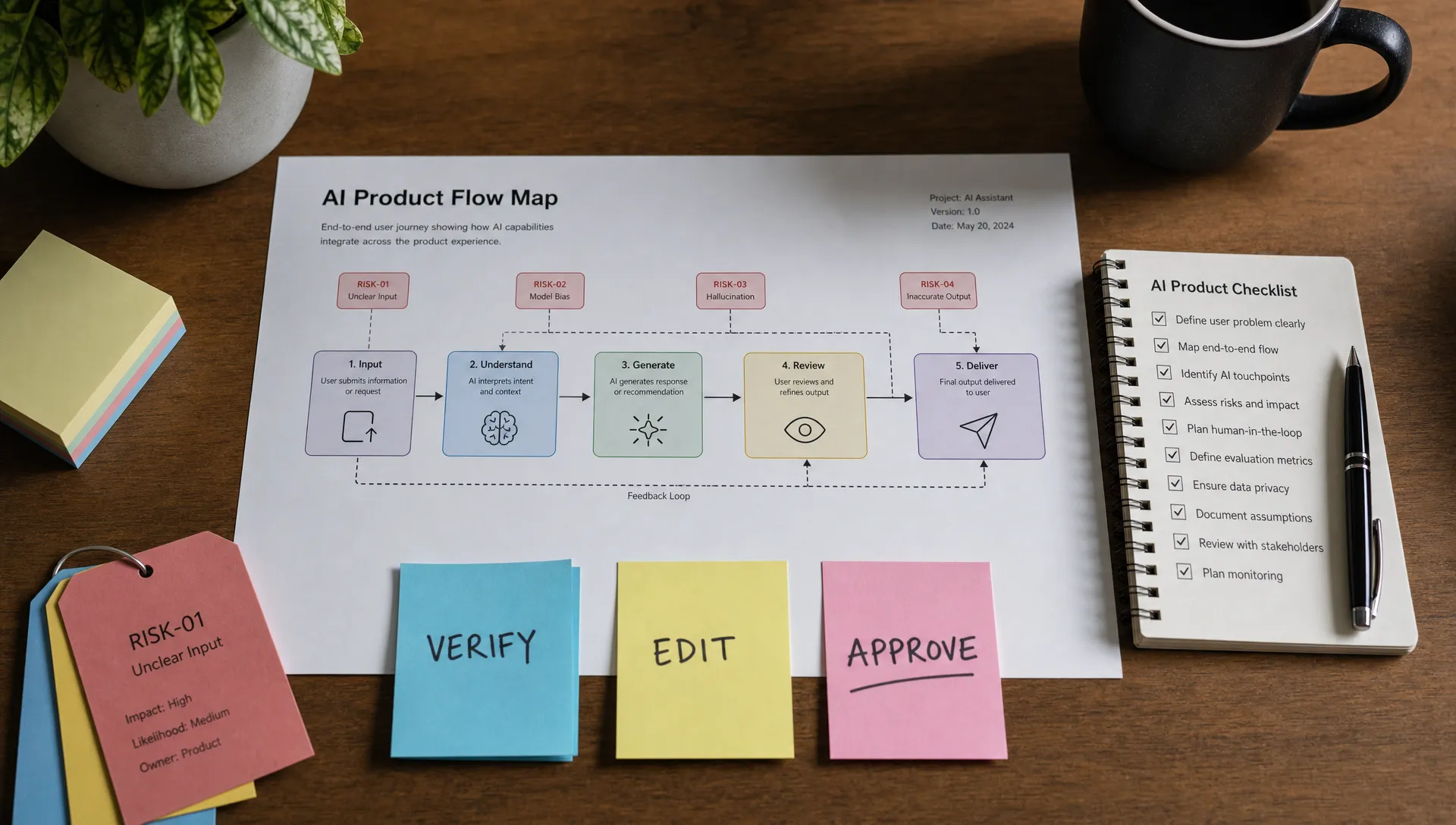
3. Does the flow separate generation from approval?
In low-risk flows, “generate and insert” can be fine. In high-risk flows, it is often the wrong default.
The core UX question is whether the AI output becomes real before the user has made a meaningful decision. If a draft email is inserted into a composer, the user can still review it. If an AI agent updates 400 records after a single vague confirmation, the review step is too thin.
Look for accidental coupling between generation and action:
| Pattern | Risk | Better design response |
|---|---|---|
| One-click generate and send | User may treat output as finished | Generate as draft, then require review before send |
| Bulk apply without preview | Errors scale fast | Show sampled changes, exceptions and rollback options |
| AI recommendation placed as default | User may accept without thinking | Require explicit selection and show rationale |
| Auto-filled critical fields | Bad data becomes system of record | Flag AI-filled fields and require confirmation |
| Hidden prompt or hidden source context | User cannot judge input quality | Expose relevant inputs and constraints in plain language |
This is not about adding friction everywhere. It is about putting friction at the point where judgment matters.
4. Can the user correct the AI in the shape of the workflow?
Many AI products treat correction as a prompt problem. “Try asking again” is not enough in a high-risk flow.
If the output is almost right, the user should be able to repair it directly. That might mean editing a clause, changing a field, removing a source, adjusting tone, marking a recommendation as wrong or sending it to a reviewer.
The correction path should match the object being worked on. A contract assistant needs clause-level editing. A support assistant needs reply, policy and customer-context controls. A data cleanup assistant needs field-level overrides and batch exception handling.
When correction only happens through regeneration, users lose control. They also lose patience. Repeated regeneration is one of the most common signs that the system is forcing users to negotiate with the model instead of giving them product controls.
If your analytics show high regenerate rates, low accept rates or heavy manual rewrites, you may be looking at a trust and control issue, not a model quality issue. The guide on how to tell if your AI UX has a trust problem breaks down those signals in more detail.
5. Is accountability visible at the moment of action?
High-risk AI UX should never make responsibility feel fuzzy.
Users need to know what the AI did, what they approved and what the system will record. This is especially important in team products, where one person generates, another reviews and a third sees the result later.
Review these accountability points:
| Check | What to look for |
|---|---|
| Ownership | The UI makes clear whether the final action is attributed to the user, the system or both |
| Audit trail | The product records AI involvement, user edits, approvals and final changes where appropriate |
| Review status | Other users can tell whether an output is draft, reviewed, approved or applied |
| Escalation | The user can route uncertain outputs to a human reviewer without leaving the workflow |
| Rollback | The product supports undo, restore or exception handling when an AI-assisted action goes wrong |
A high-risk flow does not need to scare the user. It needs to make responsibility legible.
6. Does the flow reduce review burden or just move it?
This is the adoption test most teams skip.
A feature can be technically useful and still fail because the total review burden goes up. The AI creates more output than the user can inspect. The team then adds approvals, QA steps and policy checks around the feature. Usage drops because the promised time savings vanish.
Before shipping or expanding a high-risk AI flow, compare the old workflow to the new one:
| Review dimension | Old workflow | AI-assisted workflow | Risk question |
|---|---|---|---|
| Time to first draft | Manual creation | Usually faster | Did speed create more items to review? |
| Time to verify | User knew their own reasoning | User must inspect AI reasoning | Is verification faster or slower? |
| Error detection | Errors were familiar | Errors may be fluent and subtle | Can users spot failure modes quickly? |
| Approval path | Existing reviewer model | May need new review rules | Who owns final judgment? |
| Recovery | Manual undo or edit | May affect generated artifacts or records | Can mistakes be reversed cleanly? |
If the AI saves five minutes of drafting but adds eight minutes of checking, users will feel the loss even if your activation chart looks good for a week. For more on this failure mode, see the article on working with AI without raising review burden.
A simple scoring model for the review
You do not need a giant governance process for every release. You need a clear way to decide what level of UX review the flow deserves.
Score the flow from 1 to 3 on each dimension:
| Dimension | 1 point | 2 points | 3 points |
|---|---|---|---|
| Consequence | Low personal or business impact | Meaningful workflow impact | Legal, financial, safety, reputation or access impact |
| Reversibility | Easy undo | Partial undo or cleanup required | Hard to undo, spreads downstream or affects others |
| User expertise | User can easily judge output | User needs domain context | User may not know enough to verify |
| Scale | One object or message | Small batch or team-level effect | Bulk action, automation or many recipients |
| Ambiguity | Clear right answer | Some judgment needed | Many acceptable answers with hidden risks |
A total score of 5 to 7 can usually ship with normal review patterns. A score of 8 to 11 needs explicit verification, editing and approval design. A score of 12 to 15 should not ship until the team has reviewed failure modes, auditability, escalation and rollback.
This score is not a compliance label. It is a product decision aid. Its value is forcing the team to stop treating all AI flows the same.
How to run the review in one product session
Keep the session small. Bring the PM, designer, engineering lead, domain expert and someone close to support, success or sales. Use a real user flow, not a hypothetical one.
Start at the moment before the AI appears. Walk through what the user knows, what the AI receives, what comes back, how the user checks it and what happens after approval. Mark every point where the user has to trust, verify, correct, escalate or undo.
Then pick one decision:
| If the main break is... | Your next product move should be... |
|---|---|
| Users do not know what to ask | Constrain input and frame the job before generation |
| Users do not trust the output | Add source visibility, uncertainty cues and inspection paths |
| Users spend too long reviewing | Redesign verification, not the prompt |
| Users regenerate repeatedly | Add direct editing controls and structured correction |
| Users accept too quickly | Separate generation from approval and add meaningful review |
| Teams argue about ownership | Clarify audit trail, status and responsibility |
Do not leave with ten improvements. Leave with one change that reduces risk at the point of decision.
Frequently Asked Questions
What is an AI UX review checklist? An AI UX review checklist is a structured way to inspect how users interact with AI output inside a product flow. It focuses on task framing, verification, correction, approval, accountability and recovery.
When should a product team use this checklist? Use it when an AI feature affects decisions, customer communication, records, compliance, permissions, money, reputation or any workflow where errors are hard to undo.
Is this only for regulated AI products? No. Regulated products need stricter controls, but non-regulated SaaS products can still create high-risk flows through bulk actions, public publishing, customer-facing messages or sensitive internal decisions.
How is this different from a normal UX review? A normal UX review checks usability. An AI UX review also checks whether users can understand, verify, correct and approve probabilistic output without unsafe overtrust or excessive review work.
What is the fastest way to find the biggest UX risk? Follow the output. Look at what the AI produces, who sees it, who acts on it, how it is checked and what happens if it is wrong.
Turn the checklist into a product decision
A checklist is only useful if it changes the next version of the flow.
If your team is seeing low acceptance, heavy edits, repeated regeneration, review bottlenecks or risky over-acceptance, map the symptom before debating solutions. The AI Product Adoption Deck was built for that kind of diagnostic work: 12 diagnostics, 80 action cards and 12 workshops for teams that have already shipped AI but are not seeing the adoption they expected.
If you are not sure which adoption break you have, start with the free AI adoption triage tool. Use the result to choose one high-risk flow, run the review and make one concrete product change before adding more AI surface area.