Why Users Reconnect Data but AI Still Uses Stale Information
Fix stale AI answers after users reconnect data. Diagnose refresh, retrieval and session failures that undermine AI product adoption.

A user updates a document, reconnects the data source and asks the AI the same question. The answer still uses the old information. They reconnect again. Nothing changes. Your connection dashboard is green, but the user has learned that “connected” does not mean “current.” This is an AI product adoption problem caused by a broken recovery promise: the product offers an action that appears to fix stale answers without explaining what that action actually repairs.
Start by separating restored access from refreshed knowledge. They are not the same event.
Reconnecting restores access, not necessarily freshness
A reconnect often renews authorization or reestablishes access to a workspace. Depending on the product, it may also trigger a refresh. Neither event proves that the next answer will use the latest source content.
Several things must happen before an updated fact reaches an answer: the product must fetch the changed content, make it available for retrieval, select it for the question and use it instead of older conversation context.
Connection health and answer freshness are separate product states. If the interface collapses them into one green checkmark, users cannot tell whether to wait, refresh, change sources or report a failure.
Diagnose where the updated information stops
Do not begin by changing the prompt or adding another reconnect button. Trace one source change through the experience.
| Possible break | Evidence to inspect | Product response |
|---|---|---|
| Access is still incomplete | The expected file cannot be accessed under the user’s permissions | Explain which access is missing |
| Wrong source or workspace | The connected account does not contain the edited document | Show the selected account, workspace and source |
| Refresh is pending or partial | Access works, but the changed item has not been fetched | Show pending work and item-level failures |
| Updated content is not yet searchable | The fetched version is newer than the version available to retrieval | Separate fetching from search readiness |
| Retrieval selects an older copy | The answer references an outdated duplicate or archived document | Expose the selected source and resolve source priority |
| Conversation context remains stale | The current version is retrieved, but the answer repeats an earlier fact | Offer a scoped answer refresh that replaces superseded context |
These are diagnostic possibilities, not a universal architecture. Your product may combine several stages. The useful question is still the same: what evidence shows that the changed fact reached this answer?
Trace one changed fact, not a general complaint
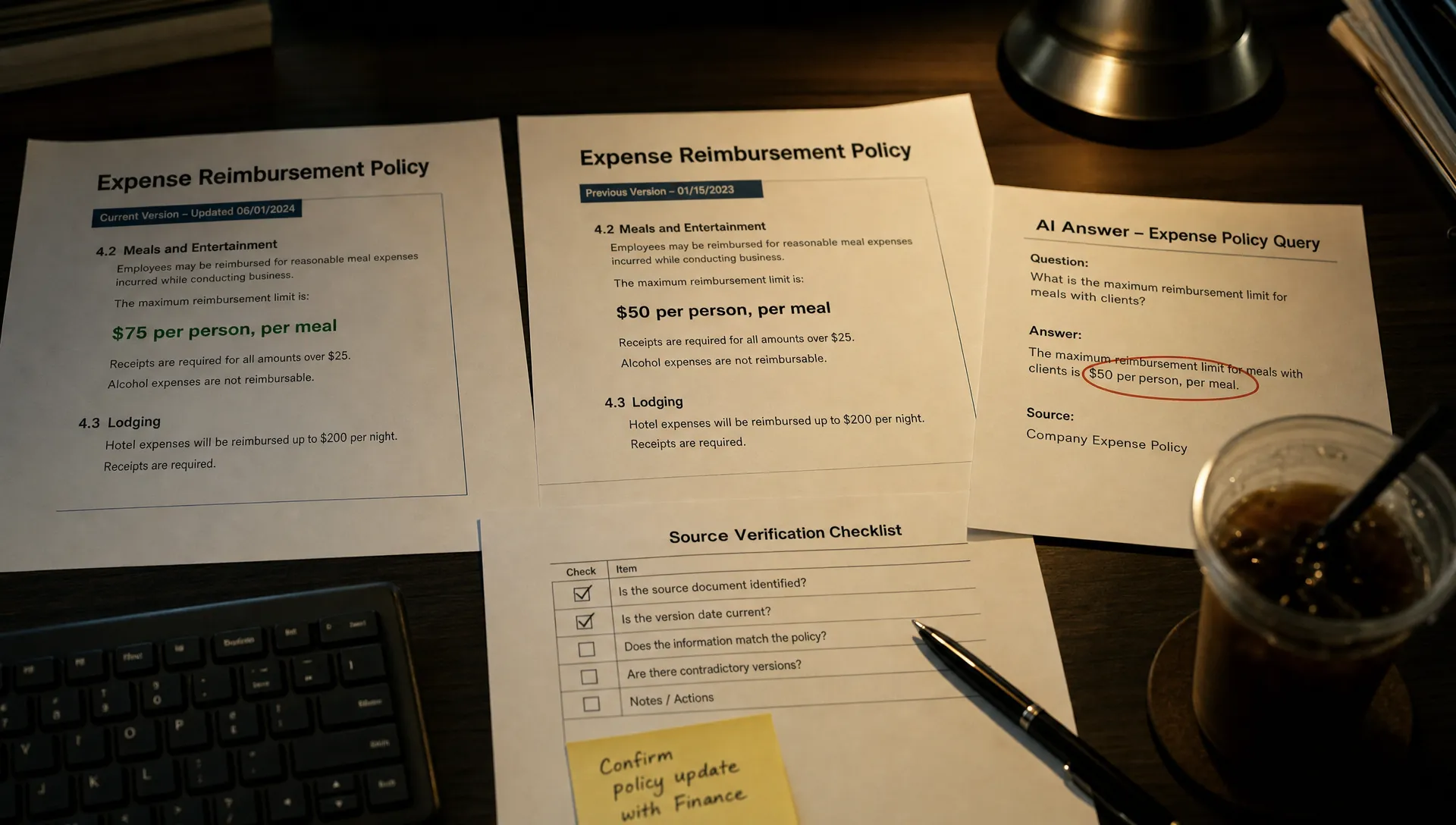
Use a controlled example. Suppose a test policy changes an expense limit from $75 to $100. Choose a document the affected user is authorized to access.
Record the source identifier and version, confirm that the refresh fetched that version, inspect which version retrieval selected and check the answer’s citation. Then compare the existing conversation with a fresh one using the same question.
If only the fresh conversation returns $100, investigate retained conversation context. If both return $75, investigate the source and retrieval path first. This comparison narrows the search; it does not prove a cause by itself.
Timestamps help, but they are not enough. “Refresh completed at 10:15” does not prove that this document’s latest version was included. Prefer version evidence or a content comparison where available.
Show freshness at the level of the user’s task
A workspace-wide “last synced” label can hide the failure. Nine hundred documents may be current while the one supporting the answer is not.
Give users the evidence relevant to their question: which source supported the answer, when that content was fetched and whether a newer version is pending. Distinguish the source’s modification time from your product’s refresh time.
Useful status copy names both the completed action and its limit:
- “Access restored. Updating 12 changed documents.” Authorization succeeded; content refresh is still underway.
- “Refresh incomplete. This answer uses the previous version of Travel Policy.” The answer depends on content that is not current.
- “Updated source available. Refresh this answer?” New content is ready, but the existing answer has not been regenerated.
Only display counts, timestamps or version claims your system can support. If freshness is unknown, say so. A precise-looking but unsupported status makes the trust problem worse.
Make recovery update the answer without erasing the work
Once the new source is ready, the user should not have to reconstruct the task in a blank conversation.
Offer a scoped action such as “Refresh this answer with the latest sources.” Preserve the user’s goal, constraints and accepted edits. Replace superseded source evidence, then identify which conclusions changed. Do not silently overwrite a result the user has already edited or applied.
This follows the broader principle that AI failure recovery should preserve context rather than restart work. Here, the distinction matters: preserve task context, not outdated facts.
Handle permission changes separately. If access has been revoked, stop using the affected content in new answers and apply the product’s access policy to cached material. A reconnect must not become a route around authorization checks.
Measure the AI product adoption cost beyond reconnect success
A successful authorization event measures connector recovery. It does not measure whether the user recovered their task.
Track the sequence from reconnect to completed refresh, then to an answer using the updated source. Where observable, follow through to whether the user applies the result and returns for the next occurrence of the task.
Two diagnostic measures are especially useful. Time to usable freshness measures the delay between a source change and a successful answer using it. Repeated reconnect rate flags users who reconnect again before getting a verified current answer. Neither should become a target without checking the underlying cases.
Inspect repeated questions, abandoned answers and support reports alongside these events. Users may keep generating responses while moving the real work elsewhere.
Keep diagnostic logs access-controlled. Source identifiers and version metadata may be sufficient; copying entire sensitive documents into analytics is usually unnecessary.
Frequently asked questions
Should reconnecting always trigger a full refresh? Not necessarily. A full refresh may be unnecessary or expensive. The requirement is to explain what reconnect does and provide a reliable path to update the sources needed for the task.
Will a new conversation fix stale answers? Sometimes it avoids stale conversation context. It will not fix an outdated source, incomplete refresh or retrieval of the wrong document. Treat it as a diagnostic comparison, not the default recovery flow.
Should stale answers be blocked? Base the decision on task risk and freshness requirements. Clearly labeled older information may be usable for some tasks. Block or require confirmation when outdated facts could make the action unsafe or invalid.
Start with one failed reconnect
Take one recent case and trace it from source edit to final answer. Identify the first point where the updated information disappears. Then change the recovery action and status message to match that failure, rather than asking users to reconnect again.
If the symptom is still unclear, use the free Triage tool to structure the diagnosis. For a broader team review, the AI Product Adoption Deck provides 12 diagnostics, 80 action cards and 12 workshops in a 104-card, 124-page playbook. Use it to turn the identified break into a concrete product decision.