AI Failure Recovery Should Preserve Context, Not Restart Work
AI failure recovery should preserve accepted work. Diagnose costly resets and design targeted repairs, useful checkpoints and safer ways to resume.

A user gets a bad AI result, clicks Retry and loses the edits they already made. The original answer was wrong. Now the product has erased useful work too. AI failure recovery has turned a correctable mistake into a reason to leave.
The symptom is easy to misread. Your team sees repeated generations followed by abandonment and concludes that output quality needs improvement. But the immediate adoption problem may be simpler: users cannot repair one failure without rebuilding the task around it.
Diagnose what the retry destroys
Review failed sessions at the moment users try to recover. Look beyond whether another answer appears. Check whether their corrections, accepted sections, selected sources and intended next step survive.
A second generation is not evidence of recovery. It may just be another attempt to reconstruct the same starting point.
| Observed behavior | Possible recovery failure | Product response to test |
|---|---|---|
| Users paste the same instructions again | Constraints disappeared between attempts | Retain confirmed task constraints |
| Users copy good sections elsewhere before retrying | Regeneration threatens accepted work | Protect accepted sections and regenerate only the rejected part |
| Users reopen files and reselect passages | Source selections were discarded | Restore selected passages and flag changed sources |
| Users stop after an interrupted action | Execution status is unclear | Show what completed before offering a resume action |
Distinguish this from context drift during an ongoing session. Here, the break happens specifically when a retry, timeout or repair discards established task state. Better instructions alone will not fix that boundary.
What AI failure recovery must preserve
The unit of recovery should be the task, not the latest prompt. Preserving a chat transcript does not necessarily preserve the task. A transcript contains rejected suggestions, outdated instructions and assumptions the user never approved.
Keep an explicit record of the current working state:
- Confirmed intent: The outcome the user wants, including audience, scope and constraints.
- Accepted work: Approved sections, user edits and decisions that should not change without permission.
- Supporting context: Selected sources, relevant passages and their versions or retrieval times.
- Execution status: Steps completed, steps pending and external actions whose outcomes remain uncertain.
These categories need different treatment. User edits should remain intact. A source that has changed may need review. An inferred preference should not silently become a permanent instruction.
Make this state inspectable. Before resuming, show a compact summary of what will carry forward and what needs attention. Let users remove an outdated constraint without clearing everything else.
Preservation also needs boundaries. Keep context only within the product’s retention rules and the user’s permissions. A retry must not regain access to a document the user can no longer open.
Repair the rejected part, not the whole result
For AI failure recovery, the default repair scope should be the smallest unit that can fix the problem.
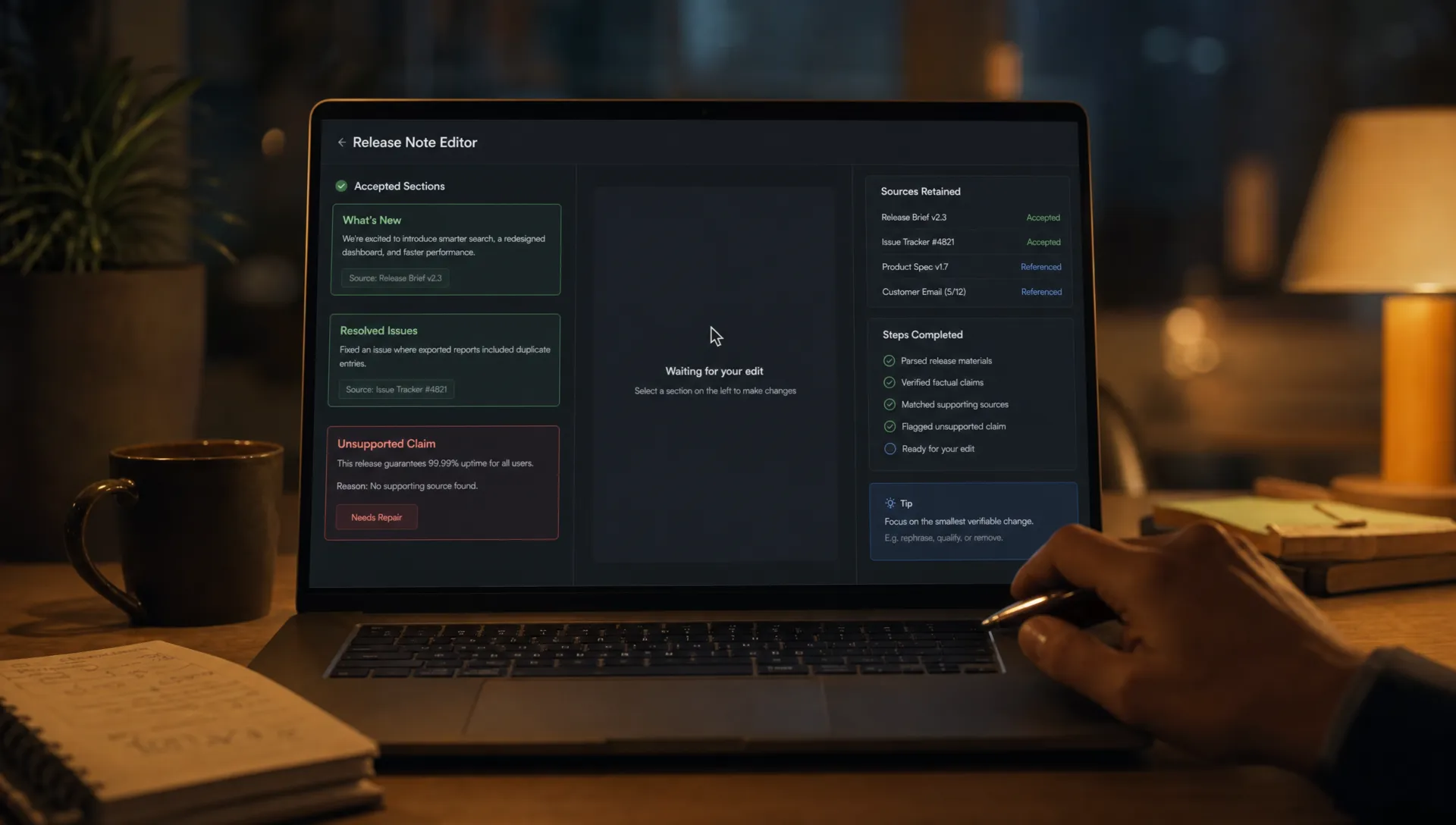
Consider a release-note draft. The user has corrected product names, approved two sections and rejected an unsupported claim in the third. A global Regenerate button puts all three sections back into play. Even a better new answer creates comparison work: the user must check whether earlier corrections survived.
A targeted repair preserves the approved sections and user edits. It replaces the unsupported claim using the selected release evidence, then shows the proposed change before applying it.
The repair control should express that scope. “Replace this claim using the selected source” is more precise than “Try again.” It tells the user what can change and, just as importantly, what cannot.
Some failures require a wider reset. If the user changes the audience or replaces the source document, accepted work may no longer fit. Ask which decisions should carry forward rather than silently preserving incompatible assumptions. A context-preserving design is not one that remembers everything forever. It is one that makes resets deliberate.
Resume from a checkpoint, not from a transcript
AI failure recovery needs a saved task checkpoint that is separate from the conversation. Save it before a consequential AI change and after the user accepts a meaningful result.
A useful checkpoint records the current artifact, accepted constraints, source references and completed steps. It should also distinguish a draft from a committed action. Generating an email and sending it are not interchangeable states.
Suppose an assistant prepares an update, creates a ticket and then times out. Restarting the entire sequence risks creating a duplicate ticket. Before offering Resume, establish whether the external action completed. If the status is unknown, expose that uncertainty and provide a way to check it. Do not treat a timeout as proof that nothing happened.
Revalidate anything that may have changed since the checkpoint. A restored source selection is useful only if the user still has access and the content remains appropriate for the task.
When recovery cannot continue, preserve the artifact for manual editing or handoff. The user should receive the work completed so far, unresolved issues and confirmed action status, not an empty composer.
Measure whether users recover their task
A successful retry response is a system event. A completed user task is a product outcome. Instrument both so that one does not stand in for the other.
Evaluate AI failure recovery with a small set of measures tied to the interrupted workflow:
| Measure | Suggested definition | What it helps diagnose |
|---|---|---|
| Recovery completion rate | Eligible failed tasks that reach the intended completion event after recovery begins | Whether users actually resume useful work |
| Recovery time | Time from the failed result or interruption to task completion | How expensive repair feels in practice |
| Repeated setup | Sources, constraints or instructions users must supply again | Context the product failed to retain |
| Accepted-work loss | Approved content or user edits overwritten without explicit permission | Destructive regeneration |
Define completion for your feature. It might mean inserting a reviewed draft, applying a code change or finishing an analysis. Another generation alone is not enough.
Compare similar failure types and task stages. Recovering from an unsupported sentence is different from recovering after an uncertain external action. Pair event data with session review to see whether apparent completion hides manual reconstruction outside your product.
Frequently asked questions
Should every retry reuse the full conversation? No. Reuse relevant, authorized task state. Carrying forward rejected answers or obsolete assumptions can reproduce the failure. Keep accepted decisions distinct from conversational history.
When should the product start over? When the task’s foundations have changed enough that existing work is no longer valid, or when the user explicitly requests a reset. Explain what will be cleared and offer to retain usable artifacts.
Does a manual fallback count as recovery? Yes, if the user can finish the task with their work intact. Track manual completion separately from AI-assisted completion so the metric does not hide a broken AI path.
Audit one failed task before adding another retry
Choose a recent abandoned session. Write down what the user had already supplied, corrected and accepted. Then compare that list with what survived the recovery attempt.
Your next AI failure recovery decision should address the most costly missing state, not add another generic button. If accepted edits vanished, protect them. If an action’s status was unclear, resolve that before enabling replay.
Use the free Triage tool to investigate the adoption symptom. For a structured follow-through, the AI Product Adoption Deck provides 12 diagnostics, 80 action cards and 12 workshops with fillable deliverable templates. Start with one recovery boundary and specify exactly what must survive it.