Why Features AI Teams Ship Still Fail in Real Work
Why features AI teams ship fail in real work, and how to diagnose weak adoption, fuzzy handoffs, trust gaps, and broken workflow loops.

The feature shipped. The demo looked good. Early users clicked it. A few even said, “This is useful.”
Then the real numbers arrived.
People tried it once and went back to the old workflow. Outputs were generated but not copied, approved, edited, or reused. Support tickets asked basic questions your onboarding already answered. Sales kept saying prospects were excited, while product data said no one was building a habit.
This is the quiet failure mode for many AI features. They work in isolation, but fail in real work.
The problem is usually not that the model cannot produce something impressive. The problem is that the feature does not survive the conditions where work actually happens: partial context, messy permissions, deadlines, handoffs, review, accountability, and existing tools.
AI teams often ship a capability. Users need a work step.
The launch signal most teams overread
A click on an AI feature is weak evidence. So is a completed generation. So is positive qualitative feedback after a demo.
AI features invite curiosity. Users will test them because they are new, not because they have decided to change how they work. The adoption question is not “Did they try it?” The better question is “Did the output move into the next step of the workflow?”
| What you see after launch | What it might really mean | Better question to ask |
|---|---|---|
| High first-week usage | Curiosity, internal pressure, or novelty | Do users return without being prompted? |
| Lots of generations | Users are experimenting, not necessarily succeeding | How many outputs are accepted, edited, exported, or shared? |
| Positive feedback | The feature feels promising in a clean setting | Does it reduce work when the user is under time pressure? |
| Long sessions | Users may be stuck correcting or reprompting | Are sessions ending in a completed artifact? |
| Demo excitement | Buyers understand the promise | Can operators fit it into their daily process? |
This is why AI product adoption can look healthy at the top of the funnel and weak everywhere else. The feature attracts attention, but the work does not move.
If this pattern sounds familiar, it overlaps with a common failure covered in why AI features win clicks but lose repeat use: curiosity creates activity, but not routine.
Why features AI teams ship break in real work
Most failed AI features do not fail all at once. They leak value at several points. The user starts with intent, hits ambiguity, receives output, then has to decide whether it is usable. Every one of those moments can break adoption.
The feature starts too far away from the trigger
A user rarely wakes up thinking, “I need to use the AI feature.” They think, “I need to respond to this customer,” “I need to clean this backlog,” “I need to prepare for this meeting,” or “I need to ship this analysis.”
If the AI feature sits in a separate tab, a blank composer, or a generic assistant panel, the user has to remember it at the exact moment of need. That is a fragile adoption model.
Strong AI features attach themselves to a recurring trigger. Grammarly appears where writing happens. GitHub Copilot appears where code is being written. The user does not need to leave the work to ask for help.
Weak AI features ask users to pause the work, describe the work, wait for an answer, then translate that answer back into the work.
That translation cost kills repeat use.
The user has to become the product manager of the prompt
Prompt freedom sounds powerful in a demo. In a real workflow, it often creates hesitation.
Users do not always know what to ask. They do not know how much context to include. They do not know what quality bar to expect. They do not know if the feature wants a command, a question, a document, a goal, or a constraint.
This is prompt paralysis. The user has intent, but the interface gives them a blank surface and makes them design the interaction.
For many work products, the better pattern is not “Ask anything.” It is “Choose the job, confirm the inputs, adjust the constraints, review the result.”
That does not make the AI less flexible. It makes the product more usable.
The output is plausible, but not ready to move
A lot of AI output is good enough to read and not good enough to use.
That gap matters. Users may like an answer, but still abandon it because it lacks format, provenance, permissions, tone, citations, data freshness, or the final mile needed for the next step.
A sales rep does not need “a good account summary.” They need a summary they can trust before a call. A product manager does not need “themes from feedback.” They need evidence, examples, severity, and a decision path. A support lead does not need “suggested replies.” They need replies that match policy and can be sent without creating risk.
This is where many teams misread output quality. They evaluate whether the output is impressive. The user evaluates whether they can safely act on it.
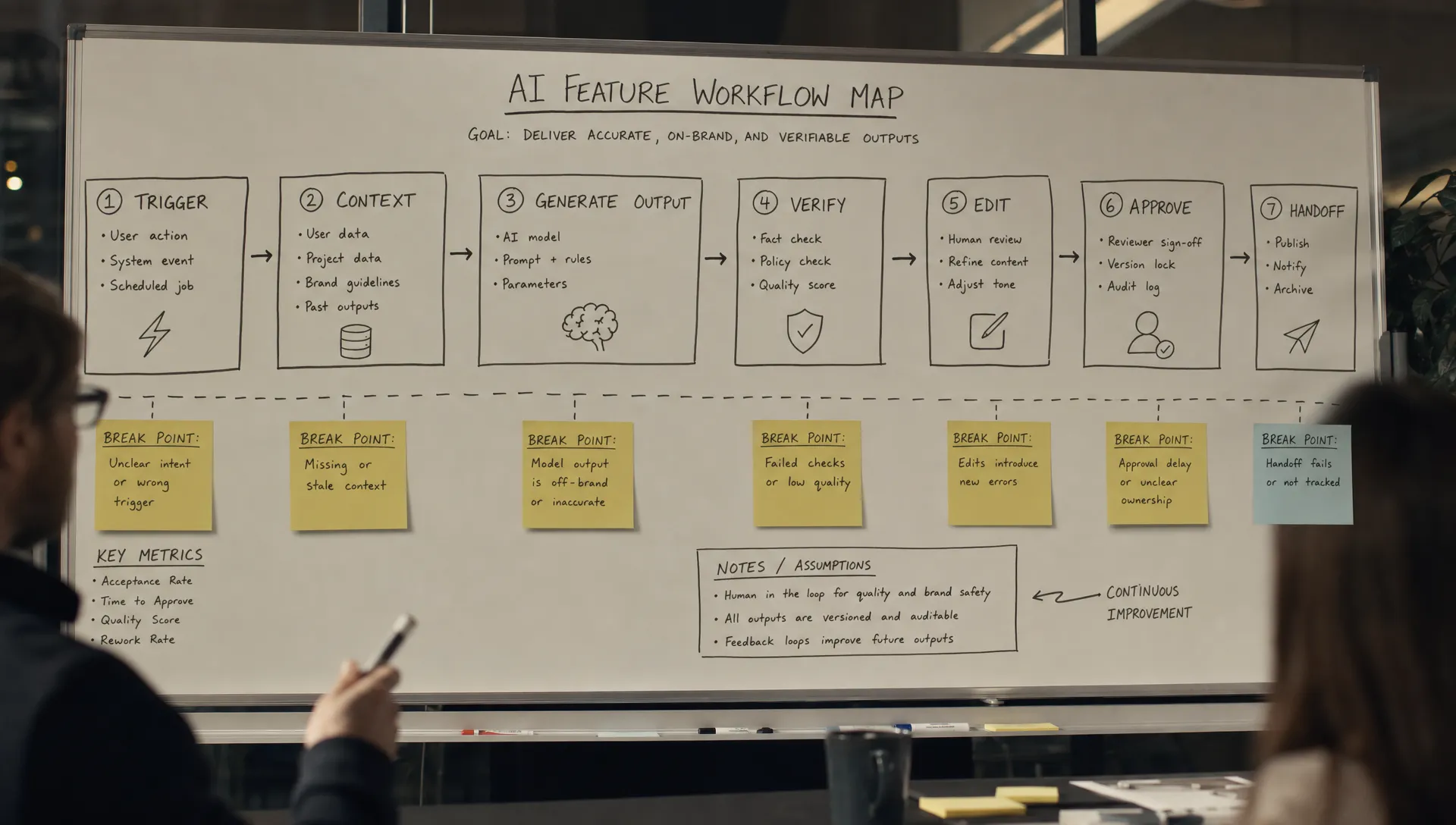
The handoff is fuzzy
AI features often produce an intermediate artifact. A draft. A recommendation. A summary. A plan. A classification.
But real work needs a handoff. Who owns the next step? What state is the output in? Is it a suggestion, a decision, a draft, or a completed action? What should the user check? What happens if it is wrong?
When that contract is unclear, users slow down. They read the output, then return to manual work because manual work has a known accountability path.
This is especially painful in teams with review chains. If a manager, legal reviewer, customer owner, engineer, or approver cannot understand where the AI output came from or what it changed, the feature becomes a side experiment rather than part of the operating model.
That is why fuzzy handoffs are one of the most common reasons AI at work fails. The issue is often not generation. It is ownership after generation.
The feature creates invisible work
Teams often measure the generation step and ignore the cleanup step.
But users feel the full cost:
- Finding the right source material
- Writing a usable prompt
- Checking the output
- Editing tone and structure
- Copying it into another tool
- Explaining it to someone else
- Repeating the process next time from scratch
If the feature saves 5 minutes but adds 7 minutes of verification and formatting, users will not build a habit. They may still praise the idea. They may still use it in low-stakes moments. But it will not become core workflow.
This is why “time saved” is often a weak adoption claim unless you measure the whole loop.
The adoption unit is the completed loop, not the AI feature
A better way to evaluate shipped AI is to stop asking whether the feature works and start asking whether the loop closes.
A minimum adoptable AI loop has six parts:
- Trigger: The user encounters a real moment where help is needed.
- Context: The product already has, or helps collect, the inputs needed for a good result.
- Generation: The AI produces something shaped to the job, not a generic response.
- Verification: The user can quickly judge whether the output is safe and correct enough.
- Commit: The user can edit, accept, send, save, apply, or hand off the output.
- Return path: The next use is easier because context, preference, or workflow state carries forward.
Most weak AI features have a generation step and not enough of the other five.
This is also why some known AI products retain better than others. GitHub Copilot fits into a tight loop: code context, suggestion, accept or reject, continue. Grammarly fits into a tight loop: writing context, flagged issue, suggested correction, accept or ignore. Cursor works for many developers because the AI is close to the edit loop and the result can be inspected in the same environment.
Contrast that with a generic AI assistant bolted onto a B2B product. It may answer questions well, but if the answer does not update the record, create the task, cite the source, notify the owner, or fit the approval path, the user still has to do the real work manually.
The feature exists. The loop does not.
How to diagnose the real break
Do not start by rewriting prompts or swapping models. Start by finding where the user drops the output.
Look at event data and session replays around the moments after generation. Interview users about the last output they did not use. Ask them to show the work, not describe their opinion of the feature.
Use a simple diagnostic table:
| Symptom | Likely break | Product response |
|---|---|---|
| Users open the feature but do not submit | The starting state is too vague | Offer job-specific entry points and prefilled context |
| Users generate output but do not apply it | The output is not trusted or not formatted for the next step | Add verification cues, sources, previews, or structured output |
| Users copy output into another tool | The feature is outside the workflow | Move the action closer to where the work is completed |
| Users heavily edit every result | The AI stops before the usable artifact | Add constraints, examples, tone controls, or reusable templates |
| Managers block rollout | Ownership and risk are unclear | Define review states, auditability, and human approval points |
| Usage is high but retention is weak | The feature is useful occasionally, not habit-forming | Attach it to a recurring trigger and make repeat use cheaper |
The most useful question is blunt: “What does the user do immediately after the AI responds?”
If the answer is “read it,” you do not yet have adoption. Reading is not adoption. Moving work forward is adoption.
For a deeper breakdown of this specific pattern, see why AI output gets read but not used.
What to change before you add more features
When adoption is weak, teams often respond by adding more AI capabilities. Summarize, rewrite, classify, generate, recommend, explain. The surface area grows, but the habit does not.
That usually makes the problem harder to diagnose.
Before adding another mode, tighten one loop. Pick one high-frequency workflow where the user already has urgency. Define the artifact that must be produced. Identify the trust bar. Make the next action obvious. Remove copy-paste. Carry context forward.
In product terms, the decision frame is simple:
| Product decision | Bad default | Better default |
|---|---|---|
| Entry point | Generic assistant | Job-specific action at the moment of need |
| Input | Blank prompt | Prefilled context with editable constraints |
| Output | Long prose | Artifact shaped for the next workflow step |
| Trust | “AI-generated” label only | Sources, previews, diffs, confidence cues, or review checks |
| Handoff | User figures it out | Clear state: draft, suggestion, approved, applied, sent |
| Retention | Hope users remember | Recurring trigger plus saved preferences or context |
This is less glamorous than launching another AI feature. It is also more likely to work.
Frequently Asked Questions
Why do AI features get initial usage but fail to retain users? Initial usage is often curiosity. Retention depends on whether the feature helps complete a recurring job with less effort, less risk, or better output. If users have to translate, verify, and hand off everything manually, they will not build a habit.
Is low adoption usually a model quality problem? Sometimes, but not as often as teams assume. Many AI features fail because the workflow around the model is incomplete. The output may be decent, but not trusted, formatted, actionable, or connected to the next step.
What is the most important metric for AI product adoption? Track downstream action, not just generation. Useful metrics include accept rate, edit rate, export rate, apply rate, share rate, repeat use by workflow, and completion of the task the AI was meant to support.
How should product teams fix an AI feature that users tried once and abandoned? Start by identifying where the loop breaks. Is the trigger weak, the prompt unclear, the output hard to verify, or the handoff missing? Fix the smallest broken step before adding more capability.
A practical next step
Take one shipped AI feature and map the last five user sessions where output was generated but not used. Do not debate the model yet. Find the break in the loop.
If you want a structured way to do that, the free AI adoption triage tool can help you narrow the symptom before choosing a fix. The AI Product Adoption Deck goes deeper with diagnostics, action cards, and workshops for turning those symptoms into product decisions.