Why AI Output Gets Read but Not Used
Why AI output gets read but not used, and how product teams can diagnose trust, handoff, and workflow gaps before adoption stalls.

The feature is getting attention. Users open the AI panel. They wait for the response. They scroll. Some even say the output is “pretty good.”
Then nothing happens.
No insert. No edit. No approval. No saved decision. No downstream task completed. The AI output gets read, but it does not change the user’s work.
That is a specific adoption failure. It is not the same as low activation. It is not the same as bad generation quality. The user found enough value to inspect the output, but not enough confidence, fit, or momentum to apply it.
If your product team only measures generations, views, or time spent reading, this problem hides in plain sight.
Read time is not product value
AI features often create a false positive signal: reading looks like usage.
In a normal content product, reading might be the goal. In a workflow product, reading is usually an intermediate step. The real question is whether the output moved the user closer to a decision, action, message, file, ticket, commit, report, or approval.
This is why teams need to measure whether AI is applied, not just generated. A user who reads three outputs and closes the tab is not adopting the feature. They are sampling it.
A healthier adoption model separates consumption from commitment.
| Signal | What it may mean | Why it can mislead |
|---|---|---|
| Output generated | User was curious or had a task | It says nothing about usefulness |
| Output expanded or read | User inspected the response | Inspection is not adoption |
| Output copied | User saw possible value | Copying may still lead to deletion |
| Output edited and submitted | User trusted enough to work with it | This is closer to real use |
| Output reused in a recurring workflow | User formed a habit | This is the adoption signal that matters |
The break happens between “this looks useful” and “I am willing to use this.” That gap is where most AI UX problems live.
The core diagnosis: the output has no use contract
AI output gets used when the user can answer three questions quickly:
- Can I trust this enough for the current task?
- What exactly is this output ready for?
- What should I do next with it?
If any answer is unclear, the user slows down. They read more carefully. They regenerate. They compare against their own knowledge. They paste into another tool. They ask a teammate. Or they abandon the output and do the work manually.
That behavior often gets misread as “the model needs to be better.” Sometimes it does. But often the product has failed to define the contract around the output.
A draft, a recommendation, a summary, and a final answer require different levels of trust. They also require different next actions. If the UI presents all of them as the same polished text block, the user has to infer the state of the work.
That inference is expensive.
Five reasons AI output gets read and abandoned
1. Verification costs more than starting over
The user reads the response and thinks, “This might be right, but now I have to check every part.”
That is the moment trust breaks. Not because the output is obviously wrong. Because the cost of verifying it is unclear.
For high-stakes work, users need a path to check claims, sources, assumptions, and missing context. If they cannot check the output quickly, they often protect themselves by not using it. Better wording will not fix that. The product needs to show why the output is safe enough for this job.
This can mean citations, visible inputs, confidence by section, review checklists, or clear warnings about what was not considered. The right answer depends on the workflow. The point is simple: trust has to be inspectable.
2. The output is readable, but not decision-ready
A lot of AI output is shaped like a fluent explanation. That makes it easy to read and hard to use.
A sales manager does not need a beautiful paragraph about an account. They need risk flags, next steps, owners, and fields that can update the CRM. A support agent does not need a generic suggested reply. They need a response that matches policy, tone, customer history, and the current ticket state.
Readable output answers, “Does this make sense?” Decision-ready output answers, “What can I do with this now?”
If users keep reading but not applying, inspect the format. The problem may be that the output is packaged for comprehension, not action.
3. The format does not match the next workflow step
GitHub Copilot works best when the suggestion appears where the code will live. Grammarly works because the correction sits inside the text being edited. In both cases, the output does not ask the user to move work across contexts.
Many AI features do the opposite. They generate a block of text in a side panel, then expect the user to translate it into the real workflow.
That translation step kills adoption.
If the next action is to update a field, generate a field update. If the next action is to compare options, generate a comparison table. If the next action is approval, generate an approval-ready artifact with the required evidence attached.
The closer the output is to the shape of the next action, the less work the user has to invent.
4. The human handoff is fuzzy
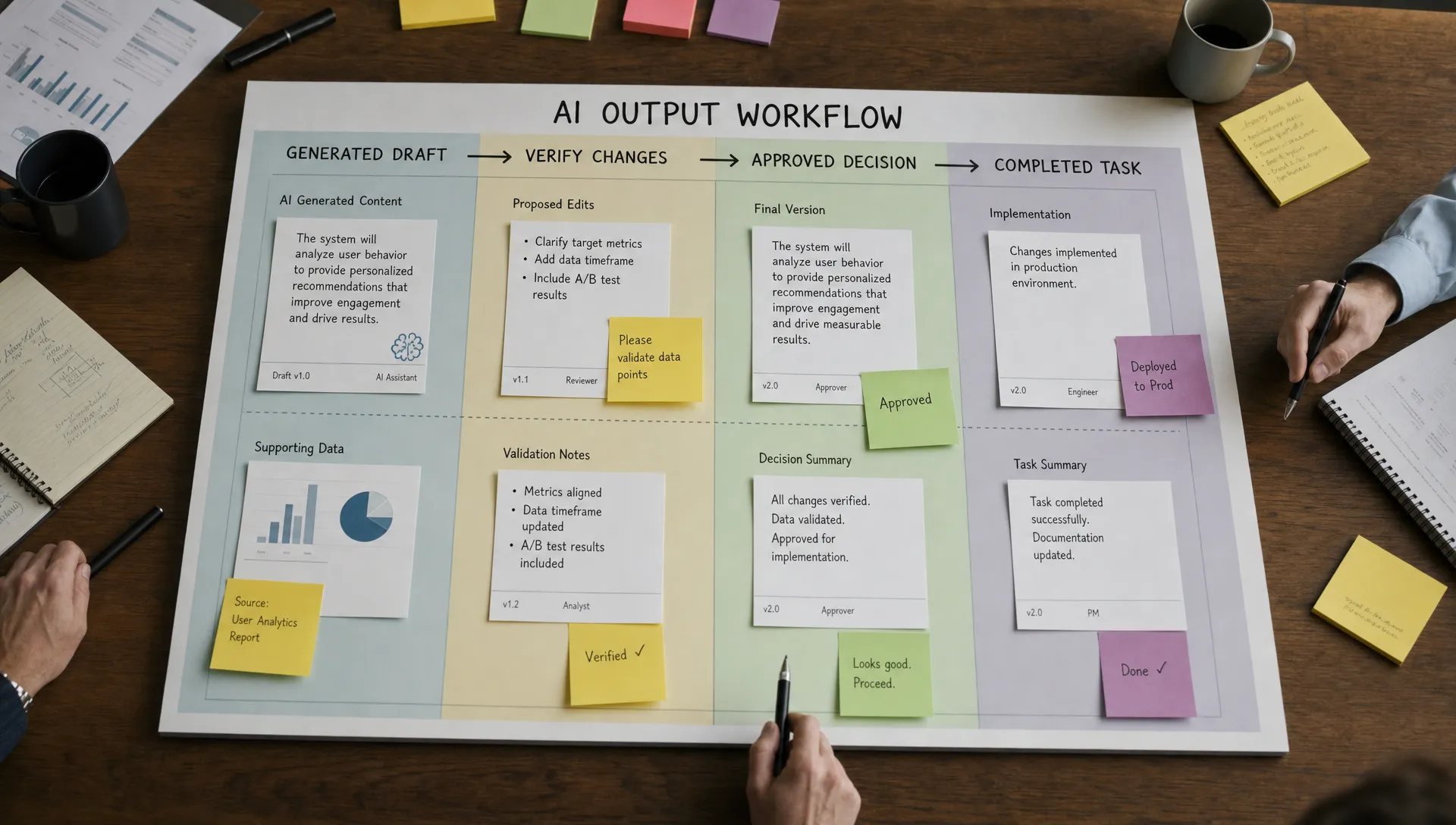
Users abandon output when they do not know where the AI’s job ends and their job begins.
This shows up in small moments. The AI writes a recommendation, but does not say what it assumed. It summarizes a meeting, but does not identify unresolved decisions. It drafts a reply, but does not say which parts need human review.
The user is left holding an object with no status.
A strong handoff names the state of the output. For example: “Draft ready for tone edit,” “Recommendation based on current pipeline data,” or “Summary needs owner confirmation.” These labels reduce ambiguity. They make the next human action obvious.
5. Corrections do not reduce future work
Users will edit AI output if editing feels like progress. They stop editing when every correction feels disposable.
If the user fixes tone, structure, terminology, or exclusions, the product should make that correction matter. At minimum, the next output in the same workflow should reflect the user’s edits or preferences. If every generation starts from zero, the user learns that the AI does not adapt to the way work is actually done.
That turns editing into cleanup. Cleanup does not become habit.
What to measure instead
If you want to diagnose this problem, stop looking only at the read event. Instrument the handoff after reading.
| Metric | What it tells you | Product question |
|---|---|---|
| Apply rate | How often output moves into the workflow | Is the output usable as produced? |
| Edit-to-apply rate | Whether edits lead to real use | Are corrections part of progress or friction? |
| Regenerate-before-apply rate | Whether users are searching for confidence | Is the first output missing context or control? |
| Abandon-after-read rate | How often inspection ends the workflow | What blocks commitment? |
| Downstream completion rate | Whether output creates finished work | Does the AI help the user complete the job? |
| Repeat use on the same workflow | Whether value becomes habit | Is the feature tied to a recurring trigger? |
The most important event is not “user read output.” It is the next meaningful action after reading.
The output use test
Take one high-volume AI workflow and run this test with your team.
Ask:
- What is the output supposed to become?
- What action should happen within 60 seconds of reading it?
- What evidence does the user need before applying it?
- What part of the output requires human judgment?
- What should the product remember after the user edits it?
If you cannot answer these questions cleanly, your users probably cannot either.
Do not start by rewriting prompts. Start by tightening the use contract. Define the output state, the verification path, the next action, and the feedback loop.
Frequently Asked Questions
Why do users say AI output is useful but not use it? Because “useful” often means the output was interesting or directionally right. Actual use requires trust, fit with the workflow, and a clear next step.
Should we improve model quality first? Only if the output is factually weak or consistently off-task. If users read it and hesitate, the bigger issue may be verification, handoff, or format.
Is copying AI output a good adoption signal? It is better than reading, but still incomplete. Track what happens after the copy. If the copied output gets deleted, rewritten from scratch, or never submitted, adoption is still broken.
What is the fastest way to improve use? Pick one workflow and make the next action obvious. Add the evidence needed to trust the output, then place the output in the format and location where work continues.
A practical next step
If this symptom is showing up in your product, do not debate whether users “like” the AI. Map the gap between reading and applying.
For a structured diagnosis, you can run the symptom through the free AI adoption triage tool. If you want to go deeper, the AI Product Adoption Deck includes diagnostics, action cards, and workshops for turning these adoption breaks into product decisions.
The goal is not more output. It is output that survives contact with the user’s real workflow.