What Your AI Stack Hides About Adoption Risk
Your AI stack can ship a working feature while hiding adoption risk. Learn which product signals expose trust, control, workflow, and habit breaks.

You shipped the AI feature. The infrastructure looks clean. The model responds. Latency is within range. Your evals are green. Support is not on fire.
But usage is soft.
Users open the feature once, test it with a vague input, regenerate a few times, then go back to the old workflow. Your AI stack says the system works. Your adoption data says users do not rely on it.
That gap is the problem.
Most teams review the AI stack as a delivery system: model, prompts, retrieval, orchestration, guardrails, logging, analytics. That is useful, but incomplete. It tells you whether the feature can produce an output. It does not tell you whether the user can turn that output into progress.
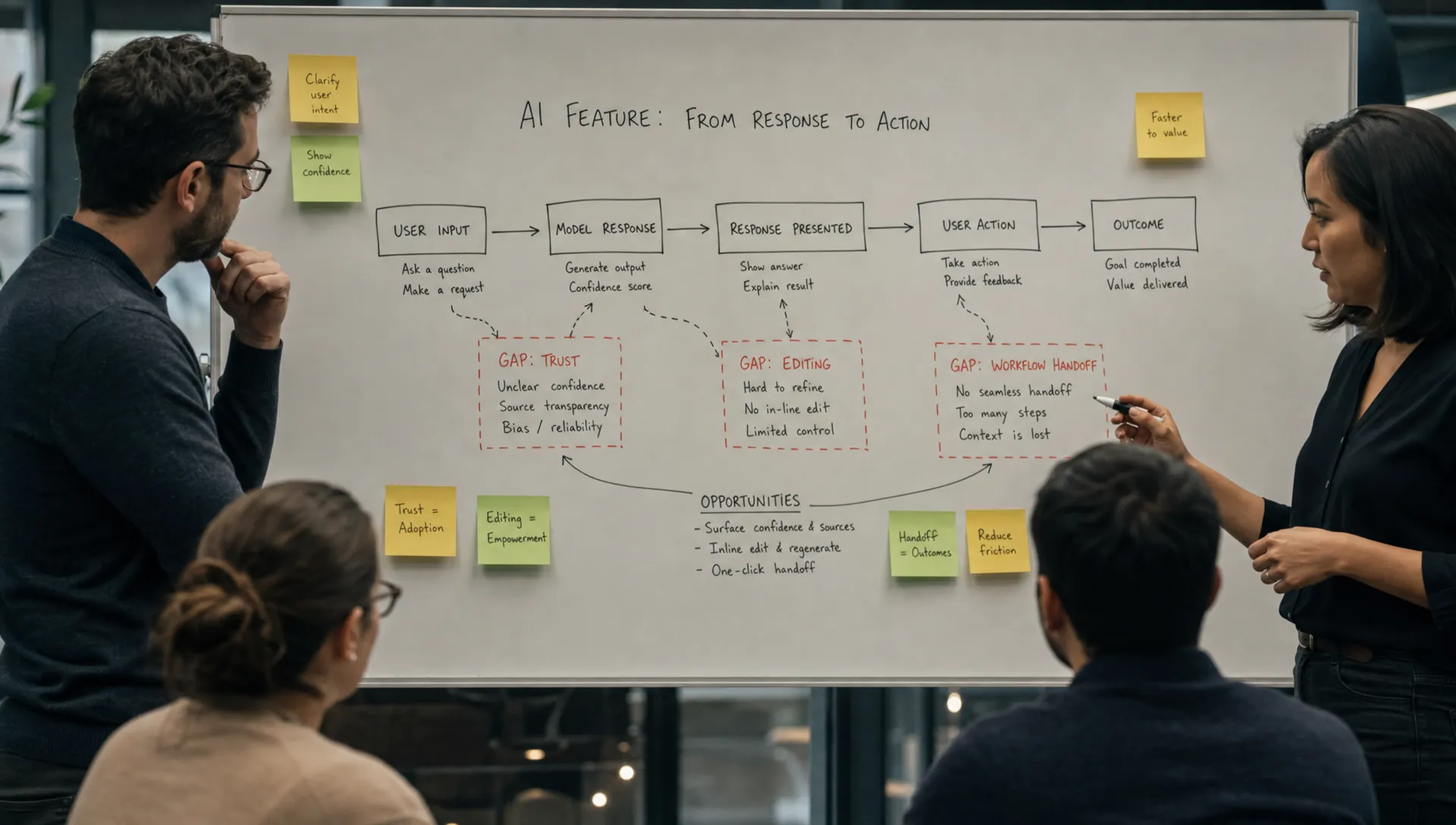
For AI products, that distinction matters. A generated answer is not adoption. Adoption happens when the user trusts the output enough, controls it enough, applies it in the workflow, and comes back because it saved effort without creating new risk.
The AI stack answers shipping questions, not adoption questions
A technical stack review usually asks reasonable questions.
Can we call the model reliably? Can we provide the right context? Can we keep responses safe? Can we monitor cost and latency? Can we evaluate quality over time?
Those are necessary questions. They are not enough.
The adoption questions sit one layer closer to the user.
Can the user tell what the AI used? Can they correct it without starting over? Can they decide when the output is safe to use? Does the output land where work actually happens? Does the feature reduce judgment work, or just move it downstream?
This is where teams get fooled. The AI stack may be healthy while the product experience is creating adoption debt.
Google’s People + AI Guidebook makes a similar point from a UX angle: AI systems need feedback, control, and clear mental models. Product teams cannot leave those decisions to the model layer.
Where adoption risk gets hidden
The model layer hides output fate
Model quality is often measured before the user touches the result. The answer is rated as good, relevant, safe, or complete.
But users do not adopt outputs because they are theoretically good. They adopt outputs that survive contact with the task.
If your dashboard stops at “generation completed,” you cannot see what happened next. Did the user accept it? Edit it? Copy it? Export it? Delete it? Ask for another version? Recreate the same work manually?
A model can produce plausible drafts that users never use. That is not a model failure in the narrow sense. It is an output fate failure.
Track what users do after the response. Acceptance, edit depth, downstream action, and repeat use are usually more useful than raw generation count.
The retrieval layer hides accountability
Retrieval makes the system feel smarter to the team building it. The product has access to docs, tickets, CRM notes, policies, or past work. Good.
But the user does not experience “retrieval.” The user experiences a claim.
If they cannot see what the AI used, why it selected that context, or where the answer came from, they still have to verify it manually. That verification burden often kills adoption, especially in work products that carry social, legal, financial, or customer risk.
This is why source visibility is not a decorative feature. It is part of the adoption path.
Perplexity makes sources central because the answer alone is not enough for many search and research tasks. In enterprise workflows, the same logic applies. If the AI summarizes a customer, explains a contract, or drafts a recommendation, the user needs a way to inspect the evidence.
If trust is the visible symptom in your product, it is worth checking whether you have a deeper evidence problem. This is the kind of signal covered in diagnosing an AI UX trust problem.
The orchestration layer hides user effort
Prompt chains and agents can make a workflow look automated from the system side. The diagram looks elegant. The user experience may still feel like work.
This shows up as prompt paralysis. Users do not know what to ask. They do not know what level of detail is required. They try one broad request, get a broad answer, and leave.
The stack may be executing perfectly. The product is still asking the user to be a prompt engineer.
Good AI UX reduces input uncertainty. It gives users a starting point, frames the job, pre-fills context, offers examples, and makes the next move obvious.
GitHub Copilot works well in part because the input surface is already the user’s work surface. The code file, cursor position, comments, and surrounding context do a lot of the prompting. The user does not have to switch into a blank chat box and explain their whole task.
Guardrails hide recovery risk
Guardrails help prevent bad behavior. They do not automatically create a good recovery experience.
If the AI refuses, fails, hedges, or gives a weak answer, what happens next? Can the user fix the input? Can they narrow the request? Can they see what constraint was triggered? Can they salvage part of the output?
Many teams treat failure states as edge cases. For adoption, they are central.
Users do not need the AI to be perfect. They need the product to help them recover when it is not. A weak first answer can still lead to adoption if the correction loop is fast and understandable.
Grammarly is a useful reference here. The product does not just produce a rewritten passage. It lets the user accept, reject, or modify suggestions in context. The correction loop is small. The cost of disagreement is low.
A stack review should map layers to adoption risk
Use the AI stack as a starting point, but do not stop there. For each technical layer, ask what user behavior it might be hiding.
| Stack layer | What it proves | What it can hide | Adoption metric to add |
|---|---|---|---|
| Model | The system can generate a response | The response is not useful enough to apply | Acceptance rate, edit depth, reuse rate |
| Retrieval | The system can access context | Users cannot verify where claims came from | Source opens, citation clicks, verification time |
| Prompting and orchestration | The workflow can run | Users do not know how to start or steer it | Start rate, prompt abandonment, template use |
| Guardrails | Risky outputs are blocked or constrained | Users cannot recover from refusals or weak answers | Recovery completion, retry success, drop-off after error |
| UI surface | The answer is displayed | The output lands outside the real workflow | Export, save, insert, send, or publish rate |
| Analytics | AI activity is visible | Activity is mistaken for habit | Repeat use by job, not just total generations |
The point is not to add endless metrics. The point is to stop treating system success as user success.
A high generation count can hide low adoption. A high thumbs-up rate can hide shallow usage if only happy users vote. A low error rate can hide users who never risk using the output in real work.
The most common hidden risks
Most post-launch AI adoption problems cluster around a few breaks.
Input risk means users do not know what to ask, what context to provide, or how much effort the first step requires.
Trust risk means users cannot decide whether the answer is safe to use. This often shows up as copy-pasting into another tool, asking a colleague to check, or recreating the work manually.
Control risk means users cannot steer the output without starting over. Regeneration becomes a slot machine instead of a correction loop.
Workflow risk means the output is good but stranded. It does not land in the document, ticket, CRM field, editor, email, or decision point where it matters.
Habit risk means the first use is interesting, but the product never becomes the default path for a repeated job.
These risks are not visible in a normal architecture diagram. You find them by tracing a real user path from task intent to downstream action. If you need a more structured method, AI diagnostics for finding the real adoption break lays out how to separate input, trust, control, application, and habit problems.
What to change in your review process
Do not throw away the technical stack review. Add an adoption review beside it.
For one shipped AI feature, pick a real workflow and walk it end to end. Not the demo path. The messy path. The path where the user has partial context, a deadline, and consequences if the output is wrong.
Then answer four questions.
First, what is the user trying to get done before they touch the AI? Name the job, not the feature. “Generate summary” is usually not the job. “Prepare for a customer renewal call” might be.
Second, what would count as the output being used? Define the acceptance event. It may be inserting text, sending a message, updating a record, committing code, or making a decision.
Third, where can the user inspect, edit, or constrain the output? If the only controls are “regenerate” and “thumbs up,” the product is probably under-designed.
Fourth, what happens after a bad answer? If the user has no recovery path, every model mistake becomes a retention risk.
This review often changes the roadmap. The next important work may not be a better model. It may be source visibility, better defaults, inline editing, narrower entry points, workflow placement, or instrumentation that follows the output after generation.
That is also why an adoption-focused AI stack is different from a shipping-focused AI stack. The stack should include product decisions, not just infrastructure choices. For a deeper version of that framing, see how to build an AI toolkit for adoption, not just shipping.
FAQ
What is an AI stack in product adoption terms? An AI stack is not only the technical layers behind a feature. For adoption, it also includes the user-facing decisions that shape input, trust, control, workflow fit, recovery, and repeat use.
Why can a healthy AI stack still produce weak adoption? Because technical health proves the system can respond. It does not prove users can rely on the response, edit it, verify it, or apply it inside their real workflow.
What metric should teams add first? Start with output fate. Track what happens after generation: accepted, edited, copied, inserted, exported, regenerated, abandoned, or followed by a downstream action.
Is low adoption usually a model quality problem? Sometimes. But many AI features fail because the product makes the user do too much judgment work. Before changing models, check input clarity, evidence, control, workflow placement, and recovery.
Run the stack through an adoption lens
Your AI stack may be doing exactly what it was designed to do. That is the issue.
If it was designed to ship responses, it will hide the moments where users hesitate, verify, correct, abandon, or fail to build a habit.
Pick one AI feature this week. Trace one real workflow. Add one output fate metric. Identify the first point where the user stops trusting, controlling, or applying the result.
If you want a structured way to do that across symptoms, the AI Product Adoption Deck gives product teams diagnostics, action cards, and workshops for finding the adoption break and turning it into product decisions.