What Happens When AI Learns From User Corrections
Learn what happens when AI learns from user corrections, why correction loops break, and how PMs can turn edits into retention.

Your user fixes the AI output. They shorten the draft, remove a wrong claim, change the tone, adjust the code or correct a field. The product says “Got it.” Next session, the same mistake comes back. That is not only a model quality issue. It is an AI product adoption problem: the correction created an expectation of learning, but the product did not close the loop.
The symptom: users correct the AI, then trust it less
At first, corrections can look like engagement. Users are editing, giving feedback and staying in the workflow. A PM dashboard may even treat that as a positive signal.
But correction can also be hidden churn.
The user is doing unpaid product work. They are teaching the system what “good” means in their context. If the next output ignores that work, the user learns a different lesson: correcting the AI does not pay off.
This is where many teams confuse activity with adoption. The danger is not that the AI makes a first mistake. Users can tolerate a miss when the product gives them a clean path to repair it. They are less tolerant when the same miss returns after they already showed you what was wrong.
If users stop editing and start copying the task somewhere else, you may have a correction loop problem, not a prompt quality problem.
The first mistake: treating every correction as training data
A correction is not one signal. It is several possible signals hiding under one user action.
When a user deletes a sentence, they might be saying “this fact is wrong,” “this tone is too formal,” “this is not relevant anymore” or “I do not want this in front of my boss.” Those are different product problems. They should not all go into the same feedback bucket.
| Correction type | What the user is really saying | Better product response |
|---|---|---|
| Factual correction | “This claim is wrong.” | Ask for source, expose uncertainty, update retrieval or validation path. |
| Style edit | “This does not sound like us.” | Save a scoped tone or style preference. |
| Formatting fix | “This does not fit my workflow.” | Learn the output structure, template or field order. |
| Policy removal | “This should never be included.” | Turn it into a rule with clear scope and owner. |
| Context change | “The task changed.” | Update the active brief, not long-term memory. |
| Domain vocabulary edit | “Use our language.” | Add project or workspace terms users can inspect. |
If you do not classify corrections, the product may learn the wrong thing. Worse, it may appear to learn while actually storing noise.
What actually happens when AI learns from user corrections
“Learning from corrections” can mean four different things. Users often assume the strongest version. Product teams often ship the weakest version.
| Learning level | What changes | User expectation risk |
|---|---|---|
| Current session context | The next response uses the correction during the same conversation. | User expects it to carry into the next session. |
| Preference memory | The product stores a reusable user preference. | User may not know what was saved or how to change it. |
| Team or workspace rules | Corrections become shared defaults for a project or company. | Personal preferences can conflict with team standards. |
| Model improvement pipeline | Corrections are reviewed, labeled or used later to improve the system. | User expects immediate change, but improvement is delayed or invisible. |
Do not write “the AI learns from you” in product copy unless you can explain which level is true.
This matters for AI product adoption because learning changes user expectations. A normal SaaS feature can say “saved.” An AI feature implies adaptation. If that adaptation is vague, users fill in the gap themselves.
Where correction learning breaks
Most correction learning failures happen in the product layer, not the model layer. The system may be capable of using feedback, but the interface fails to capture intent, scope or confirmation.
| Symptom | Likely break | Product response |
|---|---|---|
| Users repeat the same correction every session | No persistent preference or rule | Offer a visible “remember this” option. |
| Outputs get worse after edits | The system over-generalized from one correction | Ask whether the correction applies once, to this project or always. |
| Users stop giving feedback | Corrections feel ignored | Show what changed because of the correction. |
| Teams get inconsistent AI output | Personal memory conflicts with shared rules | Separate user preferences from workspace standards. |
| Users avoid correcting sensitive content | Feedback path feels like surveillance | Explain what is stored, what is not stored and how to delete it. |
| Corrections happen after export | Feedback is captured too late | Move repair controls into the working surface. |
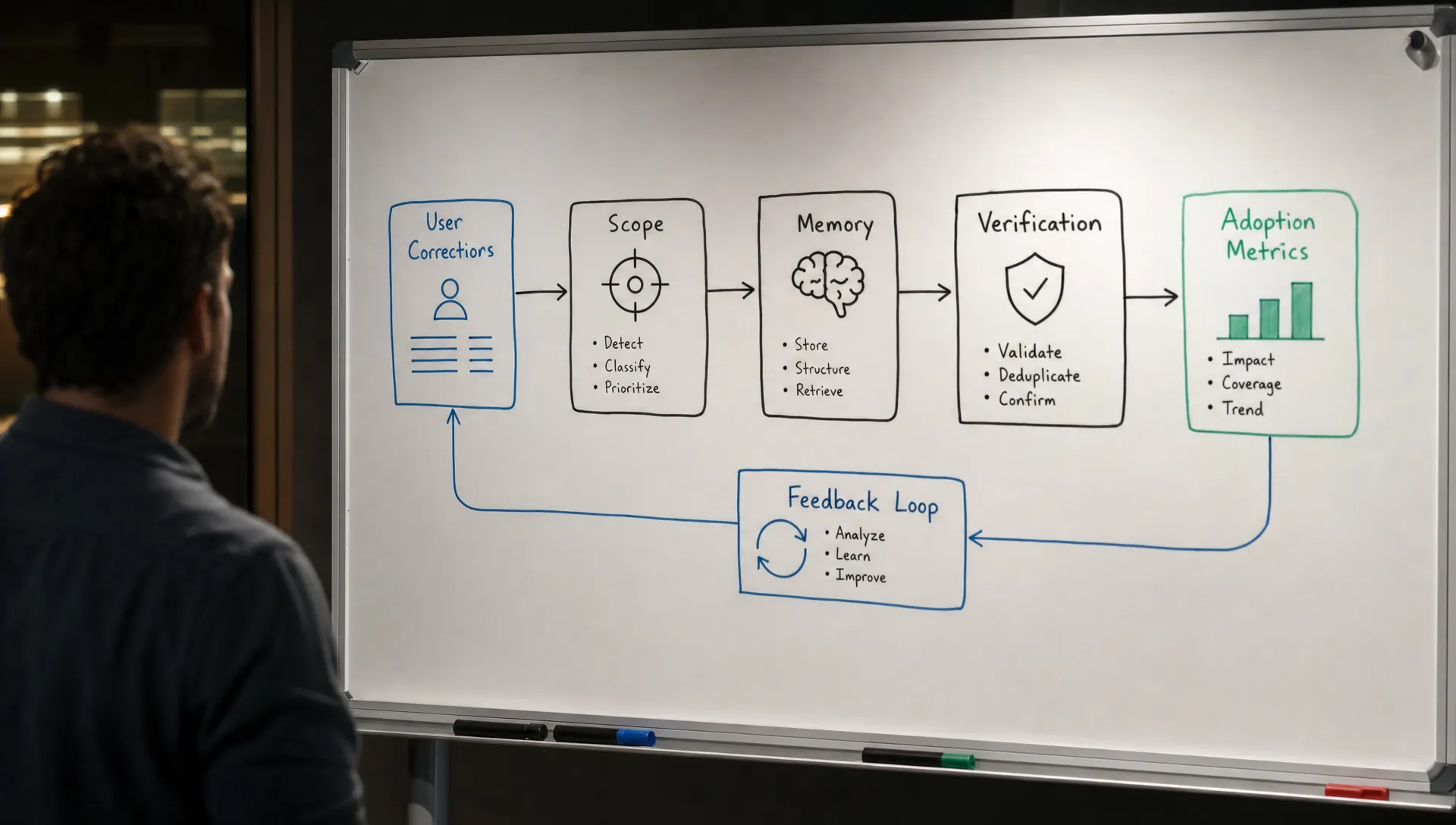
When AI product adoption improves from corrections
Corrections help adoption when users see their effort compound. Not in a vague “model improvement” someday. Inside the next attempt, the next document or the next workflow where the same issue would have appeared.
Three product decisions matter more than a better feedback button.
Ask what scope the correction should have
A correction needs scope. The safest first move is not automatic personalization. It is asking the user where the learning should apply.
Good scopes are concrete: this response, this document, this project, this workspace or future outputs like this. Each scope implies a different level of risk. Saving “make it shorter” forever is usually bad. Saving “release notes should start with customer impact, then list fixes” for a release-notes workflow is useful.
The product should not make the user manage a memory system. But it should give them control when a correction could affect future work.
Translate the correction into a rule users can inspect
“Thanks for the feedback” is not enough. It confirms receipt, not learning.
A stronger response turns the correction into a visible rule: “I’ll avoid internal acronyms in customer-facing summaries” or “I’ll use the approved product name instead of the abbreviation.” Now the user can confirm, edit or reject the learned rule.
This is also where trust forms. Users do not trust AI because it claims to improve. They trust it when they can see what it changed and recover when the change is wrong.
Keep repair close to the mistake
If one paragraph is wrong, do not force a full regeneration. If one code block needs a different pattern, do not ask the user to re-prompt the whole file. If one field in a CRM summary is wrong, let the user correct that field in place.
Products like Cursor and Grammarly work well in many editing contexts because correction happens near the artifact. The user does not have to judge a whole generated object at once. They can accept, reject or modify smaller pieces.
That pattern is often better for AI user retention than asking users to provide broad thumbs-up feedback after the task is over.
The metrics that tell you whether learning is working
Correction volume alone is a weak metric. More corrections can mean users are engaged, or it can mean the product keeps failing in the same way.
Track whether correction reduces future effort:
- Repeat correction rate: how often users make the same kind of correction again.
- Time to usable output: how long it takes after the first correction to reach something accepted.
- Follow-up acceptance rate: whether the next output after a correction is used.
- Memory override rate: how often users edit, disable or delete learned preferences.
- Scope changes: whether users frequently downgrade “always remember” to “just this time.”
- Abandonment after correction: how often users leave the workflow after correcting once.
These AI adoption metrics tell you whether the learning loop is improving the product or just collecting feedback.
The product decision: learn less, learn clearer
Most teams do not need more automatic learning. They need clearer learning.
A product that learns too aggressively becomes creepy or unpredictable. A product that learns too little makes users feel ignored. The middle ground is explicit, scoped adaptation: show what was learned, let the user set where it applies and make it easy to undo.
Before adding another feedback control, ask one blunt question: when a user corrects the AI, what exactly becomes different next time?
If the answer is “we log it,” the user experience has not learned anything. Your analytics has.
Frequently Asked Questions
Does every user correction improve the AI model? No. In many products, corrections only affect the current session or become feedback for later analysis. They do not automatically retrain the model or change future outputs unless the product has built that path.
Should AI products remember every user edit? No. Many edits are one-off task changes. Remembering them can make future outputs worse. The product should ask for scope when a correction looks reusable.
How do I know users expect the AI to learn? Look for repeated phrasing like “as I said,” “remember,” “same as before” or repeated manual edits to the same output type. Those are signs the user believes prior corrections should matter.
What is the safest first version of correction learning? Start with visible, scoped preferences. Let users save a correction as a rule for a specific workflow, inspect it later and delete it if it causes bad outputs.
A practical next step
If corrections are not improving retention, diagnose the break before tuning prompts. The free AI product triage tool can help map the visible symptom to a likely adoption problem.
If you want a deeper framework, the AI Product Adoption Deck includes diagnostic cards, action cards and workshops for turning symptoms like ignored corrections into concrete product decisions. Use it when “users gave feedback” is not translating into users coming back.