What AI in Enterprise Needs Beyond a Working Model
AI in enterprise needs more than a good model. Learn the product, workflow, trust, and measurement systems that turn pilots into adoption.

You shipped the model. It works in the demo. It answers the test prompts. The pilot team says the output is “pretty good.”
Then enterprise rollout gets quiet.
Usage concentrates in a few friendly users. Managers ask for more controls. Legal wants review paths. Operators copy the output into another tool, rewrite half of it, then stop coming back. Sales still says the model is strong, but product metrics say the feature has not become part of work.
That is the normal failure mode for AI in enterprise. The model can work and the product can still fail.
A working model proves capability. Enterprise adoption requires a system around that capability. Users need to know when to use it, what context it has, how much to trust it, who owns the output, and where the work goes next.
A working model is only the first acceptance test
Most AI product teams over-index on the moment of generation. Can the model draft the summary? Can it classify the ticket? Can it suggest the next step? Can it answer the question?
Those are useful tests, but they are not enterprise adoption tests.
Enterprise users do not just ask, “Can this produce something useful?” They ask a more operational set of questions:
- Can I use this without violating policy?
- Do I know what data it used?
- Can I explain the output to someone else?
- Can I edit or reject it without breaking the workflow?
- Does this replace an existing step or create another one?
- Who is responsible if the output is wrong?
If the product does not answer those questions inside the experience, users answer them themselves. Usually by slowing down, adding manual review, or avoiding the feature entirely.
This is why enterprise AI often looks better in pilots than in production. Pilots compress the messy parts. They have motivated users, narrow use cases, extra support from the vendor, and lower stakes. Production exposes the real adoption surface.
The failure mode: model success with product ambiguity
When AI in enterprise stalls, teams often blame the model first. Sometimes they are right. If the output is consistently wrong under realistic context, model quality matters.
But many adoption failures are not model failures. They are ambiguity failures.
The user does not know the right input. The output arrives in the wrong format. The confidence signal is missing. The edit path is awkward. The handoff to the next tool is unclear. The manager does not know how to monitor use. The buyer cannot tell whether this is replacing spend or adding work.
That is why enterprise adoption so often breaks at the workflow layer. The model produces an artifact, but the artifact does not land cleanly inside the organization’s actual process.
The product job is not just to generate. It is to make generated work usable, reviewable, and repeatable.
What enterprise AI needs around the model
The useful diagnostic is simple: if the model works, ask what is missing around it.
| Symptom after launch | Likely missing layer | Product response |
|---|---|---|
| Users generate outputs but do not apply them | Destination fit | Shape output for the next system, decision, or artifact |
| Trial is high but repeat use is low | Workflow trigger | Anchor the feature to a recurring moment, not a generic assistant entry point |
| Users rewrite most of the output | Trust and control | Add source visibility, constraints, editable structure, and correction paths |
| Managers slow or block rollout | Governance surface | Define permissions, review states, usage boundaries, and auditability |
| Adoption stays inside one team | Operational packaging | Support role-based onboarding, admin setup, and cross-team handoffs |
This table is intentionally not about model architecture. A better model may improve output quality, but it will not automatically solve unclear ownership, weak workflow fit, or missing review paths.
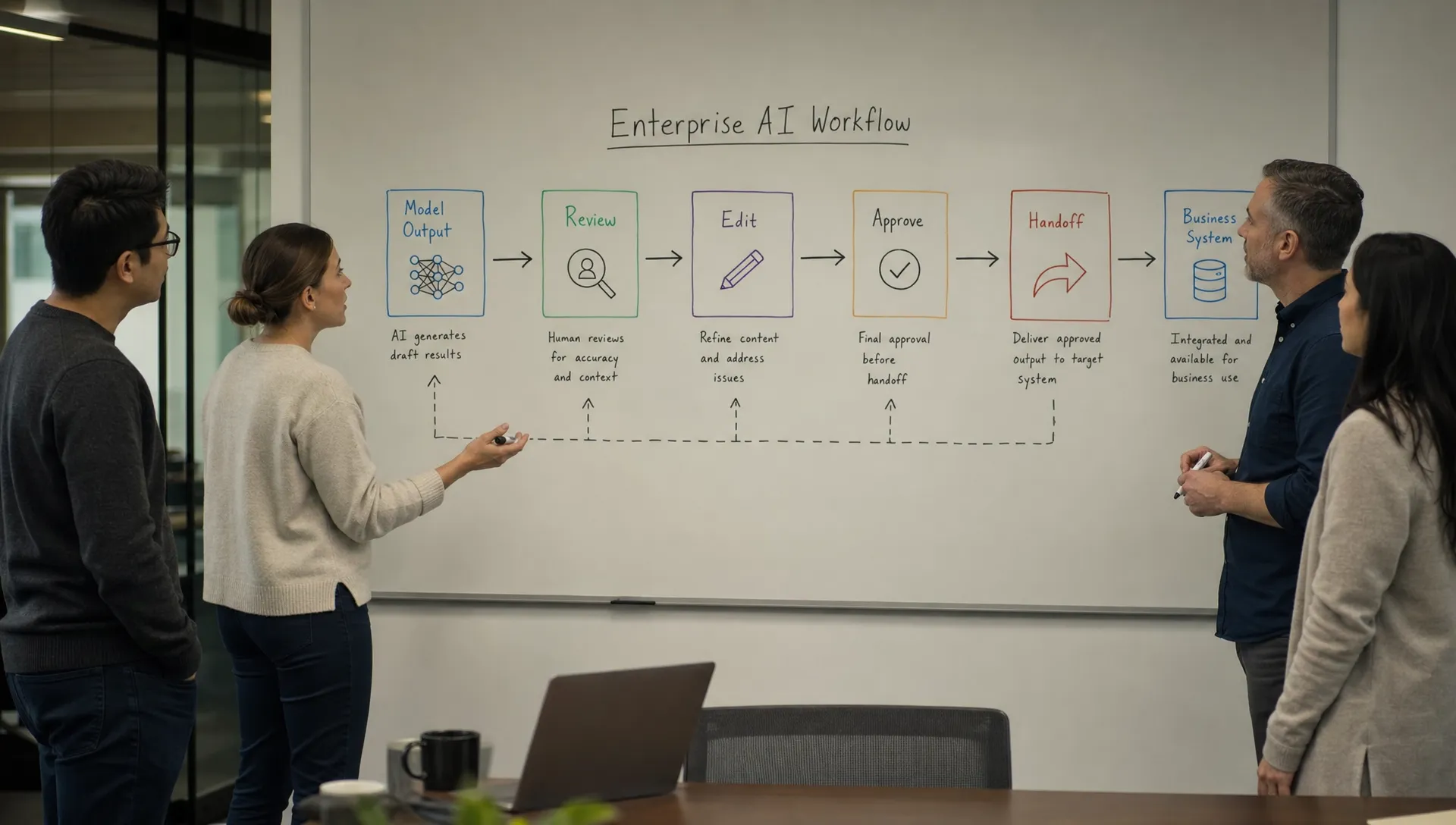
The five systems enterprise AI needs beyond generation
A trigger system
Users should not have to remember that the AI feature exists. The product should appear at the moment where the work naturally starts.
A generic “Ask AI” button is rarely enough in enterprise workflows. It puts the burden on the user to translate their task into a prompt. That creates prompt paralysis, especially for users who are not early adopters.
Better triggers are tied to recognizable work moments: a sales call just ended, a support ticket changed status, a campaign brief is incomplete, a contract clause needs review, or a customer account has new risk signals.
The question is not, “Where can we place the AI button?” It is, “What recurring work moment tells the user this feature is now useful?”
A context system
Enterprise users trust AI more when they can see what the product already knows.
If the user has to paste context every time, adoption will skew toward power users. If the model uses hidden context, users may distrust the output. The product needs to make context visible enough to support judgment.
That does not mean showing every token or system instruction. It means answering practical questions: which customer record, document, policy, meeting, ticket, or dataset shaped this output?
A good context system reduces both effort and suspicion. The user should be able to say, “I understand what this was based on,” before they decide whether to use it.
A trust system
Trust is not a vibe. It is a product surface.
Enterprise AI needs cues that help users decide what level of review is required. That might include citations, source links, confidence bands, assumptions, missing information, policy flags, or clear statements about what the system did not check.
The mistake is presenting every output with the same visual confidence. A draft email, a financial recommendation, and a compliance-sensitive classification should not feel equally final.
The product should communicate output state. Is this a suggestion, a draft, a recommended decision, or an approved action? If users cannot tell, they will either over-trust or under-use the system.
A correction system
Every AI feature needs a correction loop. Not just a thumbs up or thumbs down button.
Users need to fix the output in the flow of work. They need to edit fields, reject sections, add constraints, regenerate part of the answer, and preserve the parts that worked. If correction means starting over, users will leave.
This matters because enterprise adoption is often won in the second and third interaction, not the first. The first output rarely needs to be perfect if the product makes it cheap to steer.
A weak correction system creates output abandonment. The user sees potential, but the path from “almost useful” to “usable” is too expensive.
A handoff system
AI output usually has a next owner.
A support macro goes to an agent. A forecast goes to a manager. A campaign brief goes to a designer. A risk summary goes to legal. A code suggestion goes into a repository. In each case, the product has to define what happens after generation.
If the handoff is fuzzy, users hesitate. They do not know whether they are approving, forwarding, editing, escalating, or documenting. The AI becomes an extra tab instead of a workflow step.
This is a common break in AI at work: the human handoff is not explicit enough. The output may be useful, but no one knows what action it authorizes.
The stack question: replace, extend, or duplicate?
AI in enterprise rarely enters an empty room. It enters a stack full of tools, workflows, renewals, permissions, and habits.
That creates a positioning problem. If your AI feature overlaps with existing tools, users may not know whether to use it instead of the old workflow or alongside it. If it only adds another place to check, the feature may increase cognitive load even when the output is good.
Marketing teams feel this quickly because their stacks are already crowded. Before adding another AI layer to campaign planning, content ops, analytics, or lifecycle work, teams often need to understand where capabilities already overlap. A tool like StackOverlap can help audit redundant martech capabilities and identify consolidation opportunities, which is useful context before deciding whether an AI feature should replace, extend, or integrate with the current stack.
For product teams, the decision frame is blunt:
- If the AI replaces a step, remove or demote the old step.
- If the AI extends a workflow, make the handoff obvious.
- If the AI duplicates a tool, explain why this version belongs in the product.
Do not ask enterprise users to resolve your positioning ambiguity. They will resolve it by staying with the tool they already understand.
Measure applied work, not generated output
Generation count is a weak adoption metric.
It tells you that users tried the feature. It does not tell you whether the output created value. A team can have high generation volume and low adoption if users are sampling, testing, or abandoning outputs.
Better metrics sit downstream:
- Output accepted or inserted into workflow
- Draft edited and sent
- Recommendation approved or rejected
- Time from generation to handoff
- Repeat use at the same workflow moment
- Reduction in manual rework
The key is to measure the applied artifact, not just the model interaction.
If a user generates five summaries and uses none, that is not five wins. It is a signal that the output is not landing. If a user generates one summary every week and sends it with light edits, that is adoption.
A practical diagnostic before blaming the model
Before you open a model-quality project, inspect the adoption path. Pick one high-intent user session where the AI output was generated but not used.
Ask five questions:
- What triggered the user to try the feature?
- What context did the product provide or require?
- What made the output hard to trust?
- What edit or correction path did the user have?
- Where was the output supposed to go next?
If you cannot answer those from your product telemetry, session review, or user interviews, you do not yet know that the model is the problem.
You know adoption broke somewhere around the model.
That distinction matters. Model work is expensive and slow. Product changes around triggers, context, trust, correction, and handoff are often faster to test. They also tell you whether better model quality would actually move the metric.
When the answer really is model quality
There are cases where the model is the issue.
If users provide the right context, understand the task, trust the workflow, have a clear review path, and still reject the output because it is factually wrong, incomplete, or too generic, then model quality deserves attention.
But that should be a conclusion, not a reflex.
A lot of AI product teams treat “make the model better” as the default response because it feels measurable. Eval scores, benchmark comparisons, and prompt experiments are easier to discuss than organizational ambiguity.
Enterprise adoption is messier. It depends on how work moves, who approves it, what users are allowed to trust, and whether the output fits the next step.
A working model is necessary. It is not the product.
Frequently Asked Questions
What does AI in enterprise need beyond model quality? It needs workflow triggers, visible context, trust cues, correction paths, governance surfaces, and clear handoffs. These layers turn model output into usable work.
Why do enterprise AI pilots succeed but rollout fails? Pilots often have motivated users, narrow tasks, and extra support. Rollout exposes policy, workflow, ownership, trust, and integration gaps that the pilot did not test.
How should product teams measure enterprise AI adoption? Measure applied work. Track whether outputs are accepted, edited, sent, approved, reused, or handed off. Generation volume alone is not enough.
When should a team focus on improving the model? Focus on the model when users understand the task, provide the right context, have a usable workflow, and still reject outputs because they are inaccurate or not useful.
The next product decision
If your enterprise AI feature has a working model but weak adoption, do not start with a broad redesign. Pick the most common abandonment point and diagnose the missing layer around it.
Is the trigger unclear? Is the context hidden? Is trust unsupported? Is correction too expensive? Is the handoff undefined?
If you want a structured way to run that diagnosis, the AI Product Adoption Deck maps these post-launch symptoms to action cards and workshop templates. Use it to choose the next product decision, not to create another strategy deck.