Enterprise AI Adoption Breaks at the Workflow Layer
Enterprise AI adoption breaks when AI output does not fit the workflow. Learn how to diagnose handoffs, trust gaps, and abandoned outputs.

Your AI feature made sense in the pilot. Users liked the demo. The first accounts tried it. A few power users even said it saved time.
Then rollout hit the real organization.
Usage flattened. Outputs were generated but not acted on. Teams kept their old spreadsheets, tickets, docs, and approval threads. Sales reps still wrote their own account notes. Analysts still rebuilt the AI summary before presenting it. Managers still asked, “Where did this come from?”
That is the workflow-layer failure.
Enterprise AI adoption rarely breaks because nobody understands AI. It breaks because the AI output does not land cleanly inside the work system where decisions, approvals, edits, and accountability already happen.
The feature may be useful. The model may be good enough. The problem is that the product has not answered a more basic question: what exactly happens after the AI produces something?
The workflow layer is where usefulness becomes behavior
In enterprise products, work is not just a task. It is a chain of objects, roles, systems, and handoffs.
A support manager does not “use AI to summarize tickets.” They review escalations, prepare a weekly operations readout, assign follow-up owners, and defend the numbers in a meeting.
A salesperson does not “use AI to draft an email.” They qualify an account, check CRM context, adjust messaging for the buyer, send through an approved system, and log the touchpoint.
A compliance analyst does not “use AI to classify risk.” They collect evidence, apply policy, document the rationale, and leave an audit trail.
The workflow layer includes the practical details that decide whether an AI feature becomes part of normal behavior:
- The system where the work starts
- The object the user is trying to change
- The person responsible for the next step
- The format required for approval or sharing
- The evidence needed to trust the output
- The place where the final artifact must live
- The exception path when the AI is wrong
If your AI feature sits outside that chain, users may still try it. They may even praise it. But they will not build a habit around it.
The symptom is not “low adoption.” It is usually one of these breaks
Teams often collapse every post-launch problem into one metric: adoption is low. That is too vague to be useful.
At the workflow layer, the pattern matters. Different symptoms point to different product failures.
| Symptom | Likely workflow break | Product response |
|---|---|---|
| Users generate outputs but do not save, send, or apply them | The output is not tied to a downstream action | Add a clear next step, destination, or object-level action |
| Users copy AI output into another tool before using it | The format does not match the real workflow | Match the structure, fields, tone, and constraints of the target artifact |
| Managers ask users to verify everything manually | Trust is unresolved at the point of decision | Attach sources, assumptions, change history, or review states |
| Users try it once during onboarding but stop in week two | The feature is interesting but not attached to a recurring work moment | Reposition it around a repeated job, not a generic capability |
| Power users succeed, average users stall | The workflow depends on hidden expertise | Add templates, defaults, examples, and guardrails around the prompt or input |
| Teams disagree on who owns the AI result | The human handoff is unclear | Define who reviews, edits, approves, and acts |
This is why enterprise AI adoption can look healthy in a pilot and weak in production. Pilots measure whether the feature can produce value in a controlled setting. Rollout measures whether that value survives the real workflow.
If you want the adjacent failure mode, where the pilot works but the organization cannot absorb the product, this breakdown of why enterprise AI fails after the pilot is worth pairing with this one.
Pilots hide workflow problems
A pilot is a bad test of workflow fit unless you design it to expose handoffs.
In a pilot, users are usually motivated. They tolerate awkward steps. They explain missing context. They copy and paste. They ask the product team for help. They treat the AI feature as a project.
In production, users treat it as work.
That difference matters. In production, a useful AI output still has to compete with deadlines, permissions, manager expectations, audit requirements, and existing habits. If using the AI creates extra cleanup, extra explanation, or extra risk, the user will go back to the old path.
The old path may be slower, but it is legible.
This is the part many AI teams underestimate. Enterprise users do not only ask, “Is this output good?” They ask:
- Can I defend this if someone challenges it?
- Can I edit it without breaking the workflow?
- Can my team see what changed?
- Can this be approved, logged, exported, or reused?
- If it is wrong, who catches it?
If the product does not answer those questions, users create their own workaround. Workarounds are early evidence that the workflow layer is broken.
Trust is a workflow design problem, not a banner
Many enterprise teams respond to low AI adoption by adding trust signals. Confidence scores. Disclaimers. “AI-generated” labels. Maybe a source list.
Some of that helps. But trust does not live in a banner. Trust lives at the moment of action.
If a user needs to send a customer-facing email, the trust question is: “Can I send this without creating risk?”
If a manager needs to approve a forecast summary, the trust question is: “Can I see what numbers this is based on?”
If an analyst needs to recommend a portfolio adjustment, the trust question is: “Can I compare this recommendation against real behavior, performance, and assumptions?” That is why products built around evidence, such as private portfolio benchmarking from Upside Invest, are a useful reference point. The insight is more usable when the user can inspect the comparison basis, not just receive a suggestion.
The same principle applies inside enterprise software. Do not ask users to trust the AI in the abstract. Show the evidence they need for the specific next step.
For example, if your AI generates a sales account brief, trust may require CRM fields, last-touch history, source citations, and a visible “needs review” state. If your AI drafts a legal clause, trust may require policy references, clause comparisons, and mandatory approval routing. If your AI summarizes customer feedback, trust may require links back to source tickets and a way to exclude low-quality inputs.
The product decision is not “add confidence.” The product decision is “what would make this safe enough to use here?”
Format mismatch kills otherwise good AI output
A common workflow-layer failure is output abandonment. Users read the AI result, agree with parts of it, then rebuild it somewhere else.
That is not always a model failure. Often the output is trapped in the wrong shape.
A summary that appears as a paragraph may need to become CRM fields. A recommendation may need to become a Jira ticket. A strategy draft may need to become a slide-ready outline. A risk classification may need to become an auditable decision record.
When users manually reshape outputs, they are telling you what the product should have done.
Look for these behaviors:
- Copying AI output into docs, spreadsheets, tickets, or email
- Deleting most of the output but keeping the structure
- Asking the AI for the same format repeatedly
- Creating team-specific prompt templates outside the product
- Adding manual source links before sharing the result
These are not edge cases. They are workflow requirements showing up as user labor.
The fix is usually not a bigger generation box. It is tighter integration with the object the user already works on.
The human handoff has to be explicit
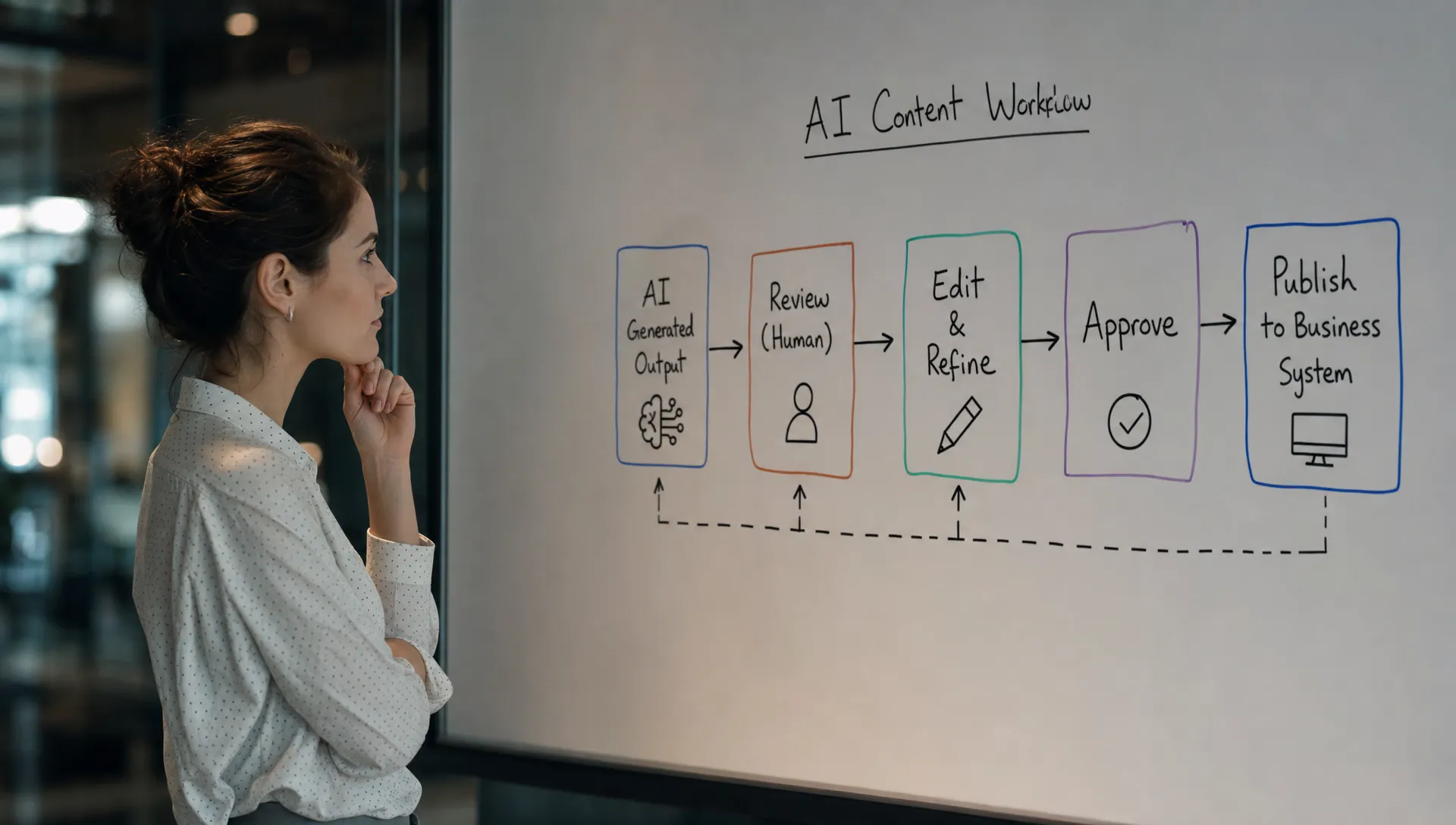
Enterprise AI products often fail between “AI produced something” and “a human did the next thing.” That gap is where accountability gets fuzzy.
Who owns the output after generation? Is the user approving it, editing it, delegating it, or just reviewing it? Can someone else see that it has not been reviewed yet? Can the AI result move forward without a human sign-off?
If this is unclear, teams slow down. They add meetings. They create side channels. They avoid the feature in sensitive workflows.
A strong handoff defines the state of the output. For example:
| Output state | Meaning | Required product support |
|---|---|---|
| Draft | AI created a starting point | Easy editing, regeneration, and version comparison |
| Reviewed | A human checked it | Reviewer identity, timestamp, and change history |
| Approved | It can be used in the workflow | Permissioning, lock state, and routing |
| Published or applied | It changed a customer, record, report, or process | Audit trail and rollback path |
This is especially important in work settings where AI output affects customers, revenue, compliance, hiring, finance, or operations. If the handoff is vague, adoption slows for rational reasons.
The deeper pattern is covered well in this piece on why AI at work fails when the human handoff is fuzzy.
Diagnose the workflow layer before changing the model
When an AI feature underperforms, the easiest internal move is to blame quality. Sometimes that is correct. But many teams tune the model before they understand the adoption break.
Start with a workflow trace. Pick one important use case and follow a real user from trigger to completed work.
Do not stop when the AI output appears. That is the midpoint, not the finish line.
Ask these questions:
- What caused the user to enter this flow?
- What object were they trying to create, update, decide, or send?
- What did the AI produce?
- What did the user do immediately after seeing it?
- Where did the output need to go next?
- Who else needed to trust, approve, or reuse it?
- What manual work happened outside the AI feature?
- What risk made the user hesitate?
- What metric proves the work was completed, not just generated?
That last question matters. “Outputs generated” is rarely the right success metric. In workflow-layer adoption, better metrics are closer to completed behavior: briefs saved to CRM, tickets created from summaries, drafts sent after review, decisions logged, reports approved, recommendations applied, or follow-up tasks completed.
If the output is generated but the work is not completed, you do not have adoption. You have activity.
What to change first
Do not try to redesign the whole enterprise workflow in one release. Pick the highest-friction handoff and make it cleaner.
A practical sequence looks like this:
- Choose one recurring work moment: Avoid broad promises like “AI assistant for operations.” Pick a specific moment, such as preparing a renewal brief, triaging escalations, drafting a compliance note, or summarizing a customer call.
- Define the output contract: Decide whether the AI result is a draft, recommendation, classification, explanation, or completed artifact. Each one needs different UX.
- Attach the next action: Let the user save, send, assign, approve, edit, cite, export, or apply the output where the work already happens.
- Add evidence at the decision point: Sources, assumptions, inputs, timestamps, reviewer states, and diffs should appear where the user needs confidence.
- Measure completed workflow behavior: Track the downstream action, not just generation, clicks, or prompt volume.
If you are not sure which symptom you are dealing with, the free AI product triage tool can help classify the adoption break before you jump to solutions. If you want a deeper internal working session, the AI Product Adoption Deck includes diagnostics, action cards, and workshop templates built around these exact failure points.
Frequently Asked Questions
What is the workflow layer in enterprise AI adoption? The workflow layer is the set of systems, roles, handoffs, formats, approvals, and follow-up actions that surround the AI output. It is where a generated result either becomes real work or gets abandoned.
How do I know if low AI adoption is a workflow problem? Look for users generating outputs but not applying them, copying results into other tools, asking for manual verification, or stopping after initial curiosity. Those patterns usually mean the product is not connected to the real work path.
Is this different from an AI model quality problem? Yes. Model quality is about whether the output is accurate or useful. Workflow fit is about whether the user can trust, edit, approve, share, and act on that output inside their job. You can have good output and still have poor adoption.
Should enterprise AI features always be embedded into existing tools? Not always, but the output must connect to the system of record or the next action. If users have to manually move, reformat, or defend the result every time, habit formation will be weak.
What metric should we use instead of outputs generated? Use a metric tied to completed work. Examples include AI drafts sent after review, summaries saved to records, recommendations approved, tickets created, decisions logged, or follow-up actions completed.
The blunt version: your enterprise AI feature does not need more novelty. It needs a cleaner path from output to accountable work.
Find the handoff. Fix that first.