What AI Failure Looks Like in Real Product Usage
AI failure rarely looks like a crash. Learn the real usage signals behind weak trust, abandoned outputs, and repeat-use drop-off.

The feature is live. Users click it. They generate something. The launch dashboard looks fine for a week.
Then repeat use flattens. The output rarely gets inserted, shared, approved, or used in the next step. Support does not explode. Users do not always complain. They just work around it.
That is what AI failure often looks like in real product usage. Not a model outage. Not a dramatic rejection. More often, it is a quiet gap between “the AI produced something” and “the user trusted it enough to move work forward.”
For product teams, this matters because the wrong diagnosis leads to the wrong fix. If you treat every adoption problem as a model quality problem, you will keep tuning the system while the actual break sits in the workflow, the UI, the handoff, or the user’s ability to check the answer.
AI failure is usually a behavior pattern
In real products, AI failure does not start with a bad demo. Demos are forgiving. The user has a clear task, the context is preloaded, the presenter knows what to type, and nobody has to own the consequences of the output.
Live usage is different. The user is busy. The source data is messy. The prompt is underspecified. The answer needs judgment. The next step sits in another workflow. The user has to decide whether the output is safe enough to use.
So the failure shows up as behavior, not opinion.
| Usage signal | What the team may think | More likely diagnosis |
|---|---|---|
| High first-use rate, low second-use rate | The novelty wore off | The feature solved a demo task, not a recurring job |
| Many generations, few accepted outputs | Users are exploring | Users are stuck in a trust or fit loop |
| Heavy editing after generation | The AI is helpful but imperfect | The output is not landing in the right format or level of specificity |
| Users copy output elsewhere, then disappear | The feature is flexible | The product lost the workflow after generation |
| Users ask support how to prompt | They need education | The feature requires too much intent formation upfront |
| Outputs are viewed but not acted on | The answer is useful | The handoff to action is unclear or too risky |
The key question is not “did the model respond?” It is “did the response change what the user did next?”
If it did not, you are not looking at successful adoption. You are looking at contained curiosity.
The common mistake: measuring generation as activation
AI teams often overcount activation because the generation event is easy to instrument. A user clicks “summarize,” “draft,” “analyze,” or “generate.” The backend returns a response. The product logs success.
But generation is only the midpoint. In many AI products, the real activation event is downstream:
The sales rep uses the account summary to write the next email. The analyst cites the generated insight in a report. The designer accepts a suggested rewrite. The developer keeps the code suggestion. The support agent sends the response with minor edits.
If you stop measuring at generation, you miss the adoption break. This is why it helps to diagnose the real AI problem in your product by tracing the full path from trigger to output to user action.
A cleaner event chain usually looks like this:
| Stage | Healthy signal | Failure signal |
|---|---|---|
| Trigger | User starts from a real task | User starts from curiosity or empty exploration |
| Context | Product supplies enough task context | User must manually explain too much |
| Output | Response is specific enough to evaluate | Response is generic, plausible, or hard to compare |
| Verification | User can check claims quickly | User must leave the workflow to verify |
| Handoff | Output moves into the next step | Output sits in a preview, modal, or dead end |
| Return | User comes back for the same job | User only tries it once |
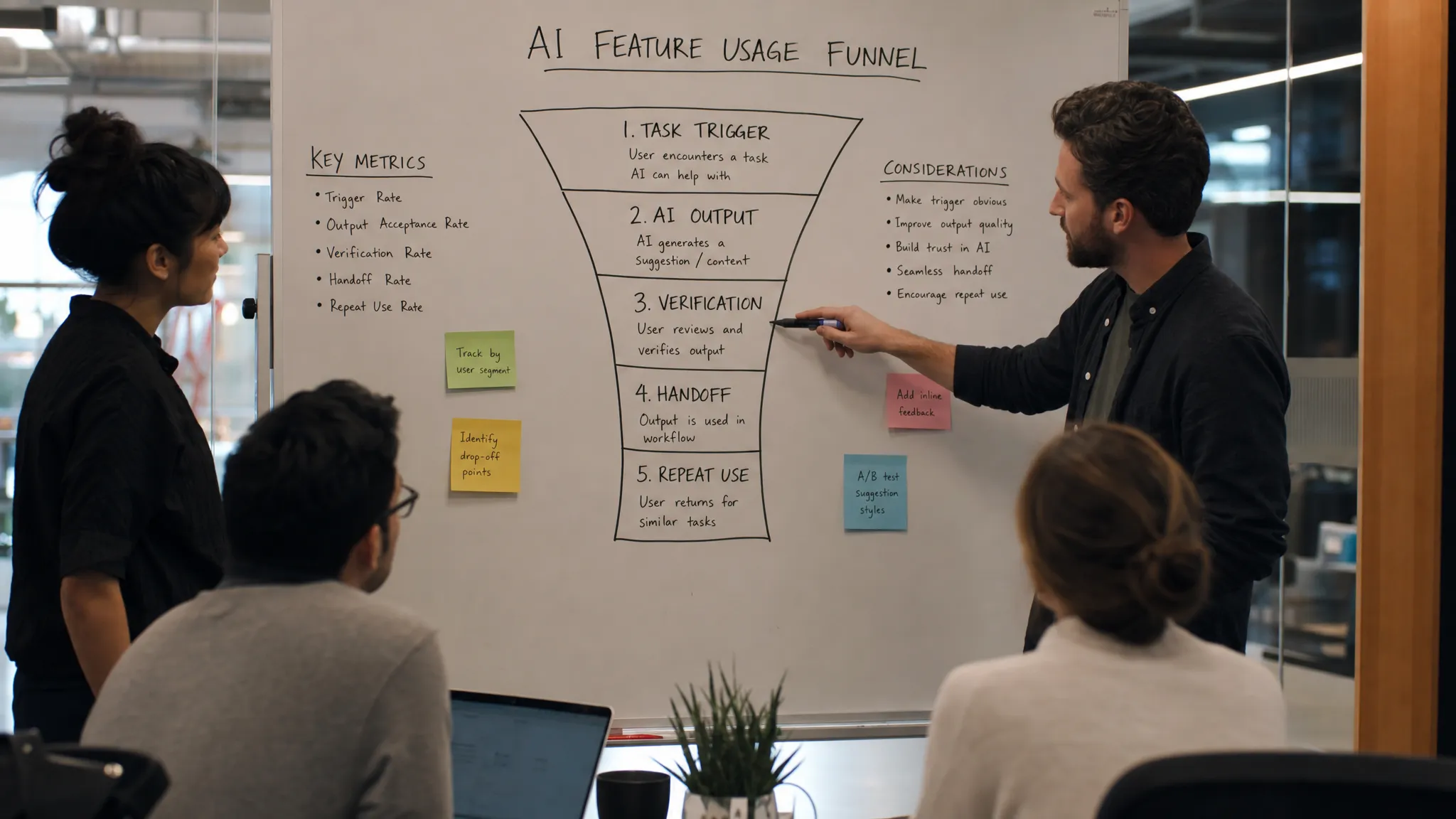
Five ways AI failure shows up after launch
1. Prompt paralysis
The user opens the AI feature and sees an empty box. The product expects them to know what to ask, how much context to provide, and what a good answer should look like.
This works in demos because the prompt is part of the script. It fails live because the user is not trying to “use AI.” They are trying to finish a job.
The fix is rarely “add more prompt tips.” The better question is: what intent can the product infer from the page, object, role, recent activity, or workflow state?
If the AI feature needs a perfect prompt before it can be useful, adoption will concentrate among power users and stall with everyone else.
2. Output abandonment
Output abandonment happens when users generate something, read it, and do nothing with it.
Sometimes the output is bad. More often, it is orphaned. It is not attached to a destination. It does not map to a user decision. It is not clear whether the user should accept, edit, compare, cite, send, save, or escalate.
This is where product shape matters. A tool built around a concrete object and action, for example a file workflow like Cloudon’s Telegram-first AI file control, has a different adoption surface than a blank assistant because the AI action is close to uploading, summarizing, sharing, and controlling access to the file. The lesson is not that every product should work that way. The lesson is that AI output needs a clear object and a next action.
If the output has no obvious next step, users will treat it like a suggestion, not part of the workflow.
3. Trust decay
Trust does not only drop when the AI is wrong. It drops when the user cannot tell whether it is right.
This is a common failure in summarization, research, analysis, recommendations, and any workflow where the user is accountable for the result. If checking the answer takes as much work as doing the task manually, the AI has not saved time. It has moved effort into verification.
Healthy AI UX gives users a way to inspect the source, compare alternatives, see uncertainty, or understand why an answer was produced. If users have to open five tabs, search the original document, or ask the AI to justify itself repeatedly, trust will decay fast.
This is why products that depend on AI-generated claims need to help users verify outputs quickly, not just generate cleaner prose.
4. Correction loops with no learning
Some editing is normal. AI output often needs user judgment. The problem starts when users correct the same issue every time and the product does not absorb that correction.
You see this in repeated tone fixes, formatting changes, terminology changes, policy corrections, and role-specific rewrites. The user is training the product informally, but the product behaves as if every session starts from zero.
This creates a specific kind of fatigue. Users do not say “the AI is useless.” They say “it gets me 60 percent there,” then slowly stop using it because the last 40 percent is always the same manual cleanup.
The product question is simple: which corrections should become preferences, defaults, examples, reusable context, or workflow rules?
5. One-time usefulness without habit
Some AI features are genuinely useful once. That still does not mean they become part of the product’s retention loop.
A user may summarize a document, generate a draft, or analyze a dataset and think, “nice.” Then there is no recurring trigger. No saved context. No reason to return. No visible improvement the next time.
This is where many AI-native products lose users after week one. The product delivers a moment of value, but not a repeated pattern of value. The output is consumed, not carried forward.
Habit requires a recurring job, a trigger inside the user’s normal workflow, and some compounding benefit. Without that, the feature stays in the category of “useful when I remember it exists.”
How to diagnose the break before prescribing the fix
Do not start with a roadmap brainstorm. Start with the failure shape.
First, find the last point where user behavior still looks healthy. Are people entering the feature? Supplying context? Generating? Editing? Accepting? Sharing? Returning? The break usually sits one step after the metric the team is celebrating.
Second, separate output quality from output usability. A technically correct answer can still be unusable if it is too generic, hard to verify, poorly formatted, or disconnected from the next action.
Third, watch real sessions. Not highlight clips. Real attempts where the user brings their own task. Look for pauses, rewrites, tab switching, repeated regenerations, and moments where the user reads the answer but does not act.
Fourth, ask what risk the user takes by trusting the output. The higher the risk, the more the product needs verification, provenance, preview, approval, or reversibility.
Finally, decide what kind of failure you have. A trust gap needs different product work than a workflow gap. Prompt paralysis needs different work than weak retention. Treating all of them as “make the AI better” is how teams burn quarters without moving adoption.
Frequently Asked Questions
What is AI failure in product usage? AI failure is when an AI feature produces output but does not help the user complete a real task, make a decision, or return for repeated use. It is a product adoption problem, not just a model performance problem.
How can we tell if users do not trust AI output? Look for repeated regenerations, heavy manual checking, low acceptance rates, copy-paste into external tools, and users abandoning the output before taking action. These are often stronger signals than survey responses.
Is low AI feature retention always a model quality issue? No. Low retention can come from weak workflow fit, unclear handoff, missing context, poor verification, or no recurring trigger. The model may be good enough while the product experience fails around it.
What should we measure instead of generation events? Measure downstream progress. Track whether the user accepted, edited, inserted, shared, approved, cited, or acted on the AI output. Then track whether they return for the same job later.
Use the failure shape as the starting point
AI failure is easier to fix when you name the break precisely. “Users do not like it” is too vague. “Users generate but do not verify,” “users verify but do not hand off,” or “users succeed once but do not return” gives the team somewhere to work.
If you want a more structured way to do that, the AI Product Adoption Deck breaks adoption problems into diagnostics, action cards, and workshops for teams that have already shipped an AI feature and need to understand why usage is not turning into habit.