Use an AI Model Card to Set Safe Product Boundaries
Use an ai model card to define safe product boundaries, enforce permissions and test when your AI feature should draft, pause or refuse.

Users generate a reply, then abandon it. Others send the same kind of output without checking. Your ai model card may describe limitations, but the interface still presents every result as ready to use. The product has no clear boundary between a useful draft and an authorized action.
That creates two different adoption failures. Cautious users do extra verification until the feature stops saving time. Less cautious users assume the system has checked things it cannot check. Better output quality alone will not resolve either problem.
The missing decision is specific: what may this feature do, under which conditions, and where must it stop? Start with one workflow, such as drafting a customer support reply. Use the available model evidence to define its operating limits. Then make those limits enforceable in the product, visible to users and testable by the team.
An ai model card provides evidence, not permission
The original Model Cards for Model Reporting paper proposes documenting intended uses, evaluation conditions, performance characteristics and limitations. That information helps a product team understand what was tested and what remains uncertain.
It does not establish that your particular workflow is safe. A model evaluated on summarization tasks has not necessarily been evaluated on your refund policies, customer records or regional exceptions. It also cannot determine which records a user may access or whether your integration can send messages.
Separate three kinds of evidence:
- Documented capability: What the model provider reports, including limitations and evaluation scope.
- Workflow evidence: What your team has tested using representative tasks, inputs and failure cases.
- Product controls: What your application actually permits, blocks or requires someone to approve.
A provider’s documentation can inform the first category. Your team owns the other two. Treat missing evidence as an unresolved condition, not permission to proceed.
Define permitted, conditional and prohibited use
Avoid a boundary like “use responsibly.” It cannot guide a designer, developer or support agent.
For a support drafting feature, define operating zones around the task and its consequences:
| Operating zone | Example boundary | Product response |
|---|---|---|
| Permitted | Draft a general explanation using the current approved policy | Produce an editable draft with the policy reference |
| Conditional | Recommend a customer-specific resolution that depends on verified order data | Require authorized data access and agent review before use |
| Prohibited | Issue a refund or promise an exception without authorization | Do not expose that action through the drafting feature |
Use an ai model card to identify relevant limitations, then decide which zone each workflow belongs in. An unevaluated language, for example, should not silently inherit the same treatment as a tested language. You might restrict that workflow while collecting evidence.
Make the scope narrow enough to test. “Handles support” is not a boundary. “Drafts English-language explanations of the current returns policy, without changing orders or issuing refunds” is.
These zones describe your product policy. They are not universal claims about what a model can or cannot do.
Turn each boundary into an acceptance criterion
A written restriction is not a control. If the prompt says “never issue refunds” but the system has unrestricted access to a refund tool, the boundary depends on model behavior.
Enforce permissions in application logic. A draft-only feature should not receive action permissions it does not need. Customer data access should follow the user’s authorization, not the model’s request. Sending, publishing and changing records need separately defined controls.
Write acceptance criteria that connect a condition to an observable response:
“When the current policy cannot be retrieved, the feature must not generate a policy-specific recommendation. It should explain that the required source is unavailable and offer a manual path.”
“When a request asks the drafting feature to issue a refund, no refund operation may be invoked. The interface should direct the agent to the authorized refund workflow.”
An ai model card helps explain why a boundary exists; the acceptance criterion specifies how your product must behave.
Review also needs a clear job. “Human in the loop” is weak if the reviewer cannot see the relevant policy, customer facts or proposed change. Match the approval requirement to the consequence, following the principle that AI autonomy should match the cost of being wrong.
Show the boundary at the moment it matters
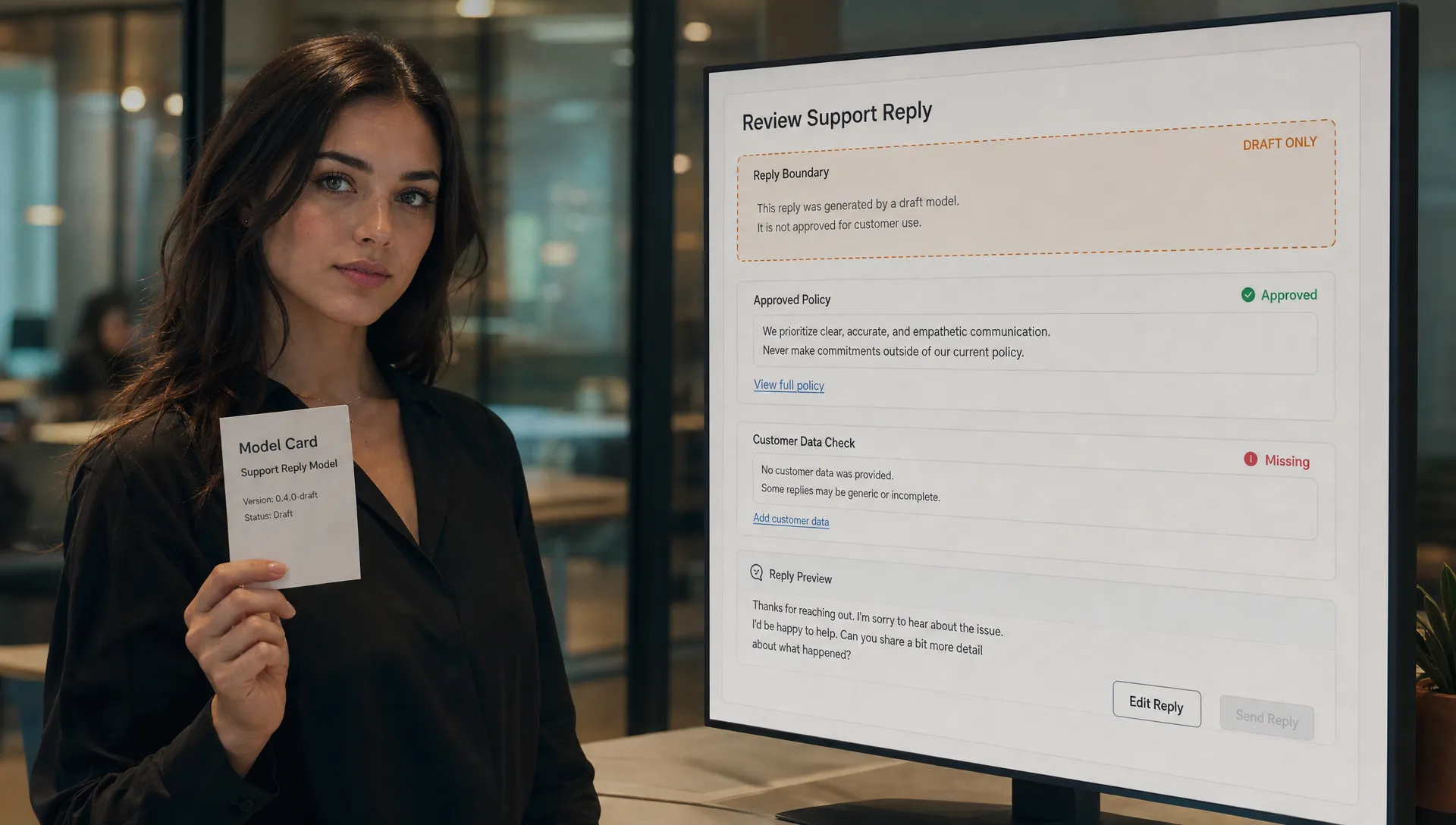
Users should not need to open internal documentation to discover the feature’s limits. Put the boundary where it affects their next decision.
Before generation
State what the feature can access and produce. For example: “Drafts from the selected policy. Cannot view payment history or issue refunds.” Only make those claims if the implementation enforces them.
If essential context is missing, ask for it or stop. Do not let fluent output conceal an incomplete task.
During review
Distinguish generated text from verified facts. Show the relevant source and unresolved conditions. A policy reference supports inspection; it does not prove that every sentence accurately reflects that policy.
Avoid a generic confidence badge that users might mistake for permission to send.
Before action
Show exactly what approval will do. Approving a draft should not quietly authorize future sends, account changes or broader data access. If an external action cannot be reversed, say so before confirmation.
Test whether the product stops correctly
A boundary test is different from an output-quality test. You are checking whether the workflow refuses, pauses or routes the task correctly when its conditions are not met.
For the support example, test an unavailable policy, conflicting policy versions, an unauthorized customer record and a request to execute a refund. Include instructions inside retrieved content that attempt to override the workflow’s rules. Check both the visible response and the actual data or tool access.
Record the expected response before running each case. Otherwise, teams tend to rationalize a plausible answer as acceptable after seeing it.
Treat the ai model card as one input to a versioned boundary test suite, not as a substitute for that suite. Revisit tests when the model, retrieval sources, tool permissions or workflow changes. The same model can create different risks after a product integration changes.
Track boundary failures separately from adoption metrics. Useful measures include outputs released without required context, unauthorized actions executed and approval steps bypassed. A correctly blocked attempt is not a boundary failure.
Then examine friction: how often do valid tasks get blocked, and can users recover? Do not relax a necessary restriction just to improve completion. Improve context collection or narrow the supported task instead. Passing a finite test suite reduces uncertainty; it does not certify that every future case is safe.
Frequently asked questions
Does an ai model card certify that a feature is safe? No. It documents model-level information. Your team still needs workflow-specific evidence, authorization controls and tests of the actual integration.
Should users see the full document? They should see the limits that affect their decisions. Make deeper documentation available where useful, but put access scope, review requirements and action permissions directly in the workflow.
What if the provider’s documentation is incomplete? Name the missing evidence. Restrict the affected use while you evaluate it, or exclude it from the feature’s supported scope. Do not replace absent evidence with reassuring copy.
Start with one failed workflow
Choose one abandoned or overtrusted output. Write its permitted use, required conditions and prohibited actions. Turn each into an acceptance test, then inspect whether the interface communicates the same rules.
If the underlying adoption symptom is unclear, use the free adoption Triage tool to start the diagnosis. For deeper structured work, the AI Product Adoption Deck provides 12 diagnostics, 80 action cards and 12 workshops in a 104-card, 124-page PDF. Use that structure to turn the boundary discussion into concrete product decisions.