The Hidden Trust Cost of AI That Acts Too Soon
AI product adoption suffers when AI acts too soon. Learn how premature automation damages trust and what product teams should change.

Your AI feature may be losing trust before it makes its first visible mistake.
The pattern is familiar. A user opens a workflow, the AI detects intent, fills a field, rewrites a draft, changes a status, sends a suggestion into the main surface or takes the next step automatically. On a demo call, it looks sharp. In real use, people hesitate. They undo. They inspect everything. They stop using the feature unless the stakes are low.
That is the hidden trust cost of AI that acts too soon. The product is not only asking, “Was the output good?” It is asking, “Was the system allowed to move before I understood what it was doing?” For AI product adoption, that second question often matters more than teams expect.
The symptom: speed goes up, adoption does not
Premature AI action usually shows up as a mismatch between apparent usefulness and repeat behavior. Users try the feature. They may even say it is impressive. But activation does not turn into habit.
You see signals like these:
- High first-use completion, low second-week reuse
- Frequent undo, regenerate or discard after automatic actions
- Users copying AI output into a separate editor before using it
- Teams asking for “manual mode” or approval settings
- Support tickets that sound like control complaints, not accuracy complaints
The feature may be solving a real job. The problem is sequencing. The AI moves before the user has set scope, checked the context or decided how much control they want to delegate.
This is why “faster” can backfire. Speed without consent feels like loss of control.
The trust cost in AI product adoption
In normal SaaS workflows, automation can often hide in the background. Users know the rules. A filter applies. A reminder sends. A record syncs. The system behaves in predictable ways.
AI changes the contract. The system is not just executing a rule. It is interpreting intent, generating content, ranking options or changing meaning. That creates an extra trust step before action.
When an AI acts too soon, users pay that cost themselves.
| Product behavior | User interpretation | Adoption risk |
|---|---|---|
| AI edits before showing its plan | “It may change something I did not want changed.” | Undo behavior and lower reuse |
| AI fills context silently | “I do not know what it used.” | Extra inspection and distrust |
| AI publishes or sends too early | “I am accountable for something I did not approve.” | Feature avoidance in real workflows |
| AI selects one path automatically | “It narrowed my options before I chose.” | Users prefer manual workarounds |
| AI hides uncertainty until after action | “I only learn risk when it is too late.” | Over-checking and abandoned output |
This is not only a UX polish issue. It affects AI adoption metrics because the user’s mental model breaks at the moment the product wants habit to form.
If your metrics show good trial usage but weak retention, the issue may not be model quality. It may be premature delegation.
Why acting early works in demos and fails in production
In a demo, the user is watching for possibility. They reward the product for doing more. The context is clean, the task is selected and the stakes are understood.
In production, the user is watching for risk. They have messy inputs, partial context, edge cases, brand constraints, client sensitivity, compliance rules and internal politics. They are not asking whether the AI can act. They are asking whether it should act now.
This is where many AI product tactics miss the real adoption break. The team optimizes the output after the model acts. The user needed a safer moment before the action.
A product can pass every demo expectation and still fail daily use if it skips the user’s control checkpoint.
The three timing mistakes that create trust debt
The AI chooses the scope before the user does
This happens when the system decides what to rewrite, summarize, prioritize or classify without asking the user to confirm the boundary.
A writing assistant that rewrites the whole paragraph when the user wanted tone help creates extra cleanup. A customer support AI that drafts a full reply when the agent needed a policy citation creates review burden. A roadmap tool that clusters feedback before the PM defines the segment may produce a plausible map that is hard to trust.
The fix is not always more settings. Often it is a small scope choice before generation: “Improve clarity only,” “Summarize objections,” “Draft reply using policy docs” or “Find themes from enterprise accounts.”
The AI changes the artifact too early
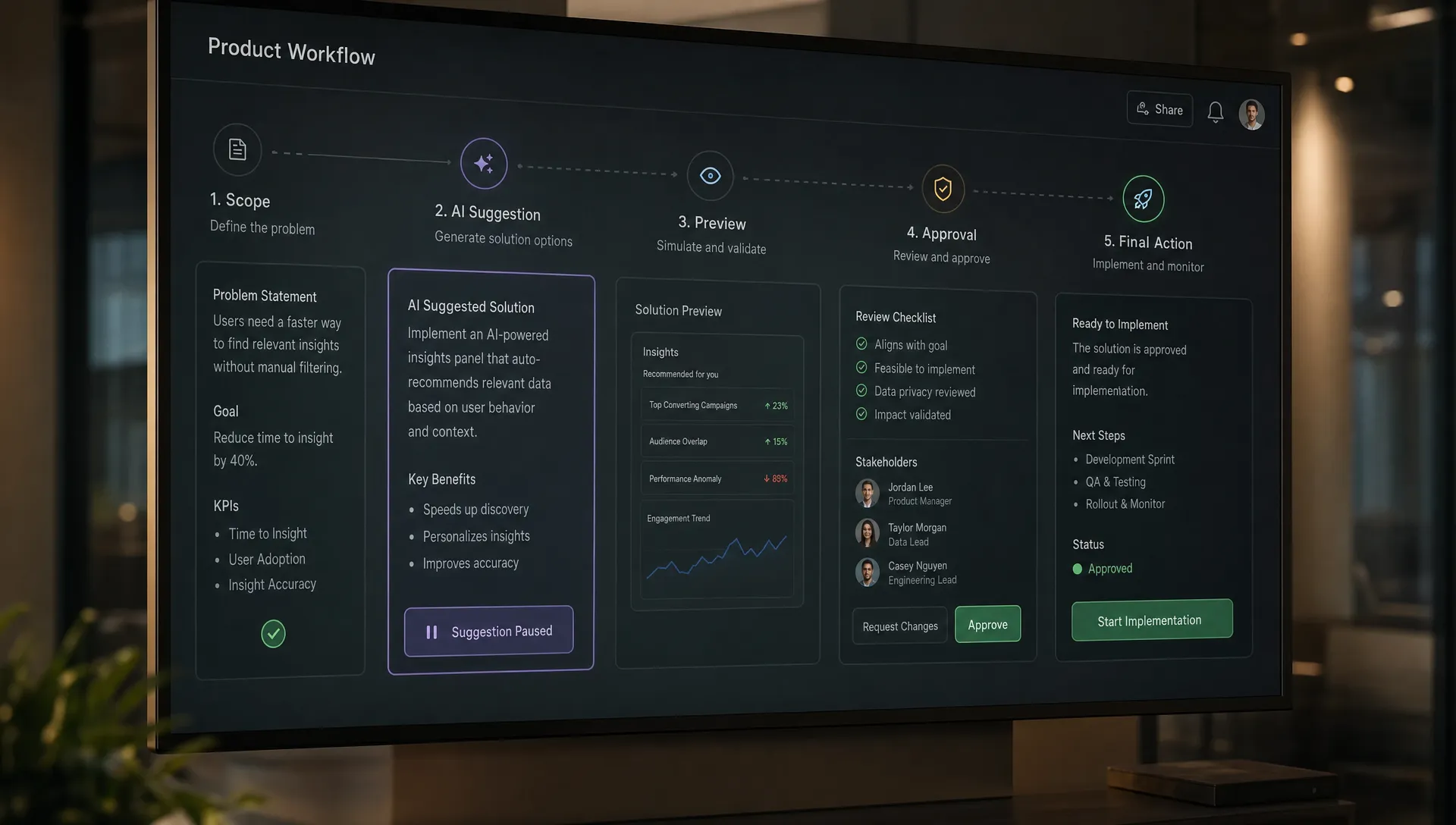
Users trust suggestions faster than silent edits. That does not mean every AI feature should be passive. It means the product should respect the difference between preview, proposal and commit.
A suggestion is cheap to evaluate. A committed change has to be audited. If your AI writes directly into the source of truth, changes project status or updates a shared document before approval, users will inspect more aggressively.
This connects to autonomy. If the cost of being wrong is high, the AI should move through lower-commitment states first. The same logic is covered well in this related piece on why AI autonomy should match the cost of being wrong.
The AI hides the “why now”
Even good timing can feel wrong if the trigger is invisible. Users need to know why the AI decided this was the right moment to act.
For example, “I noticed this customer asked for a refund and your policy has a 30-day exception” is more usable than a reply appearing from nowhere. “This task is blocked by the same dependency mentioned in three comments” is easier to trust than an automatic priority change.
The system does not need a long explanation. It needs enough trigger evidence for the user to accept the timing.
How to diagnose whether your AI acts too soon
Do not start by asking users, “Do you trust the AI?” That question is too broad. Ask where they felt the product moved ahead of them.
Review sessions, session replays and event data for control recovery. The strongest signal is not negative feedback. It is compensating behavior.
| Signal in the product | Likely diagnosis | What to inspect next |
|---|---|---|
| Users undo after AI-generated changes | Commit happened too early | Check whether preview or approval was available |
| Users regenerate many times before editing | Scope was unclear | Check whether the user set intent before generation |
| Users copy output elsewhere | Verification is easier outside the product | Check citation, diff and comparison support |
| Users disable automation settings | Default autonomy is too high | Check risk by task type |
| Users ask for templates or examples | Prompt burden is too high | Check whether the workflow starts from a blank prompt |
This is also where AI onboarding strategies often go wrong. Many onboarding flows teach users what the AI can do. They do not teach users how to control when it should act.
A better onboarding moment gives users one safe delegation choice. Not a tour. Not a list of capabilities. A decision like: “For this workflow, should AI suggest, draft or apply changes?”
What to change: make the first move smaller
The fix is rarely “make the AI less capable.” The fix is to make the first AI action smaller, more inspectable and easier to reverse.
Use four product decisions:
- Separate suggestion from commitment: Show the proposed action before it changes the source of truth. This is especially important in shared workspaces, customer-facing workflows and regulated contexts.
- Ask for a boundary before generation: Let users set the task, source, tone, audience, segment or risk level before the AI acts. This reduces prompt paralysis without taking control away.
- Show the trigger evidence: Explain what caused the AI to act now. Keep it short. Use the exact input, comment, policy or pattern that triggered the suggestion.
- Make recovery obvious: Undo, compare, restore and partial accept patterns matter more than generic confidence scores. Users trust systems they can recover from.
These are AI product tactics, not abstract trust principles. They change behavior because they reduce the user’s perceived cost of trying the feature again.
If you want a broader framework for this problem, the related article on trust debt hidden in AI shortcuts covers the tradeoff between speed, proof, control and recovery.
A decision frame for PMs
Before you ship an AI action, classify it by timing risk. This gives product, design and engineering a shared language.
| Question | Low-risk answer | Higher-risk answer | Product response |
|---|---|---|---|
| Can the user easily verify the output? | Yes, in seconds | No, requires domain review | Add proof before action |
| Can the user easily reverse it? | Yes, one click | No, creates downstream effects | Require approval before commit |
| Is the output private or shared? | Private draft | Shared with team or customer | Use preview and explicit send |
| Does the action change meaning? | Formatting or extraction | Interpretation, prioritization or recommendation | Ask for scope first |
| Is the user accountable? | Low personal risk | User owns the consequence | Keep human confirmation visible |
This frame helps cut through internal debates. The question is not “Should the AI be autonomous?” The question is “At this point in the workflow, has the user earned enough confidence to let it act?”
That confidence is built in small steps. Scope first. Preview second. Commit third. Recovery always visible.
FAQ
What does it mean for AI to act too soon? It means the AI takes a meaningful step before the user has confirmed scope, reviewed context or approved the level of autonomy. The output can be accurate and still feel premature.
Is premature AI action the same as bad AI accuracy? No. Accuracy is about whether the output is right. Timing is about whether the system acted at the right moment with the right level of user control. Many AI adoption problems come from timing, not raw quality.
Should AI products avoid automation altogether? No. Automation is useful when the user understands the boundary, can verify the result and can recover from mistakes. The issue is not automation. The issue is asking for autonomy before trust exists.
Which metric shows this problem fastest? Undo rate, discard rate, regenerate loops, manual copyout and automation opt-out are often more revealing than feature usage. They show where users are protecting themselves from the product.
The next action
Pick one AI workflow where usage looks good but retention is weak. Map the first moment where the AI acts. Then ask: did the user set the boundary, see the evidence and approve the commitment?
If the answer is no, do not start with a bigger model or another onboarding tooltip. Move the first action one step earlier in commitment. Make it a preview, a scoped suggestion or a reversible draft.
For a deeper diagnostic pass, the AI Product Adoption Deck includes 12 diagnostics, 80 AI action cards and workshop templates for turning symptoms like premature automation into product decisions. If you want to triage the specific adoption break first, use the free AI adoption triage tool.