How to Turn a Model Card Into Better Product Decisions
Learn how to use a model card to make better AI product decisions on UX, rollout, trust, verification, and adoption risk.

Your model card is finished. Engineering can explain the model’s intended use, evaluation set, known limitations, and failure modes.
But the product still has the same arguments.
Should the feature be turned on by default? Should users see confidence indicators? Should the AI draft be editable before it lands in the workflow? Should this ship to all accounts, or only low-risk use cases first?
That is the adoption gap most teams miss. A model card is useful only if it changes product decisions. If it stays in a repo, a governance folder, or a launch checklist, it may reduce internal ambiguity, but it will not help users trust, verify, or repeat the behavior.
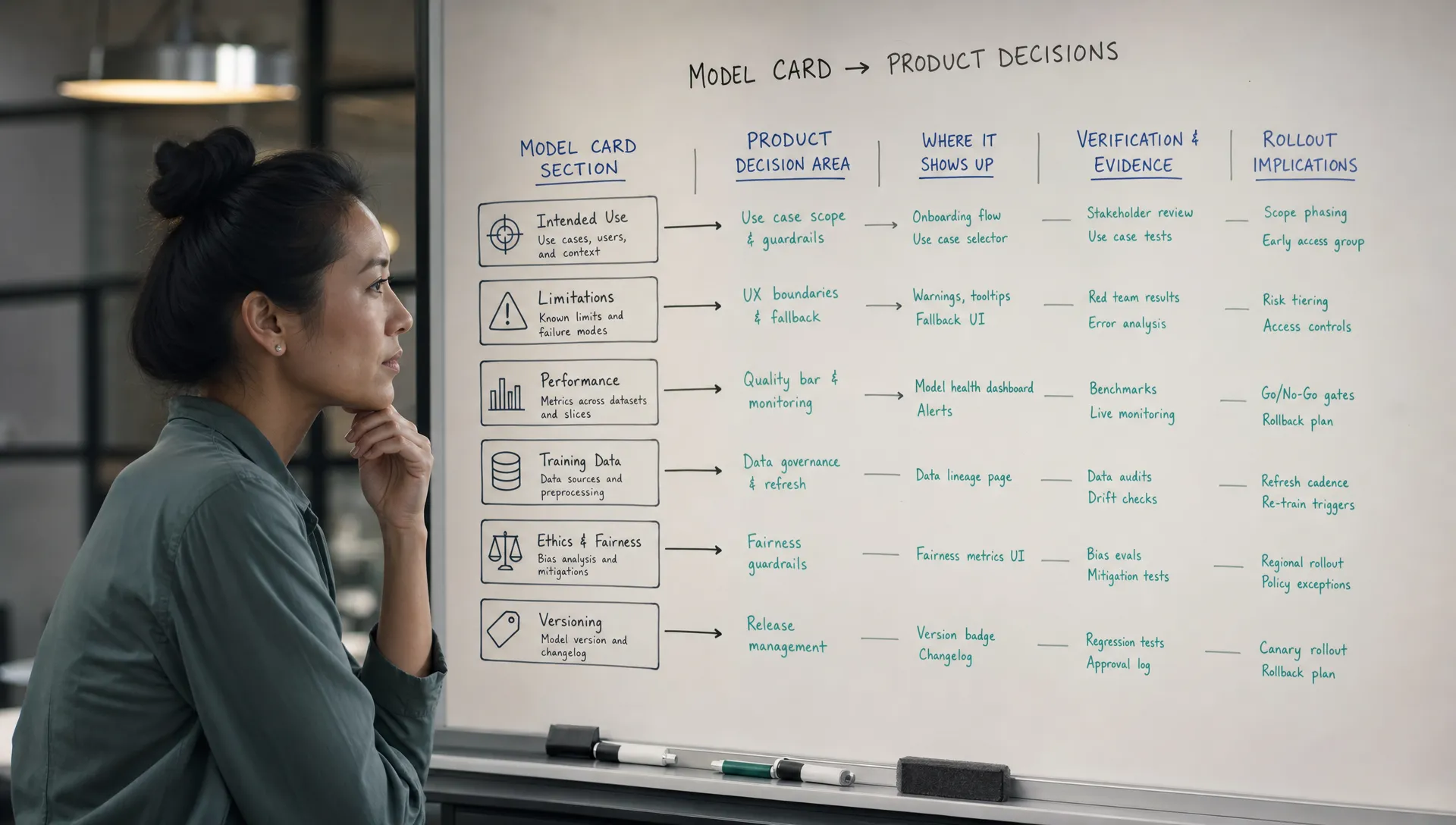
The job is not to make the model card prettier. The job is to translate it into choices about UX, onboarding, copy, defaults, permissions, review paths, and measurement.
The real symptom: the model card exists, but nothing in the product changed
A weak model card problem usually looks like a documentation problem. It is not.
The real symptom is that the team has model knowledge, but users still experience the AI feature as a black box. The product does not reveal where the model is strong, where it is brittle, or what the user should do next when the output is uncertain.
You see this in patterns like these:
- Users try the feature once, then go back to manual work.
- Sales and success teams overpromise because they do not understand the model’s boundaries.
- Designers treat AI output as a finished object instead of a draft that needs judgment.
- PMs debate model quality in abstract terms instead of deciding what risk the product should absorb.
- Analytics track generation volume, but not whether outputs were accepted, edited, rejected, or reused.
This is where a model card should become a product artifact. Not because PMs need to become ML experts. Because adoption breaks when model behavior is not reflected in the experience.
The original Model Cards for Model Reporting paper framed model cards as a structured way to report model performance, intended use, limitations, and ethical considerations. Product teams should keep that structure, but add one more layer: what each finding means for the product.
Stop asking whether the model is good enough
That question is too broad.
A better product question is: good enough for which user, which task, which workflow moment, and which consequence if wrong?
The same model can be acceptable in one product context and dangerous in another. A support reply draft that a human reviews before sending has a different risk profile from an auto-sent response. A CRM account summary used for pre-call prep is different from a compliance report sent to a customer. A coding suggestion accepted line by line is different from a full production migration script.
Your model card should help you separate these cases.
A simple translation works:
| Model card input | Product decision it should influence | Adoption risk if ignored |
|---|---|---|
| Intended use | Where the feature appears and which jobs it supports | Users apply the AI to tasks it cannot handle well |
| Known limitations | Guardrails, constraints, and fallback paths | Users hit silent failures and stop trusting the feature |
| Evaluation results | Launch scope, rollout sequence, and success metrics | Teams ship broadly before they know where quality holds |
| Data coverage gaps | Onboarding questions, user segmentation, and warnings | Outputs feel generic or wrong for specific user groups |
| Failure modes | Review UI, edit flows, and escalation paths | Users cannot recover when the AI is close but not right |
| Recommended use conditions | Defaults, permissions, and automation level | The product gives too much control to the model too soon |
The table is the missing step. Most teams read the left column and stop. Product adoption depends on the right column.
Turn limitations into product constraints
A limitation is not a disclaimer. It is a design input.
If the model card says the model struggles with long documents, do not bury that note in internal docs. Decide whether the product should limit input length, summarize in sections, ask the user to select a narrower range, or show a warning before generation.
If the model card says performance varies by domain, do not launch the same empty prompt box to everyone. Decide whether the product should ask for domain context, provide domain-specific templates, or start with the segments where the model performs reliably.
If the model card says outputs may contain unsupported claims, do not solve that with vague copy like AI can make mistakes. Decide whether the product should cite sources, highlight unverifiable claims, require approval before publishing, or keep the AI output in draft state.
This is the blunt rule: every material limitation needs a product response. If there is no response, the limitation will show up as distrust, abandonment, or support tickets later.
For a deeper treatment of this specific handoff, the post on model card AI notes product teams should actually use covers how to rewrite model notes so they are usable by PMs, designers, and go-to-market teams.
The five decisions your model card should force
A model card should not create endless debate. It should force a small number of decisions.
1. Where should the AI feature appear?
Do not start with the model’s capability. Start with the workflow moment.
If the model performs well when the user has already provided structured context, the entry point should appear after that context exists. If it performs poorly with vague prompts, do not put the feature behind a blank input at the top of the page.
The model card should tell you whether the product needs to narrow the task before the model runs.
2. What should the default request be?
Prompt paralysis is a product problem. Users often do not know what to ask, what the model needs, or what output shape is realistic.
Use the model card to define safe defaults. If the model is strongest at rewriting, default to rewrite actions. If it is stronger at extraction than reasoning, make extraction the primary flow. If it needs examples, design the input step around examples instead of hoping users provide them.
3. How should users verify the output?
Trust is not created by saying the AI is accurate. Trust is created when users can check the output fast.
If the model card identifies common error types, the interface should make those errors easier to spot. That may mean showing sources, diffs, assumptions, confidence ranges, or side-by-side comparisons. The right pattern depends on the task.
This is especially important when users are abandoning outputs, not because outputs are always bad, but because checking them takes too long. The design patterns in AI products users can verify fast are useful when the model card points to verification friction.
4. How much control should the model get?
The model card should influence automation level.
Some outputs should be suggestions. Some should be drafts. Some can be applied automatically only after the user sets rules. Some should never bypass review.
A common adoption mistake is to make the AI too autonomous too early. Users reject the feature because the cost of a wrong output is higher than the benefit of a fast one. In those cases, the product does not need a better marketing claim. It needs a lower-risk control model.
5. What should you measure after launch?
Model cards usually include evaluation metrics. Product teams need adoption metrics that match the same risks.
If a known failure mode is hallucinated citations, track citation edits and citation deletions. If the model struggles with tone, track rewrite loops. If it struggles on certain segments, compare acceptance and correction rates by segment.
Generation count is not enough. A user can generate ten outputs because the feature is valuable, or because the first nine were unusable.
A practical example: the support reply generator
Say your team shipped an AI support reply generator. The model card says the model performs well on common product questions, worse on billing edge cases, and may invent policy details when the source article is missing.
A documentation-only team adds this to an internal page and ships.
A product-led team turns it into decisions.
| Model card finding | Product decision | Why it helps adoption |
|---|---|---|
| Strong on common product questions | Show the AI action on categorized product tickets first | Users see value where quality is most reliable |
| Weak on billing edge cases | Hide or de-emphasize AI generation on billing tickets | Avoids early trust damage in high-friction cases |
| May invent policy details | Require linked source articles before generating policy language | Reduces unsupported claims and review burden |
| Needs ticket history for better replies | Pull recent conversation context into the prompt by default | Lowers user effort and improves output relevance |
| Tone may be inconsistent | Add tone presets approved by support leadership | Makes output easier to accept without heavy editing |
None of these decisions require changing the model. They change the product’s relationship to the model.
That is often where adoption improves first.
Use the model card in product review, not just launch review
If the model card appears only at launch review, it arrives too late. By then, the team has already chosen the entry point, the automation level, the empty state, the measurement plan, and the rollout scope.
Bring it into product review earlier. The useful questions are simple:
- Which user task matches the model’s strongest evaluated use case?
- Where does the current UX invite users to misuse the model?
- What failure mode would cause a user to stop trusting this feature?
- What can we constrain, explain, or route before asking for a model improvement?
- What metric will show whether users are accepting value or fighting the output?
These questions keep the conversation grounded. They also prevent the lazy diagnosis: the model is not good enough.
Sometimes the model is the problem. Often the product is asking too much from it, too soon, with too little context and too few recovery paths.
If you need to separate those cases, run the symptom through a structured diagnostic before changing the model or the UX. The free AI adoption triage tool is built for that kind of first pass.
What not to do with a model card
Do not turn it into user-facing legal copy. Users do not need a pasted version of your internal limitations. They need task-specific guidance at the moment of use.
Do not use it as a shield against product responsibility. Saying the model has limitations does not absolve the product from shaping where and how the model is used.
Do not let every limitation become a warning banner. Warning fatigue is real. Some limitations need constraints. Some need better defaults. Some need review flows. Some need segmentation. Only a few need visible warnings.
Do not treat it as static. If users consistently reject, edit, or ignore outputs in a specific pattern, that evidence should update the product interpretation of the model card.
FAQ
What is a model card in AI product work? A model card is structured documentation that explains a model’s intended use, performance, limitations, and relevant risks. For product teams, its value is not just reporting. It should guide UX, rollout, verification, and measurement decisions.
Who should read the model card besides the ML team? PMs, designers, product marketers, customer success leads, and support leads should all understand the parts that affect user expectations and workflow risk. They do not need every technical detail, but they need the product implications.
Should model card content be shown directly to users? Usually not directly. Translate it. A limitation might become a constrained input, a source requirement, a draft state, an approval step, or clearer onboarding copy. Raw model card language is rarely good user experience.
Can a model card improve AI feature retention? Yes, if it changes the product. Retention improves when users learn where the AI is useful, can verify outputs quickly, and recover from mistakes without losing confidence. A model card helps identify where those supports are needed.
Make the model card a decision tool
A model card should answer a practical product question: given what we know about this model, what should the product allow, prevent, explain, measure, or delay?
If your team is still debating adoption symptoms one by one, the AI Product Adoption Deck gives you a more structured way to work through them. It includes diagnostics, action cards, and workshops for turning AI adoption problems into concrete product decisions, not just longer docs.