Model Card AI Notes Product Teams Should Actually Use
Use model card AI notes to turn model limits into better UX, trust signals, onboarding, and adoption decisions for shipped AI features.

Your team has a model card. It sits in a Notion page, a governance folder, or a launch review doc. Legal has seen it. Engineering can find it if asked.
Users still do not trust the feature.
That is the break. Most model card AI work stops at documentation. Product adoption needs something else: model card notes that change onboarding, output design, review flows, permissions, copy, and metrics.
A model card is not useful because it proves you were responsible. It is useful when it tells the product team where the user will hesitate, misuse the feature, over-trust the answer, or abandon the output.
The adoption problem model cards are supposed to expose
The original idea of model cards was to document model behavior, intended use, performance, limitations, and ethical considerations. Google researchers described this in the paper Model Cards for Model Reporting, and the structure is still useful.
But a PM does not need a model card to admire a benchmark. A PM needs it to answer product questions like these:
- What should we promise in the UI?
- Where should we slow the user down?
- Which outputs need evidence, review, or rollback?
- What should onboarding warn users about?
- Which tasks should the feature refuse or redirect?
- What metrics will show trust is breaking?
If your model card does not affect those decisions, it is not part of the product system. It is launch paperwork.
The common failure: technical truth with no product consequence
A typical internal model card says something like this:
“The model may underperform on ambiguous inputs, edge cases, or low-context tasks.”
That may be true. It is also not actionable.
A product team needs the next layer:
“Users who submit short prompts under 10 words receive outputs that are generic enough to be abandoned. The feature should require a goal, audience, and source material before generation. Track output acceptance by prompt completeness.”
That is a model card note product teams can use.
The difference is consequence. The first version describes model behavior. The second version changes the product.
What product teams should extract from a model card
Do not ask the whole team to read a long technical artifact. Extract the parts that map to user behavior. Then translate them into product decisions.
| Model card note | Product question | Product decision it should drive |
|---|---|---|
| Intended use | What job is this feature safe and useful for? | Scope the entry point, examples, empty states, and positioning |
| Out-of-scope use | What should users not do here? | Add guardrails, refusal copy, redirects, or task boundaries |
| Input sensitivity | What inputs cause weak outputs? | Require structured fields, templates, source uploads, or prompt hints |
| Known failure modes | Where will users lose trust? | Add evidence, warnings, review steps, or preview states |
| Performance by segment | Which user groups or use cases see worse results? | Adjust rollout, onboarding, defaults, and success metrics |
| Confidence limits | When should the product avoid sounding certain? | Change language, confidence signals, and verification prompts |
| Data freshness | What may be stale or missing? | Show date context, source status, and update expectations |
| Human review needs | Where is judgment required? | Build approval workflows, edit controls, and escalation paths |
This is the useful layer. It turns model documentation into adoption design.
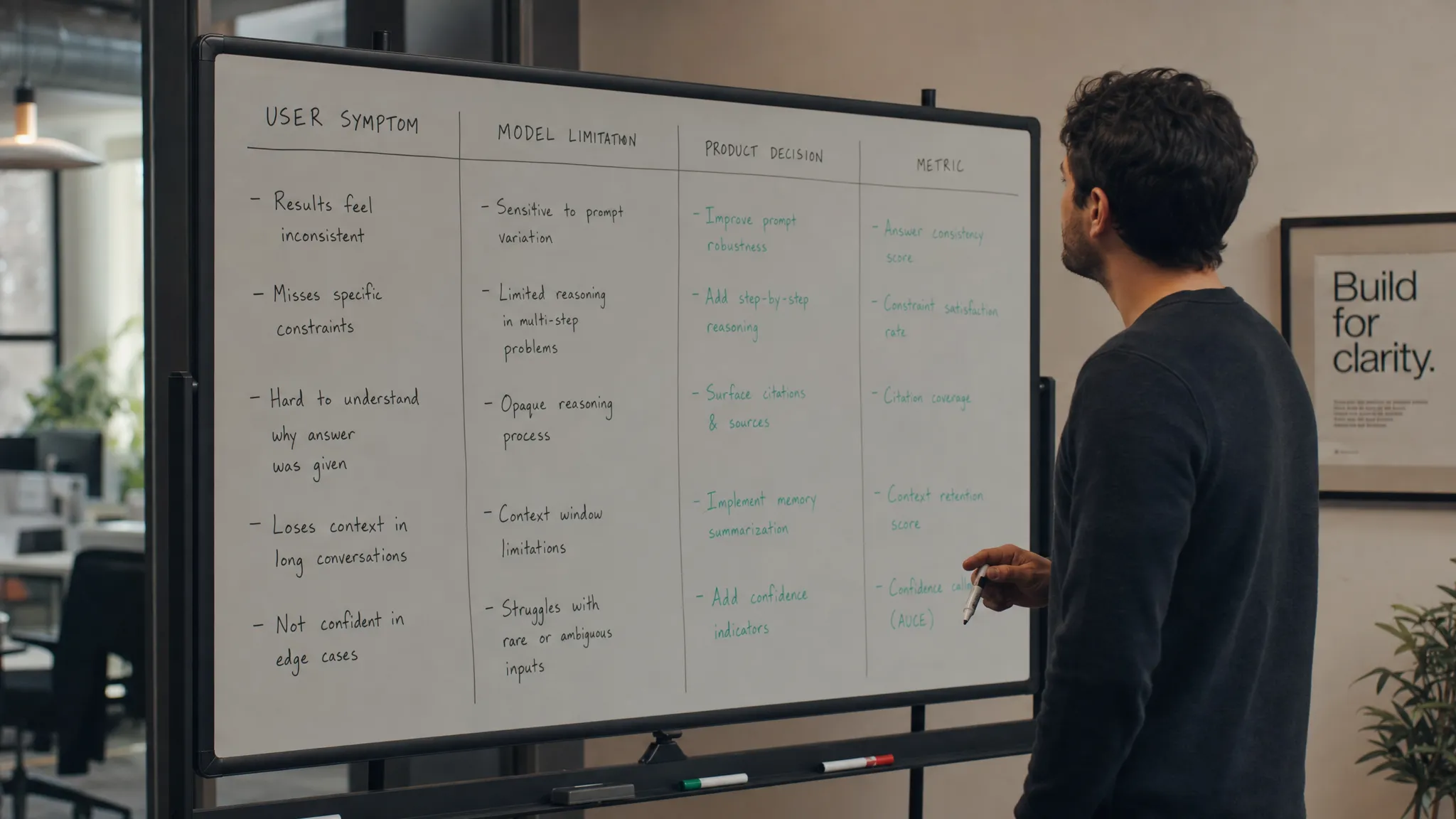
Start with the symptom, not the card
If adoption is weak, do not start by asking, “Do we have a model card?” Start with the user behavior.
Users are not coming back because something in the flow creates doubt, work, or risk. The model card can help identify which one.
Symptom: users generate once and leave
This often points to weak task fit or unclear output utility. Look at the intended-use section. Does the model card define the task tightly, or does it say the model is broadly useful for “content,” “analysis,” or “productivity”?
Broad use cases create vague UX. Vague UX creates vague outputs. Vague outputs do not become habits.
The product response is not “better prompts” in the abstract. It is tighter task framing. Show users the jobs the feature is actually good at. Remove use cases where the model card already says quality is inconsistent.
Symptom: users regenerate instead of editing
This is usually a control problem. The user sees something close, but cannot steer it locally.
The relevant model card notes are known failure modes and input sensitivity. If outputs vary heavily based on tone, constraints, audience, or source context, the product should expose those controls before generation and during editing.
Do not make users re-prompt from scratch. Give them specific controls like shorten, make more formal, preserve structure, use selected source, or revise this section only.
Symptom: users copy output elsewhere to verify it
This is a trust and evidence problem. The model may be good enough, but the product is asking users to accept too much on faith.
Look for model card notes about hallucination, stale data, uncertain classification, missing sources, or weak performance on edge cases. Those notes should become visible verification aids.
For example, Perplexity’s citations work because they reduce the cost of checking an answer. GitHub Copilot’s inline suggestions work best when the developer can inspect code in context and run tests quickly. Grammarly’s suggestions are easier to accept when the user can see the exact diff and reject it without penalty.
The product lesson is simple: if the output is costly to be wrong about, the model card should shape the review UI.
Model card notes should change user-facing language
Many AI features over-promise because product copy is written separately from model documentation.
The model card says “may produce incomplete recommendations.” The product says “Get the perfect plan in seconds.” Then users behave rationally. They try it, find gaps, and stop trusting the feature.
The fix is not timid copy. It is accurate copy.
Use model card notes to set expectations at the moment of use:
- Instead of “Generate final report,” say “Draft a report for review.”
- Instead of “Find every issue,” say “Surface likely issues to inspect.”
- Instead of “Answer any question,” say “Answer from the connected sources.”
- Instead of “Automate your workflow,” say “Prepare the next step for approval.”
This matters more in high-trust domains. If a product affects hiring, credentials, reputation, finance, healthcare, or compliance, the user needs to know what is verified, inferred, missing, and reviewable. Platforms built around verifiable professional signals, such as TalentTrust, show why the product surface cannot treat trust as a hidden backend concern.
The notes that matter most are the uncomfortable ones
The most valuable model card notes are usually the ones teams want to soften before launch.
These are the notes that say:
- The model performs worse when the input lacks domain context.
- The model can sound confident when the evidence is weak.
- The model is less reliable for some user segments or languages.
- The model should not be used as the sole basis for a decision.
- The model cannot reliably distinguish missing information from negative evidence.
Those are not reasons to avoid shipping. They are reasons to design the product honestly.
If the model cannot be the decision-maker, do not design the output as a decision. Design it as a recommendation, checklist, draft, comparison, or triage step.
If the model needs context, do not hide that burden in a blank chat box. Collect the context with fields, defaults, imports, or examples.
If the model is weaker on edge cases, do not bury the warning in documentation. Detect those cases and change the flow.
A practical template for product-facing model card notes
For every AI feature, create a one-page product version of the model card. Keep the technical card elsewhere. This version is for PMs, designers, growth, support, and sales.
Use this format:
| Field | What to write |
|---|---|
| Primary job | The specific user job where the model is expected to help |
| Good inputs | The input conditions that usually produce useful output |
| Weak inputs | The inputs that produce generic, risky, or low-confidence output |
| Output status | Whether the output is a draft, recommendation, answer, prediction, or action |
| User review needed | What the user must check before applying it |
| Failure signals | Behaviors that show trust or utility is breaking |
| UX response | The product pattern that reduces the failure |
| Metric to watch | The adoption metric tied to this risk |
Here is the blunt test: after reading this page, a designer should know what to show, a PM should know what to measure, and a GTM teammate should know what not to promise.
If that is not true, the notes are not ready.
How to use model card notes in a product review
Bring the model card into the product review before the UI is final, not after launch approval.
A useful review has three questions.
First, where does the product ask the user to trust the model? Mark those moments in the flow. Generation is only one of them. Trust is also required when the user selects an input, accepts an output, applies a change, sends a message, approves a recommendation, or hands work to someone else.
Second, what does the model card say could go wrong at each moment? Do not accept generic answers. “Hallucination” is too broad. “May invent unsupported claims when source material is thin” is useful.
Third, what product pattern reduces that risk? This might be citations, diffs, assumptions, structured inputs, confidence language, previews, approval states, fallback paths, or narrower task framing.
Now connect each risk to a metric. If you cannot measure the behavior, you will not know whether the fix worked.
Good metrics include acceptance rate, edit rate, regeneration rate, source inspection rate, rollback rate, time to applied output, and repeat use after successful application.
Do not turn the model card into user homework
Some teams respond to trust issues by exposing too much documentation. They add long disclaimers, links to model details, or generic “AI can make mistakes” banners.
That rarely helps adoption.
Users do not want to study your model. They want to know what to do next.
A product-facing model card should become interface behavior, not a wall of text. If the model may be stale, show freshness. If the output is uncertain, show why. If review is required, make review easy. If the task is out of scope, redirect the user before they waste time.
The goal is not transparency for its own sake. The goal is usable trust.
Frequently Asked Questions
Is a model card the same as an AI product spec? No. A model card describes model behavior, limits, and intended use. A product spec should translate those notes into flows, copy, states, metrics, and release decisions.
Should users see the model card? Usually not in full. Users should see the parts that help them make a safe decision in the moment, such as sources, assumptions, confidence language, review requirements, and scope limits.
Who should own product-facing model card notes? Product should own the translation. Engineering and ML teams provide the model behavior. Design, research, legal, support, and GTM should pressure-test how those behaviors affect real user decisions.
What is the first note to extract from a model card? Start with out-of-scope use. Most adoption damage comes from users trying the feature on a task it was never designed to handle, then deciding the whole product is unreliable.
How often should product teams update these notes? Update them when the model changes, the user base changes, a new use case is launched, or behavior data shows a trust or application problem the original notes did not predict.
Make the card part of the adoption system
A model card is not the adoption strategy. It is one input into it.
The useful move is to connect model limits to product moments. Where the user hesitates, the card should explain why. Where the user over-trusts, the card should create friction. Where the user abandons output, the card should point to missing context, control, or verification.
If you want a structured way to turn these symptoms into product decisions, the AI Product Adoption Deck includes diagnostics, action cards, and workshop templates built around the moments where AI adoption breaks.
Do not let the model card live only in governance. Put it where the product is making promises. That is where users decide whether to come back.