How to Design AI Escalation Paths That Users Will Use
Design AI escalation paths users trust with practical patterns for recovery, handoffs and retention when AI output creates doubt.

Your AI feature gives a decent answer. The user pauses. Then they regenerate three times, copy the output into another tool or abandon the flow.
That is not always a quality problem. Often it is an escalation problem. The user hit a moment of doubt and your product gave them no usable next step. For AI product adoption, that small gap matters. If users cannot recover from uncertainty, they learn to avoid the feature when the work is real.
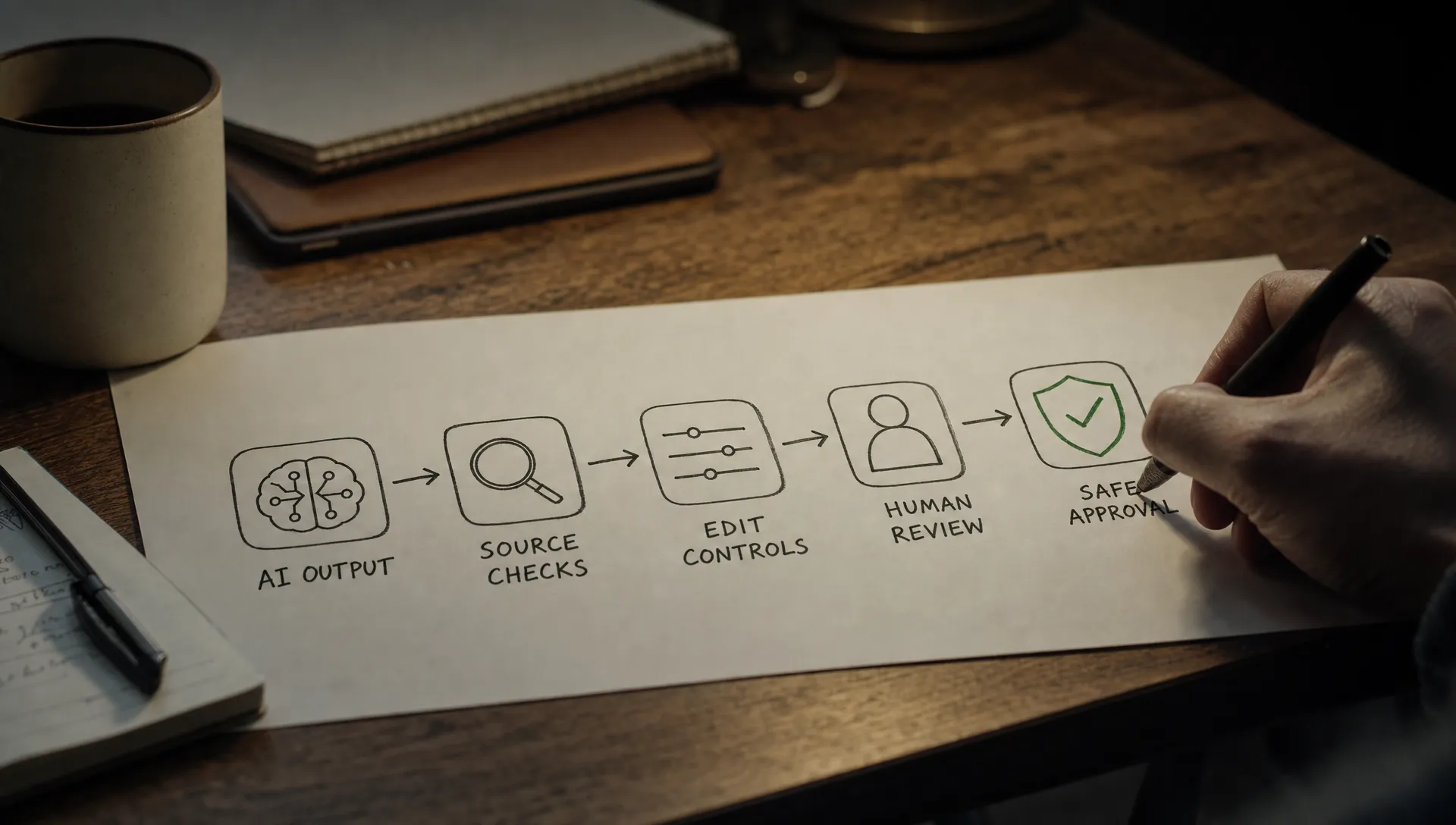
An escalation path is not just “contact support.” In an AI workflow, escalation means any designed route from uncertainty to resolution. That could be evidence, edit controls, a safer mode, a human review step, an approval flow or a way to constrain what the AI does next.
The goal is simple: when the user does not fully trust the output, they should know what to do next without leaving the product.
The symptom: users do not escalate, they leave
Most teams notice escalation problems too late because they only track the visible failure. Low acceptance. Low repeat use. Weak retention after first value. Support tickets that say “it was wrong” with no useful detail.
But the stronger signal is usually in the session path. Users do not click your feedback buttons. They do not open the help drawer. They do not use the “ask an expert” option you shipped. They just route around the AI.
Look for patterns like these:
- Repeated regeneration without acceptance
- Copying AI output into docs, Slack or search tools for verification
- Deleting most of the generated output before saving
- Starting a task with AI but finishing it manually
- Opening support or docs in another tab after viewing the output
- Drop-off immediately after a risky recommendation, summary or automation step
If you see these behaviors, the issue may not be that users dislike AI. They may be willing to use it, but only until the product asks them to take responsibility for an output they cannot judge.
What an AI escalation path actually does
A useful escalation path lowers the cost of doubt. It gives users a way to move from “I am not sure” to “I can act on this now.”
That path can take several forms. A writing assistant might let the user inspect why a sentence was changed. A code assistant might make it easy to run tests or inspect a diff. A research assistant might show citations and make source checking part of the main workflow, not a separate chore.
This is why escalation design is different from generic support design. The user is not always asking for help with the product. They are asking for help with the product's judgment.
| User doubt | Bad escalation | Better escalation |
|---|---|---|
| “Is this true?” | Generic thumbs down | Show source, evidence or affected input |
| “Can I change this safely?” | Regenerate from scratch | Edit in place with preserved context |
| “Who approves this?” | Send to support | Route to reviewer with the AI output attached |
| “What will the AI change?” | One-click automation | Preview changes before applying |
| “Why did it say that?” | Error message | Explain the constraint, source or missing input |
The key is that escalation should match the user's doubt, not your org chart.
Why AI escalation paths fail
Escalation paths usually fail for one of five reasons.
First, they are hidden. If the user has to open a support menu or hover over a tiny icon, the path is not part of the workflow. It is an escape hatch.
Second, they appear too late. A “report issue” button after a bad output does not help the user finish the task. It helps your team collect complaints.
Third, they ask the user to diagnose the model. Buttons like “incorrect,” “unsafe” or “low quality” may be useful for internal labeling, but they are not always useful to the person trying to ship work.
Fourth, they drop context. If escalation sends a user to a blank support form, a new chat or an empty editor, you have created rework at the exact moment the user is already losing confidence.
Fifth, they imply failure. If your escalation path feels like punishment for not trusting the AI, users will avoid it. They need a normal next step, not a confession that something broke.
If this sounds familiar, it is worth checking whether the product has a broader trust issue. The signals overlap with the patterns covered in how to tell if your AI UX has a trust problem.
Design AI escalation paths around the user's next fear
Do not start with “where should we put the help button?” Start with the fear that appears at the moment of use.
For AI product management, the most useful question is: what would stop a reasonable user from acting on this output?
In many products, the answer is not “the output is bad.” It is more specific:
- The user cannot tell which parts are grounded in source material.
- The user cannot see what will change if they accept the suggestion.
- The user cannot route the output to someone with authority.
- The user cannot narrow the task without starting over.
- The user cannot recover if the AI acts too broadly.
Each fear needs a different escalation path. Evidence helps with truth. Preview helps with control. Approval helps with authority. Scoping helps with overreach. Undo helps with risk.
This is also where confidence signals matter. A vague “high confidence” label rarely helps. A useful signal tells the user what to verify, what the system used and what action is safe. If you need a deeper pass on that layer, see how to design confidence signals users can actually use.
Put escalation in the work surface
Users should not have to leave the work surface to escalate. The best escalation paths sit next to the risky object.
If the AI generated a claim, escalation belongs near the claim. If it suggested a code change, escalation belongs near the diff. If it drafted an email, escalation belongs near the sentence or section that may need approval. If it planned an automation, escalation belongs inside the preview before execution.
This placement does two things. It keeps context intact and it teaches the user that doubt is expected. The product is saying, “Check this part here,” not “Go figure out what went wrong somewhere else.”
A simple design rule helps: escalation should preserve the object, the context and the user's intent.
That means the reviewer sees the draft. The evidence panel opens on the relevant source. The edit mode keeps the prompt and constraints. The approval step carries the generated recommendation and the inputs that produced it.
When escalation starts from a blank state, users experience it as more work. When it starts from the exact point of doubt, they experience it as progress.
Offer the smallest safer action
Many AI products jump from “accept output” to “start over.” That is a poor recovery model.
A better escalation path offers a smaller safe action before asking for a full commitment. Instead of “apply all changes,” offer “preview changes.” Instead of “send campaign,” offer “send for review.” Instead of “regenerate,” offer “revise this section.” Instead of “trust this answer,” offer “show the source behind this claim.”
This is especially important in products where the AI can affect real customer data, code, finances, legal language or brand voice. The path should let users reduce blast radius.
Good escalation does not slow expert users down. It gives them control when the stakes change. In low-risk moments, they may accept quickly. In high-risk moments, they need a path that lets them keep using the AI without handing it full authority.
Instrument escalation like a retention feature
If escalation only appears in your support metrics, you will underinvest in it. Treat it as part of activation, habit formation and AI user retention.
Track whether users see the path, use it and return to the workflow afterward. A high escalation rate is not always bad. It may mean users are finding a productive way through uncertainty. The better question is whether escalation leads to recovery.
Useful metrics include:
- Escalation exposure rate: how often users encounter the path at the right moment
- Escalation start rate: how often they choose it when exposed
- Recovery rate: how often they complete the original task after escalating
- Acceptance after escalation: whether confidence increases after evidence, review or edit controls
- Repeat use after escalation: whether users come back to the AI feature in later sessions
Compare these by task risk. A low escalation rate in a low-stakes drafting flow may be fine. A low escalation rate before an irreversible workflow automation may mean users are avoiding the feature completely.
Examples from products users already understand
Grammarly works in part because many escalation paths are small. Users can accept, dismiss, edit manually or inspect suggestions in context. The product does not require a full restart when one suggestion feels wrong.
GitHub Copilot benefits from living inside the developer's normal work surface. A suggestion can be accepted, edited, rejected or tested in the surrounding code workflow. The escalation path often runs through tools developers already trust, such as diffs, tests and review.
Perplexity makes source checking more visible than a generic chatbot interface. Citations are not a perfect trust solution, but they give users a path from answer to evidence. That matters because research workflows break when users have to manually reconstruct where an answer came from.
The lesson is not that every product needs citations, diffs or grammar cards. The lesson is that usable escalation matches the work object. Text needs sentence-level control. Code needs inspection and tests. Research needs source trails. Automation needs previews, limits and rollback.
A quick design diagnostic
Before adding another button, run this diagnostic on one AI flow that is underperforming.
Choose a session where the user got an output but did not complete the next action. Identify the exact moment of hesitation. Then answer five questions:
- What doubt appeared? Was it about truth, control, authority, safety, quality or effort?
- What object carried the doubt? A sentence, recommendation, source, field, file, record or proposed action?
- What would resolve it? Evidence, editing, preview, approval, narrowing, undo or human review?
- Where should that path live? Place it next to the object, not in a support area.
- How will you know it worked? Track recovery into the original task, not just clicks on the escalation control.
If you are not sure which adoption break you are dealing with, the free AI product triage tool can help sort symptoms like low acceptance, repeated regeneration and post-output drop-off before you pick a fix.
The AI Product Adoption Deck goes deeper on this type of diagnostic work with action cards and workshops for trust, control, retention and post-output behavior. Use it when the team needs a shared way to turn symptoms into product decisions.
Frequently Asked Questions
What is an AI escalation path? An AI escalation path is a designed way for users to resolve doubt or risk inside an AI workflow. It can include source checking, edit controls, previews, approvals, human review or safer scoped actions.
When should an AI product use human escalation? Use human escalation when the user needs authority, accountability or domain judgment that the AI cannot provide. Do not use it as the default fix for every bad output. Many doubts are better solved with evidence, preview or editing.
How do you know if an escalation path is working? Measure whether users complete the original task after escalating. Clicks alone are weak evidence. Recovery rate, acceptance after escalation and repeat use tell you whether the path preserved trust.
Should escalation paths be shown all the time? Not always. Show them at moments of doubt or risk. Persistent controls can help in expert workflows, but the main path should appear close to the object or action that needs verification.
The next product decision
Pick one AI flow where users pause, regenerate or leave after output. Do not redesign the whole experience yet.
Find the first moment where a reasonable user would ask, “Can I trust this enough to act?” Then design one escalation path that answers that question without forcing them out of the workflow.
If users take that path and still finish the job, you have not just reduced support load. You have given the AI feature a better chance of becoming part of the user's real work.