How Empty Prompt Paralysis Distorts Your Activation Funnel
See how empty prompt paralysis skews activation metrics, hides user drop-off and changes how you should measure AI feature experiments.

Users open your AI feature, pause at the input and leave. Your dashboard records a feature visit but no activation. Empty prompt paralysis can look like weak demand, poor output quality or an acquisition problem, depending on where your funnel starts.
The distortion gets worse when your team reports success only among users who submit a prompt. Those users have already cleared a substantial hurdle: deciding what to ask, supplying context and predicting whether the result will help.
Your funnel is measuring the people who got past that hurdle. It may tell you very little about everyone else.
Start with a task opportunity, not a feature visit
A blank input is an ambiguous measurement point. Someone might open it with a clear task, explore it out of curiosity or discover that the relevant document is unavailable. Treating those visits as equivalent makes the conversion rate hard to interpret.
Define an eligible task opportunity before diagnosing the drop-off. For a support product, that might mean an agent viewing an unresolved ticket that the AI feature can actually help answer. For a document tool, it might mean opening a draft with enough content to summarize.
Record eligibility before the user decides whether to prompt. Otherwise, your denominator already excludes some of the people experiencing the problem.
Keep feature visits as a discovery metric. Use eligible task opportunities to evaluate whether the AI helps users do work. Neither denominator replaces the other, but they answer different questions.
How empty prompt paralysis changes your activation numbers
Consider this hypothetical experiment. Both groups contain 1,000 comparable users with an eligible task. Track each user's first eligible task for seven days, rather than mixing user counts with generation counts.
| Funnel measure | Blank prompt | Task-specific starter |
|---|---|---|
| Eligible users | 1,000 | 1,000 |
| Users submitting a prompt | 250 | 500 |
| Users receiving an output | 200 | 400 |
| Users applying the output to the task | 120 | 200 |
| Output application among output recipients | 60% | 50% |
| Task application among all eligible users | 12% | 20% |
The starter appears worse if you look only at output recipients: application falls from 60% to 50%. Yet more eligible users reach a useful outcome.
This does not prove the starter improved output quality. It shows why a conditional conversion rate cannot stand in for end-to-end activation. The starter may admit users with harder tasks, less prompting experience or weaker initial intent.
A lower downstream conversion rate can coexist with a better activation funnel. Investigate both, rather than rejecting the change because one percentage fell.
Capture the missing steps without pretending to read intent
To diagnose empty prompt paralysis, distinguish input abandonment from failures that happen after submission. A single “AI used” event collapses these into one bucket.
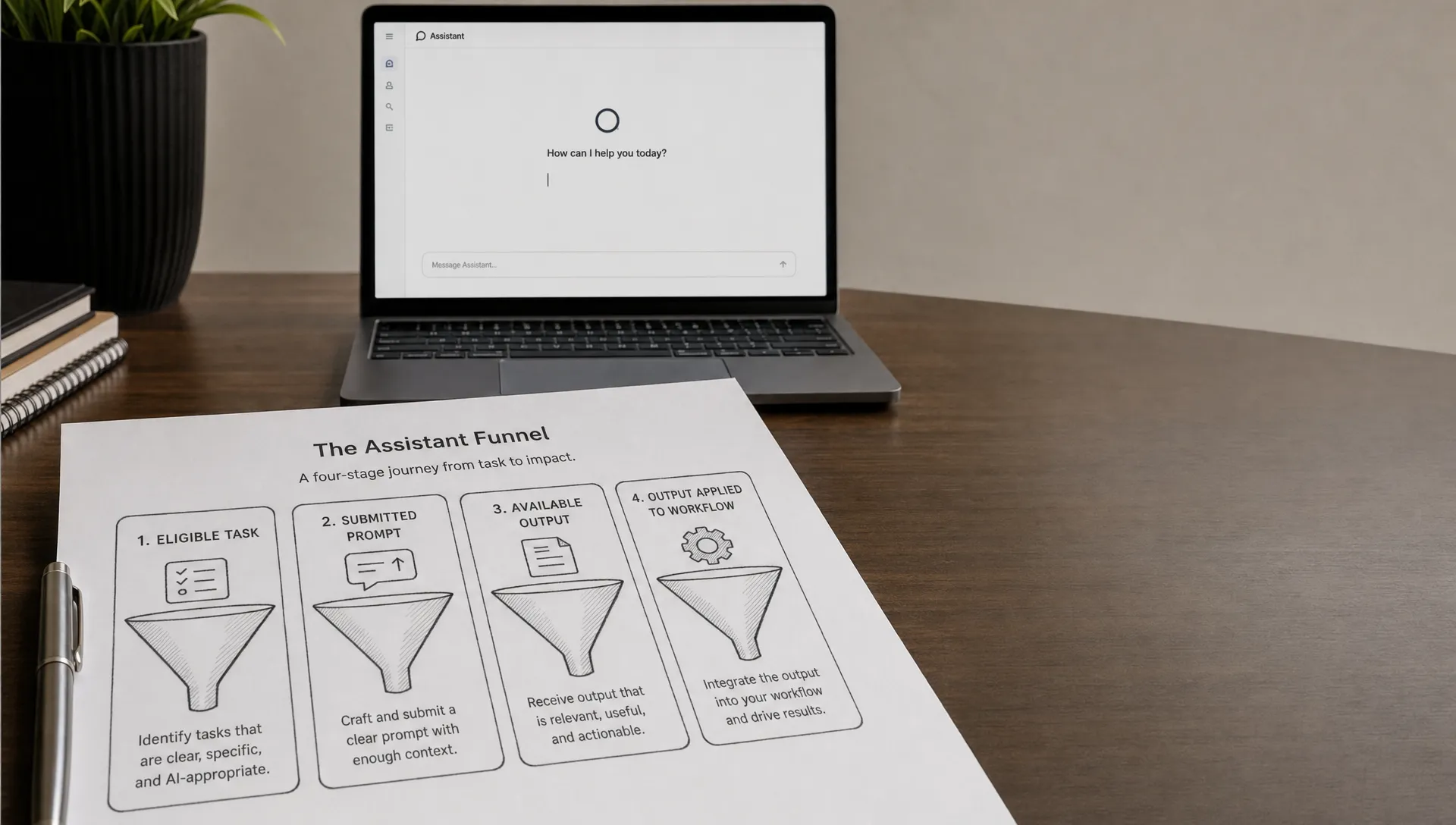
Instrument a small set of observable transitions:
- Task eligible and entry point exposed: The user has a supported task and can encounter the feature.
- Input interaction and submission: The user focuses, types, selects a starter or submits a request.
- Output available: A result becomes available, with errors and cancellations tracked separately.
- Output applied: The user takes a task-specific action that carries the result into their workflow.
Define the last event carefully. Inserting a suggested reply is not the same as sending it. Copying a summary does not prove it was useful. Choose the closest observable outcome to completed work, then validate that proxy through session review or user research.
Separate exposure-to-submission time from submission-to-output time. Otherwise, time spent deciding what to ask gets mixed with generation latency, and the team may optimize the wrong delay.
Typing and deleting can suggest uncertainty, but it does not establish the cause. Sample sessions across non-submitters, submitters who abandon outputs and users who complete the task. Reviewing only successful generations recreates the same selection problem in your research.
The broader distinction between generation and meaningful use is covered in where AI product teams misread activation data. Here, the additional problem is who disappears before generation begins.
Test access to value, not just willingness to click
Run a focused experiment at the first eligible task opportunity. Compare the existing blank input with one task-specific starting point. Keep the underlying output behavior unchanged where possible, so the experiment primarily tests how users get started.
Randomize at the user level and retain that assignment across sessions. Compare the same eligibility rules, task categories and observation windows. Do not compare experienced prompt writers from last month with new users arriving this week.
Use task completion or a validated application event per eligible user as the primary outcome. Prompt submissions are a diagnostic metric, not the win condition.
Watch downstream costs too. A starter that produces more submissions but also more discarded drafts, reversals or correction work may simply move the abandonment point.
Before launch, write the decision rule in plain language: “We will keep this entry point if more eligible users complete the supported task without an unacceptable increase in correction effort.” Set the acceptable trade-off for your workflow before seeing the results.
An experiment aimed at empty prompt paralysis should establish whether more people reach value, not merely whether more people press Generate.
Recheck retention after the activation cohort changes
Removing a submission barrier changes who reaches activation. Users who previously dropped out may now appear in your activated cohort, including those with less experience or less frequent needs.
That can lower repeat usage among activated users even when repeat usage across all eligible users improves. Report both measures with fixed observation windows. Only compare cohorts that have had enough time to return.
Also check whether users encounter another eligible task. A person who has no reason to summarize another document is different from someone who encounters the task and avoids the feature.
Do not label every decline in conditional retention a habit problem. First determine whether the entry-point change altered the cohort, the task mix or the opportunity to return.
Frequently asked questions
Does a low prompt-submission rate prove empty prompt paralysis? No. It can also reflect accidental visits, missing context, an unsupported task or a feature that users do not expect to help. Look for a supported task and a visible opportunity to act, then investigate why users stop.
Should we stop measuring first generation as activation? Keep it as a milestone. Do not treat it as proof of value. Pair it with a task-specific outcome and report both against the eligible-user denominator.
What if submissions rise but task completion stays flat? The intervention moved users into the next stage without improving the final outcome. Inspect task selection, output usefulness and correction effort before adding more starters.
Make the denominator decision first
At your next funnel review, ask which users disappear before your activation metric starts counting. Define one eligible task, instrument the path to completed work and test one entry-point change.
If the failure stage is still unclear, use the free adoption Triage tool to structure the diagnosis. For deeper team work, the AI Product Adoption Deck provides 12 diagnostics, 80 action cards and 12 workshops in a 104-card playbook.