Designing AI Permissions That Do Not Block Real Work
Design better AI permissions that keep work moving. Diagnose consent drop-off, trust gaps and workflow blocks before users abandon your AI feature.

Users do not abandon an AI feature because it asks for permission. They abandon it because the permission choice arrives at the wrong moment, asks for a decision they cannot evaluate and then blocks the job they were trying to finish. That is the permissions problem inside AI product adoption: the user has intent, the system has capability, but the product makes the safety decision feel larger than the work.
The usual fix is to make the permission screen clearer. That helps, but it is not enough. AI permissions are not just legal consent or account access. They are part of the work contract between the user and the system. If that contract is too broad, users slow down. If it is too narrow, the AI becomes a toy. If it is invisible, trust breaks later.
The symptom: permissions interrupt the job
You can spot a permissions problem without reading the modal copy.
Look at the behavior around it. Users start a task, hit a permission boundary and either cancel, downgrade the task or route around the AI. They export manually. They paste less context than the feature needs. They ask the AI to draft, but never let it apply. Admins disable access for whole teams because the product offers no middle setting.
This is not only a security problem. It is a workflow design problem.
A normal SaaS permission often answers one question: can this user access this object? AI permissions have to answer several more: can the AI read this context, remember it, combine it with other context, change something, send something or trigger work in another system?
If the user cannot tell where that authority starts and ends, they stop trusting the feature. This is closely related to the boundary problem covered in AI and trust break when users cannot set a safe boundary, but permissions add a sharper constraint: the product must let real work continue after the boundary is set.
Why AI permissions feel heavier than SaaS permissions
AI systems do not just expose data. They act on it. Even when the model only generates text, the user sees a possible chain of consequences.
A support AI that reads past tickets may reveal customer data. A writing assistant that drafts a reply may change tone, policy or legal meaning. A coding assistant may introduce defects. A research assistant may cite sources the user has not checked. A workflow agent may update records across systems before anyone notices.
That is why a single broad prompt like “Allow AI to access your workspace” feels wrong. It asks the user to approve a bundle of unknown future actions.
Security teams use the term excessive agency for systems that can take actions beyond what is necessary or expected. OWASP includes Excessive Agency as one of the major LLM application risks. Product teams should care for the same reason users do: unclear agency kills adoption before it becomes an incident.
Diagnose the permission failure before redesigning it
Do not start with a new consent screen. Start with the behavior you are seeing.
| User behavior | Likely diagnosis | Product response |
|---|---|---|
| Users cancel when asked to connect a workspace | Scope is too broad before value is proven | Ask for object-level access at the moment of use |
| Users generate output, then copy it elsewhere manually | Apply permission feels risky | Add a staged apply step with preview and rollback |
| Users approve access, but still avoid the feature | Permission is granted, but trust is not | Show what the AI used and what it changed |
| Admins block the feature for everyone | Org controls are too coarse | Offer role, workspace, data class and action-level controls |
| Users paste vague or fake context | Data use is unclear | Explain retention, memory and sharing rules before asking for context |
| Users get repeated approval prompts | Permission is too fragmented | Bundle safe repeat actions within a clear session or object scope |
The key is to separate permission friction from healthy caution. Some pauses are useful. A user should pause before an AI sends a customer email, changes production code or updates a financial record. The failure happens when users have to pause for low-risk setup, then get no useful checkpoint before high-risk action.
Designing AI permissions starts with the job
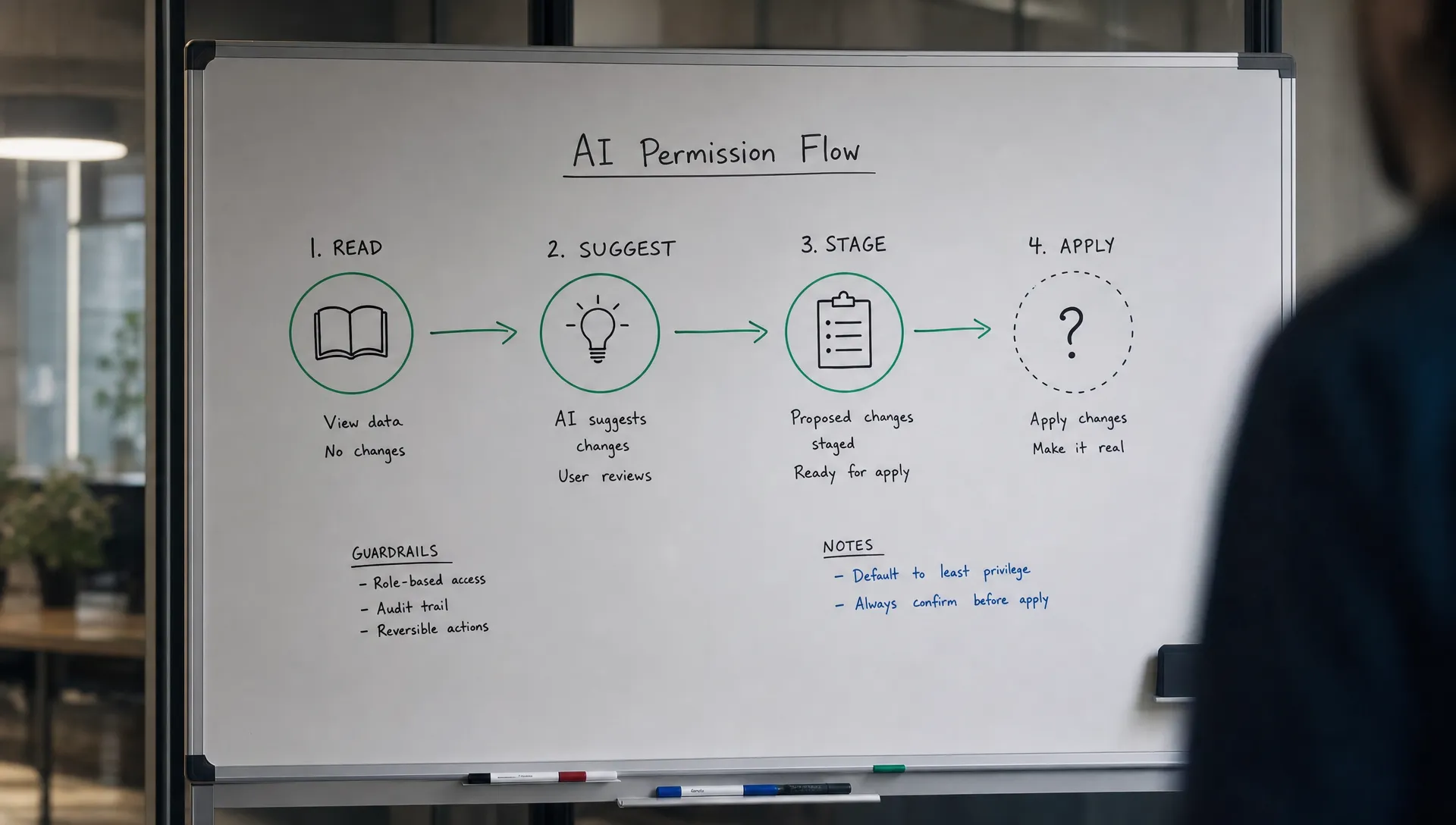
A better model is progressive authority. The AI earns more permission as the user moves closer to applying work.
Start by mapping the job into action levels. The labels will differ by product, but the sequence is usually stable.
| Permission level | What the AI can do | Good default |
|---|---|---|
| Read | Inspect the current object or selected context | Allow narrow, visible access |
| Suggest | Generate options without changing the source of truth | Allow by default when context is clear |
| Stage | Prepare changes in a draft, branch, preview or queue | Allow with visible diff or summary |
| Apply | Change the source of truth inside the product | Require user confirmation |
| Act externally | Send, publish, sync or trigger another system | Require explicit scope and recovery path |
This is where many AI features get permissions backwards. They ask for broad read access during onboarding, then provide a weak review step when the AI is about to act. Users experience the worst of both worlds: early anxiety and late uncertainty.
Move permission requests closer to the work. In Notion AI, the user is usually working inside a page or document, so the relevant boundary is the current page, selected text or workspace content. In GitHub Copilot, the useful boundary is the current file, repository context or codebase index. In Grammarly, the boundary is often the active text field plus tone and style preferences.
Those are not just technical scopes. They are mental scopes. Users can reason about them quickly.
Do not confuse permission with trust
A granted permission does not mean the user trusts the output. It only means they allowed the AI to operate within a boundary.
This distinction matters because many teams treat permission approval as the end of the safety journey. They measure consent rate, then wonder why retention is weak. The user gave access, tried the feature once and decided the review burden was too high.
For AI work, the permission layer and verification layer have to fit together. If the AI can apply a change, the user needs a way to inspect the change before it lands. If the AI used private context, the user needs to know which context shaped the output. If the AI is uncertain, the product should not hide that uncertainty behind a confident action button.
This is why verification patterns are often more important than consent copy. If your feature crosses from suggestion into action, design the review step first. The article on how to design AI so users can verify before they apply goes deeper on that handoff.
Five patterns that keep permissions from blocking work
You do not need a complicated policy engine to make AI permissions feel usable. You need the right product seams.
- Object-bound access: Let the user grant access to the current document, ticket, project, repo or customer record instead of the whole workspace.
- Time-bound sessions: Allow the AI to use context for this task or this session, then expire access unless the user chooses otherwise.
- Staged changes: Put AI edits into drafts, diffs, branches, suggestions or pending queues before they touch the source of truth.
- Scoped memory: Separate “use this now” from “remember this later” so users do not have to make a permanent data decision to finish a temporary task.
- Action receipts: After the AI acts, show what it changed, what context it used and how to undo or correct the result.
These patterns reduce the permission decision to something the user can answer. Not “Do I trust this AI?” but “Can it read this ticket to draft a reply?” or “Can it update these three fields after I approve the preview?”
That difference is large. One question asks for belief. The other asks for operational approval.
Give admins controls that match product reality
In B2B products, the end user is not the only permission holder. Admins, security teams and managers shape adoption by deciding whether the AI feature is allowed at all.
If admin controls are binary, adoption suffers. “On for everyone” is too risky. “Off for everyone” wastes the investment. Teams need settings that match the actual risk surface.
Useful controls include role-based access, data source allowlists, workspace-level limits, external action restrictions, memory settings and audit logs. Product teams should also decide which actions require approval by default. A user generating a summary of a selected document is not the same as an AI sending that summary to a customer.
This is also where privacy decisions become adoption decisions. If users and admins do not understand retention, training use, cross-workspace access or deletion rules, they will withhold the very context the AI needs. For a deeper decision frame, see AI and privacy: what product teams must decide early.
What to measure after changing AI permissions
Consent rate is a weak metric by itself. A high consent rate can hide a low trust rate. A low consent rate can still be fine if the people who grant access become successful repeat users.
Track permission behavior alongside task completion and retention.
| Metric | What it tells you |
|---|---|
| Permission grant rate by surface | Whether the request is arriving with enough context and value |
| Drop-off after permission request | Whether the permission moment is blocking task momentum |
| First successful applied action | Whether users move from generation to real workflow use |
| Manual copy or export after generation | Whether users distrust direct application |
| Revocation or admin disable rate | Whether access feels too broad after use |
| Repeat use after first applied action | Whether the permission model supports habit, not just trial |
Segment these by role and use case. A founder may tolerate broad permissions to move faster. An enterprise PM may need narrower defaults because their users sit inside a policy-heavy environment. Same feature, different adoption failure.
Frequently Asked Questions
Should AI permissions be asked during onboarding? Only if the permission is required to show immediate value. Most AI permissions work better in context, when the user understands the object, task and benefit tied to the request.
Is progressive permission always better? Usually, but not if it creates constant prompts. The goal is not more permission screens. The goal is clearer authority at each risk level, with safe repeat actions bundled inside a reasonable scope.
How should we handle AI memory permissions? Treat memory as a separate permission from task context. Users may be comfortable letting AI use a document for one task, but not comfortable letting the system remember that information later.
What is the biggest mistake in AI permission design? Asking users to approve broad future agency before they have seen useful work. Show value in a narrow scope first, then ask for more authority when the job requires it.
The next product decision
Pick one AI workflow that matters to retention. Write down every moment where the AI reads, remembers, changes, shares or triggers something. Then mark which moments are invisible to the user today.
That map will show you where adoption is breaking. Maybe the first permission asks for too much. Maybe the apply step asks for too little. Maybe admins have no safe middle option. Fix that layer before adding more model power.
If you want a structured way to diagnose this against other adoption failures, the free AI adoption triage tool can help you identify whether permissions are the primary issue or a symptom of a broader trust problem. The full AI Product Adoption Deck goes deeper with diagnostic cards, action cards and workshops for turning that diagnosis into product decisions.