AI and Trust Break When Users Cannot Set a Safe Boundary
AI and trust fail when users cannot set safe boundaries. Diagnose boundary gaps in AI UX and design controls users can rely on.

You can see the failure in behavior before users ever say they have a trust issue.
They write a careful prompt, then remove the sensitive details that would make the answer useful. They ask the AI to draft something, then paste the result into a separate document before editing. They never connect the CRM, never grant write access, never use the auto-apply button and never let the feature touch a customer-facing workflow.
The model may be good. The UX may be fast. The adoption problem is still real.
AI and trust break when users cannot set a safe boundary. If the product does not let them define what the AI can see, change, remember or publish, they will create their own boundary outside the product. Usually that boundary is blunt: use the AI only for low-risk tasks, or stop using it.
The symptom: users keep the AI at arm's length
A boundary problem often looks like weak activation or shallow retention. Users try the feature, get a decent result, then do not make it part of their normal workflow.
The common read is that the output was not good enough. Sometimes that is true. But if users say the answer was useful and still avoid deeper usage, look for a missing control layer.
You may have a safe-boundary problem if you see patterns like these:
| User behavior | Likely concern | Product response |
|---|---|---|
| Users give vague prompts instead of real context | They do not know what will be stored, exposed or reused | Make data use and memory boundaries explicit before input |
| Users copy output into another tool before editing | They do not trust the AI near the system of record | Add review, diff, undo and draft modes |
| Users only use the feature for brainstorming | They cannot limit the risk of wrong or visible output | Offer low-authority modes before action modes |
| Users keep adding defensive prompt clauses | They are trying to create policy through language | Move constraints into UI controls and defaults |
| Users avoid team or customer-facing use cases | They fear reputation damage if the AI crosses a line | Add audience, approval and publish boundaries |
This is not the same as a generic trust problem. It is more specific. The user may trust that the AI can produce something useful, but not trust the product environment around it.
What a safe boundary actually means
A safe boundary is a user-visible limit around AI behavior.
It answers practical questions before the user has to take a risk:
- What context can the AI use?
- What sources is it allowed to rely on?
- Can it make changes, or only suggest them?
- Who can see the output?
- Will this input be saved, remembered or reused?
- Can the user inspect and undo what happened?
The point is not to give users a wall of settings. Most users do not want an AI control panel. They want to know the product will not cross the line that matters in that moment.
For a sales rep, the boundary may be: do not invent customer commitments. For a support lead, it may be: do not send without human approval. For a developer, it may be: show me the diff before changing files. For a lawyer, it may be: use only the documents I selected.
Different jobs need different boundaries. If your AI UX offers the same trust pattern for all of them, users will route around it.
Why verification is not enough
Verification matters. If users cannot check AI output, trust drops fast. But boundary setting happens earlier than verification.
Verification asks: is this output safe to use?
Boundary setting asks: did I have enough control over how this output was produced and what it can affect?
A user may be able to inspect the answer and still reject the workflow because the AI touched too much context, wrote into the wrong place, exposed sensitive data or acted with too much authority. That is why AI and trust work needs to cover the whole interaction, not just the final answer.
The NIST AI Risk Management Framework treats AI risk as something teams must govern, map, measure and manage across the lifecycle. Product teams do not need to turn that into heavy process for every feature. But the product experience should make risk boundaries visible at the point of use.
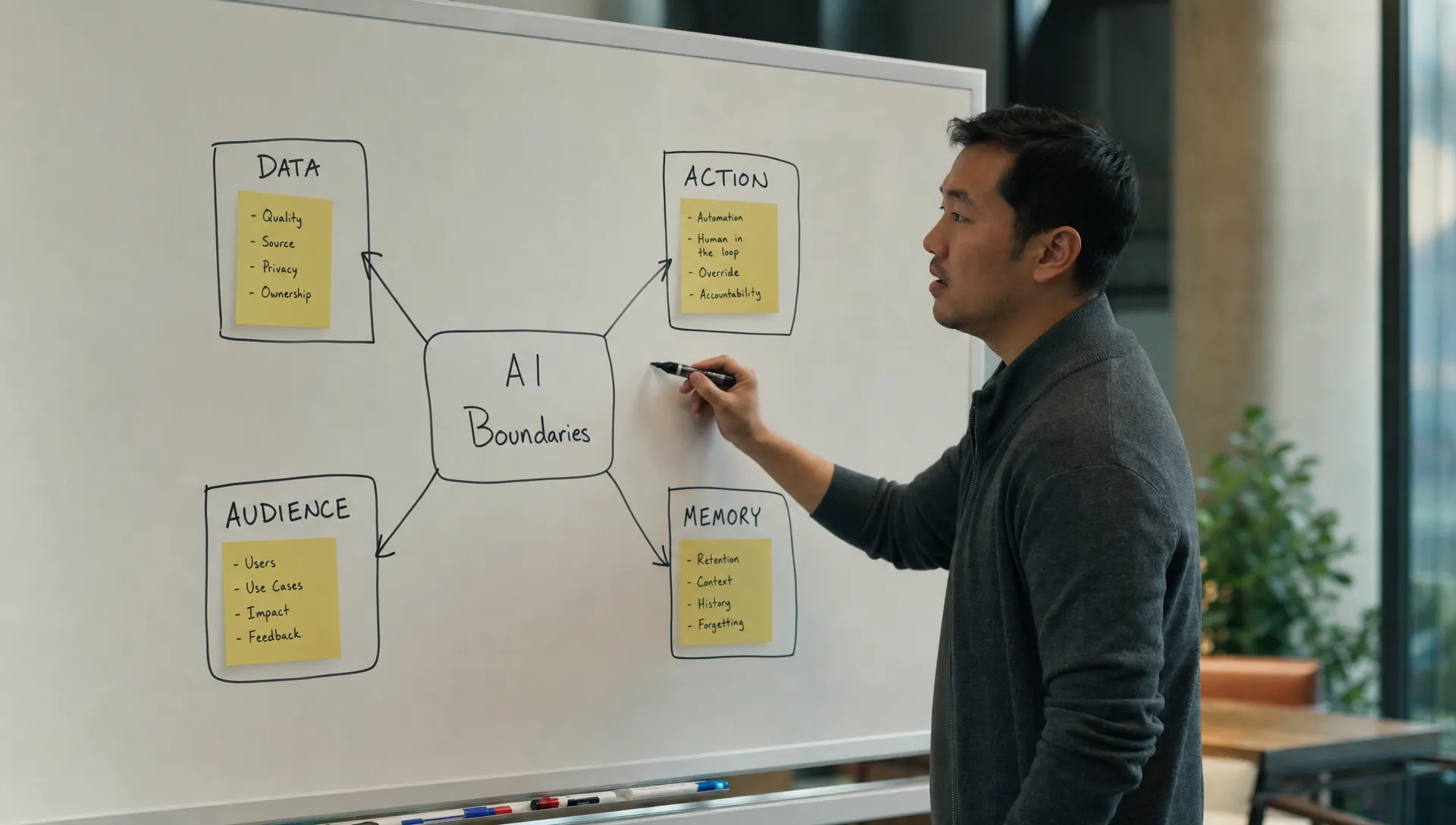
The four boundary failures that hurt adoption
1. The data boundary is unclear
Users do not provide the context your AI needs because they are unsure where that context goes. This is common in AI features layered into existing SaaS products. The feature asks for richer input, but the product does not explain whether that input is private, saved, used later or visible to admins.
When the data boundary is unclear, users degrade the input. They remove names, numbers, deal details, customer complaints and internal strategy. Then the AI gives a generic answer. The team blames model quality, but the model never got the real task.
This is where AI privacy becomes an adoption issue, not just a legal issue. If your team has not made those calls yet, the decisions in AI and Privacy: What Product Teams Must Decide Early are directly connected to trust and usage depth.
2. The action boundary is too broad
Many AI products jump too quickly from suggestion to execution. They want the magic moment: one prompt, completed work.
Users often want something less dramatic. They want a draft, a preview, a diff, a proposed change or a checklist. They want the AI close enough to help, but not close enough to break the workflow.
This is why tools like Grammarly and GitHub Copilot feel safer in many work contexts. The AI suggests. The user accepts, rejects or edits. That does not make those products perfect, but the action boundary is legible. The user can tell who is still in charge.
3. The audience boundary is missing
AI output has different risk depending on who sees it. A rough internal summary is one thing. A message to a customer is another. A recommendation visible to an executive team is another.
If the product does not distinguish between private draft, team-visible note and external publish, users will assume the worst. They will move the work into a scratchpad or avoid the feature for anything visible.
This matters for collaboration products in particular. The AI may be embedded in a shared workspace, but the user still needs a private thinking space.
4. The memory boundary is vague
Memory can improve relevance. It can also make users nervous.
If the product remembers preferences, prior prompts, customer context or writing style, users need to understand what is persistent and what is session-only. Otherwise they will hesitate to explore sensitive use cases.
A vague memory boundary creates a strange trust gap. The product feels both powerful and unpredictable. Users do not know whether yesterday's context will shape today's output, so they stop treating the AI as a reliable tool.
Move boundaries out of the prompt
A common product failure is asking users to set safety boundaries through prompting.
Do not share private information. Use only approved sources. Do not make changes without asking. Keep this internal. Be concise. Do not hallucinate.
Those instructions are doing product work that the interface should do. Prompt clauses are fragile because users forget them, phrase them inconsistently and cannot tell whether the system followed them.
Better boundary design turns repeated prompt constraints into visible product controls.
| Boundary type | Weak pattern | Stronger product pattern |
|---|---|---|
| Source boundary | User writes, use only these docs | Source picker with selected files shown in the prompt context |
| Action boundary | User writes, do not change anything yet | Draft mode, preview mode, apply button or approval gate |
| Audience boundary | User writes, keep this private | Private draft state before team or customer visibility |
| Data boundary | User guesses what is safe to paste | Plain data-use notice at the input point |
| Recovery boundary | User hopes mistakes are reversible | Undo, version history, diff view or change log |
The rule is simple: if users keep typing the same safety instruction, make it part of the product.
A practical diagnostic for your feature
Take one high-value AI workflow that is underused. Do not start with the model. Start with the user's perceived blast radius.
Ask these questions in a product review or customer interview:
- What is the worst thing the AI could do in this workflow?
- Would the user know before it happened?
- Could the user stop it?
- Could the user reverse it?
- Would the user know what data was used?
- Would the user know who can see the result?
If the answer is no to more than one, you probably do not have an output-quality problem yet. You have a boundary problem blocking the product from reaching serious use.
This is also worth instrumenting. Look for signals such as frequent use of draft modes, low connection rates for data sources, high copy-out behavior, repeated safety phrases in prompts, abandoned publish flows and edits made outside your product.
If you need a faster way to sort the symptom, the free AI adoption triage tool can help separate trust, activation, retention and workflow-fit problems before your team jumps to a fix.
Design for controlled escalation
Users rarely go from zero trust to full delegation in one step. They escalate when the product earns it.
A useful AI workflow often has a ladder:
| Trust level | User expectation | Product mode |
|---|---|---|
| Explore | Help me think without consequences | Private scratchpad or ideation mode |
| Draft | Create something I can edit | Draft output with clear source context |
| Recommend | Tell me what you would change | Suggested edits, ranked options or rationale |
| Apply | Make the change under my control | Diff, approval and undo |
| Automate | Handle this class of work next time | Rules, limits, alerts and review sampling |
Many failed AI features collapse this ladder. They offer either chat or automation, with nothing reliable between them. That forces users to choose between low-value play and high-risk delegation.
Controlled escalation gives users a path. They can start with private drafts, move to suggested changes, then grant limited authority once the product has proven itself in their workflow.
What to decide this week
Pick one AI workflow where users are active but not retaining. Write down the exact boundary they cannot set today.
Not the abstract concern. The operational line.
Examples:
- The AI can read too much customer data.
- The AI can write into the system of record too early.
- The AI output may become visible to the wrong audience.
- The AI may use unapproved sources.
- The AI may remember something the user expected to be temporary.
Then make one boundary visible in the UI. Do not redesign the whole feature. Add the smallest control that lets the user proceed with less perceived risk.
That could be a source selector, a private draft state, an apply step, a diff view, a data-use note, a memory toggle or an approval gate. The right answer depends on the failure mode.
Frequently Asked Questions
What is a safe boundary in an AI product? A safe boundary is a clear limit on what the AI can see, use, change, remember or publish. It helps users understand the risk of using the feature before they commit real work to it.
Is this the same as AI guardrails? Not exactly. Guardrails are often system-level constraints. Safe boundaries are user-facing product decisions. They tell the user where control sits in the workflow.
Do more controls always increase trust? No. Too many controls create work. The goal is to expose the one or two boundaries that matter for the user's current job, not to turn every AI feature into an admin console.
How do I know if trust is breaking because of boundaries or output quality? If users say outputs are useful but still avoid deeper workflow integration, suspect boundaries. If they provide full context, verify easily and still reject results, output quality is more likely the issue.
Go deeper
If this diagnosis matches your product, map the failure before adding more prompts or model changes. The AI Product Adoption Deck includes diagnostic cards, action cards and workshop templates for turning trust symptoms into concrete product decisions.
Start with the boundary your users are already trying to create outside the product. Then make that boundary clear enough that they can stay inside the workflow.