Apply AI Where Users Can Act on the Output Fast
Apply AI where users can act fast. Diagnose why outputs stall, choose better surfaces, and turn generation into adoption.

Your AI feature gets clicks. Users open it. They generate something. Sometimes they even say it is useful.
Then nothing happens.
The output is not accepted, inserted, sent, approved, reused, or connected to the next step in the workflow. It sits in a side panel, a chat transcript, or a draft state. The team keeps improving generation quality, but adoption does not move.
That is usually a placement problem, not only a model problem.
If you want users to apply AI, put it where they can act on the output fast. Not fast in the abstract. Fast relative to the moment of work. Fast enough that the user still remembers the context, trusts the boundary of the task, and can make a decision without starting a second review process.
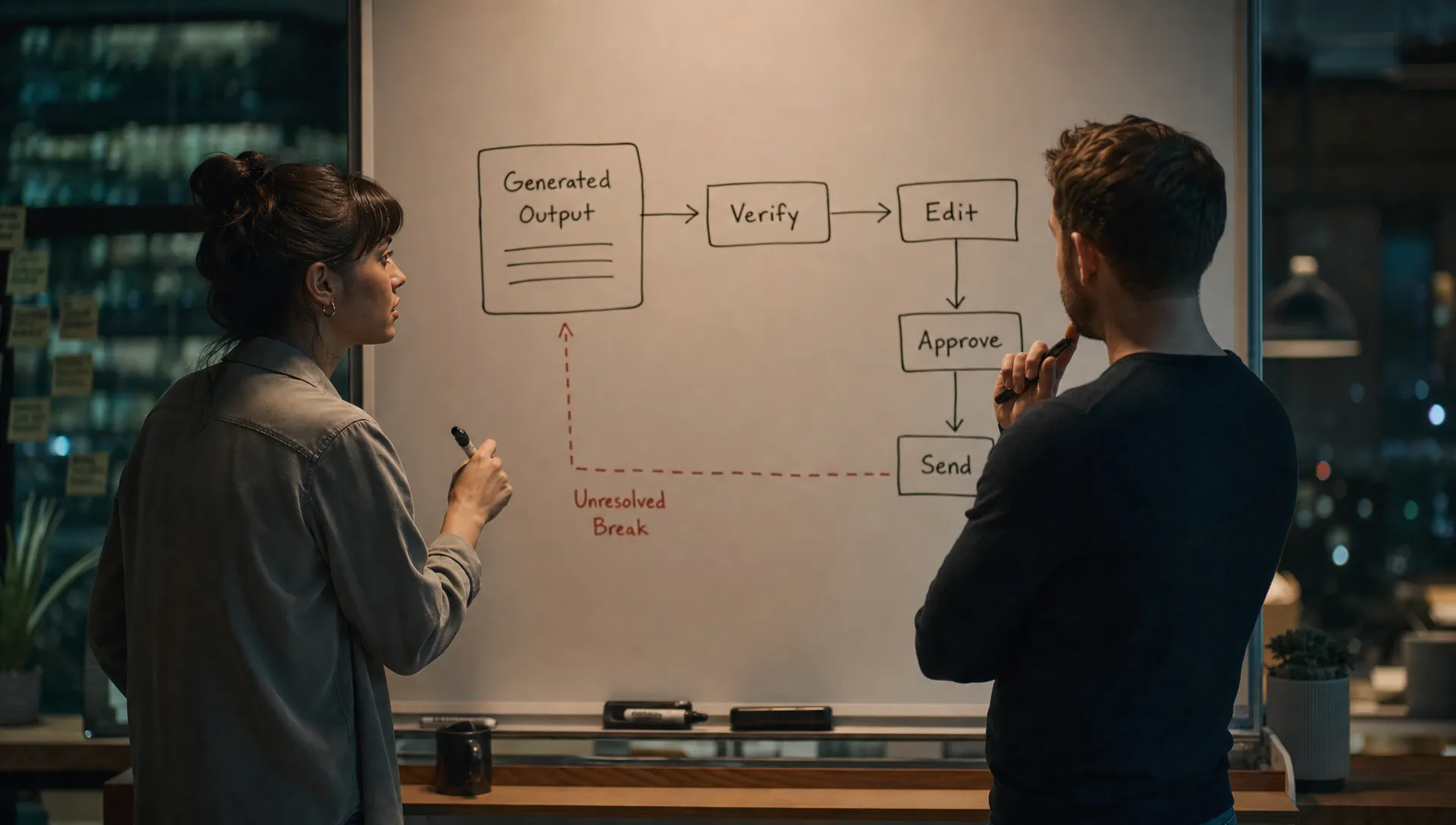
The adoption break: output arrives too far from action
A lot of AI features are designed around the moment of generation. Prompt box. Spinner. Output. Maybe regenerate.
But product adoption happens after that. The important question is: what can the user do next?
Useful output still fails when the next step is unclear or too expensive. A sales rep gets a generated account summary, but still has to decide which fields are safe to paste into Salesforce. A PM gets synthesized feedback, but has to trace every claim back to source calls before using it in a roadmap review. A support lead gets a suggested reply, but cannot see whether it matches policy.
The AI did work. The user still has to do the adoption work.
Fast action usually means the user can do one of these things in the same context:
- Accept or reject the output
- Edit a specific part of it
- Insert it into the object they were already working on
- Send it to the next workflow step
- Verify the claim against nearby source material
- Save the correction so future outputs improve
If your AI feature cannot support one of those actions, it may be generating content without creating product behavior.
This is why teams need to separate “AI was used” from “AI output was applied.” The measurement problem is covered more directly in AI in Action Means Output Applied, Not Generated, but the product design implication is simple: generation is not the finish line.
Output-to-action distance is the metric to watch
Most teams already track generation events. They know how many prompts were sent, how many summaries were created, how many drafts were produced.
That is not enough.
You need to measure output-to-action distance. How many steps sit between the generated output and the next real user action?
A short distance looks like GitHub Copilot suggesting code inside the editor. The developer can accept, edit, or ignore without changing tools. Grammarly works for similar reasons. The suggestion appears next to the sentence that will change. The user does not have to move the output somewhere else before deciding.
A long distance looks like a generic AI assistant that produces a polished paragraph in a separate panel, while the actual work happens in a CRM, ticket, slide, spreadsheet, or codebase. The user must copy, adapt, verify, format, and paste. Each step adds doubt. Each step lowers the chance of repeat use.
Use this diagnostic table when adoption looks soft but usage looks healthy.
| Symptom | Likely diagnosis | Better product response |
|---|---|---|
| High generation, low save or insert rate | Output is interesting but not actionable | Move AI closer to the target object or workflow step |
| Users copy output into another tool | Your product is not the place where action happens | Add structured handoff, export, or native insertion |
| Users regenerate many times before acting | They cannot steer or repair the output | Add editing controls, constraints, or partial regeneration |
| Users read summaries but still open all source records | Trust requires local verification | Show source links, evidence, and scope boundaries near the output |
| First use is strong, repeat use is weak | The feature helps once but does not become routine | Attach AI to recurring jobs, not novelty moments |
| Users ask “what should I do with this?” | The output lacks a decision frame | Provide a default next action and clear acceptance criteria |
The goal is not to remove all thinking. That is the wrong bar. The goal is to remove unnecessary translation between AI output and the user’s next real decision.
Good AI placement starts with a decision, not a prompt
A prompt is not a workflow. It is an input method.
Good AI placement starts by identifying a decision the user already needs to make. Then the product helps the user reach that decision faster.
For example, “write a customer email” is broad. “Draft a reply to this refund request using the current policy” is closer to action. “Suggest a reply, highlight the policy clause used, and let the agent approve or edit before sending” is much closer.
The same pattern applies across product surfaces:
- In a CRM, AI should help update the account, prioritize the next step, or prepare a message tied to the record.
- In a project tool, AI should help convert messy discussion into assigned tasks, decisions, or risks.
- In an analytics product, AI should help explain a metric movement and point to the chart, segment, or query behind it.
- In a design tool, AI should help revise the current artifact, not produce an unrelated artifact the designer must reconstruct.
Perplexity is a useful reference here. Its output is not just a block of generated text. It keeps citations and follow-up paths close to the answer. That reduces the distance between reading and checking. It does not solve every downstream workflow, but it understands that answer quality and verification live together.
Notion AI shows both sides of the problem. When it helps rewrite or summarize inside the document you are already editing, the action path is short. When it behaves like a broad blank-page generator, the user has to decide what the output is for, where it belongs, and how much to trust it.
Bad AI placement creates a second job
A common failure mode is the “helpful side quest.” The AI output seems valuable, but it creates more work before the user can benefit.
This happens when the output is detached from the system of record. It also happens when the AI suggests a recommendation but cannot help execute it. The user now has to become the integrator.
Some examples:
| AI feature pattern | Why it stalls | Better placement |
|---|---|---|
| Standalone chat for operational work | User must translate answer into workflow actions | Embed AI into the record, queue, ticket, or editor |
| Long generated report | User must scan and extract decisions | Produce sections tied to decisions, owners, and source evidence |
| Recommendations without controls | User cannot safely accept or tune the recommendation | Add accept, dismiss, edit, and explain actions |
| Summary with no source access | User cannot check what was included or omitted | Link claims to source material and show scope |
| Draft with no destination | User must choose where to use it | Generate inside the destination field or object |
The blunt version: if the user has to leave your AI surface to make the output useful, your product may be training them not to come back.
Design moves that shrink the gap
You do not always need a better model. Often you need a better path from output to action.
Put the output inside the thing that will change
Inline beats adjacent. Adjacent beats separate. Separate beats exported.
If the user is editing a support reply, put the AI suggestion in the reply composer. If the user is updating a roadmap item, put the synthesis in the roadmap object. If the user is reviewing a contract clause, put the explanation next to the clause.
The closer the output is to the object of action, the less context the user has to rebuild.
Give the user one clear next action
Many AI products give users output and then hide behind flexibility. “You can do anything with this” sounds powerful, but often creates hesitation.
A better pattern is to offer a strong default action: apply to draft, add to ticket, create task, send for review, mark as accepted, compare with source, replace selected text.
Users can still choose. But the product should make the expected action obvious.
Make verification local
Fast action depends on fast checking. If users cannot verify the output where they receive it, they slow down or abandon it.
This is not just a trust issue. It is a workflow cost issue. Every extra tab, source lookup, or teammate ping adds friction.
For a deeper breakdown of this pattern, see Design AI So Users Can Verify Before They Apply. The short version: show what the AI used, what it did not use, and what confidence the user should have in the result.
Let users repair, not restart
Regeneration is a weak correction loop. It asks the user to gamble again.
If the output is close but wrong, users need ways to repair specific parts. Shorten this section. Use a stricter tone. Keep only customer quotes. Change the action owner. Exclude closed tickets. Preserve the structure but update the recommendation.
Repair controls keep users in the workflow. Regeneration often pushes them back into prompt design.
Define the apply event before the feature ships
Before building the prompt interface, define what “applied” means.
For a writing assistant, it might be inserted text that remains after editing. For a support tool, it might be an approved reply sent to a customer. For an analytics assistant, it might be a saved explanation added to a report or shared with a stakeholder. For a coding tool, it might be accepted code that passes tests.
If you cannot define the apply event, you probably have not found the right workflow surface yet.
A simple decision frame for where to apply AI
Use three questions before adding AI to a product surface.
First, is there a frequent decision here? If the user only needs help once, the feature may create curiosity but not habit.
Second, can the user verify the output without leaving the flow? If not, trust will leak at the review step.
Third, can the user act on the output within one or two product actions? If not, the AI may be producing raw material instead of helping complete work.
If the answer to any of these is no, do not start with a bigger AI surface. Start with a smaller, sharper placement.
This is where many teams overbuild. They launch a general assistant when the adoption opportunity is a narrow inline action. They add a chat entry point when the user needs a better approve, edit, or apply control. They optimize the prompt before fixing the handoff.
Frequently Asked Questions
What does it mean to apply AI in a product workflow? It means the AI output leads to a real user action, such as accepting, editing, inserting, sending, saving, approving, or reusing the output inside the workflow.
Why do users generate AI output but not use it? Usually because the output is too far from the action. Users may need to verify it, reformat it, move it into another tool, or decide what it is for before they can benefit.
Should every AI feature be inline? No. Some tasks need exploration. But if your goal is adoption and repeat use, the output should eventually connect to a clear action path in the user’s existing workflow.
How should product teams measure this? Track apply events, not only generation events. Look at insert rate, accept rate, edit rate, send rate, save rate, reuse rate, and the number of steps between output and action.
The next product decision
If adoption is weak, do not ask only whether the model is good enough. Ask where the output lands.
Find one AI surface with high generation and low application. Map the next five user actions after output appears. Then remove one translation step. Move the output closer to the target object. Add verification. Add an apply control. Make the next action explicit.
If you want a structured way to diagnose that break, the free AI adoption triage tool can help identify which adoption failure you are dealing with. For a deeper operating system, the AI Product Adoption Deck includes diagnostics, action cards, and workshops for turning these symptoms into product decisions.