Why Your AI Prompt Fails Before Users Even Type
Learn why your AI prompt fails before users type, how to diagnose pre-prompt friction, and what product changes improve adoption.

Your prompt box is getting attention. It is not getting useful input.
Users open the AI panel. They pause. They type something vague like “improve this” or “help me with this.” They generate once, skim the output, and leave. In the dashboard, it looks like weak prompting. In the roadmap meeting, someone says users need better examples.
Maybe. But usually the AI prompt failed earlier.
The product asked the user to do too much cognitive work before the first character. It made them decide the task, gather context, choose the output format, estimate risk, and plan the next step, all inside one empty field.
That is not a prompt problem. That is a product design problem.
The AI prompt is the last step, not the first step
A useful AI prompt is not just text. It is a handoff.
By the time the user starts typing, the interface should have already answered a few basic questions:
- What task am I trying to complete?
- What context does the AI already have?
- What kind of output will I get back?
- How good does the output need to be before I can use it?
- What am I supposed to do after generation?
If those questions are unanswered, the user has to solve the product strategy in the prompt box.
This is why “Ask AI anything” often performs worse than teams expect. It sounds flexible. To the user, it often means “figure out what this feature is for.” Flexibility is useful after intent is clear. Before that, it creates work.
This is the same reason blank states have always been hard. Interfaces that rely on recall make users work harder than interfaces that support recognition. Nielsen Norman Group’s guidance on recognition rather than recall applies directly here. A blank AI prompt asks users to recall the right task, wording, format, constraints, and success criteria from memory.
Most users will not do that. They will guess.
What pre-prompt failure looks like
You can often see the failure without reading a single prompt. Look at the behavior around the prompt field.
| User behavior | Likely pre-prompt cause | What it usually means |
|---|---|---|
| Opens AI composer, then exits | No clear trigger | The user does not know why now is the right moment to use AI |
| Types a very generic prompt | Task is underspecified | The product has not named the job clearly enough |
| Pastes a long brief every time | Context is not visible or trusted | The user does not believe the AI has the right inputs |
| Clicks examples but does not submit | Examples are not tied to their current work | The prompt suggestions feel generic |
| Regenerates repeatedly without editing | No correction model | The user knows it is wrong but not how to steer it |
| Accepts output once, then never returns | No workflow handoff | The output was interesting, but not embedded in repeat work |
This is where many teams misread the data. They see a low submit rate and try to improve the placeholder. They see weak prompt quality and add a prompt library. They see low retention and blame the model.
Those fixes can help, but only if the prompt is actually the bottleneck. If the user does not understand the task contract, better wording will not save the experience.
If this pattern matches your product, it is close to what we call empty prompt paralysis: the freeze starts before the field, because the product has not created enough intent, context, or confidence.
Strong AI products reduce prompt invention
Look at the AI products that get repeat use inside real work. They rarely depend on a user inventing everything from scratch.
GitHub Copilot starts from code. The cursor location, open file, nearby functions, and developer intent narrow the space before the user asks anything. Cursor does similar work by grounding the interaction in a codebase, a file, or a selected block. Grammarly starts from existing text and known writing issues. Perplexity makes the expected output legible by returning sourced answers and visible follow-up paths.
Notion AI is strongest when it appears inside a page, database, or writing workflow. It is weaker when treated as a blank general-purpose assistant. The difference is not only model quality. It is product context.
The lesson is simple: the best AI prompt is often half-written by the product.
That does not mean hiding the prompt. It means giving the user a narrower, safer starting point. A prompt box should let users steer, not force them to define the entire job from zero.
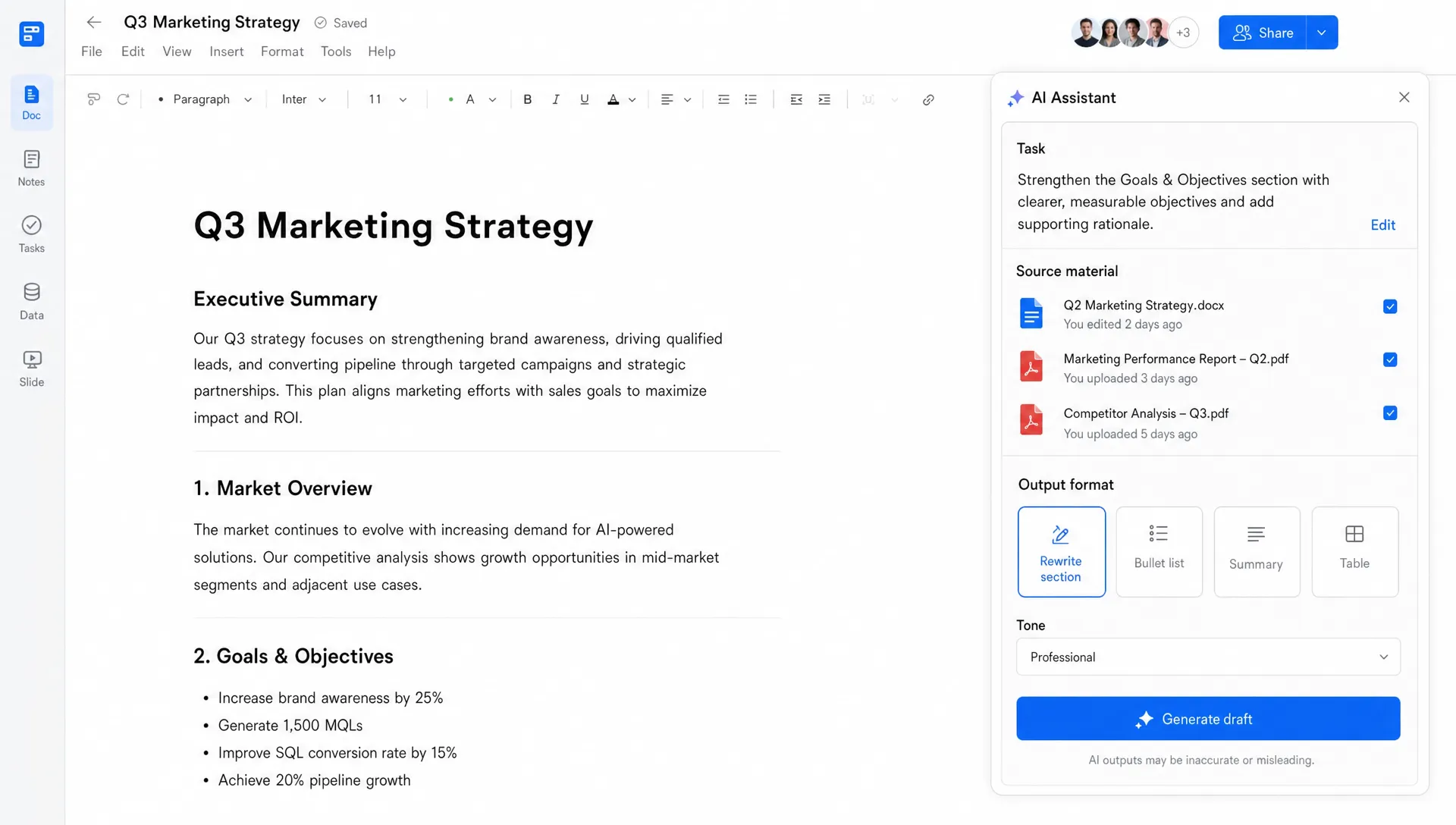
The five decisions that make or break the prompt
Before adding more prompt examples, audit the decisions around the prompt surface.
1. The trigger
Why is the AI feature appearing here?
A good trigger is tied to a recognizable moment in the workflow: a user has selected messy notes, finished a draft, opened a stale account, reviewed a support thread, or reached a decision point. A weak trigger is just a button that says “AI” in the sidebar.
If the trigger is vague, the prompt becomes vague.
2. The input contract
Users need to know what the AI can see.
Can it read the current document? The whole project? Past customer messages? The selected text only? If this is unclear, users either under-prompt because they assume the system knows more than it does, or over-prompt because they do not trust the context.
Both create bad outputs. Both are product failures.
3. The task frame
The user should not have to decide whether this is a summarization tool, a drafting tool, a critique tool, a research tool, or a decision aid.
You can still allow freeform input. But the first layer should be job-shaped: summarize this thread, turn these notes into next steps, critique this draft, compare these options, rewrite for this audience.
A task frame reduces the burden on the AI prompt without removing user control.
4. The output contract
Many AI features fail because users do not know what state the output is in.
Is it a draft? A recommendation? A final answer? A list of options? A risky guess? A source-backed summary? If the product does not say, users have to infer it from the prose. That is a bad place to put trust decisions.
Output contracts can be simple: “Draft for review,” “Suggested next steps,” “Answer with sources,” “Editable first pass,” or “Risks to check before sending.” The point is not perfect labeling. The point is reducing ambiguity.
5. The correction path
Users should not need to become prompt engineers to fix a poor answer.
If the first output is close but wrong, what can they do? Regenerate is not enough. Regeneration is a slot machine. Useful correction paths include changing the audience, tightening the scope, adding missing context, selecting a preferred option, marking a section as wrong, or asking for a shorter version.
The correction path teaches the user how to collaborate with the system. Without it, every failed output feels like a dead end.
A better prompt surface starts with a diagnostic
Do not start by rewriting placeholder text. Start by watching first-session behavior.
Pick ten new or low-frequency users. For each session, inspect the moment before the first prompt. You are looking for three things.
First, did the product create a clear task before asking for input? If not, fix the trigger or task frame.
Second, did the user understand what context was already included? If not, expose the input contract.
Third, did the user know what would happen after the AI responded? If not, define the output state and next action.
Here is the simplest decision frame:
| If the user is stuck because... | Do this before changing the model |
|---|---|
| They do not know what to ask | Replace the blank prompt with task-specific entry points |
| They do not know what the AI knows | Show included context and let them adjust it |
| They do not know what good output looks like | Set an output contract before generation |
| They do not know how to fix the result | Add structured correction controls |
| They do not know where the output goes | Connect the result to the next workflow step |
Prompt quality improves when the product carries more of the setup. That is the core shift.
FAQ
Why do users write bad AI prompts? Often because the product has not given them enough task context, input visibility, or output expectations. The user is not necessarily bad at prompting. They may be compensating for a vague product surface.
Are prompt examples still useful? Yes, but only when they are tied to the user’s current workflow. Generic examples rarely solve adoption problems. A useful example should reflect the current object, task, role, and desired output.
Should every AI feature avoid a blank prompt? No. Power users may want open-ended control. But for activation and repeat use, most products need a guided starting point before freeform prompting becomes useful.
How do you know if the prompt or the model is the problem? If users freeze before submitting, submit vague prompts, or abandon before testing the output, the issue is likely pre-prompt product design. If users submit clear prompts and still get unusable results, model capability or retrieval quality may be the bottleneck.
What to do next
Run a pre-prompt audit before your next AI UX redesign. Watch the thirty seconds before the prompt, not just the generated answer. That is where the adoption break usually shows up.
If you want a structured way to diagnose the symptom, use the free AI product Triage tool. If you want to go deeper, the AI Product Adoption Deck maps these failures across diagnostics, action cards, and workshops for teams trying to turn shipped AI features into repeat behavior.