Why the AI User Journey Breaks After First Value
Learn why the AI user journey breaks after first value, how to diagnose the real drop-off, and what to fix before adding onboarding.

You shipped the AI feature. Users tried it. Some even said, “This is useful.”
Then the curve flattened.
Not at the first click. Not at the first output. The break happened after first value, when the user had to decide whether the output was good enough, useful enough, and easy enough to bring back into real work.
That is the uncomfortable part of the AI user journey. First value can look strong while adoption is already breaking.
A user can generate a decent answer, smile at the demo, copy one paragraph, and still never build a habit. The problem is not always model quality. It is often the product failing to carry the user from “that was interesting” to “this is how I now get this work done.”
First value is not adoption
In a traditional SaaS flow, first value often means the user completed the core action. They created a dashboard, sent an invoice, invited a teammate, or published a page.
In an AI product, first value is usually more provisional.
The user receives an output. Now they have to judge it. They have to edit it. They have to move it somewhere. They have to explain it, trust it, or defend it. Then they have to remember to come back when the next relevant task appears.
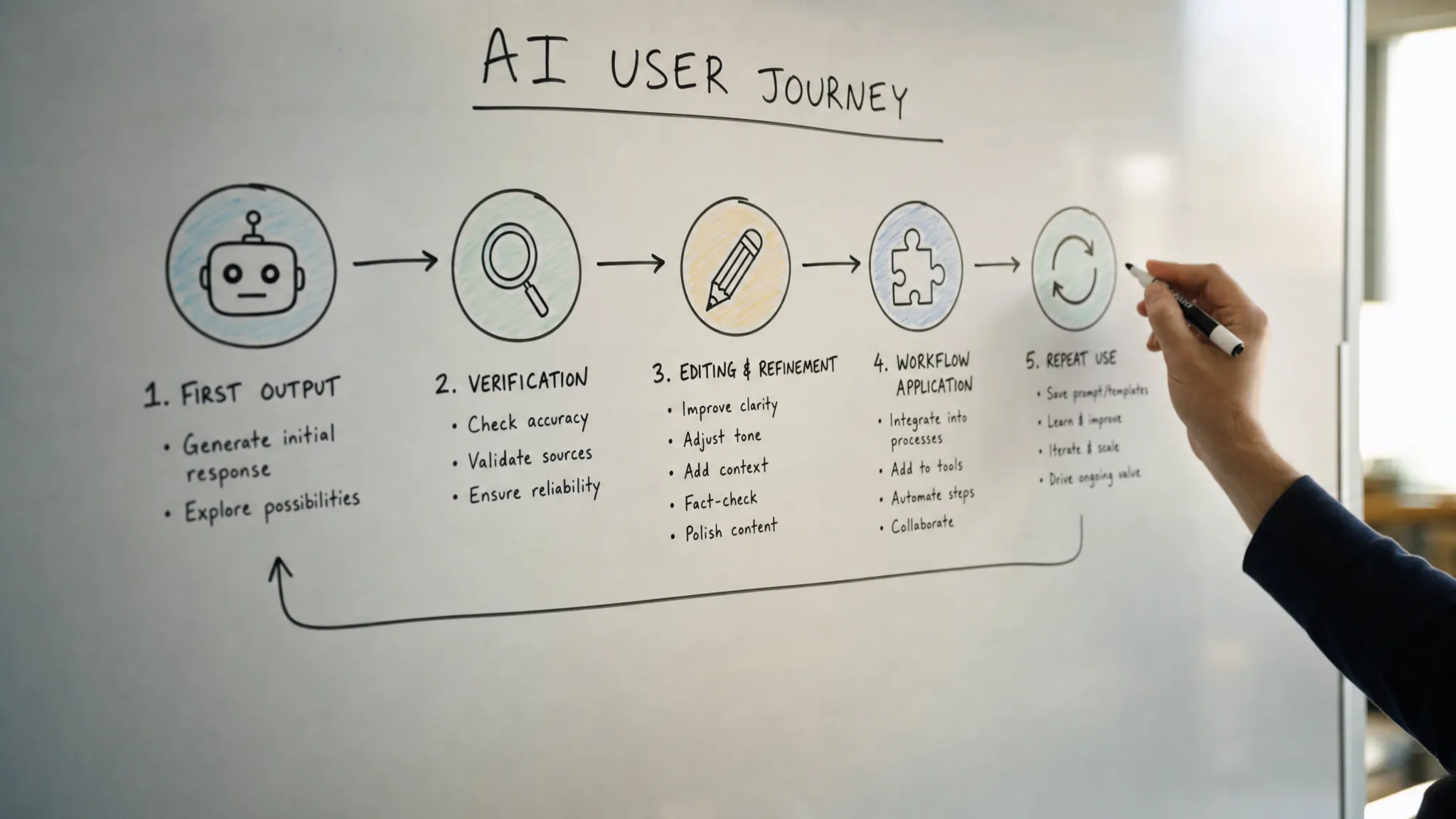
That means the AI user journey has more fragile steps after the first “aha” moment:
- The user hits a trigger.
- They provide input.
- The system generates output.
- The user evaluates the output.
- They adapt it to their context.
- They apply it in the workflow.
- They encounter the next trigger.
- They repeat the behavior.
Most teams over-design steps one through three. They under-design steps four through eight.
That is why activation can look fine while retention stays weak.
The misleading metric: “they got a good output”
A good output is not the same as a completed job.
If the user generates a draft but never sends it, the journey broke. If they summarize a customer call but never attach the summary to the CRM record, the journey broke. If they create code suggestions but spend more time checking them than writing from scratch, the journey may still be broken.
The metric that matters is not only whether the AI produced something usable. It is whether the user carried that output into the next meaningful action.
| What you see in the data | Likely journey break | What it usually means |
|---|---|---|
| High first-generation rate, low repeat use | Application break | The output was interesting but not connected to a recurring workflow |
| Many regenerations, few accepts | Control break | Users cannot steer the output toward what they need |
| Positive qualitative feedback, weak retention | Trigger break | Users liked the feature but do not know when to use it again |
| Strong opens, weak input completion | Input break | Users are unsure what to ask or how much context to provide |
| Output copied into another tool, then no return | Workflow break | The product lost the user after creating the artifact |
| Users ask others to review every output | Trust break | The output creates verification work before it can be applied |
This is where many teams misdiagnose the problem. They see first value and assume the top of the journey works. Then they blame retention on awareness, pricing, or “users not being ready.”
Sometimes those are real issues. But often the break is more specific: the product never made the second use easier than the first.
Break 1: the user cannot verify the output fast enough
AI output often fails in the evaluation step.
The user sees something that looks right. But they cannot tell whether it is right enough. That uncertainty creates work. They need to check sources, compare against internal context, ask a teammate, or rerun the task manually.
This is why generic disclaimers do not solve trust. “AI can make mistakes” protects the company more than it helps the user.
A better product question is: what does this user need to verify before they can act?
For some products, that means citations. Perplexity made this part of the core experience by keeping sources close to the answer. For writing tools, it may mean showing what changed and why. Grammarly works partly because users can accept or reject edits inline instead of treating the output as a black box. For internal business tools, it may mean showing which records, assumptions, or constraints shaped the result.
Microsoft’s Human-AI Interaction Guidelines are useful here because they treat trust as an interaction problem, not a slogan. Users need to understand what the system can do, what it used, and how to correct it.
If verification takes longer than doing the job manually, first value will not turn into a habit.
Break 2: the output creates a new task instead of finishing one
Many AI features produce artifacts that still need heavy cleanup.
A support team gets a suggested reply, but the tone is off. A sales rep gets an account summary, but the next step is missing. A PM gets a synthesized user research report, but the quotes are not traceable. A developer gets a code suggestion, but it does not match the surrounding pattern.
The user did get value. They just did not get completion.
This is the difference between “generate” and “apply.” A product that stops at generation leaves the user holding a half-finished object. A product that supports application helps the user edit, place, approve, send, merge, or track the output.
GitHub Copilot is a useful reference point. Its suggestions appear inside the editor, near the work, where acceptance is a small action. The user does not have to leave the environment, paste code from a separate AI panel, and then reassemble the workflow.
The lesson is not “make everything inline.” The lesson is simpler: reduce the distance between output and use.
Break 3: there is no second trigger
A launch modal can create first use. Curiosity can create first use. A prominent button can create first use.
None of those create the next use.
After first value, the user needs a clear moment where the AI feature becomes relevant again. If that moment is not attached to the user’s real workflow, they have to remember the feature from scratch.
That rarely happens.
Good second triggers are usually tied to live work:
- A new customer conversation arrives.
- A draft reaches a messy state.
- A ticket has enough context to summarize.
- A meeting ends and needs follow-up.
- A user returns to a project with unresolved decisions.
Bad second triggers are usually generic:
- “Try AI again.”
- “Use our assistant.”
- “Ask anything.”
- “Generate more.”
The user should not have to translate your feature into their next task. The product should surface the AI at the moment where the task becomes painful.
If you are unsure where that moment is, start by looking at activated users who did not return. The free AI adoption triage tool can help classify whether the break is around input, trust, application, or habit rather than treating “low retention” as one generic problem.
Break 4: the product hides the learning curve
Some teams want AI to feel effortless, so they remove too much structure.
The prompt box is empty. The assistant says it can help with anything. The product assumes users will discover the right inputs through exploration.
That may work for early adopters. It does not work for most users inside a business workflow.
AI products often require users to learn a new interaction pattern. They need to know what context matters, what format works, what the system is good at, and how to recover when the first output is close but wrong.
If the product hides that learning curve, the user experiences failure as personal friction. They think, “I’m not sure what to ask,” or “This is too much effort,” or “I got lucky the first time.”
The fix is not a longer onboarding tour. It is better scaffolding at the moment of use.
That can mean suggested inputs based on the current object, examples that reflect real tasks, edit controls that teach users how to steer, or follow-up actions that turn a rough output into a usable one.
If users only succeed when they already know how to prompt, your product has shifted the adoption burden onto them.
Break 5: the individual user sees value, but the organization cannot absorb it
AI value is often social.
A user may like an output, but they still need a manager to accept it, a teammate to trust it, a client to approve it, or a compliance process to tolerate it.
This is common in B2B products. The first user gets value privately. The workflow breaks when the output leaves their screen.
Ask what has to happen after the user says, “This is good.” Does someone need to review it? Does the output need a source trail? Does it need a version history? Does it need to be explainable to a skeptical stakeholder?
If the answer is yes, then adoption depends on more than individual UX. It depends on making the AI output shareable, reviewable, and defensible.
This is one reason AI features can win demos but lose production usage. The demo audience evaluates the output in isolation. Real users evaluate whether the output survives the next handoff.
How to diagnose the break after first value
Do not start by asking, “How do we improve retention?” That is too broad.
Start with users who reached first value. Then trace what happened next.
Look for the first point where momentum stopped:
- Did they inspect or verify the output?
- Did they edit, regenerate, or steer it?
- Did they apply it to the actual workflow?
- Did they share it with anyone else?
- Did they return when the next relevant task appeared?
- Did the second use take less effort than the first?
The answer tells you what kind of fix you need.
| Diagnostic question | If the answer is no | Product response |
|---|---|---|
| Can users judge whether the output is safe to use? | Trust break | Add evidence, assumptions, sources, previews, or review paths |
| Can users easily correct a near-miss? | Control break | Add targeted editing, constraints, regenerate options, or guided refinement |
| Can users move the output into the workflow? | Application break | Add insert, send, assign, merge, export, or approval actions |
| Do users know when to come back? | Trigger break | Attach AI entry points to recurring workflow moments |
| Can the output survive handoff? | Social adoption break | Add rationale, traceability, comments, versioning, or review states |
This is the same diagnostic habit behind finding the real AI adoption break: separate the visible metric from the underlying behavior. “Users do not retain” is not a diagnosis. It is a symptom.
The next product decision
If your AI feature breaks after first value, do not immediately add more onboarding, more prompts, or a better empty state.
Pick one cohort: users who generated a useful first output. Watch the next session, or the next seven days. Classify the break into one of five buckets: trust, control, application, trigger, or handoff.
Then make one product decision:
- If trust broke, make the output easier to verify.
- If control broke, make near-misses easier to fix.
- If application broke, move the output closer to the workflow.
- If the trigger broke, surface the feature at the next real moment of need.
- If handoff broke, make the output easier for others to review and accept.
That is a better roadmap input than “improve AI adoption.” It names the actual failure mode.
Frequently Asked Questions
What does first value mean in an AI product? First value usually means the user received an output that seemed useful. It does not mean the output was trusted, applied, shared, or repeated in a real workflow.
Why do AI users drop off after a good first experience? They often drop off because the product does not support the steps after generation. The user may struggle to verify the output, edit it, apply it, or remember when to use the feature again.
How should product teams measure the AI user journey after first value? Track downstream actions, not just generations. Useful signals include accept rate, edit rate, insertion into workflow, sharing, approval, repeat use after a recurring trigger, and time from output to applied outcome.
Is this mainly a model quality problem? Sometimes. But if users get good first outputs and still fail to return, the issue is more likely in trust, control, workflow fit, or habit formation.
If you want to go deeper
The cleanest next step is to stop debating “adoption” as one problem.
Take 20 activated users. Find where each journey stopped after first value. Sort the failures by trust, control, application, trigger, and handoff. Then ship one fix against the largest cluster.
If you want a structured way to do that with your team, the AI Product Adoption Deck gives you diagnostics, action cards, and workshop templates for turning these symptoms into concrete product decisions.