Why AI Output Feels Useful but Never Becomes Routine
AI product adoption stalls when output feels useful but not routine. Diagnose the break and turn one-off generation into repeat use.

Your AI feature gets polite praise. Users say the output is “pretty good.” They copy a paragraph. They smile in the demo. Maybe they even tell the CS team it saved them time.
Then they do not come back.
This is one of the more annoying AI product adoption problems because it looks, on the surface, like the product is working. The output is not useless. The model is not obviously failing. The user is not confused about what the feature does.
But useful output is not the same as routine use.
Routine forms when the user knows when to use the feature, trusts the result enough to move work forward, and gets pulled back by a recurring workflow. If any part of that loop is missing, the output can feel helpful in the moment and still disappear from the user’s actual habits.
The symptom: users like the output, but the workflow does not change
The easiest way to spot this pattern is to separate reaction from behavior.
Reaction sounds like this:
“They said the summary was accurate.”
“They liked the draft.”
“They were impressed by the suggestions.”
Behavior looks different:
They still start the next task from a blank doc. They still ask a teammate to review from scratch. They still copy the AI output into another tool and do all the real work there. They still use the feature only when someone reminds them it exists.
This is not a satisfaction problem. It is a workflow attachment problem.
The feature produced value, but the value did not attach to a repeatable moment. It stayed as a one-off assist instead of becoming part of how the user gets work done.
That is why so many AI features get strong first-session feedback but weak retention. Users are not lying when they say the output helped. They are telling you it helped once.
The core diagnosis: the output has no job to return to
AI output becomes routine when it is tied to a recurring job. Not a broad use case. A specific job that happens again and again.
“Help me write better” is too vague.
“Turn messy sales notes into a follow-up email after every discovery call” is closer.
“Summarize information” is too vague.
“Prepare a weekly customer risk summary before the account review” is closer.
The difference matters because routines need triggers. If the trigger is weak, the user has to remember to use the feature. That is fragile. Most users will not build a new habit around a generic capability, even if the capability is useful.
Here is the diagnostic version:
| What you see | Likely cause | Product response |
|---|---|---|
| Users praise output but do not return | No recurring trigger | Attach the feature to a repeated workflow moment |
| Users regenerate often but rarely apply | Output is close but not decision-ready | Design better editing, review, and acceptance paths |
| Users copy output elsewhere | The AI step is outside the real workflow | Move the next action into the product context |
| Users ask “can I trust this?” | Verification cost is too high | Add sources, checks, previews, or constraints |
| Users start from scratch every time | Context is not carried forward | Save defaults, inputs, preferences, and prior decisions |
The mistake is treating “the model produced a useful answer” as the finish line. For adoption, it is usually the midpoint.
Why useful AI output stalls before habit
There are five common breaks.
1. The user has to rebuild context every time
A blank prompt box is fine for exploration. It is bad for routine.
If the user has to explain the customer, role, tone, policy, file, goal, and edge case every session, the product is asking them to do setup work before receiving value. That may be acceptable once. It will not become a daily behavior unless the payoff is large.
Routine AI products carry context forward. They remember the stable parts of the job. They reduce the amount of instruction needed on the next run.
This does not always mean “memory” in the technical sense. It can mean saved templates, inherited project data, structured inputs, prefilled constraints, or default workflows that match the user’s real task.
2. The output is useful, but not safe to apply
Users do not need perfect AI output. They need output they can judge quickly.
If checking the output takes as long as doing the work manually, adoption slows. If the user cannot tell where a claim came from, whether a field was skipped, or what changed from the source material, trust decays.
This is especially common in AI features that summarize, recommend, classify, or draft on behalf of a professional. The product may feel helpful, but the user still carries the risk.
When AI trust drops because users cannot check the output, the fix is rarely “make the copy sound more confident.” The fix is to make verification cheaper.
Show the source. Highlight uncertainty. Preserve the path back to the original material. Let users inspect the parts that matter before they commit.
3. The product optimizes for generation, not revision
Many AI features are built around the first output. The user enters a prompt. The product generates. The screen celebrates the result.
But real work usually starts after the first output.
The user needs to trim, reject, combine, fact-check, soften, sharpen, route, approve, or adapt. If the product does not support that revision loop, the user either leaves or starts regenerating in hope of a better answer.
Regeneration is often a sign that editing is broken.
A better adoption path treats the first output as a draft state. The product should help the user decide what is wrong, make targeted changes, and move toward acceptance. This is why designing AI tools around revision instead of one-shot output matters for retention.
4. The output lands outside the place where work finishes
Copying AI output is not always bad. But if copying is the main success path, your product may be training users to finish the job somewhere else.
That creates a routine outside your feature.
A user might generate a draft in your product, then edit it in Google Docs. They might generate a customer insight, then paste it into Salesforce. They might ask for code, then do all evaluation in the IDE. In each case, the AI output helped, but the habit forms around the downstream tool.
The adoption question is not “did they copy?” It is “where did the next important decision happen?”
If the answer is always somewhere else, your feature is not yet part of the routine.
5. The product has no feedback loop
A routine gets stronger when the system learns from use, or at least makes the next use easier.
If the user corrects the same tone every time, removes the same section every time, or adds the same missing detail every time, the product is wasting adoption energy. It is asking the user to re-teach the same preference.
Even simple feedback capture can help. Did the user accept the suggestion? Which section did they edit? What did they delete? Which output made it into the final workflow?
You do not need to overcomplicate this. The goal is to make the next run feel less like starting over.
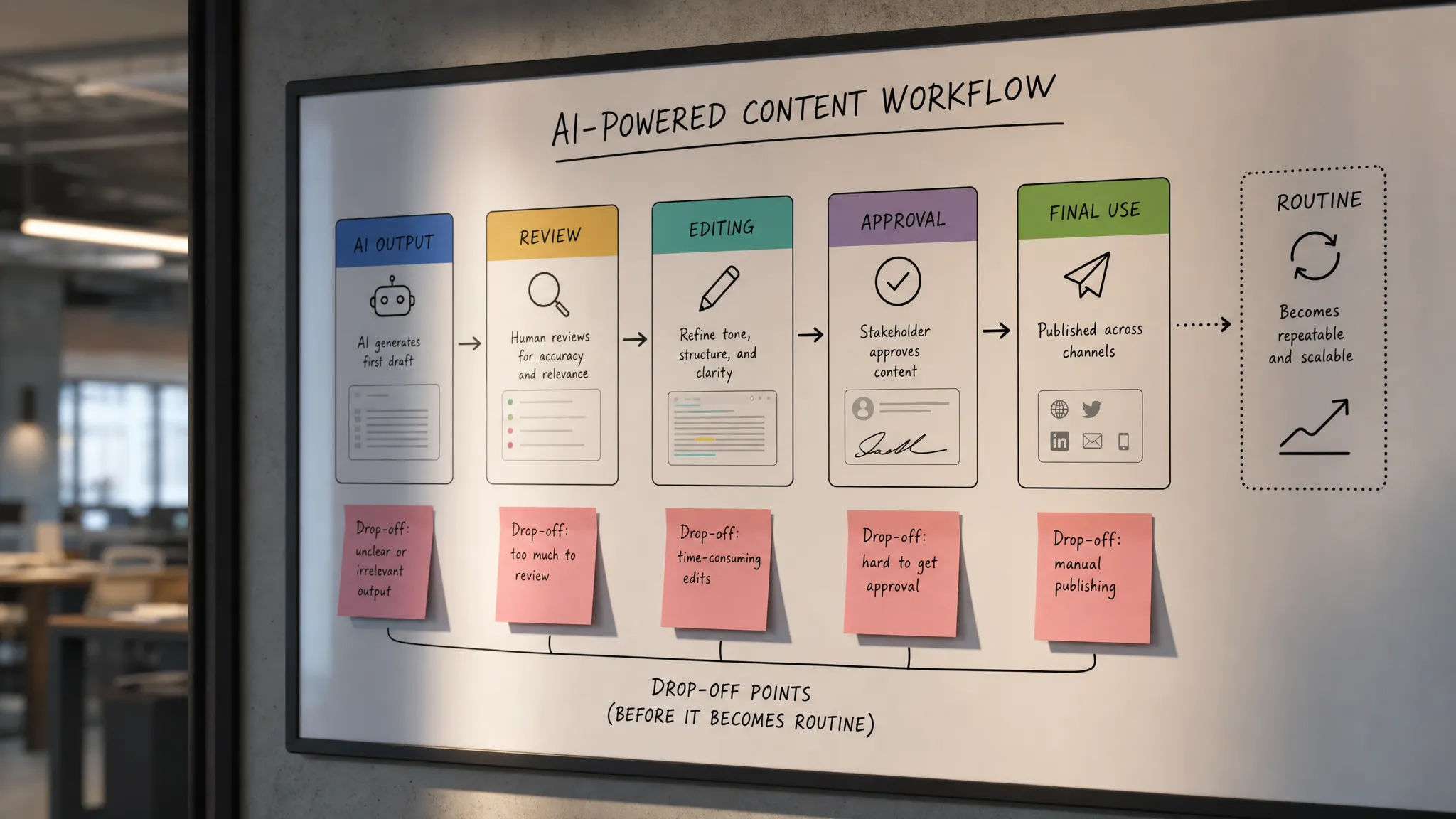
Routine is a loop, not an output
Useful AI output is a component. Routine use is a loop.
A strong AI routine usually has six parts:
- A clear trigger, such as after a call, before a review, during a planning session, or when a ticket changes state.
- Enough carried context so the user does not re-explain the job every time.
- A first output that is close enough to inspect, not just impressive enough to read.
- A review path that helps the user find problems quickly.
- An apply path that moves the work forward inside the workflow.
- A feedback signal that improves the next use or reduces repeated setup.
This is not unique to AI. People learn and retain behavior through repeated decisions, feedback, and application. That is why training teams often use experiential business simulation software instead of only explaining concepts. The behavior sticks because the learner acts, sees consequences, and tries again.
AI product routines work the same way. Users do not adopt because they saw a strong output once. They adopt because the product gives them a repeatable way to make progress with less effort and less uncertainty.
Measure routine, not appreciation
If you only measure generation events, you will overestimate adoption.
A generation event says the user tried the feature. It does not say the feature changed the way work gets done.
Better AI adoption metrics look at whether output moves forward:
| Metric | What it tells you |
|---|---|
| Repeat use by workflow | Whether the same user returns for the same job |
| Apply rate | Whether AI output makes it into the real work product |
| Edit-to-accept ratio | Whether outputs are close enough to become usable |
| Regeneration-to-apply ratio | Whether users are stuck fishing for a better result |
| Context reuse rate | Whether the product is reducing setup over time |
| Downstream completion | Whether the user finishes the job after AI assistance |
The best signal is not “how many outputs did we generate?” It is “how often did AI help complete the recurring job?”
That metric forces a better product conversation.
If generation is high but apply rate is low, the output is not decision-ready.
If apply rate is decent but repeat use is low, the job may not be recurring enough.
If repeat use happens only after reminders, the trigger is weak.
If users return but edit heavily every time, the product is not learning the stable parts of the task.
Product moves that make useful output routine
Start by choosing the routine you want to own. Do not ask, “Where could AI help?” Ask, “What repeated moment should users associate with this feature?”
Then design around that moment.
If the moment happens after a meeting, inherit the meeting notes, attendees, account, and next-step format. If it happens before a weekly review, prefill the date range, metrics, and open risks. If it happens inside a writing flow, keep the draft, audience, and constraints visible.
Next, reduce the verification burden. Add source links where they matter. Show what changed. Let users compare the AI output with the input. Make uncertainty visible without making the interface noisy.
Then make the first edit obvious. A user should not have to choose between accepting the whole output and regenerating the whole thing. Give them handles for the common corrections: shorter, more specific, less formal, cite the source, remove speculation, match this format.
Finally, close the loop. The product should know, or at least observe, what happened after generation. Did the user accept the output? Did they send it, publish it, save it, assign it, or reject it? Those events are more valuable than another satisfaction survey.
Frequently Asked Questions
Why do users say AI output is useful but still not return? Because usefulness is a moment-level judgment. Routine use requires a recurring trigger, low setup cost, fast verification, and a clear next step. If those are missing, users may appreciate the output without building a habit.
Is this an onboarding problem? Sometimes, but not usually. Onboarding can explain when to use the feature. It cannot compensate for weak workflow fit, high verification cost, or outputs that require too much cleanup.
Will a better model fix weak repeat use? It can help if output quality is the main blocker. But many retention problems come from context, review, handoff, and habit design. A better model will not automatically create a routine.
What is the first metric to check? Start with repeat use by workflow, not total generations. Then compare it with apply rate. If users generate often but rarely apply, you have an output usability problem. If they apply once but do not return, you have a routine problem.
Next step
If your AI output feels useful but never becomes routine, do not start with a bigger prompt box or another model upgrade. Map the loop.
Find the trigger. Track where context gets rebuilt. Watch the review step. Measure what gets applied. Look for the point where the user leaves the product to finish the real work.
If you want a structured way to do that diagnosis, the AI Product Adoption Deck includes 12 diagnostics, 80 action cards, and workshop templates for turning symptoms like this into product decisions, experiments, and specs. Use it when the team already shipped the AI feature and needs to figure out why adoption is not sticking.