Where AI in Diagnostics Helps and Where It Breaks
AI in diagnostics can surface adoption signals, but it breaks when teams outsource judgment. Learn what to automate and what to inspect.

The failure pattern is familiar.
You shipped an AI feature. Activation looked fine. Then usage flattened. The team exports events, support tickets, sales notes, and survey responses into an LLM. Ten minutes later, you have a clean diagnosis.
Too clean.
It says users need better prompts. Or more confidence. Or faster output. All plausible. None proven.
That is the central tension with AI in diagnostics for product teams. It can compress noisy signals fast. It can also manufacture certainty at the exact moment you need discipline.
The issue is not whether AI can help you diagnose adoption problems. It can. The issue is where you let it make the call.
Where AI in diagnostics actually helps
Good product diagnostics has two jobs. First, reduce the search space. Then prove where the adoption path breaks.
AI is useful for the first job. It is weak on the second unless a human team frames the question, checks the evidence, and understands the workflow.
It finds repeated language in messy feedback
Most AI adoption problems do not show up as one clean metric. They show up as fragments.
A user says the output was close but not usable. Another says they had to rewrite everything. Another says they were not sure if they could trust it. Support tickets mention confusing setup. Sales calls mention the feature looked good in the demo but did not stick.
AI can group that mess faster than a PM reading 400 comments manually. It can cluster words, phrases, objections, and repeated moments of hesitation. That is useful because adoption breaks often hide in phrasing.
For example, these two comments are different:
- The answer was wrong.
- I did not know if the answer was safe to use.
The first points toward output quality. The second points toward verification. If your team treats both as model quality, you may spend a sprint improving generation while the real break remains untouched.
It turns event noise into behavior clusters
AI can also help when the data is too broad to inspect manually.
If you have usage logs, session notes, and event streams, AI can look for repeated behavior patterns after generation. It can help separate users who never start from users who start once, users who regenerate repeatedly, users who copy output but never apply it, and users who apply once but never return.
That distinction matters. Low retention is not one problem. It can come from prompt paralysis, weak output fit, low trust, poor handoff, or lack of habit.
AI can help you see those clusters earlier. But it should not be allowed to label them as causes without more evidence.
It helps stress-test your team’s pet theory
Every team has a favorite explanation.
Engineering thinks the model needs to improve. Design thinks onboarding is unclear. Sales thinks the feature was positioned badly. Leadership thinks users need education.
AI can help by generating competing hypotheses from the same evidence. That is not magic. It is just a forcing function. The value is that it stops the team from collapsing too early around the loudest theory.
A useful diagnostic output sounds like this:
| AI can flag | What it cannot know alone | What the team should check |
|---|---|---|
| High regeneration rate | Whether the first output is bad, or users are exploring variants | Compare regenerate behavior with apply, edit, save, and discard events |
| Low prompt starts | Whether users are confused, anxious, or do not value the task | Watch users reach the empty state in a live workflow |
| Long editing time | Whether the AI failed, or review is normal for the job | Compare editing patterns across low-risk and high-risk tasks |
| Strong first-use activation but weak return | Whether users liked the demo but had no repeat trigger | Look for calendar, workflow, or team handoff moments that create habit |
| Negative feedback comments | Whether the problem is quality, trust, control, or expectation mismatch | Tag feedback by task type, role, and downstream consequence |
The safe use of AI in diagnostics is simple: let it show you where to look. Do not let it decide what is true.
Where AI in diagnostics breaks
AI breaks when the team asks it for root cause before the product work has earned one.
That usually happens in five places.
It mistakes symptoms for causes
Users regenerate output five times. AI says the model is not good enough.
Maybe. Or maybe the user wants options. Maybe the first output is acceptable but the user does not know what good looks like. Maybe the task has no single right answer. Maybe the UI trained them to regenerate instead of edit.
The behavior is real. The cause is not proven.
This is where teams burn weeks. They see a symptom, ask AI to explain it, and get a tidy narrative. The narrative may be reasonable. It may also be wrong.
It does not understand workflow stakes
AI can summarize what users said. It cannot automatically understand what is at risk when they apply output.
A bad AI-generated meeting summary is annoying. A bad AI-generated legal clause, customer email, medical note, security recommendation, or financial forecast has different stakes. The same behavior means different things depending on the cost of being wrong.
If users copy output but do not send it, the issue may not be content quality. It may be accountability. They may need review paths, source visibility, editing control, or a safer handoff.
That kind of diagnosis requires context from the workflow. AI will not reliably infer it from logs.
It averages away the people who matter
AI summaries often flatten segments.
A founder, admin, analyst, manager, and frontline user may all touch the same AI feature for different reasons. One group may need speed. Another may need traceability. Another may need control. Another may only care if the output fits an existing handoff.
If AI summarizes all feedback into one theme, it can erase the adoption break for the segment that actually drives retention.
This is common in AI features sold to teams. The buyer likes the concept. The champion likes the demo. The daily user does not return. Averages make that look like mild interest. In reality, the product has failed at the usage layer.
It is biased toward what you already instrumented
AI can only inspect the evidence you give it.
If you track generation but not editing, AI will overfocus on generation. If you track clicks but not handoff, it will miss the moment where output dies. If you capture thumbs up and thumbs down but not whether the user applied the result, it will confuse sentiment with adoption.
This is a product instrumentation problem, not an AI problem.
Many teams do not know where their AI feature breaks because they only measure the start of the experience. They know who clicked Generate. They do not know who checked the answer, changed it, trusted it, used it, shared it, or came back because of it.
It turns diagnosis into generic advice
When evidence is thin, AI tends to recommend familiar fixes.
Improve onboarding. Add examples. Add confidence scores. Make the prompt clearer. Improve model quality. Add education. Add templates.
Some of those may be right. But generic fixes are dangerous because they feel productive. They let the team ship something without naming the break.
If the issue is verification, templates will not fix it. If the issue is poor workflow fit, confidence labels will not fix it. If the issue is lack of repeat trigger, a better first-run experience will not create habit.
Use AI as a scanner, then run a product diagnosis
A better pattern is to split the work.
Let AI scan for clusters, contradictions, and missing evidence. Then force every hypothesis through the adoption path.
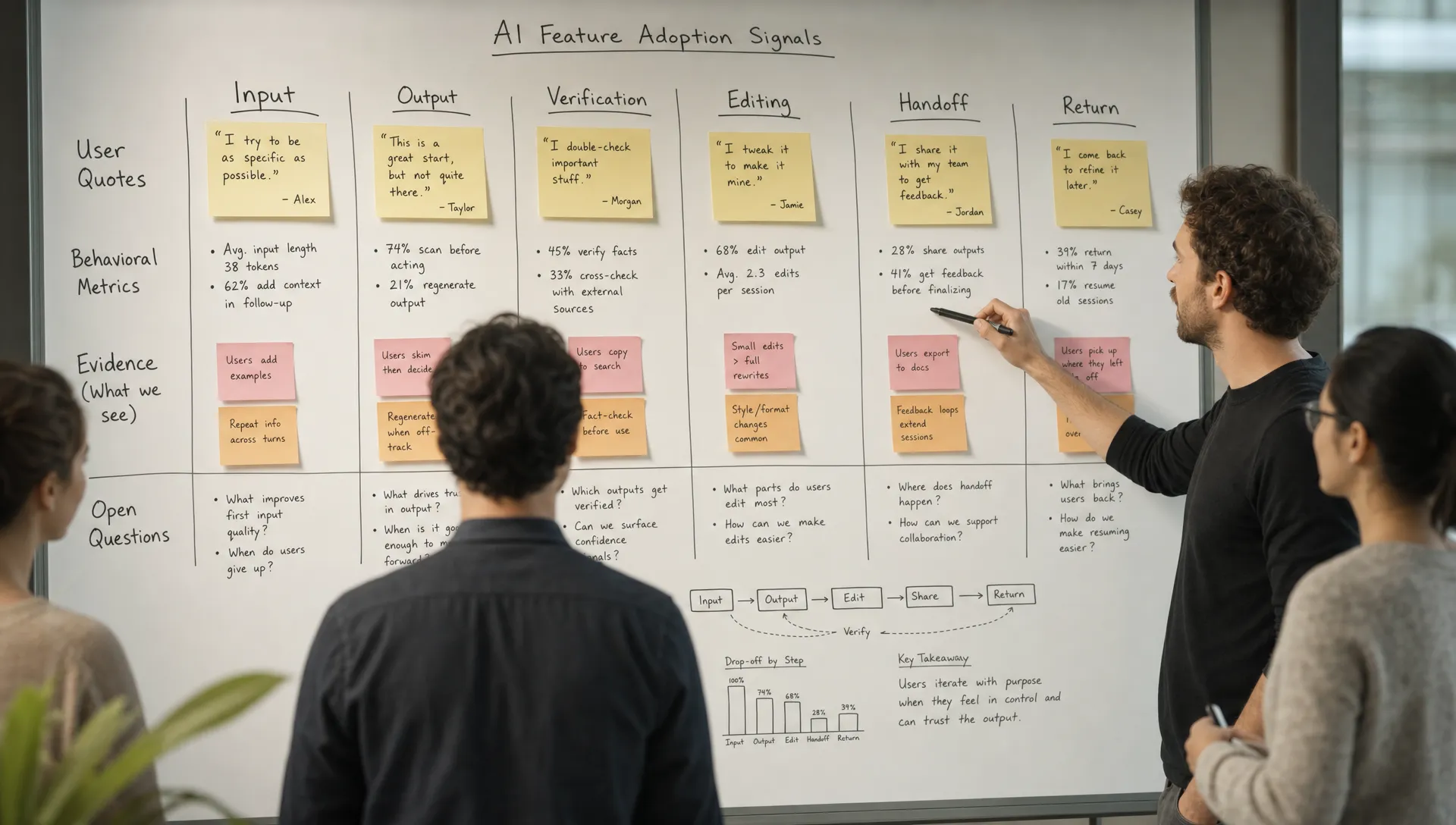
For AI products, that path usually has seven moments:
| Diagnostic moment | Question to answer | Evidence to inspect |
|---|---|---|
| Task fit | Is this a job users already care enough to complete? | Frequency, urgency, existing workarounds, manual effort |
| Input | Can users provide the context the AI needs? | Empty starts, abandoned setup, vague prompts, pasted source material |
| First output | Does the output look directionally useful? | First reaction, regenerate rate, immediate discard rate |
| Verification | Can users check whether it is safe to use? | Source checks, review time, trust comments, refusal to apply |
| Control | Can users shape the output without starting over? | Editing behavior, partial accepts, undo, refinement loops |
| Handoff | Does the output land where work actually happens? | Copy, export, share, send, save, integration events |
| Return | Is there a trigger that brings users back? | Repeat use by task, saved workflows, team loops, scheduled needs |
This is where AI-assisted analysis becomes useful again. You can ask it to map evidence against the path, not to invent a universal answer.
A good diagnostic prompt is constrained:
Cluster these adoption signals by observed behavior.
Do not infer root cause unless evidence supports it.
For each cluster, return the evidence, the missing context, and the next observation we should run.
Map each cluster to task fit, input, first output, verification, control, handoff, or return.
That kind of prompt will not give you a roadmap. Good. It gives you a shortlist of breakpoints to inspect.
If you need a deeper map of these breakpoints, this guide to AI diagnostics for finding the real adoption break goes further into input, trust, control, application, and habit failures.
The decision rule: automate the scan, not the judgment
The most useful teams do not ask AI to replace product judgment. They use it to make product judgment less sloppy.
A simple rule works:
- Use AI when the task is pattern detection across messy evidence.
- Use the product team when the task is deciding what the pattern means.
- Use live observation when the task involves hesitation, trust, accountability, or workflow fit.
- Use experiments when the task is choosing between plausible fixes.
That split keeps the team honest.
If AI says users do not trust the output, the next step is not automatically to add a confidence score. The next step is to ask why trust fails. Can users verify sources? Do they know what the AI used as context? Can they edit without fighting the system? Does the output affect a high-stakes decision? Is the user accountable if it is wrong?
Trust is not a label. It is a behavior.
The same applies to retention. If AI says users do not form a habit, that is not enough. You need to know whether the task repeats, whether the trigger exists, whether the output saves future work, and whether the feature is connected to the user’s real workflow.
If you want a quick way to separate these failure modes, the free AI Product Triage tool is built around symptom-based diagnosis rather than generic best practices.
What to do next
If your AI diagnostic output reads like a confident consultant, slow down.
Ask three questions before you commit roadmap time:
- What observed behavior supports this diagnosis?
- What alternate cause could explain the same behavior?
- What would we need to see in a user session or experiment to prove it?
Those questions are basic. They also prevent a lot of wasted AI product work.
AI in diagnostics helps when it reduces the mess. It breaks when it removes the productive discomfort of not knowing yet.
The goal is not a faster answer. The goal is a better next inspection.
Frequently Asked Questions
Can AI diagnose why an AI feature is not retaining users? It can help surface patterns behind low retention, but it should not own the final diagnosis. Retention can break at task fit, input, trust, handoff, or habit. AI can narrow the search area, while the product team verifies the actual break.
What data should product teams give AI for diagnostics? Useful inputs include anonymized event data, support tickets, user interview notes, open-ended survey responses, sales call notes, and product analytics exports. The key is to include behavior after generation, not just clicks on the AI feature.
How do we know if the problem is model quality or product UX? Look at what users do after the output appears. If they cannot verify, edit, apply, or hand off the result, the problem may be product experience even when the model is decent. If verified outputs are still consistently wrong or unusable, model quality may be the real constraint.
Should we use AI to summarize user interviews? Yes, but keep the raw quotes. Summaries are useful for clustering, but they can flatten hesitation, risk, and context. The exact words users use often reveal whether the break is trust, control, or workflow fit.
Go deeper on the adoption break
If you are diagnosing an AI feature that shipped but did not stick, the AI Product Adoption Deck gives you a structured way to move from symptom to decision. It includes 12 diagnostics, 80 action cards, and 12 workshops for turning adoption problems into concrete product changes, copy, experiments, or specs.