When AI Personalization Locks Users Into Outdated Preferences
AI personalization can trap users in old preferences. Diagnose stale memory, fix correction loops and test whether your product adapts.

Users keep asking your AI to stop writing in the same tone, recommending the same options or assuming they still have the same goal. The next session brings those assumptions back. AI personalization worked when the preference was first learned. Now it makes the product harder to use.
This is preference lock-in: a past choice becomes a persistent default, even after the user’s needs change. The adoption symptom is repeated correction, followed by avoidance. Before improving the recommendations, check whether users can actually change what the system believes about them.
Diagnose AI personalization that has stopped adapting
A poor result does not automatically mean a stale preference. The current brief may be incomplete, a workspace rule may apply or the session may have lost track of an instruction.
The distinguishing signal is persistence: an old assumption keeps winning across otherwise clear, current requests.
| Observed symptom | Possible cause | Useful diagnostic test |
|---|---|---|
| An old writing style returns in new sessions | A saved preference overrides current intent | Repeat the task with that preference disabled |
| One client’s requirements appear in another client’s work | Project context was saved as a user-wide preference | Compare the same task across separate projects |
| Users accept familiar suggestions but complain about repetition | Acceptance is treated as preference, with no alternatives tested | Offer a neutral alternative and ask which fits this task |
| “Don’t do that again” fixes only the current output | Corrections do not update persistent state | Repeat the task in a fresh session |
Problems that develop within a conversation may instead be context drift, where the session loses track of the user’s current goal. Preference lock-in can survive a fresh conversation because the wrong assumption is loaded again.
For each reported failure, inspect three things: the current instruction, the stored preference and which one actually shaped the output. Do not infer the cause from a thumbs-down alone.
Give preferences a scope, source and review rule
Imagine a user who asks for playful copy while working on a campaign. Weeks later, they draft a customer incident update. The product still adds jokes because “prefers playful language” became a global fact.
The original instruction was valid. Its storage scope was wrong.
A useful preference record needs more than a value. It needs enough context to decide when that value should apply.
Scope: Does this apply to one output, this project, this workspace or the person across projects? Default ambiguous instructions to the narrowest useful scope rather than silently making them permanent.
Source: Did the user explicitly save it, or did the product infer it from behavior? A clicked suggestion is weaker evidence than “Use this style for this project.” Acceptance can mean “good enough,” not “this represents me.”
Review rule: What should trigger reconsideration? A project ending, an explicit contradiction or repeated edits may justify reviewing an inferred preference. Stable, explicitly saved needs should not disappear on an arbitrary timer.
Ownership: Can this user change it? Personal preferences and required workspace rules need different controls. A user should not be invited to “forget” a rule they lack permission to remove.
For personal style, current task instructions should beat older inferred preferences. Required organizational constraints remain separate. Do not present a policy restriction as something the AI has learned about the user.
Make a correction change the next result
The most frustrating personalization failure is not getting something wrong once. It is making users explain the same correction repeatedly.
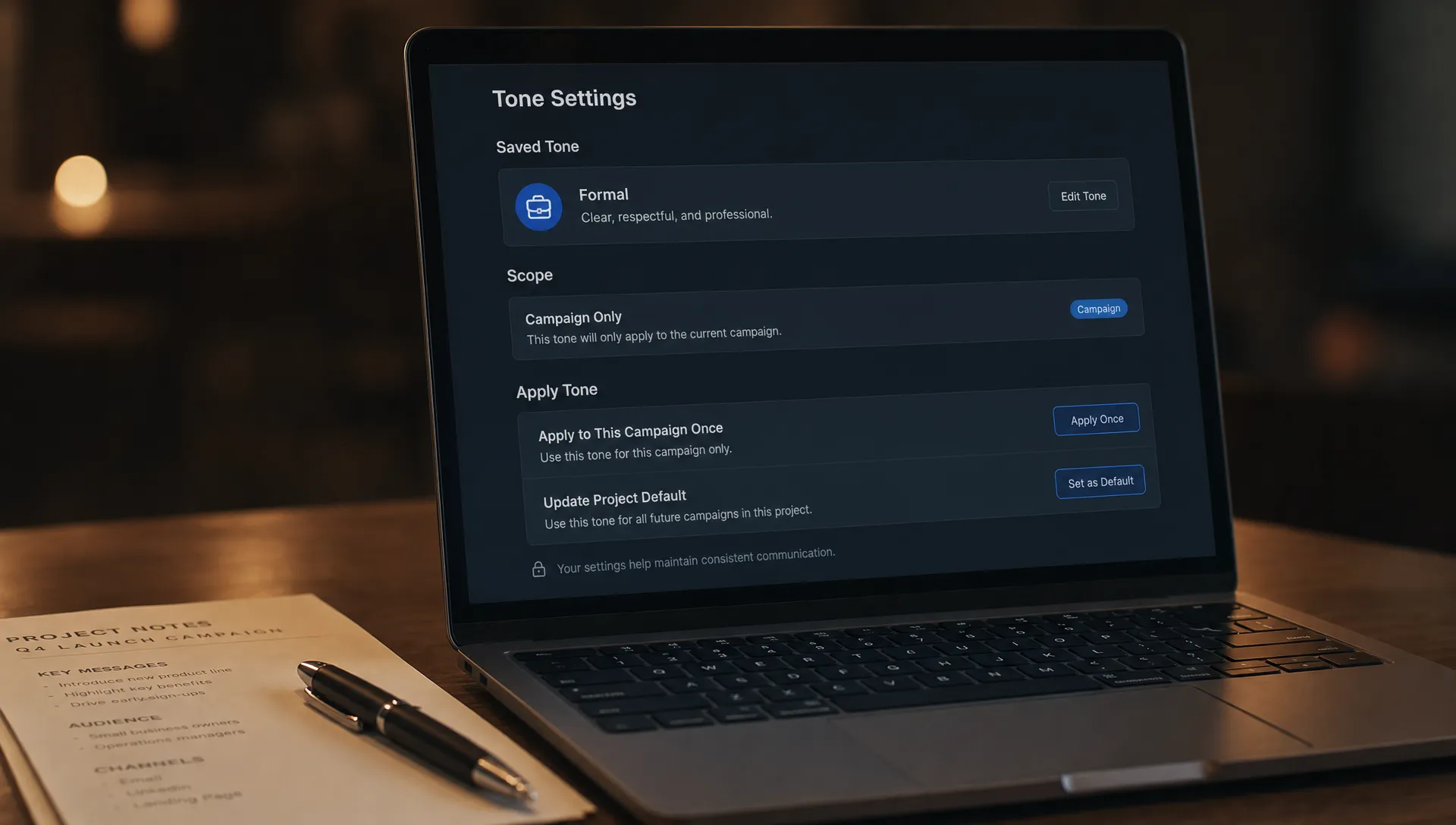
A correction interface should distinguish three intentions: change this result, change the project default or change a saved personal preference. These are different operations. A generic thumbs-down cannot reliably identify which one the user meant.
After a correction, show the relevant assumption and offer a scoped action. For example:
“This draft used your saved ‘playful tone’ preference. Use a formal tone for this draft, or update the project default?”
Do not require a memory-management detour for every edit. Offer the control when an existing preference conflicts with the correction. Let users inspect or remove the underlying preference without deleting unrelated history.
A visible confirmation is not enough. Test the next eligible task. If the product says it updated the project default but restores the old tone in a new session, the correction loop is still broken.
For AI personalization, successful correction means the right change persists at the right scope. It does not mean every edit becomes a permanent preference. Someone shortening one paragraph has not necessarily asked for shorter writing forever.
Test recovery, not just recommendation acceptance
Acceptance rate can hide preference lock-in. Users may accept an output because editing is expensive, because alternatives are absent or because they have learned not to argue with the product.
Run a controlled comparison for users showing repeated corrections. Keep the current task context available, but disable the disputed inferred preference for the comparison group. If preferences persist across sessions, assign the comparison at the user or workspace level to avoid mixing states.
Do not remove all memory. That would test whether context is useful, not whether a particular assumption is stale.
Measure recovery with task-level outcomes:
- Correction recurrence: Among comparable tasks after a preference correction, how often does the same unwanted behavior return?
- Time to usable output: Does changing the preference reduce editing and regeneration before the user finishes the task?
- Task completion: Do users finish more eligible tasks, rather than merely generating more alternatives?
- Return to the workflow: At the next relevant opportunity, do users use the feature again?
Review these alongside inappropriate carryover: did a project-specific correction accidentally change work elsewhere?
Also run a scripted multi-session test. Establish a preference, introduce a clear change, start a fresh session and try an unrelated project. The system should adapt where instructed without spreading that change everywhere.
Record preference identifiers and update events where possible, rather than copying sensitive user content into analytics. You need to understand which state changed, not retain every document used to change it.
Frequently asked questions
Is preference lock-in the same as an AI filter bubble? They overlap, but the product failure here is narrower. A stale preference can distort tone, formatting or workflow defaults without narrowing the information a user sees.
Should AI personalization always favor recent behavior? No. Recent behavior can reflect a temporary task or a reluctant acceptance. Explicit instructions, scope and the reason for a change matter more than recency alone.
Will a “forget everything” button solve it? It provides an escape hatch, but makes users discard useful context alongside the bad assumption. Scoped inspection, editing and removal offer a less destructive recovery path.
Pick one recurring assumption to fix
Start with one complaint that contains “again,” “still” or “I already told it.” Reproduce the failure across sessions. Identify the stored assumption, its scope and what happened to the user’s correction.
If the symptom overlaps with other adoption problems, the free Triage tool can help you choose what to investigate first. For deeper follow-through, the AI Product Adoption Deck is a 104-card, 124-page diagnostic playbook with action cards and workshop templates for turning adoption symptoms into product decisions.
Your next decision should be specific: which preference will stop applying, under what conditions and how will the user know the change held?