What the Adoption of AI Looks Like After Launch
Learn what the adoption of AI looks like after launch, how to spot weak retention, and which product signals show real workflow change.

Your AI feature launched. The announcement landed. The dashboard moved. People clicked the new button, generated outputs, and shared a few screenshots in Slack.
Then the signal got muddy.
Usage did not collapse, but it also did not become a habit. Some users tried it once. Some returned when they had spare time. Some generated outputs but never used them. Support heard both praise and confusion. Sales still talked about it, but customer success could not point to changed workflows.
That is the post-launch adoption problem. The adoption of AI does not look like interest. It looks like users trusting the system with a real piece of work, applying the output, and coming back when the same situation appears again.
Launch tells you who is curious. Post-launch tells you who changed behavior.
The first week after launch is usually contaminated by novelty. Users inspect the feature because it is new, promoted, or bundled into onboarding. That activity matters, but it is not proof of adoption.
A working AI product creates a new default. The user stops doing some old manual step, or does it differently because the AI now sits inside the workflow. If the old workflow remains intact and the AI feature is an optional side quest, adoption is still unproven.
This is why teams often misread early traction. A high generate rate can hide low application. A strong activation rate can hide weak trust. A promising retention curve can hide shallow use, where users return to test the feature but do not rely on it.
If that sounds familiar, the issue may not be demand. It may be that AI use is high but adoption is low, which is a different product problem.
The adoption ladder after launch
After launch, you need to know how far users actually carry the AI output. A simple adoption ladder is more useful than a single usage metric.
| Stage | What it looks like | What it proves | Common false positive |
|---|---|---|---|
| Exposure | User sees the AI entry point | The feature is discoverable | Banner clicks from curiosity |
| First try | User enters a task or prompt | The value promise is clear enough to test | Empty prompts, vague prompts, demo tasks |
| Output generated | AI produces something | The system can respond | Output viewed but abandoned |
| Output inspected | User reads or checks the result | The output is relevant enough to evaluate | Long dwell time caused by confusion |
| Output edited | User modifies or corrects it | The result is close enough to work with | Heavy rewrites that erase the value |
| Output applied | User sends, saves, publishes, imports, or acts on it | The AI changed the workflow | Copying into a dead-end document |
| Return use | User comes back for a similar job | The trigger is remembered | Sporadic use with no repeat moment |
| Delegated habit | User expects AI to handle that class of work | The workflow has changed | Overreliance without review or control |
Most teams celebrate too early at “output generated.” Real adoption starts closer to “output applied.” Durable adoption shows up when return use maps to a specific recurring situation.
What healthy post-launch adoption looks like
Healthy adoption is rarely broad at first. It is usually narrow, repeated, and specific.
A user does not say, “I use the AI feature.” They say, “When I need to summarize a messy account history before a customer call, I start there.” Or, “When a candidate matches the role but needs outreach, I let the system draft the first version.”
That matters because AI adoption is tied to moments of uncertainty. Users need to know when to use it, what it is good at, how much to trust it, and what to do when it is wrong.
After launch, look for these signs:
- Users describe the feature by job, not by technology.
- The same trigger appears in interviews, session replays, and support tickets.
- Users apply outputs inside the workflow where the task already happens.
- Edits become lighter over time, not heavier.
- Users recover from a bad output instead of abandoning the feature.
- Teams can name which user segment should not use the feature yet.
That last point is underrated. If your adoption story includes everyone, it usually means you have not found the real use case yet.
What weak adoption looks like, even when usage exists
Weak adoption often hides behind respectable activity. The feature is not dead. It is just not earning a stable role.
One pattern is output abandonment. Users generate something, inspect it, then leave. This usually means the output is not easy to verify, not formatted for the next step, or not trusted enough to apply.
Another pattern is prompt paralysis. Users want value, but they do not know how to ask. This often happens when the product exposes a blank prompt box instead of anchoring the AI around a known workflow state.
A third pattern is correction loop breakdown. The output is close, but the user cannot steer it efficiently. They rewrite manually, then conclude that the AI is interesting but slower than doing the job themselves.
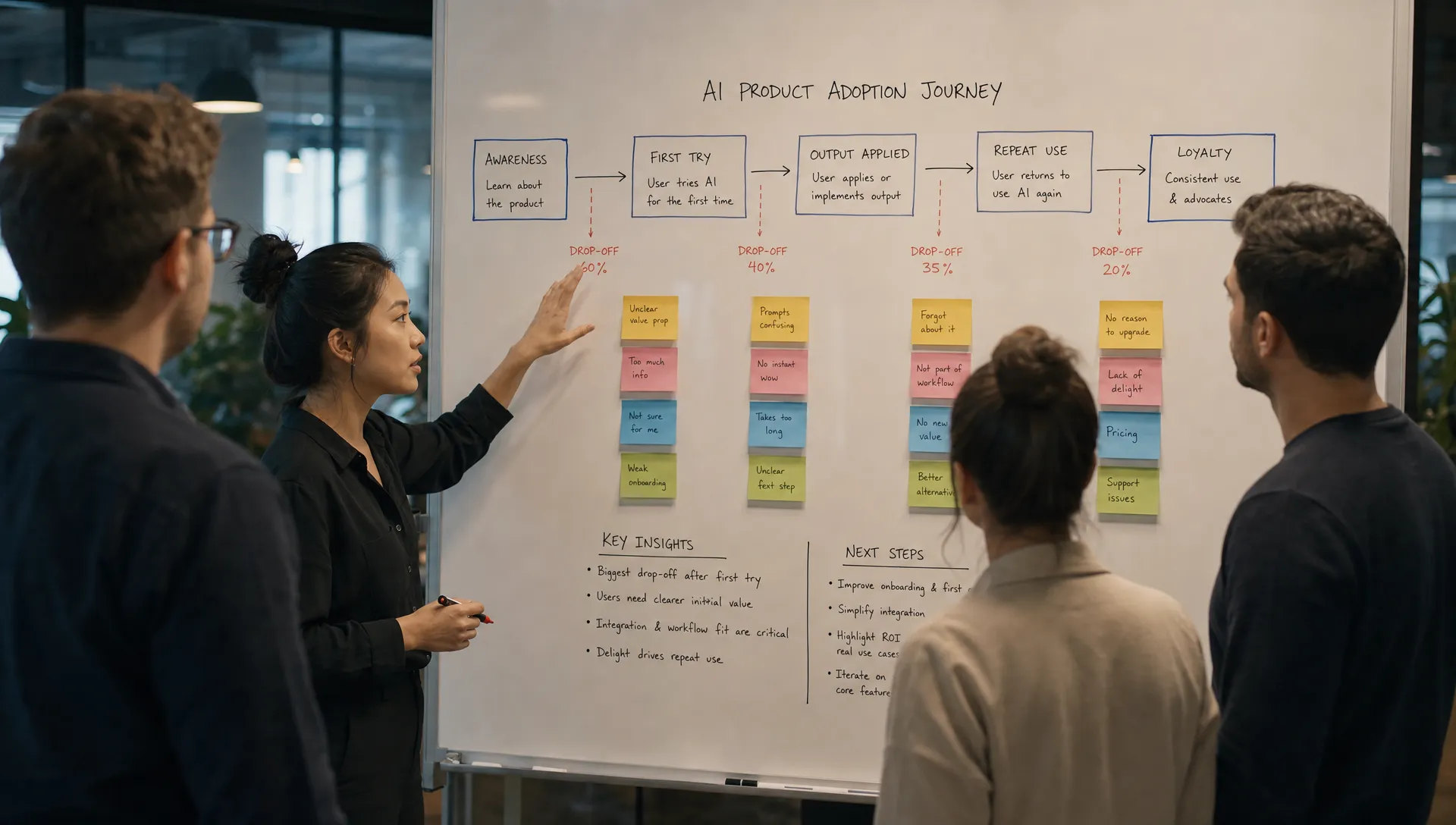
A fourth pattern is retention without habit. Users return occasionally, but not at the moment of need. This creates a soft retention curve that looks alive in aggregate but weak at the workflow level. If your week-one curve looked strong and then flattened, it is worth diagnosing why AI adoption slows after a strong first week before adding more features.
The metric that matters is not “AI used.” It is “work moved.”
For normal SaaS features, usage can be a decent proxy. For AI, usage is often an exploration signal. People use AI to test boundaries, compare outputs, and see if it can be trusted. That behavior is useful, but it is not the same as adoption.
The better question is: what work moved from the old path to the AI-assisted path?
For a writing assistant, do not only measure generated drafts. Measure drafts accepted, revised, sent, and reused as templates.
For an analytics copilot, do not only measure questions asked. Measure decisions created, reports updated, anomalies investigated, and follow-up actions taken.
For a recruiting workflow, do not only measure candidate summaries or outreach drafts. In a product like CandiDesk's AI recruitment platform, where AI can support screening, outreach, scheduling, and pipeline updates with human approval, the meaningful adoption signal is whether recruiters approve, send, schedule, and keep the pipeline current with less manual coordination.
This is where many teams need a new measurement layer. If your dashboard stops at prompts, generations, and thumbs-up ratings, you are measuring interaction, not adoption. A better approach is to connect AI events to downstream workflow events. The goal is not to prove that the model responded. It is to prove that the response survived contact with the user’s job.
For a deeper metric breakdown, the useful frame is to track where adoption actually breaks: exposure, prompt completion, output inspection, output application, return, and expansion. That is the core idea behind AI metrics that show where adoption actually breaks.
Diagnose the break before changing the feature
The most common mistake after launch is to ship more surface area. More prompts. More templates. More entry points. More model options.
Sometimes that helps. Often it makes the adoption problem harder to see.
Before changing the product, name the break.
| Symptom after launch | Likely diagnosis | Product response to test |
|---|---|---|
| Users click but do not start | The trigger is weak or the use case is unclear | Move the entry point closer to a live task |
| Users start but submit vague prompts | The product is asking users to design the workflow | Add guided inputs, examples, or context capture |
| Users generate but abandon outputs | Trust or fit is breaking after generation | Add evidence, previews, citations, or clearer next actions |
| Users heavily rewrite every output | The output is not aligned to user standards | Let users steer tone, format, constraints, or source context |
| Users apply once but do not return | The repeat trigger is not memorable | Attach the feature to a recurring workflow moment |
| Users overuse weak outputs | Control and verification are missing | Add review states, confidence cues, and human approval paths |
The fix depends on the break. A trust gap is not solved by better onboarding copy. Prompt paralysis is not solved by a faster model. Output abandonment is not solved by more generations.
What to do next
Pick one AI workflow. Not the whole feature. One workflow where adoption should matter.
Then trace ten real sessions from trigger to downstream action. Do not stop when the output appears. Keep following the work. Did the user edit it? Did they apply it? Did they send it, save it, import it, schedule it, or make a decision from it? Did they come back the next time the same job appeared?
If you cannot answer those questions, your product analytics are still launch analytics. They are not adoption analytics.
Once you find the break, choose one intervention. Move the entry point. Add context. Show evidence. Improve the correction loop. Create a stronger handoff. Narrow the use case. Remove the blank prompt. Add a review step.
Do not ask, “How do we get more people to use the AI?”
Ask, “Where does the user stop trusting this output as part of their work?”
That question usually points to the real product decision.
Frequently Asked Questions
What does adoption of AI mean after launch? It means users apply AI output to a real workflow and return to use it again when the same job appears. It is more than trying the feature or generating an output.
How long does it take to know if an AI feature is being adopted? You can see curiosity in the first week, but adoption usually becomes clearer in weeks two to four. That is when novelty fades and repeat workflow behavior starts to show.
What is the biggest post-launch AI adoption mistake? The biggest mistake is treating generation as success. Many users generate outputs they never trust, apply, or reuse.
How should product teams improve AI adoption after launch? Start by diagnosing the break. Find whether the issue is trigger, prompting, trust, correction, workflow handoff, or repeat use. Then change the smallest product surface that addresses that break.
If you want a structured way to do that diagnosis, the AI Product Adoption Deck breaks post-launch AI adoption problems into diagnostics, action cards, and workshops so teams can move from vague usage data to concrete product decisions.