What Makes a Great AI Product People Keep Using
Learn what makes a great AI product users keep using: trust, clear value, workflow fit, feedback loops, and retention-ready design.

A great AI product is not the one that creates the most impressive first demo. It is the one users trust enough to bring into real work, understand well enough to use correctly, and value enough to return to when the next problem appears.
That difference matters because AI products fail in different places than traditional software. A normal SaaS feature usually breaks when the workflow is too slow, the interface is confusing, or the value is not strong enough. An AI product can fail for all of those reasons, plus a few more: the user does not know what to ask, the model gives a plausible but wrong answer, the output is hard to verify, or the product feels impressive but not dependable.
People keep using AI when the product helps them move from uncertainty to a useful outcome with less effort than before. That requires more than a better model. It requires product design around trust, feedback, control, context, and habit.
The difference between an AI demo and an AI product people keep using
AI demos are optimized for surprise. Products are optimized for repeated value.
A demo works when the system does something that feels magical in a controlled scenario. A retained user comes back when the system helps them complete a meaningful job under messy, real-world conditions. The user may be tired, in a hurry, unsure how to phrase the request, working with incomplete data, or accountable for the result.
This is why the best AI product teams do not only ask, can the model do this? They ask, can the user get a trustworthy result from this product again and again?
A strong AI product typically has five qualities:
- It solves a recurring, high-friction job.
- It makes the first useful outcome easy to reach.
- It sets accurate expectations about what the AI can and cannot do.
- It gives users control, correction paths, and ways to verify output.
- It fits naturally into the workflow where the result will be used.
If any of these are missing, users may try the product once, admire it, and never build a habit around it.
Start with a recurring job, not a model capability
The most durable AI products begin with a clear job to be done. The job should be frequent enough to create repeat use and painful enough that users are willing to change behavior.
Weak product framing sounds like this: our AI summarizes documents. Strong product framing sounds like this: we help customer success managers prepare for renewal calls in half the time by extracting risks, open issues, and recommended next steps from account history.
The second version is better because it defines the user, the situation, the outcome, and the reason to return. The AI capability is still important, but it is not the product promise. The product promise is the improved workflow.
Before investing in model improvements, teams should pressure-test the job:
| Question | Why it matters |
|---|---|
| How often does this job happen? | Infrequent jobs rarely create retention unless the stakes are very high. |
| What does the user do immediately before and after the AI interaction? | This reveals workflow fit and integration needs. |
| What makes the task hard today? | The AI should reduce a specific source of friction, not add a novelty layer. |
| What counts as a successful outcome? | Retention depends on user-perceived value, not just model completion. |
| What risk does the user take by trusting the output? | Higher-risk tasks need stronger verification, control, and escalation. |
An AI product people keep using is usually not a general-purpose box with intelligence inside. It is a tool that repeatedly helps a specific person make progress in a specific situation.
Make the first useful outcome obvious
Many AI products lose users before the model has a chance to be impressive. The user lands in an empty prompt box, feels pressure to write the perfect instruction, receives a generic answer, and leaves.
Great AI products reduce prompt anxiety. They guide users toward a high-quality first interaction through examples, templates, defaults, and contextual suggestions. The product should make the user feel, I know what to do next.
This does not mean hiding all flexibility. It means giving people a reliable starting point. For example, instead of asking a sales manager to type anything, the product could offer a structured workflow: choose an account, select a goal, review detected risks, and generate a call plan. The AI still does intelligent work, but the product shapes the interaction so the user is more likely to succeed.
The first-use experience should answer three questions quickly:
- What can this AI help me do?
- What information does it need from me?
- How will I know whether the output is good?
The faster a user reaches a useful, verifiable result, the more likely they are to try the product again.
Set expectations before the AI responds
Trust starts before the output appears.
If an AI product overpromises, users will treat normal limitations as failure. If it under-explains, users may either distrust everything or trust too much. Both are adoption problems.
The goal is calibrated trust. Users should understand where the system is strong, where it may be uncertain, and what they need to check. This is consistent with established human-AI interaction guidance. Microsoft's Guidelines for Human-AI Interaction emphasize setting expectations, showing contextually relevant information, and supporting efficient correction. Google's People + AI Guidebook also focuses on helping users understand AI capabilities, limitations, and feedback loops.
In practice, expectation-setting can be simple. A product can show what sources it used, label uncertain outputs, explain what the AI did not inspect, or prompt the user to confirm key assumptions. The best version depends on the use case. A creative brainstorming tool may need lightweight guidance, while a financial, legal, medical, or operational tool needs much stronger guardrails.
The key is not to bury users in disclaimers. It is to make the product's confidence, scope, and limits visible at the moment those details matter.
Design for verification, not blind trust
A great AI product does not ask users to accept output on faith. It helps them verify quickly.
This is especially important because AI output can be fluent even when it is incomplete or wrong. If users must manually inspect every detail from scratch, the product may not save time. If they cannot inspect the output at all, they may avoid using it for serious work.
Verification design can include citations, source previews, confidence indicators, change tracking, comparison views, test cases, or clear explanations of how the output was generated. The right mechanism depends on the task. A code assistant needs runnable tests and diffs. A research assistant needs source links and quote-level traceability. A support assistant needs policy references and easy escalation.
The NIST AI Risk Management Framework highlights characteristics such as validity, reliability, transparency, accountability, and privacy as part of trustworthy AI systems. Product teams should translate those principles into interface and workflow decisions users can actually experience.
A practical rule: the more consequential the task, the more the product should help users inspect, challenge, and recover from the AI's work.
Keep users in control
AI products often fail when they feel too autonomous too soon. Users may enjoy automation in theory, but in practice they want control over outcomes that affect their work, reputation, customers, or decisions.
Control does not mean making the user do everything. It means giving them meaningful choices at the right moments. Can they edit the output? Can they regenerate part of it without losing everything? Can they compare alternatives? Can they undo an action? Can they tell the system what was wrong in plain language?
Good control patterns reduce fear. When users know they can recover, they explore more. When they can steer the AI, they begin to treat it as a collaborator rather than a black box.
This is one of the biggest differences between a feature that impresses and a product that sticks. People return to tools that make them feel more capable. They avoid tools that make them feel exposed.
Build a feedback loop that improves the next use
Retention grows when every interaction makes the product feel more aligned with the user.
That does not require invasive personalization or opaque memory. In many cases, lightweight feedback loops are enough. The product can remember user preferences with permission, learn from accepted edits, save reusable instructions, or let teams define shared standards.
The important part is that feedback should feel worth giving. A thumbs-up button that disappears into the void rarely changes behavior. A correction that visibly improves the next draft builds confidence.
Strong feedback loops usually have three traits:
- They are easy to provide during the normal workflow.
- They improve a future output the user can recognize.
- They give users transparency and control over what is remembered.
For AI products, learning is not only a technical system behavior. It is a user experience. If users cannot tell that the product is becoming more useful, they may not credit it for improvement.
Fit into the workflow where value is realized
An AI output is not the end of the product experience. It is often the middle.
If users generate a great summary but cannot move it into their CRM, document, ticket, email, analytics tool, or approval process, the value leaks out. The product may feel useful in isolation but inconvenient in practice.
Workflow fit is one reason retention metrics can look confusing. Users may love the output but still not return because copying, formatting, verifying, or sharing takes too much effort. The AI saved five minutes and created seven minutes of cleanup.
Product teams should map the full path from trigger to outcome. What causes the user to need the AI? What context is already available? What output format do they need? Who else must review it? Where does the final result live?
The best AI products meet users inside an existing rhythm. They do not ask people to invent a new work habit unless the payoff is obvious and repeated.
Measure retained value, not just usage
Traditional product metrics still matter, but AI products need more specific instrumentation. A daily active user count can tell you whether people are opening the product. It does not tell you whether the AI is trusted, useful, or improving the workflow.
A better approach is to measure the moments where adoption actually breaks. Did the user reach a first useful output? Did they accept, edit, or discard it? Did they verify it? Did the result move into the downstream workflow? Did the user come back for the same job later?
Here are practical measurement areas for AI product teams:
| Adoption dimension | What to look for | Example metrics |
|---|---|---|
| Activation | Users reach a meaningful first result. | Time to first useful output, completed guided setup, first task completion. |
| Trust calibration | Users know when to rely on the AI and when to check it. | Accept rate, override rate, citation usage, confidence label engagement. |
| Control | Users can fix problems without abandoning the flow. | Regeneration rate, edit completion, undo usage, recovery after bad output. |
| Workflow fit | The AI result moves into real work. | Export rate, share rate, downstream task completion, integration usage. |
| Retention | Users return for the same recurring job. | Repeat task frequency, cohort retention, saved workflow reuse. |
These metrics should be paired with qualitative research. Watch users interact with the product. Ask where they hesitate, what they mistrust, and what they do after receiving the output. In AI products, hesitation is often more revealing than clicks.
Common reasons AI products do not retain users
When an AI product has strong trial but weak repeat use, the issue is rarely just model quality. More often, the product has an adoption break in the surrounding experience.
| Symptom | Likely adoption problem | Product response |
|---|---|---|
| Users try it once and do not return. | The use case is interesting but not recurring or urgent. | Reframe around a frequent job with a clear trigger. |
| Users generate output but do not use it. | The result is hard to verify, format, or move into workflow. | Add source visibility, editing controls, and downstream actions. |
| Users ask very broad prompts and get weak answers. | The product has not guided input quality. | Provide templates, examples, and structured context capture. |
| Users distrust correct outputs. | The product does not explain confidence, sources, or limits. | Add contextual trust signals and verification paths. |
| Users overtrust risky outputs. | The product has not created enough friction for high-stakes use. | Add review steps, warnings, scope limits, or human approval. |
| Users correct the same issue repeatedly. | Feedback is not improving future output. | Capture preferences and make learning visible. |
This is why AI adoption work should be diagnostic. If a team jumps straight to adding features, it may optimize the wrong part of the system. The retention problem might be expectation-setting, onboarding, verification, or workflow integration rather than the model itself.
The retention standard for a great AI product
A useful standard is this: would users miss the product next week if it disappeared?
If the answer is yes, the AI has likely become part of a real work pattern. It helps users do something they already needed to do, with less effort, better quality, faster turnaround, or more confidence.
If the answer is no, the product may still be in novelty territory. Users may appreciate the technology but not depend on the outcome.
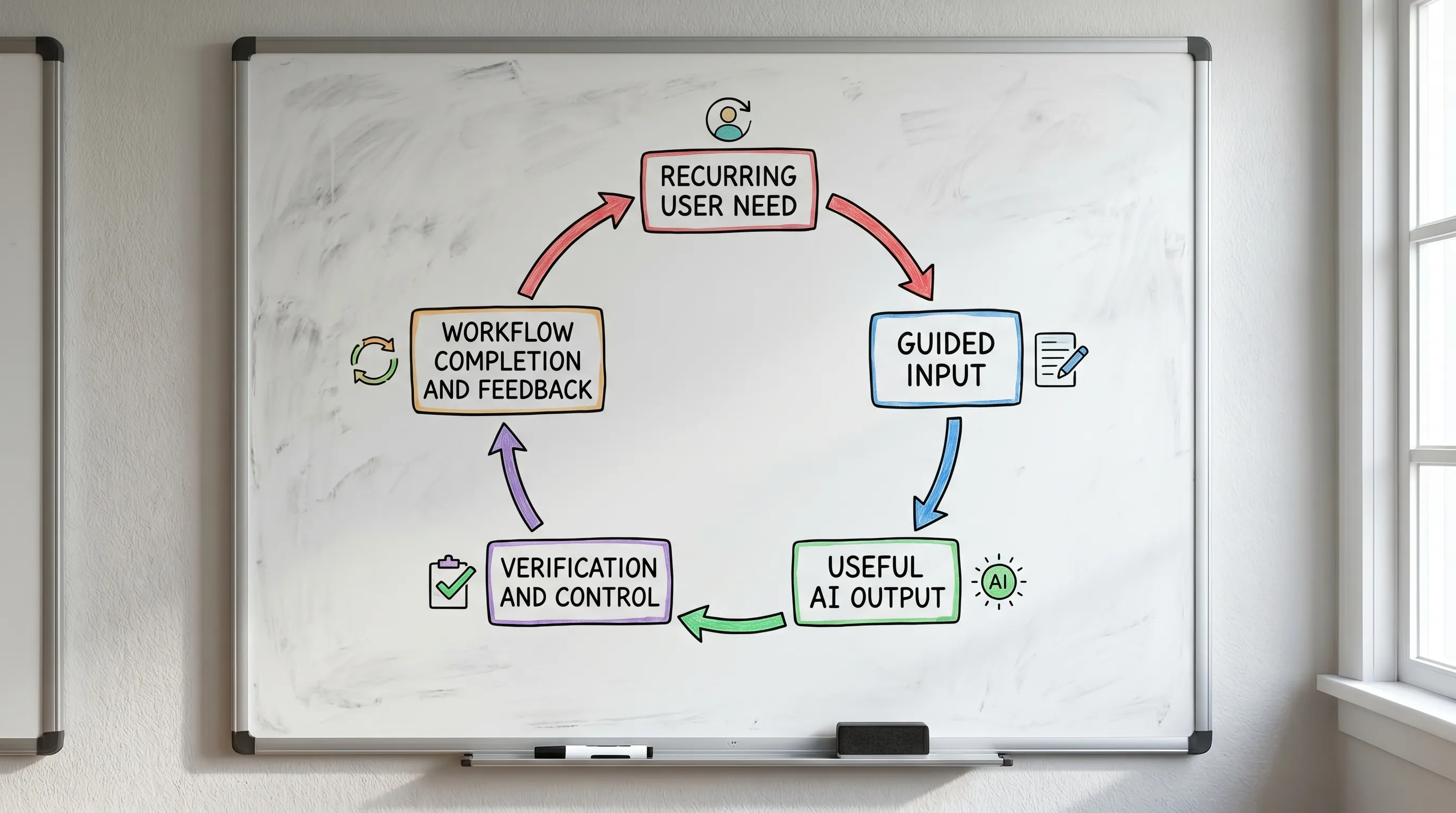
A great AI product people keep using usually delivers on four promises:
- It reduces effort without reducing user agency.
- It increases confidence without pretending to be infallible.
- It improves with context and feedback without feeling invasive.
- It connects to the user's real workflow, not just a standalone AI moment.
That combination is hard to build, but it is also where durable AI product adoption comes from.
Frequently Asked Questions
What is an AI product? An AI product is a software product that uses artificial intelligence to help users complete a job, make a decision, create an output, automate a step, or understand information. The AI capability matters, but the product experience determines whether people can use it successfully.
What makes users keep using an AI product? Users keep using an AI product when it solves a recurring problem, creates a useful result quickly, earns calibrated trust, gives them control, and fits into the workflow where the result is needed.
Why do many AI products fail after the first use? Many AI products fail after the first use because they create novelty but not repeatable value. Common issues include unclear use cases, weak onboarding, hard-to-verify output, poor workflow fit, and lack of meaningful feedback loops.
How should product teams measure AI product adoption? Product teams should measure more than logins or generations. Useful signals include time to first useful output, accepted outputs, edits, overrides, verification behavior, downstream workflow completion, repeat task frequency, and cohort retention.
Is model quality enough to create AI product retention? No. Model quality is important, but retention depends on the full experience around the model, including guidance, context, trust signals, correction paths, integrations, and whether the product solves a job users have again and again.
Build AI products users return to
If your team is shipping AI, the hard part is often not adding another capability. It is finding the exact moment where adoption breaks and fixing it with the right product move.
The AI Product Adoption Deck is a 124-page, 104-card PDF playbook built for that work. It includes 12 diagnostic cards, 80 targeted action cards, and 12 workshop templates to help product teams improve trust, understanding, retention, and usability. The deck is organized by adoption challenge, indexed by symptom and metric, and designed for symptom-based triage so teams can move from vague adoption problems to concrete next steps.
Use it when users try your AI once but do not return, when trust is unclear, when onboarding is not working, or when your team needs a shared language for building AI products people keep using.