What an OpenAI Product Team Still Has to Design
An OpenAI product still needs job fit, input design, trust, revision, and retention loops. Use this diagnostic frame to find what broke.
Your OpenAI product demos well. The first output looks useful. People say “nice” in the launch thread. Then the usage graph does the thing nobody wants to explain in the roadmap review: first-run activation is fine, repeat use is weak, and the feature becomes a novelty tab.
That is not always a model problem.
For a product team building with OpenAI, the model can generate, summarize, classify, reason, and transform. It still does not decide what the user is trying to finish, what context matters, when an answer is safe enough, how the user should revise it, or where the work goes next.
That is the remaining product work. And it is usually where adoption breaks.
The model is not the product boundary
A common mistake is to define the feature by the model task: “generate a sales email,” “summarize this account,” “write release notes,” “answer questions over docs.” Those are capabilities. They are not yet product boundaries.
The user’s job is usually more specific and more constrained.
A sales rep may not need a generated email. They may need a version that uses the right account context, avoids a sensitive topic, matches the stage of the deal, and can be sent after a quick scan. A PM may not need summarized feedback. They may need a ranked set of product risks with links back to evidence. A support lead may not need an answer. They may need a confident answer when policy is clear, and escalation when it is not.
If the OpenAI product team designs around the model task instead of the work outcome, users do the missing product thinking themselves. They rewrite prompts. They cross-check facts. They paste outputs into another tool. They ask a teammate if the answer “looks right.”
That is not adoption. That is unpaid QA.
If this is the failure mode you are seeing, the fix starts with matching the product to the actual AI job to be done, not the most impressive generation path.
The input burden is still your problem
OpenAI can handle a lot of context. That does not mean users want to supply it.
A blank prompt box pushes the hardest part of the workflow onto the user. They have to know what to ask, what context to include, what format to request, what constraints matter, and what “good” looks like. Power users may tolerate that. Most product users will not.
This shows up as prompt paralysis. Users open the feature, hesitate, try a generic prompt, get a generic output, and leave. The team reads this as “the model was not good enough.” Sometimes it was. Often the input design was lazy.
Good AI product design preloads context from the object the user is already working on. It narrows the task. It offers useful defaults. It asks for missing information only when the missing information changes the quality or risk of the output.
For example, “write a customer follow-up” is too open. “Draft a follow-up using the last call notes, current renewal risk, and agreed next step” is much closer to a product workflow. The user should not have to remember all of that. The product should already know where to look.
Output needs a contract, not just text
The output contract tells the user how to treat the result.
Is this a draft, a recommendation, a decision, a search result, a warning, or a completed action? Can the user send it as-is? Should they verify claims? Which parts are sourced? Which parts are inferred? What changed from the original?
Without that contract, the user has to invent their own trust model.
This is why two products using similar model capability can feel completely different. GitHub Copilot puts suggestions inside the code-writing flow, where the developer can accept, reject, or edit in context. Grammarly shows edits against the user’s own text. Perplexity makes sources part of the answer surface. These are product decisions, not just model outputs.
A generic text block gives users maximum ambiguity. It may look flexible, but it creates review cost. On a busy day, review cost kills adoption. If users cannot verify the output quickly, they will either ignore it or overtrust it. Both are product failures.
For a deeper version of this trust problem, the key design move is to make AI products trustworthy on a busy day, when users have low patience and high consequences.
| Symptom in the product | Likely design gap | Better product response |
|---|---|---|
| Users copy output into another tool before using it | Output is not shaped for the real workflow | Match the format, fields, and destination of the next step |
| Users regenerate repeatedly | No useful revision path | Add targeted edits, partial accept, and visible diffs |
| Users ask “where did this come from?” | Evidence is hidden or missing | Show sources, inputs used, and assumptions |
| Users try once but do not return | The feature solved a demo task, not a recurring job | Anchor the feature to a repeated workflow moment |
| Users accept bad output too quickly | Confidence and limits are unclear | Mark uncertainty, risky claims, and escalation paths |
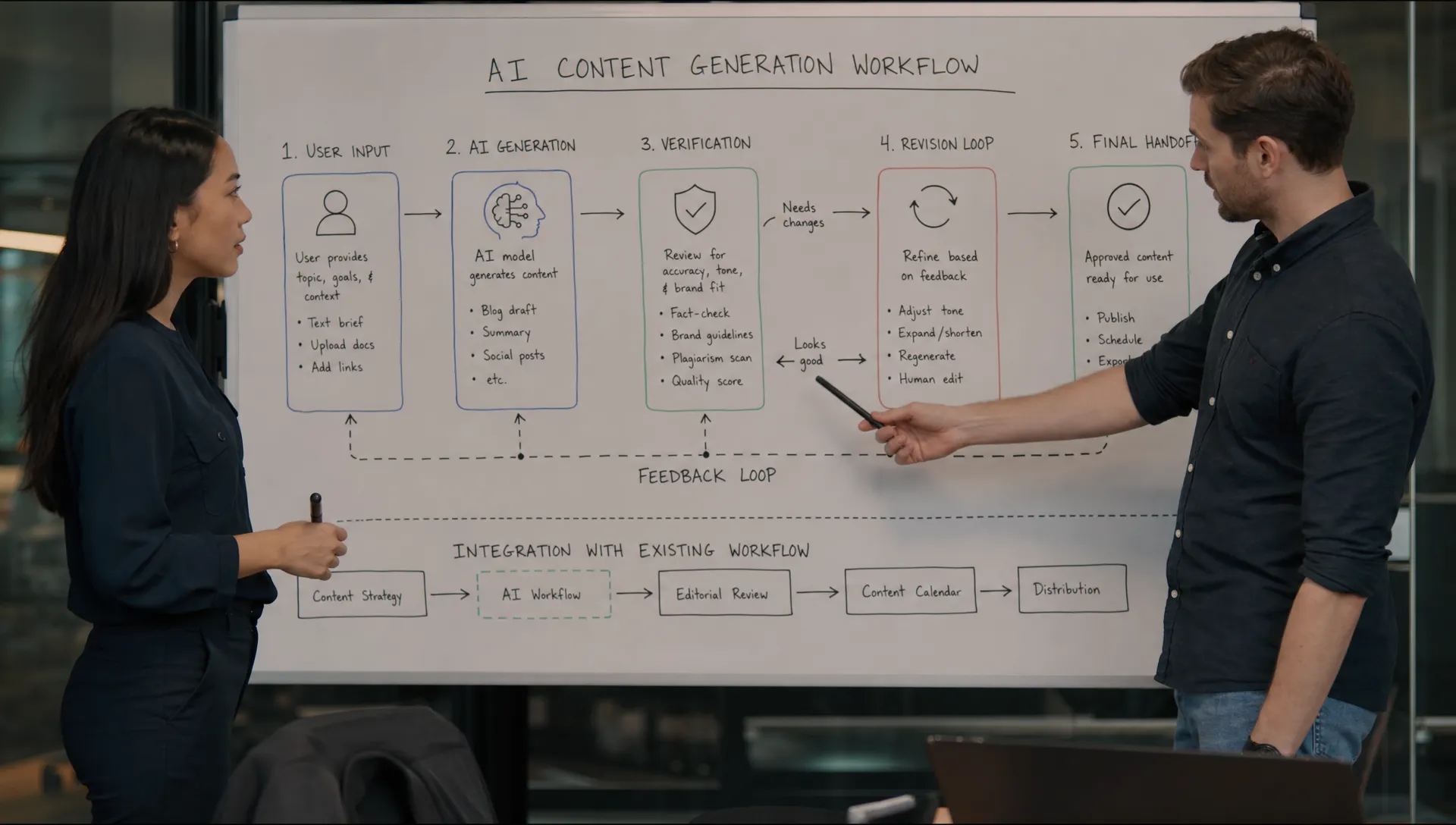
Revision is the real interface
Most useful AI work is not one-shot.
The first draft gets the user closer. Then they need to correct, narrow, expand, approve, reject, combine, or hand off. If your only controls are “copy,” “thumbs up,” “thumbs down,” and “regenerate,” you have not designed the working loop.
Regeneration is especially blunt. It throws away context the user may have liked. It forces the user to compare full outputs. It creates lottery behavior, where the user keeps rolling until something feels acceptable.
A better revision loop lets users act on parts of the output. Accept this paragraph. Replace this claim. Make this section shorter. Keep the structure, change the tone. Use the original source, not the inferred version. Show what changed.
This is where many AI UX problems are really product architecture problems. If the output is just a blob, revision is hard. If the output has structure, revision becomes a product surface.
That is why teams shipping serious AI workflows should design AI tools around revision, not one-shot output. The adoption gain often comes less from a smarter first answer and more from a better second move.
Failure states need a path forward
OpenAI products fail in more ways than traditional software.
The model can be uncertain. The user may provide thin context. The task may be outside policy. The source material may conflict. The answer may be plausible but not useful. A normal SaaS error state says something went wrong. An AI error state has to say what kind of wrong, what the user can do next, and whether the system can still help.
Bad failure state: “I can’t answer that.”
Better failure state: “I don’t have enough account context to recommend a renewal risk. Add call notes, connect CRM activity, or generate a neutral account summary instead.”
That small difference matters. One blocks the workflow. The other preserves momentum.
Measurement has to move past first use
If your OpenAI product team only tracks feature opens, prompt submissions, and generated outputs, you are measuring curiosity. Not adoption.
You need to know what happened after the output appeared.
Did the user accept it? Edit it? Regenerate it? Copy it? Ignore it? Send it? Come back next week for the same workflow? Did the output shorten the path to a completed job, or just add another artifact to review?
The most useful metrics are often boring and specific:
- Accepted output rate
- Partial accept rate
- Edit distance before use
- Regeneration rate per completed task
- Abandonment after output
- Time from output to final action
- Repeat use at the same workflow moment
A high generation rate with a low completion rate is a warning sign. It means the model is producing, but the product is not helping the user finish.
The product review question
The blunt question is this: after OpenAI returns a good answer, what still has to be true for the user to use it?
That question forces the right discussion. It moves the team away from model admiration and toward adoption mechanics.
Use it to review one workflow at a time. Pick a high-value AI feature that already shipped. Pull five recent sessions or user interviews. Look for the break. Did users struggle to start, verify, revise, decide, or hand off? Do not average those together. Each one has a different fix.
If the break is starting, improve defaults and context capture. If the break is verification, expose evidence and uncertainty. If the break is revision, structure the output and add targeted controls. If the break is handoff, integrate with the next system of record. If the break is repeat use, revisit whether the feature maps to a recurring job.
This is also the logic behind the AI Product Adoption Deck: diagnose the adoption symptom first, then choose the product move. The deck is built for teams that already shipped and need to understand why the AI feature is not becoming a habit. If you want a quick starting point, the free triage tool can help separate trust gaps, prompt friction, revision failures, and retention problems.
Frequently Asked Questions
What does “OpenAI product team” mean here? It means any product team building user-facing workflows with OpenAI models or similar model capability. The point is not the vendor. The point is that model output still needs product design around it.
What should OpenAI handle, and what should the product team handle? OpenAI handles model capability. The product team still owns the user job, context collection, output shape, verification path, revision loop, workflow integration, and retention measurement.
How do we know if adoption is blocked by UX instead of model quality? Watch what users do after the output appears. If they rewrite prompts, regenerate repeatedly, copy the answer elsewhere, ask for verification, or abandon before completion, the problem is often the product wrapper around the model.
What is the first thing to redesign after a weak AI feature launch? Start with the biggest post-output drop-off. If users do not trust the result, redesign verification. If they cannot get the result they want, redesign revision. If they never come back, revisit the recurring job and workflow trigger.