Verify AI Output With Less Friction and More Trust
Learn how to verify AI output with less friction by designing evidence, diffs, recovery paths, and acceptance flows users can trust.

Your AI feature is getting used. That is not the problem.
The problem starts after the output appears.
Users read it. Pause. Regenerate. Copy parts into another tool. Google a fact. Ask a teammate. Rewrite half of it. Then they leave the workflow and do the job manually next time.
That pattern is not just a quality problem. It is a verification problem. If users cannot verify AI output fast enough, they will not trust it enough to apply it. Even when the output is mostly good.
Verification is now part of the product surface. It is not an afterthought. It is the bridge between “the AI made something” and “the user is willing to use it.”
The adoption break: checking costs more than doing
Most teams measure whether the AI generated something useful. Users measure something else: whether accepting it creates risk.
A sales rep does not ask, “Is this email fluent?” They ask, “Will this make me look careless in front of this account?”
A support lead does not ask, “Is this summary readable?” They ask, “Did it miss the angry part of the ticket?”
A developer does not ask, “Is this code plausible?” They ask, “Will this break something I own?”
When the cost of checking is higher than the benefit of generation, users stop adopting. They may still try the feature. They may even praise it in feedback. But they will not build a habit.
This is why “verify AI” should not mean dumping citations or adding a confidence score. It means designing the shortest credible path from output to safe acceptance.
Verification friction has visible symptoms
You can usually see this problem in product behavior before users say it out loud. Look for moments where generation succeeds, but application stalls.
| Symptom in the product | Likely verification break | Product response |
|---|---|---|
| High generation, low apply or insert rate | Users cannot tell whether the output is safe to use | Add review surfaces at the decision point, not after the fact |
| Repeated regeneration with small prompt changes | Users are trying to get certainty through variation | Show what changed, what evidence was used, and what remains uncertain |
| Heavy editing before acceptance | The output is close, but not reviewable in parts | Offer partial accept, section-level edits, and structured diffs |
| Users copy output into another tool | Your product does not support their checking workflow | Bring sources, context, and comparison into the same surface |
| Users ask for “more accurate AI” but cannot define failure | They lack a way to inspect the reasoning path | Expose inputs, constraints, and assumptions in plain language |
| Early activation looks fine, but repeat use drops | The first try is interesting, but repeated checking is tiring | Reduce verification effort for repeat tasks and saved workflows |
If you want a deeper version of this diagnosis, the pattern is close to the problem described in designing AI so users can verify before they apply. The key point is simple: acceptance is not a quality score. It is a risk decision.
Trust is a workload
Trust is often discussed like a feeling. In product usage, it behaves more like a workload.
A user trusts an AI output when the effort required to check it is reasonable for the task risk. That balance changes by use case. A rough brainstorming draft can be accepted with light inspection. A customer-facing policy answer needs evidence. A regulated recommendation may need formal human review.
The NIST AI Risk Management Framework describes trustworthy AI in terms such as validity, reliability, transparency, and accountability. For product teams, that translates into a UX question: can the user understand enough, quickly enough, to decide what to do next?
That is the design job. Not proving the model is perfect. Not explaining every token. Just giving the user the right checks for the level of risk.
| Task risk | Example AI task | Verification surface that usually fits |
|---|---|---|
| Low risk | Rewrite a note, brainstorm titles, summarize a personal draft | Before-and-after view, quick undo, tone controls |
| Medium risk | Draft a customer email, summarize sales calls, update CRM fields | Source snippets, field-level accept, missing-info flags |
| High risk | Recommend contract language, analyze financial exposure, provide compliance guidance | Approved sources, mandatory review, audit trail, restricted scope |
Do not use the same verification pattern for every AI feature. That creates either too much friction or too little control. Both hurt adoption.
Design moves that reduce verification friction
The goal is not to make users check less. The goal is to make checking useful, fast, and local to the decision.
Show what the AI used
Users do not only need the answer. They need to know what the answer was based on.
A weak pattern says, “Generated from your workspace.” That sounds broad, but it is not useful. A better pattern says, “Based on 4 open support tickets, the customer’s last renewal note, and the current plan limits.”
Even better, show what was not included when that matters. If the AI did not use archived tickets, old contract terms, or private notes, say so. Omitted context is often where trust breaks.
Put evidence next to the claim
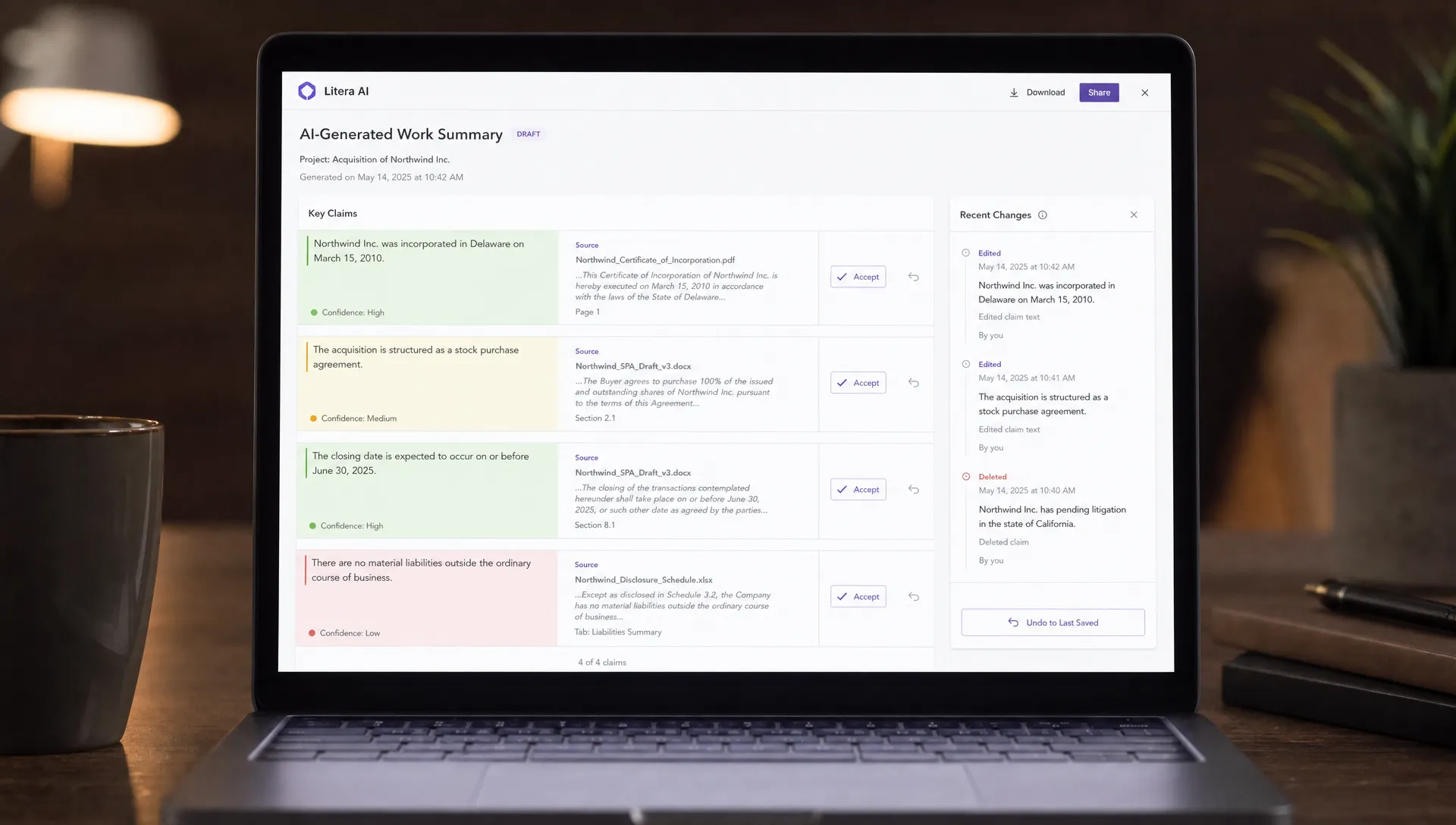
Sources should live where the decision happens. Not in a collapsed appendix. Not behind a generic “view sources” button that opens a wall of text.
If the output says, “The customer has asked about SOC 2 twice,” the user should be able to check the two moments immediately. If the output changes a product spec, the user should see the source requirement beside the changed section.
This is especially important when the user has domain knowledge. Experts do not want long explanations. They want fast inspection points.
Use diffs before drafts
For many AI workflows, the output is not a blank page. It is a change to existing work.
In those cases, a polished draft can actually make verification harder. Users need to know what changed.
Grammarly is effective partly because suggestions are reviewable as small edits. GitHub Copilot works best when a developer can inspect code in context, line by line, inside the editor. The user is not asked to trust an abstract answer. They are asked to accept a visible change.
If your AI edits documents, records, tickets, workflows, or code, design the diff first. The prose can come later.
Let users accept in pieces
All-or-nothing acceptance is a trust tax.
If the AI writes a customer email with a strong opening, a questionable claim, and a useful close, the user should not have to choose between accepting the whole thing or starting over. They should be able to accept the parts that are safe and fix the parts that are not.
Partial acceptance also gives you better product data. “User rejected output” is vague. “User accepted summary, rejected recommendation, edited tone” is diagnostic.
Make uncertainty actionable
A confidence score rarely helps on its own. “87% confident” does not tell a user what to check.
Actionable uncertainty sounds different:
- “I could not find the renewal date in the account notes.”
- “This answer uses the 2025 pricing page, but the customer may be on a custom contract.”
- “The summary excludes attachments because they were not readable.”
Those messages are useful because they point to a specific next action. Check the contract. Open the attachment. Confirm the plan.
This is also where recovery matters. Users forgive mistakes more easily when the product gives them a clear way to inspect, correct, undo, and continue. That is why trust in AI comes from recovery, not confidence scores.
Separate correctness, fit, and taste
Users reject AI output for different reasons. Many products collapse them into one feedback action.
That hides the real adoption problem.
Correctness means the output is factually wrong or unsupported. Fit means it does not match the task, customer, policy, or workflow. Taste means it is too long, too formal, too generic, or not in the user’s voice.
Each failure needs a different product response. Correctness needs evidence and guardrails. Fit needs better context and constraints. Taste needs reusable preferences and editing controls.
If you treat all rejection as “bad output,” you will keep tuning the wrong thing.
A simple diagnostic for your next user session
You do not need a large research project to find verification friction. Run five sessions with users who have real work to complete. Do not ask whether they “trust AI.” Watch what they check.
Track these signals:
- Time from output shown to first acceptance action
- Number of external checks outside your product
- Number of regenerations before editing starts
- Percentage of output accepted without rewrite
- Parts of the output users inspect first
- Places where users say, “I just need to confirm…”
Then ask one blunt question: “What would you need to see here to use this without leaving the workflow?”
That answer is often more useful than a satisfaction score. It tells you what verification surface is missing.
What to change before improving the model
Better model output can help. But if users still cannot check it, the adoption problem will remain.
Before you spend another cycle on prompt tuning or model swaps, make one product decision: where should verification happen?
There are only a few good answers:
- Before generation, by clarifying the task, inputs, and scope
- During review, by showing evidence, diffs, and uncertainty
- At application, by offering partial accept, preview, and undo
- After correction, by learning from user edits and preserving context
Most AI products underinvest in the middle two. They generate, then hope the user figures it out. That creates friction at the exact moment where trust is being decided.
Frequently Asked Questions
What does it mean to verify AI output? It means giving users a fast way to check whether an AI-generated answer, edit, summary, or recommendation is safe to use in their workflow. Good verification shows inputs, evidence, changes, uncertainty, and recovery options.
Is adding citations enough to build trust? Not usually. Citations help when users can inspect them at the claim level. A long list of sources at the bottom often adds work instead of reducing it.
Should every AI product show confidence scores? No. Confidence scores are often too abstract for product decisions. Users usually need actionable uncertainty, such as what the AI could not verify, which source was missing, or which assumption may be wrong.
How do I know if verification friction is hurting retention? Look for high generation but low acceptance, repeated regeneration, heavy editing, users checking outside the product, and drop-off before applying the output. Those are stronger signals than generic trust survey responses.
Make verification a product decision
If users are not coming back to your AI feature, do not start by asking whether the model is smart enough. Ask whether the user can check the output fast enough to use it.
That one shift changes the roadmap. You stop adding more generation options and start designing the review path.
If you want to diagnose where this is breaking in your own product, try the free AI adoption triage tool. For a deeper operating system, the AI Product Adoption Deck includes diagnostics, action cards, and workshops for turning adoption symptoms like low trust, output abandonment, and weak retention into concrete product decisions.