Users Trust AI Differently When They Own the Decision
Learn why AI product adoption depends on decision ownership, and how to design trust, review and recovery into high-stakes AI workflows.

Your AI feature works during exploration. Users ask it to draft, summarize, suggest or analyze. Then usage stalls at the moment that matters: approve the recommendation, send the message, update the record, merge the code, publish the answer.
This is often mislabeled as a generic trust problem. More precise: the product has blurred who owns the decision.
When users own the outcome, they do not trust AI the same way they trust automation running in the background. They are not asking, "Is the model smart?" They are asking, "Can I stand behind this if someone checks it later?"
That changes the product job. The interface has to help the user make a decision, not just admire an output.
Trust is different when the user is accountable
At work, trust is practical. A user trusts an AI feature when they can use it without creating unacceptable risk for themselves, their team or their customer. That risk may be factual, financial, legal, reputational or social.
If the user owns the decision, the AI output is only one input into that decision. It might be a strong input. It might save time. But the user still needs to know what the system considered, where it might be wrong, what they can change and how recovery works if the output causes a problem.
This is why trust patterns vary so much by workflow. A support rep may happily let AI summarize a ticket but hesitate when it drafts a refund policy exception. A PM may use AI to cluster feedback but stop short of letting it prioritize the roadmap. A developer may accept an autocomplete suggestion but inspect a larger refactor line by line.
If you want the broader trust frame, this is close to the workflow-based model in how users decide whether to trust AI at work. The short version is that users do not evaluate AI in the abstract. They evaluate it against the cost of being wrong.
The adoption break: the product acts like it owns the call
Many AI features present output as if the hard part is generation. The system gives one recommendation, one draft, one answer or one next action. The primary button says accept, apply, send or insert.
That pattern is fine when the task is low-risk or easy to undo. It breaks when the user is accountable for the result.
The user now has two bad options. They can accept something they cannot fully inspect, which feels reckless. Or they can reject the AI and do the work manually, which makes the feature feel like a novelty instead of a workflow tool.
The same product can create undertrust and overtrust depending on the user. Some users abandon. Others rubber-stamp because the UI makes review feel optional. Both are adoption failures. One kills usage. The other creates downstream risk that eventually damages trust.
| Symptom you see | Likely decision ownership issue | Better product response |
|---|---|---|
| Users regenerate the same output several times | They are trying to make the AI feel safe without knowing what to check | Show assumptions, inputs and editable parts instead of only a new version |
| Users copy output into another tool before using it | They need a private review step the product does not provide | Add preview, draft mode, diff or sandboxed apply |
| Users accept low-risk suggestions but avoid high-risk ones | The same trust pattern is being used across different task risks | Separate advisory, reviewed and automated modes |
| Users ask a manager or peer before accepting | The decision has social or organizational risk | Make approval, evidence and rationale part of the workflow |
| Users accept output then heavily edit it | The AI is close but not controllable enough | Support partial accept, constraint setting and direct manipulation |
There are three decision modes, not one
A useful diagnostic is to ask which decision mode your AI feature is actually in. Many products mix these modes without naming them, then wonder why users hesitate.
Advisory mode
The AI suggests, explains, ranks, drafts or highlights. The user clearly owns the final call.
In this mode, trust comes from inspectability. Users need to see the basis for the suggestion, compare alternatives and understand what was excluded. The output should feel like a prepared brief, not a command.
Examples include AI writing assistants, research summaries, sales account insights and product feedback clustering. The AI helps the user think faster, but the user still decides what to do.
Delegated with review mode
The AI prepares an action and the user approves it before it changes the system of record.
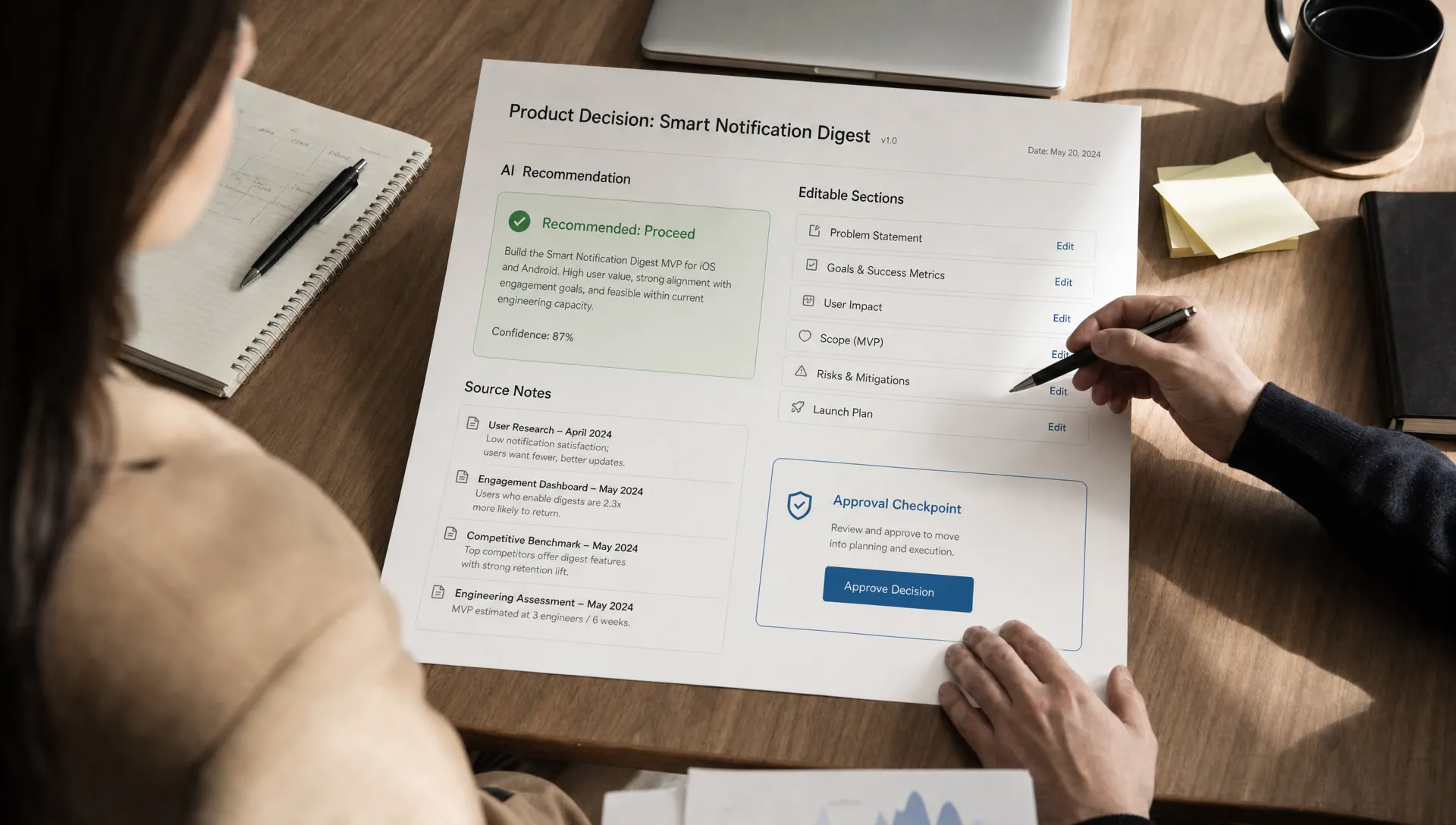
This is where many adoption problems appear. The product says the user is in control, but the review step is too thin. A modal with a generated paragraph and a confirm button is not meaningful control if the user cannot see what changed, why it changed or how to undo it.
Good review mode needs previews, diffs, rollback and partial acceptance. GitHub Copilot works better for many developers when suggestions are inserted into an editing context, because the user can inspect and modify the code before it becomes theirs. Grammarly suggestions work similarly. The user can accept one change, reject another and keep writing.
Automated mode
The AI takes action within a defined boundary. The user or organization has delegated the decision before the moment of execution.
This mode can work, but only when the boundary is explicit. The product must define what the AI can do, when it must stop, what gets logged and how exceptions route back to a person. If you skip that boundary work, users will treat automation as unsafe even when the model is good.
For teams building bespoke internal workflows, the right time to make these calls is before the interface is finalized. Agencies that design custom internal AI applications and agents often start from the operating process itself, which is where decision rights, approval paths and audit needs should be mapped.
The interface should package the decision, not just the output
When users own the decision, the AI feature should answer five questions quickly:
- What is the system recommending?
- What did it use to reach that recommendation?
- What is uncertain or outside scope?
- What can I change before I commit?
- What happens if this is wrong?
This does not mean adding long explanations everywhere. Long explanations often become another review burden. The goal is targeted evidence at the point of decision.
For a generated customer email, that may mean showing the ticket facts used, the policy constraint and the tone setting. For an AI analytics summary, it may mean linking each claim back to the chart or query behind it. For an AI coding tool, it may mean showing the changed files and test impact before apply.
Diagnose the ownership gap before changing the model
If adoption is weak at the commit point, do not start by asking whether the model is accurate enough. Start with the ownership gap.
Ask where the user first has to take responsibility. Is it when they read the output, edit it, apply it, share it or defend it later? That moment is where trust has to be designed.
Then look at the behavior around that moment. Regeneration usually means the user lacks a better way to adjust or verify. Copying into another tool means your product does not provide a safe review space. Long pauses before approval often mean the user cannot tell what will happen next. Heavy edits after acceptance mean the AI output is useful but not shaped to the user's decision criteria.
The fix may be small. A preview before apply can change behavior. A visible source list can reduce outside verification. A partial accept pattern can turn a rejected output into a useful one. An undo path can make users willing to try the feature in real work instead of test work.
This is also where many teams misread onboarding metrics. A user who tries the AI feature once has not adopted it. Adoption starts when the user brings it into a real decision they own.
Watch metrics that reveal ownership, not just usage
Raw usage can hide the problem. A feature can have plenty of prompts and still fail to become trusted work infrastructure.
Better signals include acceptance after inspection, partial acceptance, edit distance after accept, undo rate, time spent in review, source expansion, approval escalation and repeat use on higher-risk tasks. You are looking for evidence that users are moving from curiosity to accountable use.
A healthy pattern is not always faster approval. Sometimes trust improves because users slow down briefly at the right checkpoint, then stop doing expensive workarounds elsewhere. If users no longer paste output into a separate doc, ask a peer to verify every answer or rerun the same prompt six times, your product has removed hidden friction.
A practical decision frame
Take one AI workflow where users hesitate before commit. Write down the decision the user believes they are making. Then write down the decision your UI appears to ask them to make.
Those are often different.
The user may be deciding, "Can I send this to a customer without creating a support escalation?" Your UI may be asking, "Do you like this generated reply?"
The user may be deciding, "Can I merge this without breaking production?" Your UI may be asking, "Do you accept this code suggestion?"
The user may be deciding, "Can I use this research in a leadership memo?" Your UI may be asking, "Was this summary helpful?"
Once you see the mismatch, the product work gets clearer. Add the missing evidence. Change the call to action. Split the task into lower-risk steps. Make recovery visible. Let users own the parts they need to own and delegate only the parts that have a safe boundary.
If you are unsure which adoption break you are seeing, the free AI adoption triage tool can help map the symptom to a more specific trust, onboarding or retention problem.
Frequently Asked Questions
Should AI always leave the final decision to the user? No. Some workflows are good candidates for automation. The point is that decision ownership must be explicit. If the AI owns the action, the product needs boundaries, logs, exceptions and recovery. If the user owns it, the product needs review, evidence and control.
Does adding explanations always increase trust? No. Explanations help only when they reduce the user's decision cost. A long rationale can make review harder. Users need the specific evidence, uncertainty and scope limits that help them decide what to do next.
What if users are too cautious with a good AI feature? Treat caution as a signal. Users may lack a safe way to verify, edit, undo or limit the AI. Improve those controls before pushing more education or stronger confidence labels.
How is this different from human-in-the-loop design? Human-in-the-loop describes where a person appears in the process. Decision ownership describes who is accountable for the outcome and what control they need to carry that accountability safely.
Go deeper
If this pattern is showing up in your product, the AI Product Adoption Deck gives you a structured way to diagnose it. It includes 12 diagnostics, 80 action cards and workshop templates for turning adoption symptoms into product decisions, copy, experiments and specs.