How to Apply AI Where Users Can Safely Commit the Result
Apply AI where users can safely commit results. Diagnose abandoned outputs, handle stale approvals and design clear completion and recovery paths.

Users generate a result, edit it and leave without applying it. Your team sees output abandonment and starts improving the answer. But the answer may already be good enough. The unresolved question is what happens when the user commits it. When you apply AI for work that changes records, publishes content or triggers a customer action, adoption depends on making that transition predictable, not just making the preview convincing.
The symptom to investigate: users accept the proposal in principle but avoid making it real.
Diagnose the gap between approval and commitment
A user saying “that looks right” is not the same as authorizing a change. And an authorization is not proof that the change completed.
Separate three events in your product:
- Approved: The user accepted a specific proposed result.
- Applied: The product changed the intended destination.
- Confirmed: The product showed what actually changed, including exceptions.
If your analytics collapse these into one “accepted” event, you cannot tell whether users hesitate before committing or encounter problems afterward.
Start with sessions where users inspected an output but did not apply it. Ask: “What did you expect this button to change?” Then ask what they would do if the result were wrong.
If users cannot assess the content, focus on helping them verify before they apply. If they accept the content but cannot predict its consequences, investigate the commitment step instead.
Apply AI for changes users can recover from
Choose the smallest useful unit of commitment. This is the amount of work a user can authorize without accepting unrelated consequences.
A generated rewrite does not have to replace the whole document. A proposed cleanup does not have to update every matching customer record. Smaller commitments let users make progress without approving an entire batch they cannot comfortably own.
| Proposed AI action | Useful commitment unit | Failure to design around |
|---|---|---|
| Rewrite a document | One selected passage | Unreviewed sections get replaced |
| Update CRM records | A named field on selected records | Correct values overwrite newer information |
| Classify support tickets | A selected set of classifications | Wrong labels trigger downstream routing |
| Draft customer messages | Individually approved messages | A retry sends the same message twice |
Do not confuse a small interface action with a small consequence. Changing one ticket label may trigger an escalation workflow. Sending one message may disclose information that cannot be recalled.
Map the downstream effect before deciding what “Apply” should mean. If the consequence cannot be bounded, keep the AI contribution as a proposal rather than an executable action.
Keep approval attached to the reviewed result
AI introduces a specific commitment hazard: the result can change between preview and execution.
Suppose a user reviews proposed updates to 18 customer records. Before they confirm, a colleague edits two of those records. Applying the original proposal could now overwrite newer work.
When you apply AI for updates to shared data, approval should refer to the exact proposal the user reviewed and the relevant destination state. If either changes materially, the approval should no longer silently authorize execution.
Product requirements should make this explicit:
- Freeze the reviewed proposal: Do not regenerate it behind the confirmation button.
- Check for changed destinations: Identify records or fields that no longer match the reviewed state.
- Reopen only affected decisions: Preserve valid approvals rather than forcing a complete restart.
For the 18-record example, show which two records changed. Let the user resolve those separately while retaining the other 16 approved edits, if the edits are independent.
A generic “Something changed” error forces the user to reconstruct the problem. Name the affected item and explain what requires another decision.
Treat partial completion as a product state
A batch is not always a single success or failure. Some items may apply while others fail validation, lose permission or encounter a temporary service error.
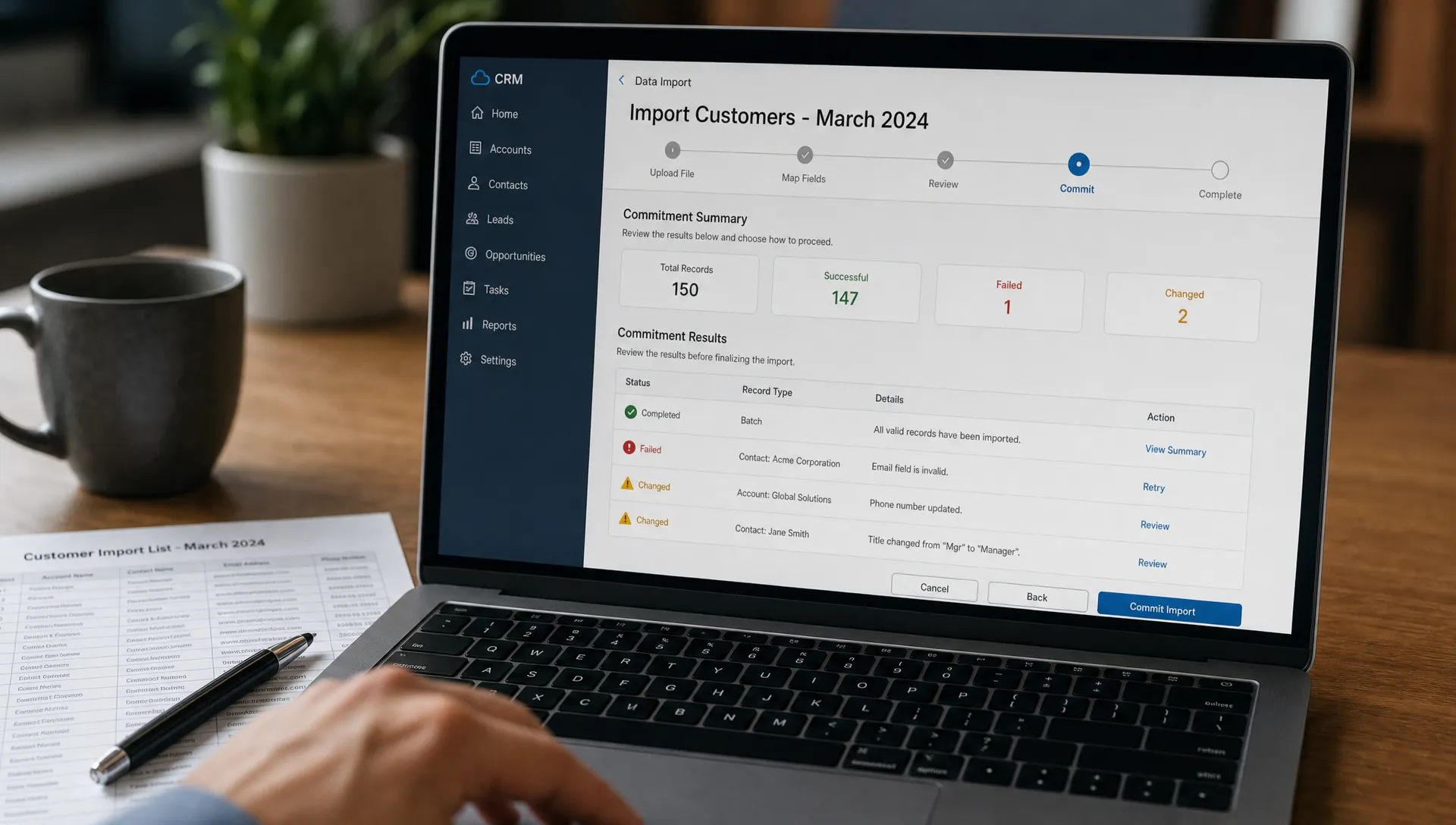
Continuing the example, suppose 15 of the 16 authorized updates succeed. The remaining update fails. A spinner followed by “Please try again” leaves users guessing whether retrying will repeat all 16 actions.
Show separate states for applied, failed and untouched items. Preserve the successfully applied work. Offer a retry for the failed item only when doing so is safe.
Retrying execution and regenerating output are different actions. A retry should not quietly produce a new proposal. Regeneration should not quietly execute it.
This distinction matters even more for external effects such as messages or payments. Preventing duplicate execution is a product requirement, not something users should have to infer from a loading indicator.
Give users a receipt and an honest recovery path
After commitment, show the actual outcome rather than repeating the original intention.
A useful receipt names the destination, the completed changes and any exceptions. For shared work, it should also make the action attributable: who authorized it and when it happened.
If you apply AI for actions with external consequences, distinguish reversal from compensation. Restoring a previous field value may reverse an edit. Sending a correction email does not reverse the original email. It creates another customer-facing event.
Avoid an “Undo” label unless the product can restore the relevant prior state. Even restoring a database value may not reverse a notification or workflow that the original change triggered.
State the recovery limit before commitment when it affects the decision. For example: “These labels can be restored, but notifications already sent will remain.”
A receipt closes the loop. Without one, users may check the destination manually after every AI action, reducing the value of the feature.
Measure completed work, not just accepted suggestions
Instrument the commitment path separately from generation. Track reviewed proposals, authorized changes, completed changes and unresolved exceptions.
Then examine recovery behavior. A reversal can mean the AI was wrong, but it can also mean the recovery control worked. Pair event data with the reason for correction before treating every reversal as failure.
When you apply AI for batch work, report both batch-level and item-level outcomes. One failed item should not conceal 15 successful updates. Nor should 15 successes conceal an unresolved failure that matters to the user.
For your next experiment, change one commitment property: the unit of application, stale-approval handling or the completion receipt. Watch whether more reviewed outputs become completed work without increasing unintended changes. Do not optimize the confirmation rate alone.
Frequently asked questions
Should every AI action require confirmation? No. Match the approval requirement to the consequence, reversibility and authority the user has already granted. A private draft edit and a customer-facing send should not inherit the same policy simply because both use AI.
Is an undo button enough? Only if it reverses the consequences users care about. Restoring text does not retract information already published or undo actions taken by another system.
What if users still hesitate after reviewing the result? Ask them to describe the expected change, who will be affected and how they would recover. Uncertainty in those answers points to the commitment design rather than necessarily to output quality.
Choose one commitment boundary to fix
Take one abandoned workflow and write down five things: the reviewed proposal, the destination, the smallest useful change, the completion evidence and the recovery limit. Any blank is a concrete product decision to resolve.
The free Triage tool can help you start from the adoption symptom. For a broader diagnostic workflow, the AI Product Adoption Deck provides 12 diagnostics, 80 action cards and 12 workshops in a 104-card, 124-page PDF.