Cursor UX Lessons From Real Editing Behavior
Cursor UX lessons for AI product teams: diagnose output abandonment, design better edit loops, and measure adoption through real editing behavior.

Your AI feature may be producing decent output and still failing.
Users try it once. They generate a draft. They nod. Then they copy the result somewhere else, rewrite it manually, or go back to the old workflow. The model was not obviously bad. The adoption still did not stick.
Cursor is useful to study because it sits inside a behavior people already understand: editing. Developers do not treat AI output as a finished answer. They inspect changes, accept small pieces, reject others, run tests, and keep moving. The UX does not ask them to leave the work surface and admire a generated artifact. It puts AI inside the loop where judgment already happens.
That is the lesson most AI products miss.
The adoption problem is often not “users need better prompts.” It is that your product asks users to switch from editing mode to evaluation mode too early. They have to judge a whole output before they can make it useful.
The real Cursor lesson: AI works better as a proposed edit
Cursor is not just interesting because it helps write code. It is interesting because code editing has clear pressure on AI UX:
- The user has existing context open.
- The desired change is usually local before it is global.
- Bad output has visible cost.
- Partial acceptance is normal.
- Verification is part of the workflow.
That makes the UX lessons transferable. Not every product has code files, tests, and diffs. But every serious AI product has objects users care about: documents, records, tickets, dashboards, emails, designs, contracts, campaigns, support replies, specs.
If your AI feature treats those objects as background context and generates a separate answer, you are making the user do extra work. If it proposes changes directly against the object, the user can stay in the behavior they already know.
A lot of AI adoption problems are editing problems wearing different clothes.
Where AI products break after the first output
The common failure pattern looks like this: the product helps the user create something, but does not help them confidently turn it into accepted work.
That gap creates a behavioral tax. The user has to compare the output to the source, remember constraints, decide what to keep, make changes manually, and recover when the AI goes off track. After two or three cycles, the AI stops feeling like leverage. It becomes another thing to manage.
This is why “generate again” is a weak default. Regeneration gives the user another complete object to evaluate. It does not help them repair the part that failed.
| Observable symptom | Likely behavior underneath | Better product response |
|---|---|---|
| Users generate output but rarely accept it | They cannot localize what is useful | Show proposed edits against the current object |
| Users copy output into another tool | The real editing surface is elsewhere | Bring AI actions into the native workflow |
| Users regenerate several times | They know what is wrong but cannot target the fix | Offer constrained revision controls |
| Users accept output then immediately rewrite it | Acceptance is not the same as trust | Track post-accept edits and reversions |
| Users abandon after one mistake | Recovery cost is too high | Make undo, partial accept, and correction obvious |
Cursor’s strongest UX lesson is not “make AI fast.” It is “make AI interruptible, inspectable, and reversible.”
If you want a broader pattern for this, the principle is close to designing AI tools around revision instead of one-shot output. The output is not the finish line. The accepted edit is.
Lesson 1: Start from the object, not the blank prompt
A blank prompt asks the user to frame the task from scratch. That creates hidden work. The user must describe the object, the goal, the constraints, the intended change, and the standard for success.
Cursor avoids much of that by operating near the file, selection, error, or codebase context. The user does not have to explain everything. The product already knows where the action is happening.
For non-code products, this means the AI action should be attached to the thing being changed.
A support tool should start from the ticket, policy, customer history, and current draft. A CRM assistant should start from the account, last touch, deal stage, and next step. A product spec assistant should start from the feature brief, open questions, decisions, and linked research.
The question is simple: can the user invoke AI from the exact place where they would otherwise edit manually?
If not, you are probably asking them to translate the work into a prompt. That translation step is where many users drop. This is also why task starters often outperform generic prompt boxes, especially when they are tied to the current object rather than floating as generic examples.
Lesson 2: Make changes small enough to judge
Large AI outputs create large review burdens. Even if the quality is good, the user has to inspect too much at once.
Developers are used to reviewing diffs because diffs reduce cognitive load. The user can see what changed. They can compare before and after. They can reject the change without rejecting the whole workflow.
Most AI products need their own version of a diff.
That does not always mean red and green text. It may mean highlighted clauses in a contract, changed assumptions in a forecast, suggested fields in a CRM record, rewritten sentences in a campaign, or proposed sections in a product requirements document.
The key is that the user should not have to ask, “What did the AI do?” The interface should answer that by default.
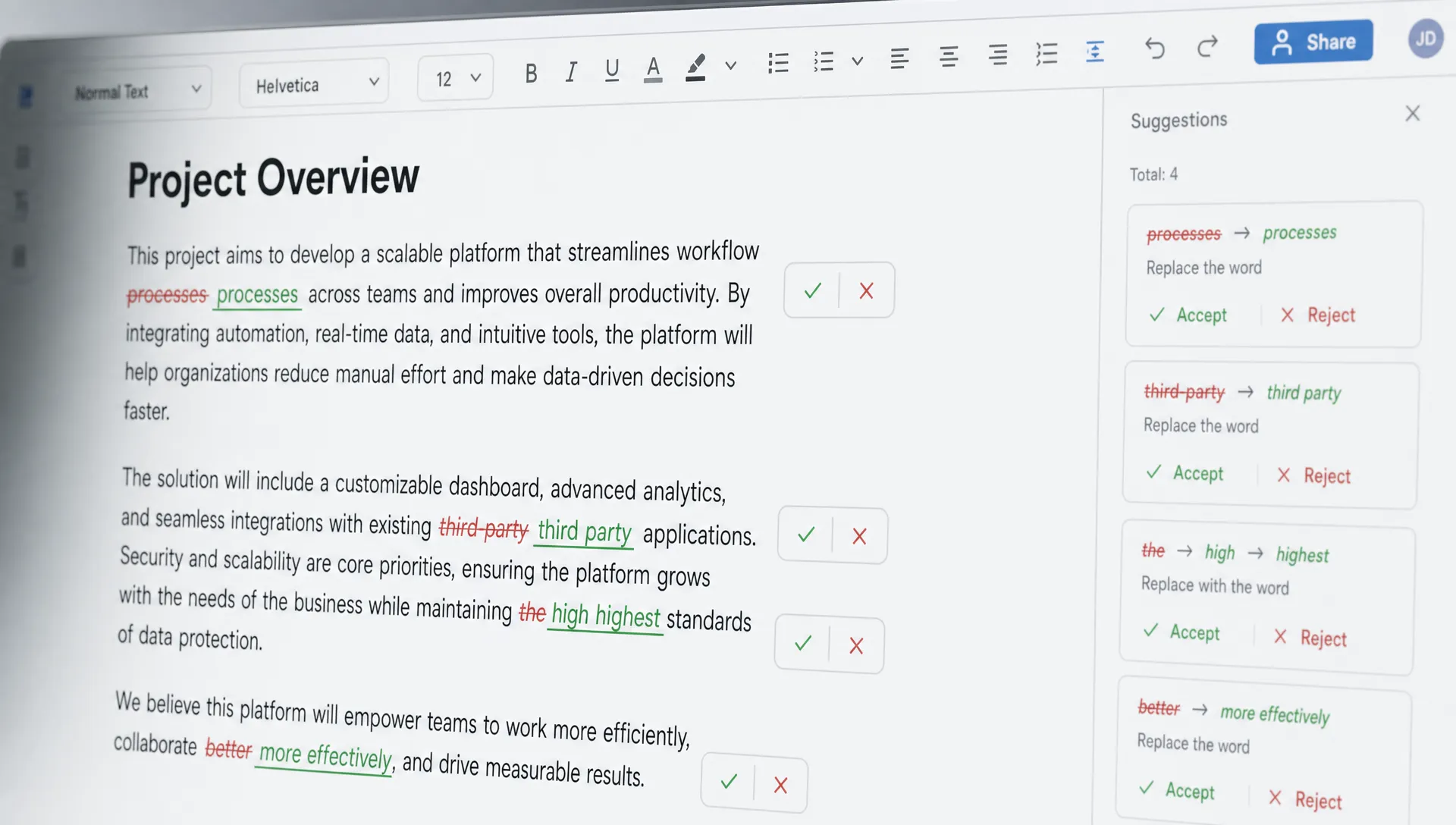
When users can judge a small change, they are more likely to stay in the loop. When they have to judge a finished artifact, they often delay, rewrite, or abandon.
Lesson 3: Keep the user in correction mode
A good AI editing loop lets the user say, “Not that part. Change this part.”
A weak loop makes the user restate the whole task.
This matters because users build trust through correction. They need to see that the system can recover from a miss without destroying the useful parts. If each correction creates a new full output, the user learns that iteration is risky.
Cursor-style UX keeps correction close to the artifact. The user can select, ask for a change, inspect the result, and continue. That pattern is valuable in any AI product where the first answer is rarely perfect.
You can diagnose this by watching what happens after the first failed output. Do users refine in your product, or do they leave? Do they target the bad section, or do they regenerate everything? Do they keep useful work, or does each attempt replace the previous attempt?
If the session gets worse over time, you may also have a context problem. The system may be losing the user’s goal, constraints, or approved decisions as the conversation continues. That pattern is covered more directly in the breakdown of context drift in AI sessions, but the short version is this: revision only works if the product remembers what has already been settled.
Lesson 4: Measure editing behavior, not just generation
If your main AI metric is “outputs generated,” you are measuring activity before the adoption moment.
The adoption moment is when AI work becomes user-approved work. Cursor-like behavior points to better metrics because editing creates visible signals: accepted suggestions, rejected suggestions, modified suggestions, reversions, and follow-up corrections.
Track the shape of the loop, not just the start of it.
| Metric | What it tells you | Why it matters |
|---|---|---|
| View-to-accept rate | Whether users find proposed changes useful enough to keep | Better than counting generations |
| Partial accept rate | Whether the product supports real judgment | High partial acceptance can be healthy |
| Edit-after-accept rate | Whether accepted output still needs heavy repair | Helps separate usefulness from polish |
| Revert-after-accept rate | Whether trust breaks after inspection | Signals hidden quality or confidence issues |
| Correction depth | How many targeted revisions happen before acceptance | Shows whether iteration is productive |
| Copy-out rate | Whether the real workflow lives elsewhere | Indicates integration failure |
These metrics force a better product conversation. Instead of asking, “Are users trying AI?” you ask, “Where does AI stop becoming accepted work?”
That is a much more useful question.
Lesson 5: Do not hide uncertainty behind polish
AI output often looks more confident than it deserves. In code, that confidence gets tested quickly. The user can run the code, inspect references, compare behavior, or see compiler errors.
In many business workflows, verification is weaker. A polished strategy paragraph, customer summary, or financial explanation may look right while being incomplete or subtly wrong.
The product needs to expose what the user should inspect.
That might include source links, changed fields, assumptions used, missing inputs, confidence by section, or a clear “needs review” state. The goal is not to scare users. The goal is to make review fast enough that trust can form.
This is where many AI products confuse trust with confidence. Trust does not come from saying “high confidence.” It comes from helping the user verify the parts that matter.
How to apply Cursor’s editing lessons outside code
Do not copy Cursor’s interface blindly. Copy the behavioral pattern.
Ask what your user already edits, how they judge a change, and where they recover from mistakes. Then place AI inside that loop.
| Product surface | Weak AI pattern | Better editing pattern |
|---|---|---|
| Document editor | Generate a full draft in a side panel | Suggest changes inline by section |
| Support inbox | Draft a complete reply with no evidence | Propose reply blocks tied to policy and ticket facts |
| CRM | Generate a generic account summary | Update specific fields with visible source context |
| Analytics | Explain a chart in prose | Mark changed drivers, assumptions, and anomalies |
| Product planning | Write a PRD from a prompt | Revise selected sections against known decisions |
The product question is not “Can AI produce this?”
The better question is, “Can the user accept, reject, or repair this without leaving the flow?”
If the answer is no, adoption will depend on novelty, not habit.
A simple diagnostic for your next product review
Open one real AI session from your product. Do not start with model quality. Start with editing behavior.
Look for the first moment where the user has to turn output into usable work. Then ask:
- Is the AI acting on the current object or in a separate surface?
- Can the user see exactly what changed?
- Can they accept only the useful part?
- Can they correct one section without restarting?
- Can they verify the output fast enough to keep momentum?
- Does your analytics distinguish generation from accepted work?
If several answers are no, you do not just have an AI UX issue. You have an adoption issue.
The fix is usually not a better empty prompt box. It is a tighter edit loop.
Frequently Asked Questions
What is the main UX lesson from Cursor? Cursor shows that AI adoption improves when the product supports real editing behavior: local changes, visible context, partial acceptance, fast rejection, and easy correction.
Does this only apply to developer tools? No. Code editing makes the pattern easier to see, but the same issue appears in documents, support replies, CRM records, analytics workflows, and product specs.
What should AI product teams measure instead of generations? Measure accepted work. Useful signals include view-to-accept rate, partial accept rate, edit-after-accept rate, revert-after-accept rate, correction depth, and copy-out rate.
How do I know if my AI feature has an editing problem? Look for users generating output but finishing the work somewhere else, repeatedly regenerating, accepting then rewriting, or abandoning after the first bad result.
Turn the lesson into a product decision
For your next AI product review, do not ask whether the model is impressive. Ask where the user edits, verifies, accepts, and recovers.
If you want a structured way to diagnose that break, the free AI adoption triage tool can help map the symptom to the likely adoption problem. And if you want to go deeper, the AI Product Adoption Deck includes diagnostics, action cards, and workshop templates for turning those symptoms into concrete product changes.