Build an AI Playbook Around Symptoms, Not Features
Build an AI playbook that starts with adoption symptoms, maps root causes, and gives PMs clearer fixes than feature checklists.

Your AI feature shipped. The launch doc says users can summarize accounts, draft replies, generate briefs, write code, or analyze files.
Then the adoption review gets vague.
People tried it once. Some regenerated outputs five times. Others copied the result into another tool and never came back. A few power users love it, but the broader user base does not build a habit. The team responds by adding more templates, improving the model, or moving the feature higher in the nav.
That is usually the wrong move.
A feature-first AI playbook tells the team what exists. A symptom-first AI playbook tells the team what is breaking. If you are already shipping AI, the second one is much more useful.
Features are the wrong unit for AI adoption
Most product playbooks are organized around feature areas. On a normal SaaS product, that can work well enough. Billing has a flow. Permissions have a flow. Reporting has a flow.
AI behaves differently. The same feature can fail for several unrelated reasons.
A summarizer can fail because users do not trust the source material. It can fail because the summary is not editable. It can fail because the output lands outside the workflow. It can fail because the user only needs the summary once a quarter, not every week.
Those are not the same problem.
If your playbook says “improve summarization,” the team will argue about model quality, prompt design, onboarding, and UI placement in the same meeting. Nobody is wrong, but nobody is diagnosing the break.
A symptom-first playbook changes the unit of work. It starts with observable adoption behavior:
- Users open the AI entry point but do not submit.
- Users generate output but do not apply it.
- Users regenerate repeatedly instead of editing.
- Users copy the output elsewhere to check or rewrite it.
- Users get first value but do not return.
- Users rely on the output too heavily and create review risk.
Now the team can ask a better question: what behavior are we seeing, and what does that behavior usually mean?
The symptom is not the root cause
A symptom is evidence. It is not the diagnosis yet.
Low retention might mean the feature has no recurring trigger. It might mean users got burned by one bad answer. It might mean the result was useful, but the next step was unclear. It might mean the user had to do too much prompt setup every time.
This is where a real AI playbook earns its keep. It should help the team move from symptom to likely cause to product response.
| Adoption symptom | What it often means | Bad feature-first response | Better symptom-first response |
|---|---|---|---|
| High first-use clicks, low second use | Curiosity converted, habit did not | Add more launch messaging | Find the recurring trigger and connect AI to that moment |
| Prompt opened, no submission | The user does not know what to ask or what context is needed | Add a bigger prompt box | Prefill context, offer task-specific starts, narrow the job |
| Many regenerations, few accepts | The user cannot steer the output or see what changed | Make the model more creative | Add local edits, constraints, diffs, and version comparison |
| Output copied out of product | The native workflow cannot absorb the AI result | Add export options | Turn the output into the next object, task, comment, ticket, or record |
| Users ask support if output is safe | Verification is too hard or too slow | Add a generic confidence score | Show sources, assumptions, limits, preview, and undo |
| Strong use by a few experts only | The workflow rewards prompt skill, not normal product behavior | Publish a prompt library | Package repeatable jobs with defaults and visible guardrails |
The point is not to make the table perfect. The point is to stop treating every AI adoption problem as a feature gap.
Build the playbook around the user’s failure path
A useful AI playbook should follow the path where adoption breaks, not the internal architecture of the product.
Start with the moments users pass through when they interact with an AI feature.
First, there is the trigger. Why would the user reach for AI now? If the trigger is weak, the feature becomes a novelty tool. People remember it during launch week and forget it during real work.
Then there is the input moment. Does the product bring enough context, or does the user have to restate everything from scratch? Blank prompts create work before value. That is why “just ask anything” often underperforms.
Next comes output review. This is where many AI products lose trust. The user has to decide whether the answer is useful, accurate, safe, and worth acting on. If inspection is hard, users either abandon the output or move it into another tool for review.
After that comes correction. Good AI workflows let users adjust the output without starting over. Bad ones trap users in regenerate loops.
Finally, there is handoff and habit. Does the output become part of the actual workflow, or does it sit in a side panel? Does the user know when to come back next week?
That is the spine of the playbook.
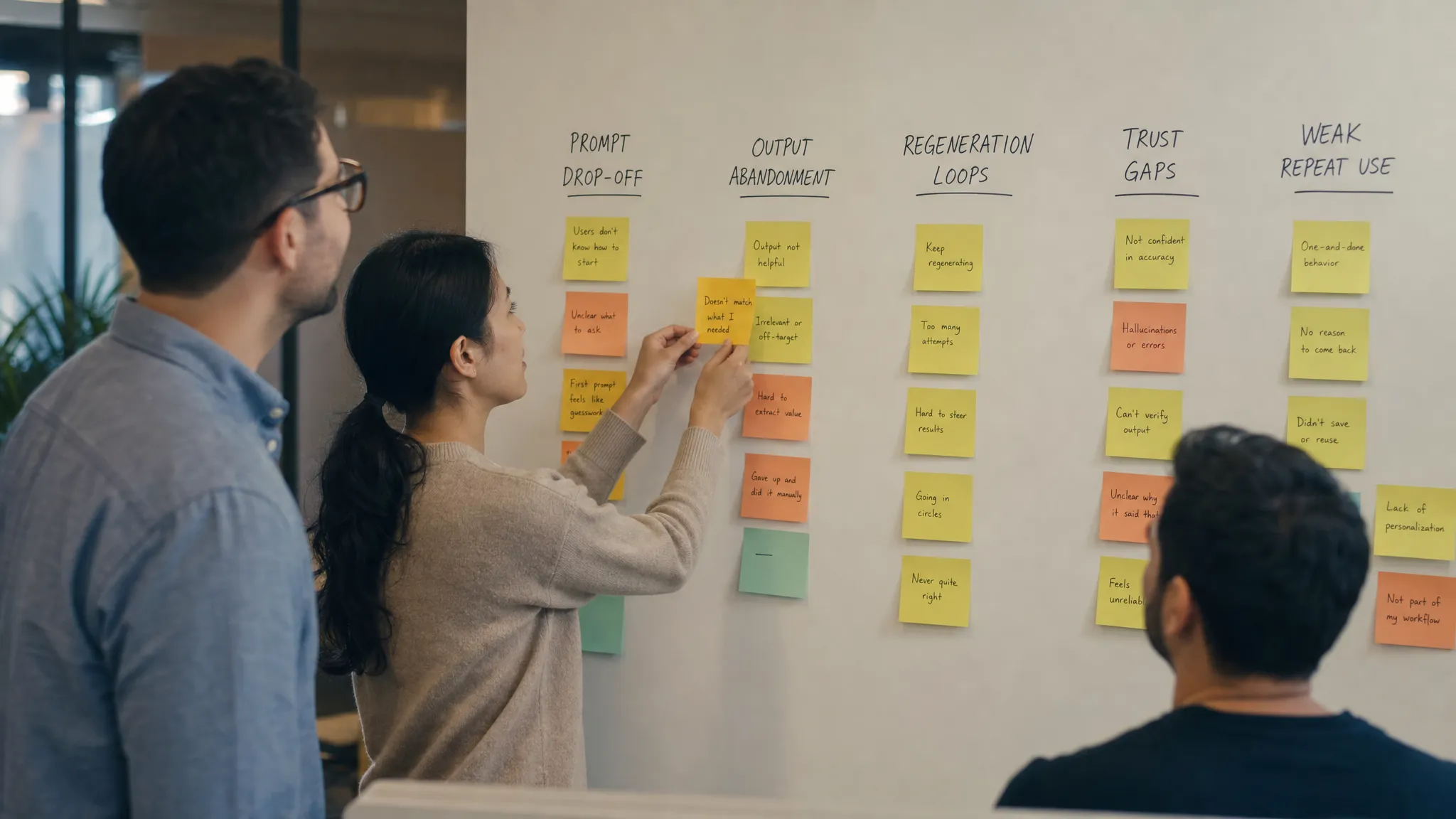
What each symptom card should contain
Do not write symptom cards like feature specs. Write them like diagnostic tools.
A good symptom card should include the behavior, the likely meaning, the evidence to check, and the product moves that usually help. It should also name the moves that sound reasonable but often waste a sprint.
Use a consistent structure:
- Symptom: The observable behavior in product data or customer sessions.
- Signals: Events, funnels, session clips, support tickets, or sales notes that confirm it.
- Likely causes: The small set of explanations worth testing first.
- False fixes: The tempting changes that do not address the real break.
- Product responses: UX, copy, workflow, or metric changes that map to the cause.
- Decision output: The artifact the team should produce, such as a revised flow, experiment brief, or onboarding copy.
- Metric to watch: The behavior that should move if the diagnosis is right.
This keeps the playbook operational. A PM can pull a card into a planning meeting and use it to decide what to inspect next. A designer can use it to propose a new review state. A founder can use it to stop a model-quality debate when the actual problem is workflow handoff.
Borrow from operations, not feature catalogs
Good operational products are rarely adopted because users admire the feature list. They are adopted because they match the sequence of work.
Take drone operations as a non-AI example. A platform like Dronedesk’s drone operations management app is not just a pile of CRM, fleet, planning, checklist, risk assessment, and logging features. Its value comes from connecting the operational path, from client work to flight planning to records. AI product teams need the same discipline. The playbook should follow the work state the user is in, not the feature name the team shipped.
For AI, that means the playbook should not have sections like “chat,” “summaries,” “agents,” and “generation” as the main structure. Those labels describe implementation. They do not describe adoption.
Better sections look like this:
| Playbook section | Core diagnostic question |
|---|---|
| Trigger fit | Why would the user reach for AI at this moment? |
| Input burden | What does the user have to know, gather, or write before value appears? |
| Output trust | Can the user inspect the result fast enough to act? |
| Correction loop | Can the user improve the result without restarting? |
| Workflow handoff | Does the output become usable work inside the product? |
| Repeat use | What brings the user back after first value? |
| Safe reliance | Where does the product prevent blind acceptance or risky automation? |
This structure gives every team a shared language. Growth can talk about repeat triggers. Design can talk about correction loops. Engineering can talk about context capture and state. Customer success can tag symptoms from real accounts.
The playbook should reduce argument quality, not increase document size
Many internal playbooks become knowledge dumps. They collect every prompt pattern, UX idea, onboarding note, and competitor screenshot. Then nobody uses them because every problem still requires a fresh debate.
A symptom-first AI playbook should make the next conversation smaller.
When adoption drops, the team should be able to say:
“We are seeing output generation, but not output application. That points to trust, correction, or handoff. Let’s inspect acceptance rate, copy-out behavior, source checks, and downstream object creation before changing the model.”
That is a useful meeting.
Compare that to:
“Users are not using the AI feature enough. Should we improve prompts, add templates, change the model, or run another lifecycle email?”
That meeting will sprawl.
The job of the playbook is not to contain every answer. It is to narrow the first diagnostic pass so the team stops guessing from taste.
Make metrics part of the card, not an afterthought
Every symptom card should attach to a behavior metric. Otherwise the playbook becomes advice.
For AI adoption, usage alone is usually too blunt. You need metrics that show the path from generated output to used work.
Useful metrics include:
- Prompt start to prompt submit rate.
- Generation to acceptance rate.
- Regeneration count before accept or abandon.
- Edit rate inside the product.
- Copy-out rate to external tools.
- Source inspection or evidence expansion rate.
- Undo, rollback, or correction rate.
- Repeat use after the first successful application.
Do not track all of them for every feature. Pick the metric that matches the symptom.
If users never submit prompts, acceptance rate is downstream noise. If users generate but never apply, prompt submit rate is not the problem. If users accept too quickly in a high-risk workflow, raw acceptance might be a warning sign, not a win.
That is why symptoms matter. They tell you which metric deserves attention.
A simple test for your current playbook
Open your current AI playbook, launch plan, or product requirements folder.
If the headings are mostly feature names, you probably have a reference document. Useful, but not diagnostic.
If the headings are mostly user behaviors that indicate a break, you are closer to a working playbook.
Ask these questions:
- Can a PM use the playbook after seeing one weak funnel and know what to inspect next?
- Can design use it to choose between better onboarding, better review, or better correction?
- Can engineering see whether the issue is context, state, latency, or integration?
- Can customer success tag account feedback by symptom instead of saying “AI quality issue” every time?
- Can leadership tell whether the next sprint is fixing adoption or adding surface area?
If the answer is no, the playbook is probably organized for the team that built the feature, not the user trying to adopt it.
Frequently Asked Questions
What is an AI playbook? An AI playbook is a reusable operating guide for diagnosing and improving AI product adoption. The useful version connects observed user behavior to likely causes, product responses, and metrics.
Why should an AI playbook start with symptoms instead of features? Because the same AI feature can fail for different reasons. A symptom-first structure helps teams distinguish prompt friction, trust gaps, correction problems, workflow handoff issues, and weak repeat triggers.
Who should own the AI playbook? Product should usually own the structure, but design, engineering, data, growth, and customer-facing teams should contribute evidence. The playbook works best when it becomes a shared diagnostic language.
How often should the playbook change? Update it whenever a repeated adoption pattern appears, a fix works, or a fix clearly fails. Treat it as an operating system for product decisions, not a static launch document.
If you want a ready-made diagnostic structure
If you want to go deeper, the AI Product Adoption Deck is built around this symptom-first approach. It includes 12 diagnostics, 80 action cards across 10 adoption stacks, and 12 workshop templates for turning adoption symptoms into concrete product decisions, experiments, copy, and specs.
The main shift is simple: stop asking which AI feature needs more polish. Ask which adoption symptom is showing up, what it means, and what decision the team needs to make next.