AI Explainability Is Useless if Users Still Cannot Act
AI explainability only helps when users can verify, edit, and act. Diagnose why explanations fail and what product teams should build next.

The symptom is familiar: users open the explanation panel, read the rationale, maybe inspect a source or two, then leave the output untouched.
Your dashboard says explainability is being used. Your adoption data says the AI feature is not sticking.
That gap matters. A user can understand why an AI system produced an answer and still have no idea what to do with it. They may not know whether to apply it, edit it, challenge it, route it, or ignore it. In that case, AI explainability is not solving the adoption problem. It is only making the uncertainty more visible.
For product teams, the question is not, “Did we explain the model?” It is, “Did the explanation help the user take the next safe action?”
The failure mode: explanation without agency
Most explainability features are designed as annotations. They sit beside the output.
A support AI says it drafted a reply based on three past tickets. A sales AI says a lead is high priority because of firmographic fit and recent site activity. A writing AI says it rewrote the paragraph to improve clarity. A research AI lists sources and gives a confidence label.
Useful? Sometimes.
Enough? Usually not.
The user still has to answer the operational question: “What should I do now?”
If the product does not help them answer that, the explanation becomes a dead end. It may reduce mystery, but it does not reduce work. In some cases, it adds work because the user now has more information to interpret before they can move forward.
This is where many AI products confuse transparency with control. Transparency helps users see into the system. Control helps users change the outcome, narrow the scope, verify the claim, recover from risk, or pass the work to someone else.
Adoption usually needs both.
What users actually need from AI explainability
Users do not ask for explainability in the abstract. They ask for it when they are stuck.
They are deciding whether to trust an output, send it to a customer, use it in a forecast, paste it into a document, accept a recommendation, or let an agent continue. The explanation has a job. If it does not support that job, it will not change behavior.
| User symptom | What the explanation gives them | What is still missing | Better product response |
|---|---|---|---|
| They read the rationale but do not apply the output | Reasons, sources, or confidence | A clear acceptance path | Add “apply as is,” “apply with edits,” and “send for review” choices |
| They regenerate repeatedly | A generic explanation of the current answer | A way to steer the next answer | Let users lock what is good, reject what is wrong, and revise specific parts |
| They copy the output into another tool before using it | Context about how the AI answered | Workflow fit | Add export, insertion, diff, or approval actions where the work happens |
| They ignore high-confidence outputs | A score or label | Evidence they can inspect | Show supporting data, missing data, and boundary conditions |
| They abandon after one mistake | A post-hoc apology or explanation | Recovery | Offer undo, rollback, correction, escalation, or human review |
This is why confidence percentages rarely fix adoption by themselves. A label can make the interface feel more scientific, but it often does not tell the user what to do next. If that pattern shows up in your product, the problem is close to the one described in why confidence labels rarely build real trust: the signal is present, but the user cannot convert it into a decision.
Explainability has to connect to a decision
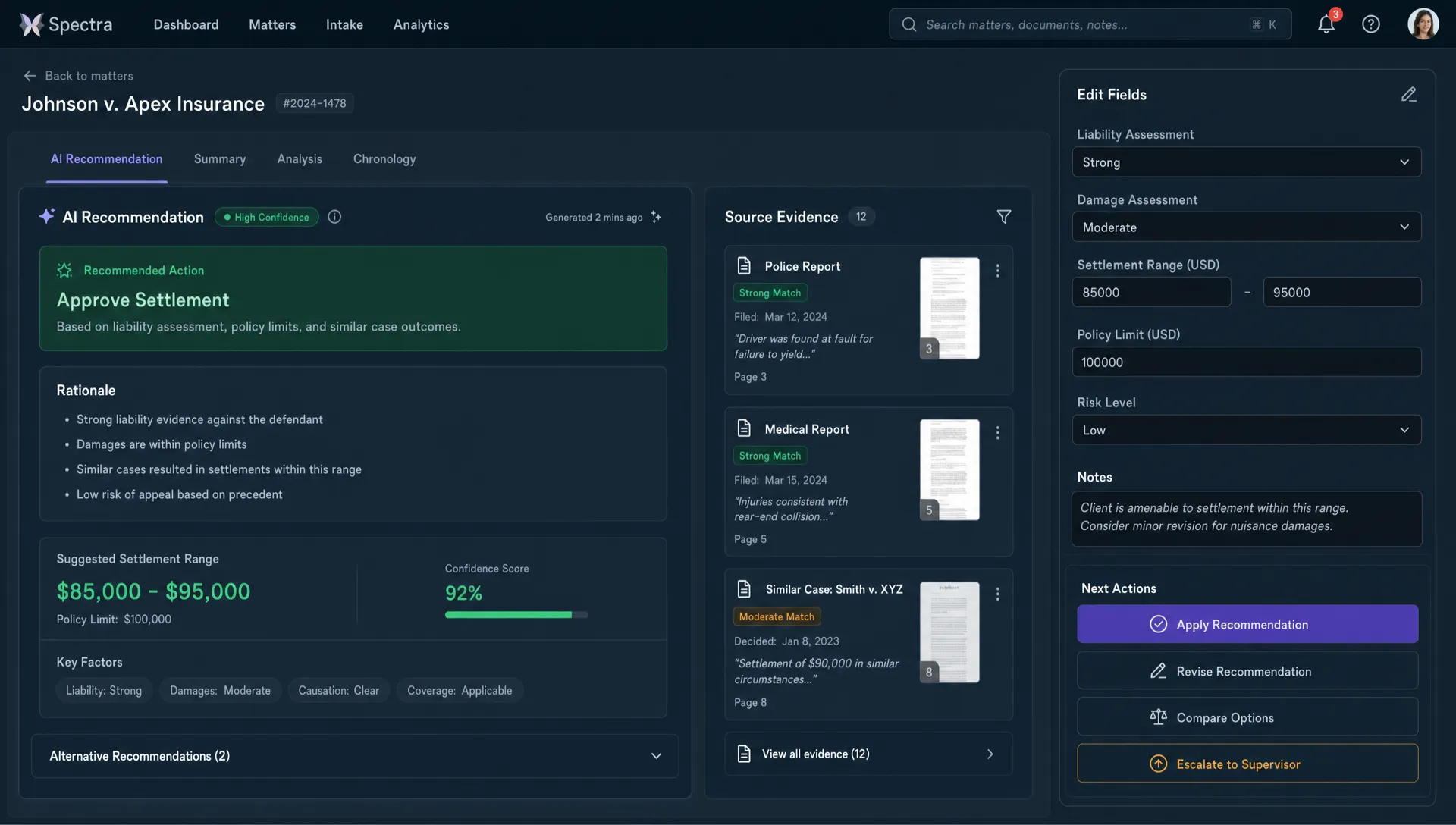
A good explanation changes the user’s available moves.
That is the bar. Not whether the explanation is technically complete. Not whether it sounds clear. Not whether legal or compliance likes the copy. The bar is whether the user can act with less hesitation and less cleanup.
A useful AI explanation usually answers five practical questions:
- What did the AI use to produce this output?
- What did it ignore or not have access to?
- Which parts are strong, weak, or uncertain?
- What can I change if this is not right?
- What is the safest next step from here?
This is where products built around comprehension can be useful references. For example, unrav.io frames AI output around different ways of understanding content, such as quick grasping, deeper insight, or teaching. The lesson for product teams is not “add more summary modes.” It is that explanation becomes more useful when it adapts to the user’s goal, not just the system’s internal reasoning.
If your product gives the same explanation to every user in every context, it is probably underfitting the decision.
The action ladder for AI explainability
Think of explainability as a ladder. Each level gives the user more ability to act. Many AI products stop at the first or second level.
| Level | Product shows | User can now do |
|---|---|---|
| Label | “High confidence,” “AI-generated,” “based on sources” | Notice that the output has a status |
| Rationale | A short reason for the output | Understand the rough logic |
| Evidence | Sources, inputs, examples, constraints, missing data | Check whether the output is grounded |
| Controls | Edit knobs, exclusions, locked sections, comparison paths | Improve the output without starting over |
| Commitment path | Apply, approve, route, undo, monitor, or escalate | Move the work forward safely |
The adoption break usually happens when the product offers rationale but not controls, or evidence but not a commitment path. Users understand more, but still cannot proceed.
How to diagnose performative explainability
Do not start by redesigning the explanation panel. Start by checking whether the current explanation changes behavior.
A high explanation open rate is not automatically good. It can mean users are engaged. It can also mean they are confused, skeptical, or looking for a reason not to proceed.
Look for these patterns:
- Users open explanations, then abandon the output.
- Users open explanations, then regenerate instead of editing.
- Users open explanations, then manually verify outside your product.
- Users accept only low-risk outputs, even when explanations are present.
- Users ask support how the AI “really decided” something.
- Users copy the output somewhere else before making a decision.
The key metric is not explanation usage. It is post-explanation action rate.
What percentage of users take the intended next step after viewing the explanation? Do they apply the output, revise it, send it for approval, compare alternatives, or correct the input? If the answer is low, your explainability layer is not doing adoption work.
This is closely related to the broader trust problem where AI trust drops when users cannot check the output. But explainability adds another test: after users check it, can they do anything useful with what they learned?
Common product fixes that actually help
The fix depends on the adoption break. Do not add a bigger explanation box by default. More text can make the user feel responsible for interpreting the system.
For generated text, show what changed and why. Let users accept individual sections, preserve parts they like, and revise specific claims. A rewrite tool that only offers “regenerate” trains users to gamble. A rewrite tool with diff, tone controls, source checks, and partial accept paths lets users work.
For recommendations, separate drivers from evidence. “Recommended because this account is a strong fit” is vague. “Recommended because usage expanded 28 percent, admin seats increased, and renewal is in 21 days” is inspectable. Then give the user actions: dismiss reason, compare similar accounts, update the account data, or create a task.
For AI agents, explain the next step before the system takes it. Users need to know what the agent is about to do, what permission it needs, what can be undone, and when the human must re-enter. If the handoff is unclear, even a smart agent will feel risky. That failure mode shows up often when the human handoff is fuzzy.
For data or analytics outputs, show the query, assumptions, exclusions, and confidence boundaries. Then let users change the time window, segment, metric definition, or comparison group. If they cannot manipulate the analysis, the explanation is just a footnote.
A simple decision frame
Before shipping an explainability feature, ask one blunt question:
What action should become easier after the user reads this?
If you cannot answer that, the explanation is probably decorative.
Use this frame instead:
- If users doubt correctness, add evidence and verification paths.
- If users dislike the output, add targeted controls and partial revision.
- If users fear consequences, add approval, undo, and scope limits.
- If users do not know where the output belongs, add workflow insertion.
- If users cannot judge readiness, add status, boundary conditions, and review states.
Then instrument the moment. Track what happens after the explanation, not just whether the user opened it.
A practical test is to watch five sessions where users open the explanation and do not complete the next step. Do not ask if they “trusted” the AI. Ask what they were trying to decide at that moment. Then inspect whether the interface gave them a move that matched that decision.
Frequently Asked Questions
What is AI explainability in product design? AI explainability is the product layer that helps users understand why an AI output, recommendation, or action was produced. In product design, it only matters if that understanding helps the user verify, edit, approve, reject, or safely move forward.
Why do users still avoid AI outputs after seeing an explanation? Because understanding the output is not the same as being able to use it. Users may still lack evidence, controls, context, workflow fit, or a safe recovery path.
Are confidence scores useful for AI explainability? They can help, but only when paired with inspectable evidence and clear actions. A score without sources, scope, or next steps often creates more ambiguity.
What should product teams measure instead of explanation clicks? Measure post-explanation action rate. Track whether users apply, edit, approve, compare, escalate, or correct the output after viewing the explanation.
The next product decision
If your AI feature has explanations but weak adoption, do not assume users need more education. They may need more agency.
Pick one low-conversion AI moment. Identify the decision the user is trying to make. Then redesign the explanation so it gives them a concrete next move.
If you want a structured way to map symptoms like low apply rate, repeated regeneration, and output abandonment to better product responses, the AI Product Adoption Deck goes deeper into this kind of diagnostic work across trust, workflow fit, activation, and retention.